10 YouTube Short Ideas for Creators and Marketers

YouTube Shorts has grown from 30 billion daily views in 2021 to more than 200 billion by 2025–2026, so the strongest YouTube Short ideas aren’t isolated bursts of creativity. They’re repeatable formats such as problem-solution clips, transformations, myth-busts, process reveals, quotes, comparisons, tips, workflows, trend commentary, and story-driven lessons.
That matters for creators, podcasters, social media managers, and B2B or SaaS marketers working with limited production time. You don’t need a new concept for every upload. You need a reliable way to find standalone moments in podcasts, webinars, courses, interviews, case studies, and demos, then package each moment with a clear hook, readable captions, safe-zone awareness, and a practical publishing rhythm.
Shorts now reach a broad audience. In 2025, the largest reported audience group was 25–34 at 21.5%, followed by 35–44 at 17.9%, while 18–24 represented 15.7% of the audience, according to recent YouTube Shorts audience data. That makes useful educational and business content just as relevant as entertainment-led formats.
Before publishing a URL with the slug youtube-short-ideas, the publisher should check quso.ai for a near-duplicate. Relevant internal destinations could include the platform’s YouTube Shorts maker, a guide to video hook ideas, and advice on how to edit a YouTube Short. For additional inspiration on adapting content for audiences, see ViralBrain.
Table of Contents
- 1. Hook-First Problem-Solution Format
- 2. Before-After Transformation Clip
- 3. Myth-Busts and Objection Call-Outs
- 4. Step-by-Step Process Reveal
- 5. Expert Quote or Soundbite Highlight
- 6. Comparison or Side-by-Side Analysis
- 7. Rapid-Fire Tips or Checklist Rundown
- 8. Behind-the-Scenes Process or Workflow Reveal
- 9. Pattern Recognition or Trend Commentary
- 10. Story-Driven Lesson or Case Study Narrative
- 10 YouTube Short Formats Comparison
- Turn One Long Video Into a Short-Form Queue
1. Hook-First Problem-Solution Format
A problem-solution Short earns attention by naming the pain before explaining the background. Open with a specific problem, show one practical fix, and point viewers toward the fuller method.
A SaaS marketer might say, “Your onboarding emails aren’t failing because they’re too long,” then show how moving the first product action into the opening message changes the sequence. A fitness coach could ask, “Why does your form break at rep eight?” and demonstrate one correction. A consultant might open with, “Cold emails ignored?” before showing a single template adjustment.
Podcast transcripts, webinar Q&A, course lessons, support tickets, sales calls, and interviews often contain ready-made clips. Search for questions that describe a clear obstacle, then match each question with the narrowest useful answer. A case study can supply the problem and the action taken, while B2B content can turn a recurring customer objection into a standalone Short.
Practical rule: One Short should solve one problem. If the answer requires several techniques, make it a series rather than cramming every fix into one clip.
Separate the problem and solution in the on-screen text. This gives viewers without sound a clear path and keeps auto-captions aligned with the spoken structure. Place captions inside the mobile safe zone. Bottom-edge text can sit beneath interface controls, while upper text may overlap channel or navigation elements.
Create several opening variations from the same source clip, but keep the answer unchanged. The video hook ideas guide can help sharpen a broad topic into a specific opening. Schedule the versions for different publishing slots, then compare which framing best matches the audience’s actual problem without exaggerating the outcome.
2. Before-After Transformation Clip
Before-after videos work because viewers understand the contrast immediately. Show the starting problem, reveal the changed result, and explain the decision or action that produced it.
A real estate team can show a room before staging and after staging. A UX designer can display an app layout before and after a redesign. A productivity creator can move from a cluttered desk to an organized workspace, while a coach can show posture before and after a correction.
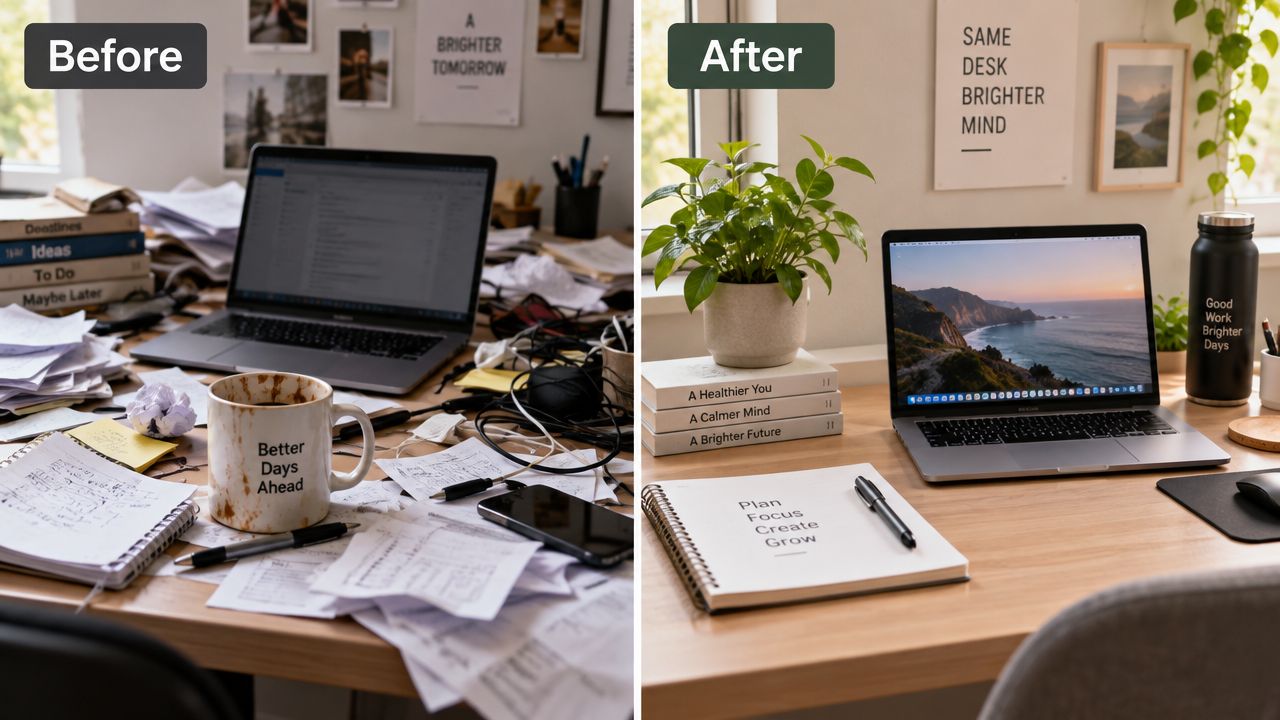
Don’t rely only on old footage. If the “before” state wasn’t recorded clearly, recreate it deliberately with permission and make the comparison honest. The strongest transformation clips don’t just show a dramatic result. They explain what changed.
Make the contrast readable
Use short labels such as “Before” and “After,” then add one line explaining the intervention. Keep those labels in an area that remains visible across mobile interfaces. A split screen can work well, but the text needs enough contrast and spacing to survive compression.
You can extract several versions from one long video by isolating different transformations. A webinar about a website redesign might contain a navigation change, a homepage change, and a checkout change. Each can become its own Short with a separate hook.
The visual payoff should arrive quickly, but don’t cut away before viewers understand the cause. A fast reveal without context may earn attention while failing to teach anything.
The embedded example below can support the visual pacing of a transformation format.
3. Myth-Busts and Objection Call-Outs
Start with a belief your audience already recognizes, then correct it with a clear explanation. “Multitasking boosts output” can become a productivity myth-bust about batching. A SaaS team might address the belief that automation works immediately without clean inputs. A marketer could challenge the idea that viral reach automatically produces qualified demand.
The format needs empathy. Treat the mistake as common, not stupid. That keeps the clip useful for people who are already uncertain and prevents the tone from becoming performative.
Build the correction in two beats
First, show the myth or objection as large, concise text. Then deliver the correction in plain language. A buzzer, visual switch, or change in framing can help signal the transition, but the explanation matters more than the effect.
Use audience comments, sales objections, support tickets, and podcast questions as source material. Those inputs reveal the exact wording viewers use, which often produces stronger hooks than a polished internal description.
For example, a consultant might extract this sequence from a webinar:
- Myth: “More automation fixes a broken process.”
- Correction: “Automation only repeats the process you give it.”
- Action: “Document the handoff before connecting the tools.”
Keep the evidence or source visible when you have one. If the clip relies on a named policy, platform rule, or public explanation, include the attribution in the caption or spoken audio. Don’t claim that a correction is universally true when your material only supports a narrower point.
4. Step-by-Step Process Reveal
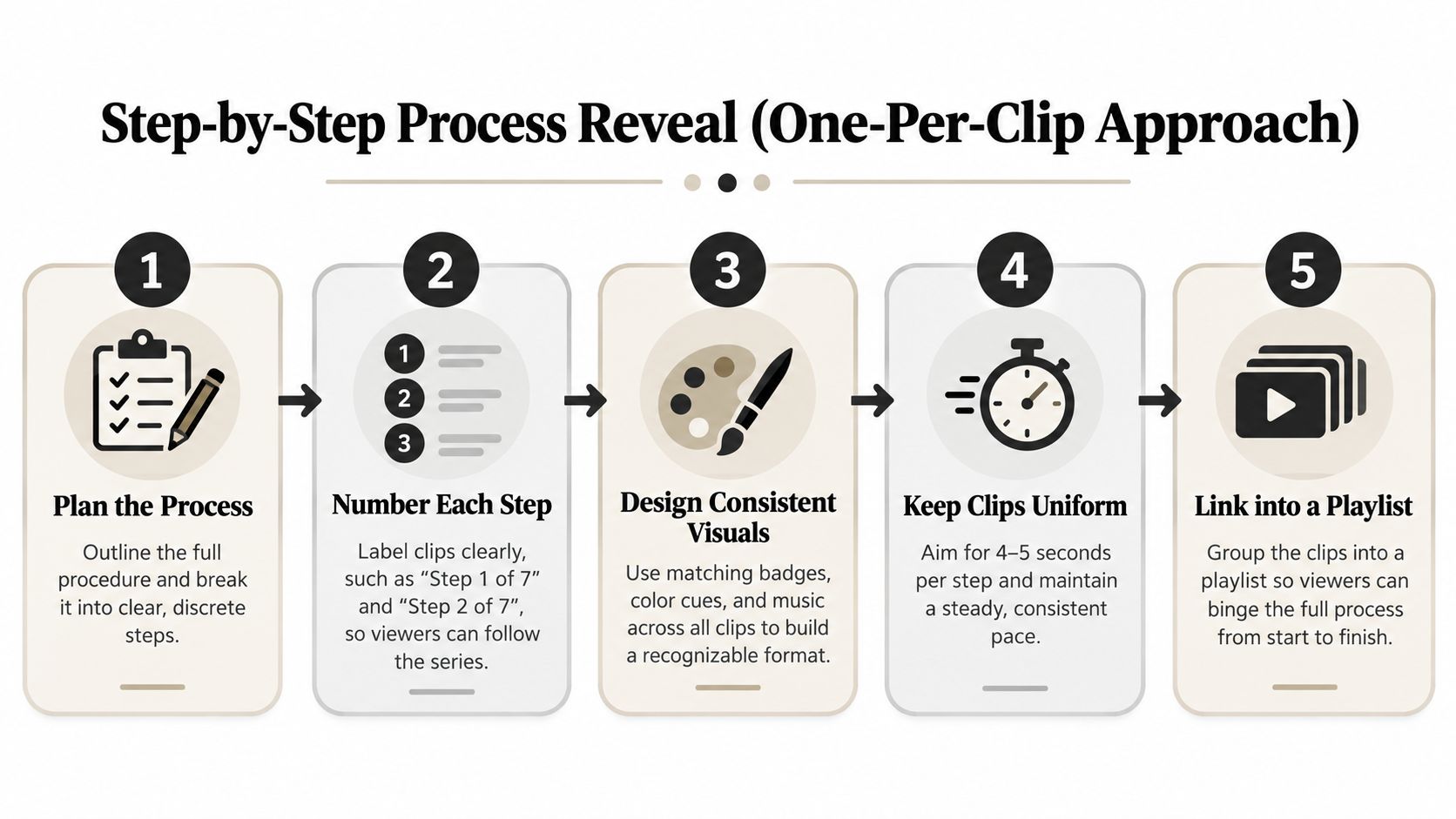
A long tutorial can produce several Shorts when each clip delivers one complete action and outcome. Number the clips so viewers can follow the process, while keeping every episode useful when recommendations surface it independently.
Start with a direct label such as “Step 3 of 7, configure your webhook.” Keep the same badge, color, sound cue, or title treatment throughout the series. That consistent packaging helps viewers identify related clips without repeating the full introduction.
An accounting educator could separate account reconciliation into individual steps. A fitness coach could isolate each part of a squat breakdown. A digital marketing instructor could turn a customer acquisition funnel into a sequence, with one Short covering each stage. The same approach works for podcast tutorials, webinar demonstrations, online courses, and B2B walkthroughs.
Keep each step focused
Show the action, explain why it matters, and point viewers to the next step or playlist. A webhook clip should display the setting and expected result, rather than adding the entire integration strategy.
Place the step number and title where platform controls will not cover them. Review the export on a phone before publishing, since interface elements often occupy the upper area and captions can disappear near the bottom. Keep important labels inside a safe zone, especially when screen recordings contain small interface text.
For editing choices, follow the practical guidance in how to edit a YouTube Short. Build a playlist for the complete process, then schedule clips in an order that remains clear when viewers discover an episode out of sequence. A repeatable title, caption, and opening hook makes the queue easier to manage and the series easier to recognize.
5. Expert Quote or Soundbite Highlight
A strong soundbite can carry a Short without extra explanation. Pull a complete thought from a podcast, interview, webinar, or conference recording, then pair it with the speaker’s face, relevant B-roll, or a restrained text treatment.
A founder discussing culture, a wellness professional reframing rest, or a marketing consultant explaining audience-first strategy can all produce useful clips. The quote should be understandable without the surrounding conversation. Avoid cutting into a sentence or removing the qualification that gives the statement its meaning.
Flag potential moments during recording by asking follow-up questions. When a guest gives an interesting answer, prompt them to restate the idea in a concise, self-contained way. That produces cleaner source footage than trying to rescue a fragmented response later.
“A quotable moment isn’t automatically a complete Short. It still needs context, attribution, and a reason for the viewer to care.”
Display the quote in the upper or central portion of the frame, but leave enough room for the speaker and visual subject. Put the speaker’s name and credential in a stable lower area that doesn’t compete with captions. Avoid oversized graphics that make the quote harder to read.
For testimonial-led content, the 7 testimonial format ideas resource offers additional structures. The same principle applies to expert interviews: preserve the speaker’s credibility while making the clip easy to understand and share.
6. Comparison or Side-by-Side Analysis
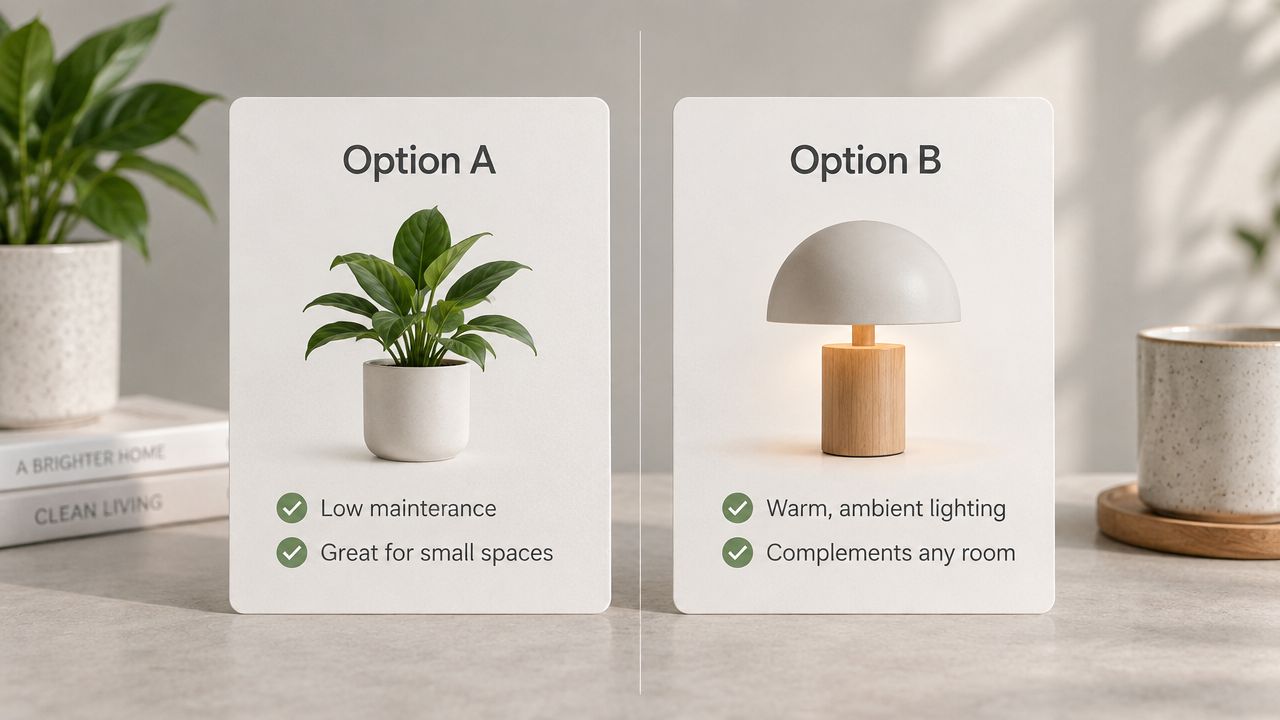
Comparison Shorts help viewers make a decision quickly. Put two approaches, tools, or concepts next to each other, define a small set of differences, and reserve the recommendation for the end.
A SaaS marketer might compare Notion and Asana for a small team. A consultant could contrast cold outreach with content-led inbound. A real estate professional might compare investing in granite counters with opening a floor plan.
Use a left-right visual split so the comparison is obvious before anyone hears the explanation. Limit the clip to a few criteria, such as setup effort, collaboration, or best use case. Too many criteria turn a fast decision aid into a compressed buying guide.
Make the verdict conditional
Avoid presenting one option as universally superior. “Choose A when your team needs speed. Choose B when governance matters” is more useful than a generic winner. It also gives the audience a reason to comment with their situation.
Keep captions aligned with the correct side of the frame. A viewer should never wonder whether a statement applies to the left or right option. Use consistent icons, labels, or colors, but check that the meaning remains clear without color alone.
A podcast episode about marketing channels can produce several comparisons. One clip can compare paid and organic acquisition, another can compare founder-led and brand-led content. Each video should have its own decision and closing recommendation.
7. Rapid-Fire Tips or Checklist Rundown
A tips Short delivers several small actions in sequence. Use it for calendar habits, form checks, sales scripts, mobile design rules, or content publishing checks.
A productivity creator might share calendar adjustments. A sales trainer could give objection-handling lines. A designer might demonstrate spacing rules through quick screen recordings. The format also works well for a course module where several small recommendations appear close together.
Give every tip a visible number, icon, or visual break. Keep the spoken line short and demonstrate the point whenever possible. A screen recording of the exact setting often teaches more than a presenter describing it abstractly.
- Use one visual pattern: Keep numbered badges in the same safe-zone position throughout the clip.
- Change the frame between tips: Use a new crop, screen, gesture, or object so the rundown doesn’t feel static.
- Add a useful close: Ask viewers to save the checklist or comment with the tip they’ll apply.
Captions need room to breathe. Don’t stack a long sentence, a badge, and a product label in the same area. Review the final version with platform controls visible, especially if the clip uses bottom-aligned captions.
A rapid-fire format is easy to extract from a webinar, but it can become shallow when every point is reduced to a slogan. If one tip needs explanation, make it the subject of a separate problem-solution Short.
8. Behind-the-Scenes Process or Workflow Reveal
A workflow reveal shows how the work happens. Close-ups of screens, hands, notes, templates, or preparation steps are usually more useful than a wide office tour.
A content creator can show the morning planning ritual. A consultant can demonstrate client onboarding from form submission to CRM handoff. A writer can reveal the path from research notes to outline. An ecommerce team can show an inventory check before reordering.
The clip needs one discrete action. “This is how our entire marketing department works” is too broad. “This is how we turn one webinar into a publishing queue” gives the viewer a process they can understand.
Protect private information
Blur customer names, email addresses, account details, and internal documents before publishing. Place labels outside important interface areas, and zoom in enough that viewers can see the action without exposing unrelated information.
Narrate the reason for the step. A screen recording becomes more compelling when the speaker explains what the action prevents, simplifies, or clarifies. Keep the claim specific to the workflow rather than promising a universal time saving.
The content creation workflow guide can help organize the broader process around recording, extracting, captioning, reviewing, and publishing. This format is particularly effective for B2B teams because it demonstrates operational knowledge without requiring an entertainment angle.
9. Pattern Recognition or Trend Commentary
Trend commentary works when it identifies a concrete pattern and gives viewers an implication. Avoid vague openings such as “The industry is changing.” Start with an observable shift in your niche, a recurring customer question, or a meaningful platform update.
For example, a SaaS marketer might discuss teams consolidating customer-success tools. A recruiter could explain why writing ability is appearing more often in technical hiring conversations. A fitness coach might examine the return of group training in an unexpected format.
Use current material carefully. A trend clip has a shorter shelf life than an evergreen tutorial, so it should be published while the topic is still relevant. If the observation depends on a public statistic or policy, name and link the source in the description or caption rather than presenting an unsupported number.
Turn observation into action
The viewer should know what to do next. A SaaS team might review its onboarding workflow. A recruiter might revise an interview exercise. A creator might test a new format against an existing evergreen series.
YouTube now classifies square or vertical videos uploaded on or after October 15, 2024 as Shorts when they’re up to three minutes long, according to YouTube’s official Shorts classification rules. That gives educators and commentators more room for context, but extra runtime doesn’t remove the need for a strong opening.
Use the pattern name as on-screen text, keep captions concise, and state the practical implication before the close. Don’t chase every trend. Choose topics that connect to the audience’s existing problem and your own expertise.

10. Story-Driven Lesson or Case Study Narrative
A story gives a Short a natural structure: setup, turning point, resolution, and lesson. Use a real client story, failure, market example, or personal experience, and get permission before naming a person or organization.
A consultant might describe a client who missed a deadline, changed the handoff process, and recovered. A coach could explain how one reframe changed a student’s approach. A founder might tell the story of removing an unused feature and learning to simplify the product.
Open with the situation, not the moral. “The client missed the deadline twice” creates a concrete question. “We learned an important lesson about process” doesn’t. The turning point should show the decision that changed the outcome, while the final line should state the lesson plainly.
Keep the case study honest
Don’t imply that one anecdote proves a universal result. Explain what happened, what changed, and what another viewer could test in a similar situation. If a client agrees to be named, include enough context to make the story specific without exposing confidential information.
Use B-roll to keep the narrative moving. Show the document, workflow, product screen, whiteboard, or environment connected to the story. Captions should reinforce names, stages, and the turning point, while staying clear of UI-covered areas.
A case study can also become a small series. One Short can cover the problem, another the decision, and a third the lesson. Keep each clip complete enough to stand alone.
10 YouTube Short Formats Comparison
| Format | Implementation complexity | Resource requirements | Expected outcomes | Ideal use cases | Key advantages | Key limitations |
|---|---|---|---|---|---|---|
| Hook-First Problem-Solution (HFPS) Format | Medium, needs strong, concise hooks | Low–Medium, short clips, captions; repurpose long-form content | High engagement and quick value delivery | B2B SaaS, coaching, skill-building, FAQ content | Stops scroll with relatable pain + single actionable fix; easy repurposing | Can oversimplify complex topics; relies on hook quality; not all content fits |
| Before-After Transformation Clip | Low–Medium, straightforward editing and transition work | Medium, requires clean before/after footage or staged shoots | High retention and satisfying visual payoff | Design, fitness, real estate, product demos | Strong visual contrast; works without dialogue; high shareability | Needs actual before/after visuals; weaker for abstract concepts |
| Myth-Busts & Objection Call-Out Format | Low, short setup and clear correction | Low, script, captions, optional evidence clips | High comments/shares; builds credibility when sourced | Education, marketing, wellness, SaaS objections | Leverages cognitive surprise; drives discussion and trust | Risky if claims lack nuance or evidence; can feel preachy or clickbaity |
| Step-by-Step Process Reveal (One-Per-Clip) | Medium, requires serialization and consistent labeling | Medium, planning series, badges, uniform edits | Increased return views and series bingeing | Tutorials, onboarding, procedures, recipes | Scalable; predictable captions; boosts discoverability | Viewers may skip steps; needs visually clear sequential content |
| Expert Quote or Soundbite Highlight | Low, extract and present a single line | Low, audio clip, text overlay, simple B-roll | High share/forward potential and authority signaling | Podcasts, interviews, talks, keynote highlights | Low production overhead; highly quotable and repurposable | Context loss risk; may appear low-effort; needs concise original quote |
| Comparison or Side-by-Side Analysis | Medium, requires balanced, credible framing | Medium, split visuals and supporting data or metrics | High decision-making utility; strong engagement | Product choices, methodologies, buyer guidance | Helps viewers decide quickly; supports CTAs/affiliate links | Hard to condense complexity; risk of perceived bias without data |
| Rapid-Fire Tips or Checklist Rundown | Low, simple, repeatable format | Low, list content, overlays, sound cues | High saves/screenshots and shareability | Productivity, fitness, sales, quick skill tips | High utility density; easy to batch and repurpose | Limited depth per tip; listicle fatigue if overused |
| Behind-the-Scenes Process or Workflow Reveal | Medium, needs authentic, focused footage | Medium–High, screen recordings, team shots, permissions | Builds trust and practical authority; drives tool interest | Creator workflows, agency processes, onboarding demos | Highly authentic and actionable; enables product referrals | Requires genuine footage; can be complex or mundane if common |
| Pattern Recognition or Trend Commentary | Medium–High, requires research and synthesis | Low–Medium, data points, examples, concise narrative | Positions creator as thought leader; sparks debate | Industry analysis, market shifts, strategy audiences | Establishes foresight and discussion; PR potential | Short relevance window; risky if speculative or unsupported |
| Story-Driven Lesson or Case Study Narrative | Medium, needs tight pacing and clear arc | Medium, B-roll, testimonials, permissions | Strong retention and emotional connection | Client wins/failures, founder anecdotes, coaching outcomes | Memorable lessons; builds trust and loyalty | Hard to fit complex stories into short format; may need permissions |
Turn One Long Video Into a Short-Form Queue
Start with the source, not the trend. Review a podcast, webinar, course, interview, demo, or case study and mark moments that contain a complete thought. A useful candidate usually includes a problem, contrast, decision, process step, quote, or lesson that makes sense without several minutes of setup.
Then assign each moment a format. A customer question belongs in a problem-solution clip. A redesign belongs in a transformation. A guest’s sharp statement becomes a soundbite. A dense tutorial can become a numbered process series. This simple classification prevents every clip from becoming the same talking-head edit.
Tighten the opening before polishing the middle. The first line should identify the pain, promise a reveal, challenge a belief, name the decision, or introduce the story. Remove greetings, repeated context, and internal references that only make sense in the original long video.
Review captions on a phone. YouTube’s current rules classify square or vertical videos up to three minutes as Shorts when they meet the relevant upload-date requirements, but longer clips still need disciplined pacing. YouTube’s monetization policy also states that Shorts over one minute containing claimed content are blocked and aren’t eligible for monetization, so check music, podcast excerpts, and interview footage before publishing.
Production check: Captions should be readable, the main subject should remain visible, and no essential text should sit beneath platform controls.
Use evergreen and timely formats together. Tips, quotes, process clips, and workflow reveals can remain useful for longer. Trend commentary should be scheduled while the topic matters. Comparisons and myth-busts can sit between those two categories, provided the underlying problem remains relevant.
Shorts are consumed at significant scale. One 2026 roundup reports more than 200 billion daily views, 2 billion monthly users, and 74% of views from non-subscribers. The same source reports that Shorts represent about 10% of total YouTube watch time in the U.S. and says channels using both Shorts and long-form grow 41% faster. Those figures support a workflow built around discovery clips that lead interested viewers toward deeper content, not a strategy based only on isolated viral attempts.
A practical queue might contain several formats from one recording. Extract a problem-solution answer, a quote, a process step, and a story lesson. Caption each version, check the safe zones, then schedule a small batch across the channels that matter to your audience. A platform such as quso.ai can help repurpose long videos into short-form clips, generate captions, and schedule selected assets, while the editorial decisions still belong to the content operator.
For broader planning, repurposing content to drive sales is useful when you need to connect short-form discovery with a larger content journey.
FAQ
How do I find YouTube Short ideas?
Start with existing source material. Search podcast, webinar, course, interview, and customer-call transcripts for questions, objections, transformations, memorable quotes, process steps, and lessons.
What makes a good YouTube Short idea?
A good idea stands alone and delivers one clear payoff. It should have a specific opening, a focused middle, readable captions, and visuals that remain clear around platform interface safe zones.
How do I turn a podcast into Shorts?
Find complete answers and quotable moments, remove conversational setup, add speaker attribution, caption the clip, and review any music or claimed content before publishing. One episode can produce several different formats rather than one generic excerpt.
Can long-form videos be repurposed into Shorts?
Yes. Webinars, interviews, demos, tutorials, courses, and case studies can be broken into standalone problem-solution clips, transformations, comparisons, workflows, and story-driven lessons.
How often should creators schedule YouTube Shorts?
Choose a cadence your team can sustain and schedule a batch instead of publishing only when inspiration appears. Keep evergreen clips in the queue, then add timely commentary when a relevant topic emerges.
quso.ai helps creators and B2B teams repurpose long videos into short-form clips, add auto-generated captions, and schedule selected videos for distribution. Turn your next podcast, webinar, or demo into a practical Shorts queue by visiting quso.ai.