Social Media Approval Workflow How to Build One That Ships

You’ve turned one long recording into a batch of short clips. The captions are added, the copy is ready, and the posts are sitting in a calendar. Then approval starts in three places at once: a comment in Slack, a client reply by email, and an internal note on an old draft. A timely post misses its window, nobody knows which version is final, and the team spends more time reconstructing decisions than creating content.
A social media approval workflow fixes that by routing each post through defined stages, owners, permissions, and deadlines before it’s scheduled. The strongest workflows don’t send every post through the same level of scrutiny. They apply lighter checks to routine, low-risk repurposed clips and reserve human attention for content with greater brand, legal, or campaign risk.
Table of Contents
- What a Social Media Approval Workflow Is and Why It Matters
- Roles Stages and Permissions That Keep Approvals Moving
- How to Build Your Approval Workflow Without the Bottlenecks
- SLAs Benchmarks and How to Spot a Broken Workflow
- Integrating Repurposed Clips Captions and Scheduling Into Approval
- Final Checklist and Social Media Approval Workflow FAQ
What a Social Media Approval Workflow Is and Why It Matters
A social media approval workflow is a fixed sequence that moves content from draft to review, revision, sign-off, scheduling, and publication. Each post should occupy one clear state, such as Draft, In Review, Approved, Scheduled, or Published. Approval is the gate between creation and publication, not an informal conversation that happens whenever someone notices a post in a calendar.
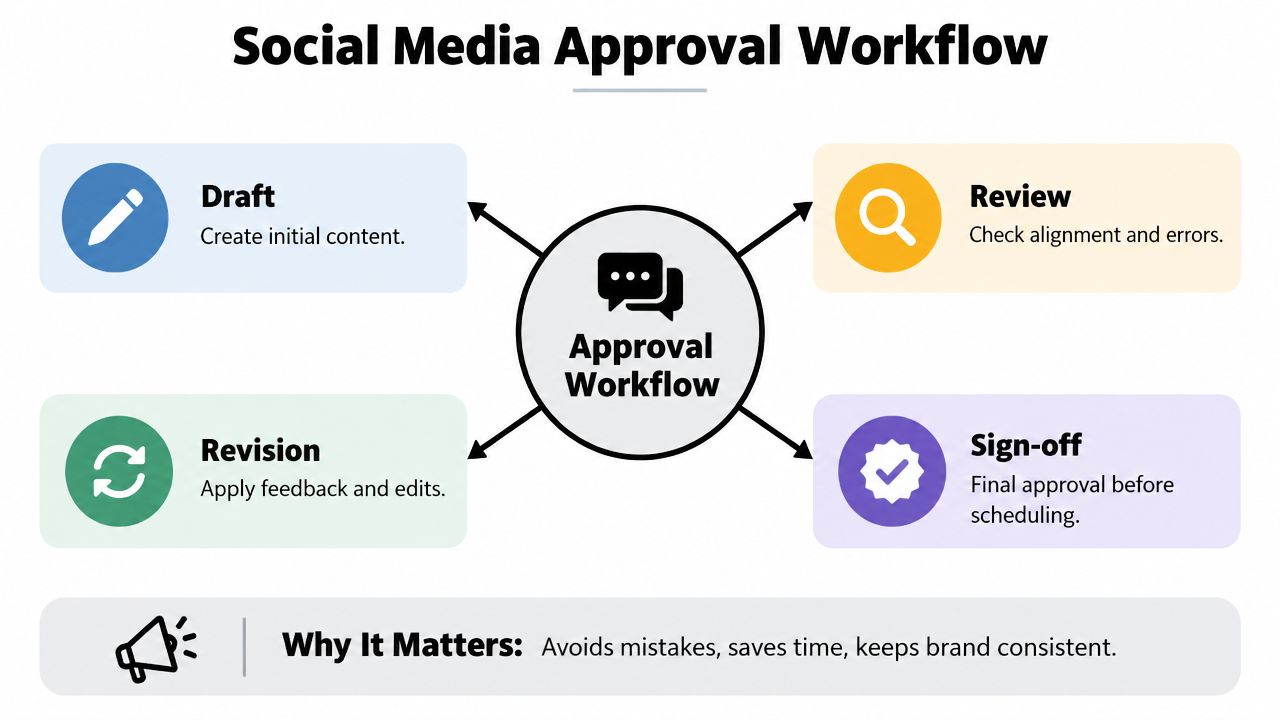
The basic sequence is straightforward:
- Draft: Create the caption, creative, video, tags, links, and publishing details.
- Review: Check accuracy, brand fit, formatting, accessibility, and platform requirements.
- Revision: Apply consolidated feedback to one controlled version.
- Sign-off: Record the approver and decision before scheduling.
For recurring content calendars, the approval record should include the approver’s name and timestamp. That creates an auditable trail and helps teams prove which version received clearance. A documented path also reduces errors before scheduling because the publisher can see whether a post is approved or merely discussed.
The need becomes more obvious when one long video produces multiple short clips. Each clip may have a different hook, caption, thumbnail, crop, and platform destination. Without explicit states, a creator can approve one version while a social manager schedules another.
Practical rule: If nobody can identify the current owner and next action by looking at the post, the workflow is already broken.
Teams looking beyond social operations can also use helpful articles from SiteSelf for broader process and content planning context. The principle is the same: make ownership visible, keep decisions attached to the work, and separate creation from release.
Roles Stages and Permissions That Keep Approvals Moving
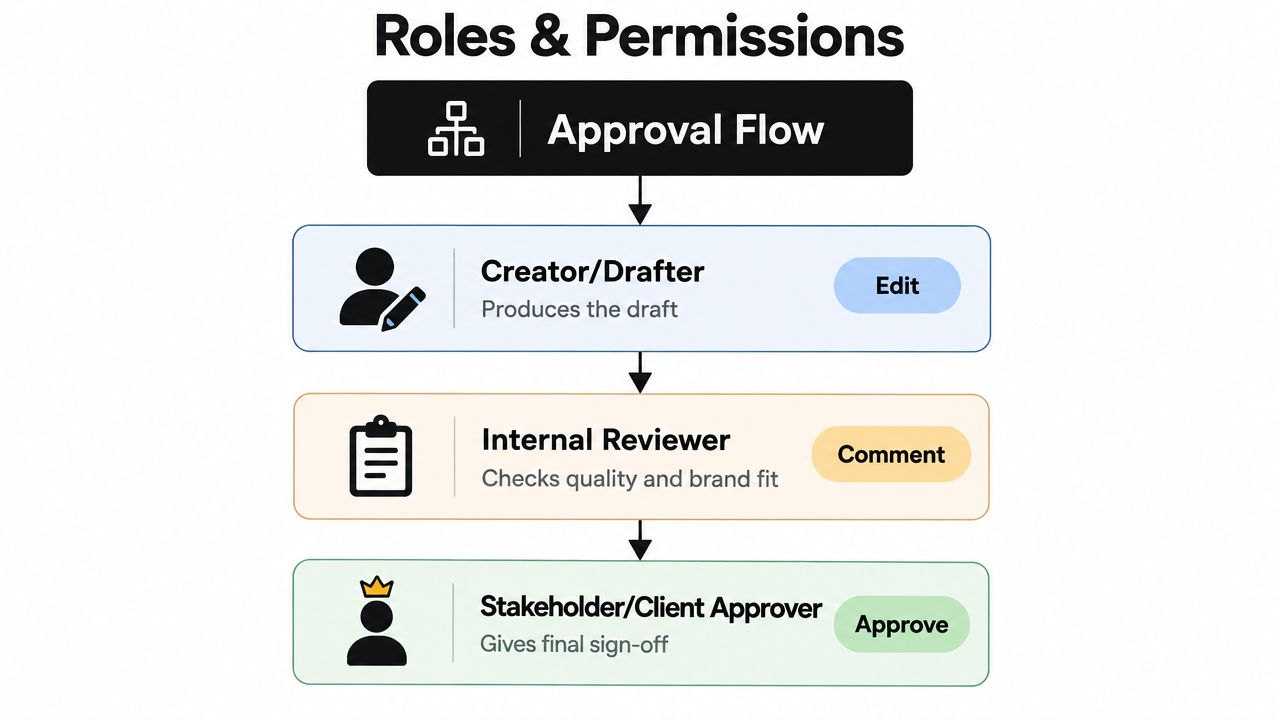
A reliable workflow assigns one clear job to each handoff. The creator produces the asset, the internal reviewer checks it before outside eyes see it, the stakeholder or client confirms business-sensitive details, and the publisher moves the approved version into the calendar.
Give each role a boundary
The creator or drafter owns production. They assemble the clip, write or refine the caption, check the brief, and submit a complete draft. They shouldn’t be expected to interpret silence as approval.
The internal reviewer owns quality control. This person checks the message, brand voice, spelling, claims, links, caption placement, and whether the asset matches the intended platform. Their job isn’t to invite unlimited creative rewriting. It’s to return a publishable draft to the next gate.
The stakeholder or client approver confirms what only the business can confirm: factual accuracy, sensitive language, product details, campaign alignment, and legal or compliance concerns. Give this person a focused review request rather than asking them to redesign the post.
The publisher verifies that the approved version is the one being scheduled. If the publisher edits the copy, changes the media, or alters the destination after sign-off, the post should return for re-approval.
Set permissions before the first post
Use permissions that match the decision:
- Edit: The drafter can create and revise the working version.
- Comment: Reviewers can identify issues without changing the approved artifact.
- Approve: The named decision-maker can give final sign-off.
- Publish or schedule: Only the designated operator can move approved content live.
Keep feedback in one source of truth. Email and chat can notify people, but they shouldn’t hold the final decision. A centralized record should show the comment, response, revision, approval, and timestamp together.
Teams that need clearer ownership can use this guide to map social media marketing job titles to actual workflow responsibilities. Job titles vary, but the handoff must not.
How to Build Your Approval Workflow Without the Bottlenecks
Build the workflow by making a sequence of decisions, not by adding every possible reviewer. Start with the content’s risk and work toward the lightest process that protects the brand.
1. Define content tiers
Create practical tiers based on business impact, not production effort.
A routine repurposed clip from an already approved long-form recording may need a caption, transcript, safe-zone, and brand check. A product launch, regulated claim, executive statement, or sensitive customer story needs deeper human review.
A workable routing model looks like this:
- Low risk: Routine clips, educational excerpts, evergreen tips, and previously approved themes. Use a concise checklist and a named approval gate.
- Medium risk: New positioning, customer examples, offers, partnerships, or posts with specific business claims. Require internal review and stakeholder confirmation.
- High risk: Legal, regulatory, crisis, executive, or campaign-critical content. Require the relevant subject-matter reviewer and final approver before scheduling.
The point isn’t to remove humans from the process. It’s to stop humans from spending senior review time on posts that don’t need it.
2. Set the stage gates
Write the states in the order your team will use them. A compact workflow might be Draft, Internal Review, Changes Requested, Approved, Scheduled, Published.
Each state needs an exit condition:
- A draft is complete enough to review.
- Internal review confirms quality and readiness.
- Changes requested means feedback is consolidated and assigned.
- Approved means the exact version is cleared.
- Scheduled means the approved version has a date, time, channel, and destination.
- Published means the post went live and the record can be checked.
Don’t create a status for every conversation. Too many states make the board look precise while hiding the actual blocker.
3. Centralize feedback and connect approval to scheduling
Choose one workspace where reviewers can see the final media, caption, platform, timing, and discussion. The approval should sit next to the asset, not in a separate document that can drift out of sync.
For a batch of clips from one podcast episode, submit the complete batch with labels for channel, hook, caption, and scheduled slot. Reviewers can then catch repeated issues once instead of reopening the same question on every asset.
Guides comparing approval workflow software from Vision are useful when you’re evaluating how permissions, review links, and audit records should work. For broader tool selection, this list of social media workflow tools for content teams can help you compare the surrounding stack.
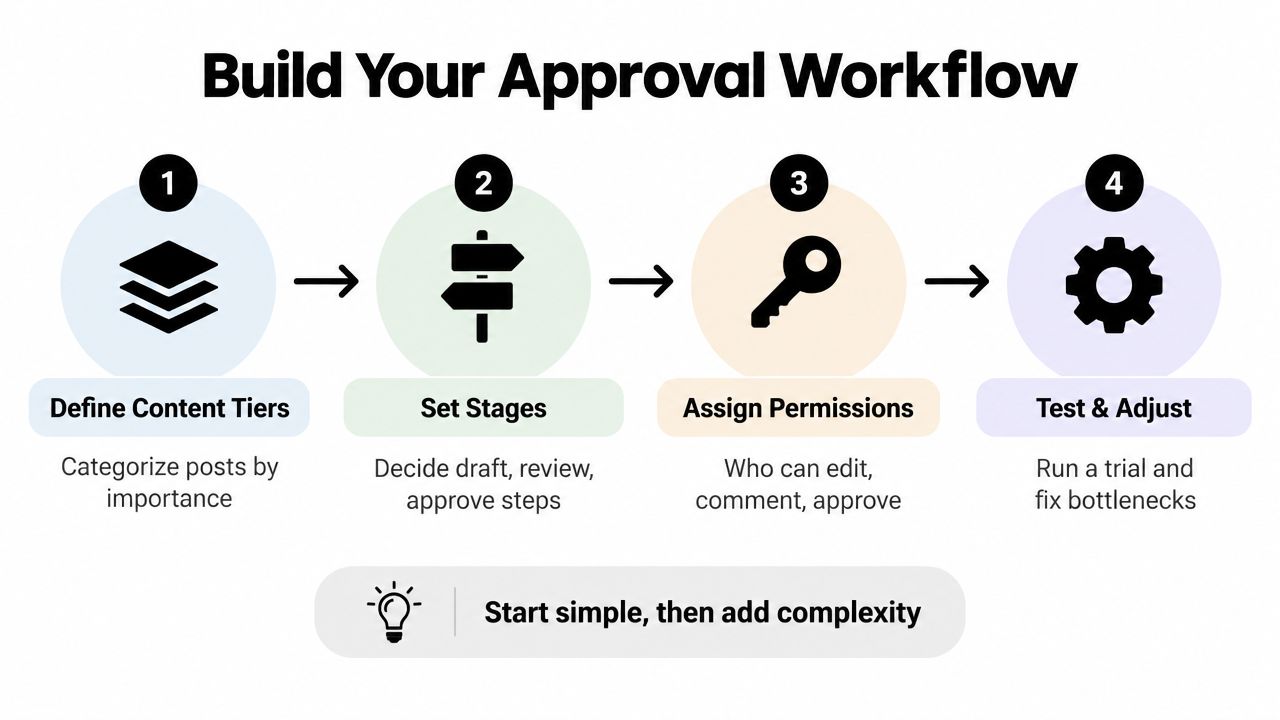
4. Test one content batch
Run the process with a real batch of repurposed clips. Watch where people pause, ask for missing context, duplicate feedback, or change the post after approval. Fix those points before adding more automation or more reviewers.
A good workflow doesn’t eliminate judgment. It makes judgment happen at the right point, by the right person, on the right version.
SLAs Benchmarks and How to Spot a Broken Workflow
A social approval workflow needs explicit service levels. Without them, posts wait in inboxes and approvals depend on memory. Track time-to-approval, revision rounds, rejection rate, and first-pass approval rate. Together, these measures show whether briefs lack context, review is excessive, or one approver has become the queue.
For an agency-style process, Kontentino’s social media approvals workflow guidance cites 24 hours for internal review and 48 hours for client review, or a 2–3 day total turnaround. The same guidance describes an average approval process of eight days when the workflow is poorly designed.
| Metric | Healthy Benchmark | Warning Sign |
|---|---|---|
| Internal review | 24 hours | Review remains open beyond the agreed window |
| Client review | 48 hours | Stakeholder response pushes the publishing slot |
| Total turnaround | 2–3 days | Approval drifts toward the broader eight-day average |
| First-pass approval | 60% or higher | Below 60% suggests thin briefs |
| Time in review | Up to two days | More than two days suggests a reviewer bottleneck |
| Revision cycles | 2–3 or fewer | More than 2–3 cycles suggests unclear guidelines |
Use median time-in-review to diagnose the normal workflow. A single urgent post can distort an average, while a rising median shows that the queue is slowing across routine work. Identify the stage where posts wait, then check whether the reviewer is receiving incomplete briefs or unnecessary volume.
A low first-pass approval rate usually points upstream. The brief may omit audience, objective, source context, or acceptance criteria. Fix the input before asking reviewers to move faster.
Route by risk as well. Low-risk repurposed clips with unchanged claims and approved formats can use lighter review or automatic checks. Posts involving regulated claims, sensitive topics, new messaging, or material edits should require human review. This routing reduces context-switch tax without removing judgment where it protects the brand.
Consolidate comments, remove optional approvers from low-risk posts, and require re-approval whenever an approved caption or asset changes. Record the owner, deadline, current version, and final decision in one place. Viral.new’s expert social tools guide offers further context for evaluating the tools around this process.
Integrating Repurposed Clips Captions and Scheduling Into Approval
Repurposing creates a specific approval challenge: one source video can produce many publishable assets, but not every asset carries the same risk. Treat each clip as its own post record while keeping the source episode, campaign, or recording visible for context.
A practical review pass checks five things:
- Message: The clip makes sense without the full recording.
- Caption: The text reflects what the speaker said and contains no unsupported claim.
- Media: The opening frame, crop, audio, and thumbnail match the platform.
- Safe zones: Captions, faces, logos, and calls to action stay clear of platform interface areas that may overlap the frame.
- Schedule: The selected channel, date, time, link, and account are correct.
Safe zones deserve their own gate. A caption can be accurate and still fail if buttons, profile information, or other interface elements cover the text. Review the rendered post in its intended aspect ratio, not only the raw video canvas.

Route by risk, then schedule immediately
Low-risk clips can use a lighter path, such as automated checks for missing captions, obvious formatting problems, incomplete fields, or unsafe text placement, followed by a designated human exception review. High-risk content should pause for human judgment, especially when it contains claims, customer information, sensitive topics, or launch messaging.
The hidden cost of a messy workflow is context switching. One source notes that reviewer interruptions can cost up to 40% of productive time, while undocumented approvals create audit and compliance exposure when something goes wrong. Oktopost’s analysis of the hidden cost of manual social media approval workflows makes the case for routing routine work away from unnecessary senior review.
For teams combining clipping, auto-captioning, and scheduling, quso.ai can fit the handoff by preparing short-form assets and moving an approved post toward its scheduled slot. Keep the approval decision attached to the final asset, then schedule immediately so the signed-off version doesn’t drift while someone re-uploads or edits it.
Teams building a broader automation layer can also review content workflow automation for ways to reduce repetitive handoffs without removing the approval gate.
Final Checklist and Social Media Approval Workflow FAQ
Before publishing, verify these controls:
- One source of truth: The final media, caption, feedback, and decision stay together.
- Clear states: The post shows whether it is drafted, under review, approved, scheduled, or published.
- Risk-based routing: Routine repurposed clips follow a lighter path. Claims, customer information, sensitive topics, and launch messaging receive human review.
- Named ownership: One person owns each handoff and approval.
- Defined SLAs: Review windows are visible and monitored.
- Immediate scheduling: The approved version moves into the calendar without an untracked re-upload.
What should happen when an urgent post can’t follow the normal workflow?
Use an emergency route with one named approver, a short checklist, and a recorded decision. Time pressure changes the route, not the need for documentation.
Can low-risk social posts be auto-approved?
Yes, if the team has defined low risk in advance. Automated checks can screen for missing captions, formatting problems, incomplete fields, and unsafe text placement. Send exceptions, sensitive claims, and campaign-critical content to a human reviewer.
What needs to be recorded for auditability?
Record the approved asset, approver’s name, timestamp, feedback history, and every change made after review. A material change sends the asset through approval again.
How many approval rounds should a post have?
Keep the chain short and consolidate feedback before revision. More than 2–3 revision cycles usually signals a weak brief, unclear guidelines, or unresolved decision rights. Review those controls before adding another approver.
What’s the fastest way to find the bottleneck?
Measure median time in review by stage. The longest wait identifies the handoff that needs adjusted permissions, a clearer SLA, or different risk routing.
quso.ai can turn long videos into short-form clips, add auto-captions, and move approved assets into a publishing workflow. Visit quso.ai to test a repurposing-to-scheduling process that keeps review controlled without slowing every post.