AI podcast clip generator for video podcasts
Creating an account is free. See pricing for your country.
Free plan: 75 credits a month, about 75 minutes of video. 720p with a watermark, no card.
The short answer
An AI podcast clip generator takes a full video episode and proposes short vertical clips with captions for TikTok, Reels and YouTube Shorts. quso.ai does this from a video file or link, frames two to four speakers with CutMagic layouts, and lets you fix every caption word before you download or schedule. It does not take audio-only files.
Updated
Most of the work in clipping a podcast is finding the moments. A 60-minute episode takes an hour to watch, and the clips worth posting are the three or four exchanges where a guest says something sharp that still makes sense with no setup. The cutting, reframing and captioning after that is mechanical.
This page covers the job as it runs in quso.ai, from the episode file to the scheduled post, and it names the one step software can't do for you, which is deciding whether a clip actually represents the show. It also says plainly where other podcast clip tools do better.
From episode to scheduled clips
Seven steps. On a typical hour-long episode, the first two take a few minutes of attention; steps three to six are the review, and that is where your time goes.
Step 1
Bring in the episode video
Paste a link from YouTube, Zoom, Vimeo, Loom or Google Drive, or upload the MP4, MOV or WebM. Recordings from Riverside or SquadCast go in as files. Uploads cap at 5 GB on the free plan and 15 GB on paid plans. A YouTube link avoids the upload entirely.
The episode needs speech and has to be longer than 3 minutes. quso.ai handles videos up to 5 hours.
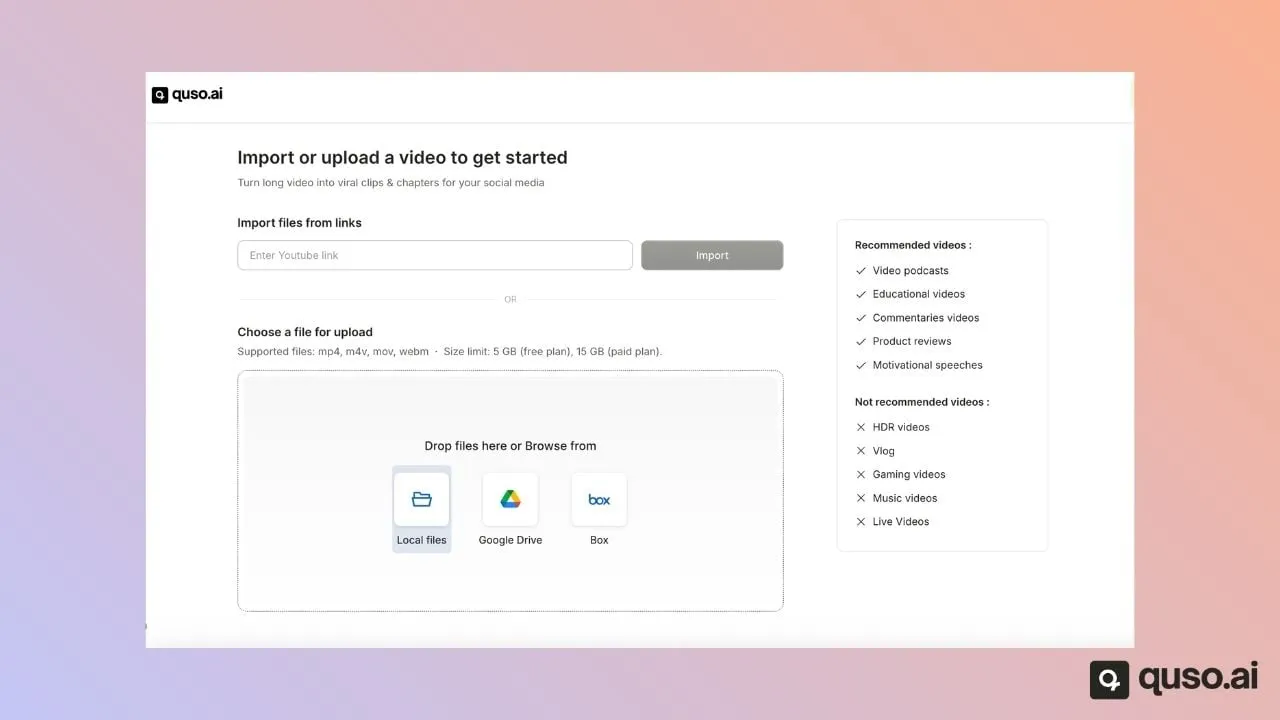
The upload screen, from quso's help center. Video podcasts top its list of recommended inputs. Step 2
Set the language and the two toggles
Pick the language the episode is spoken in. This matters more than it looks: an English setting on a French episode produces no clips at all.
Then check two toggles. Remove silence & filler words (Essential and Growth) trims the ums and dead air. CutMagic handles multi-speaker framing, and it only exists here: if a video is processed without it, it can't be added later.
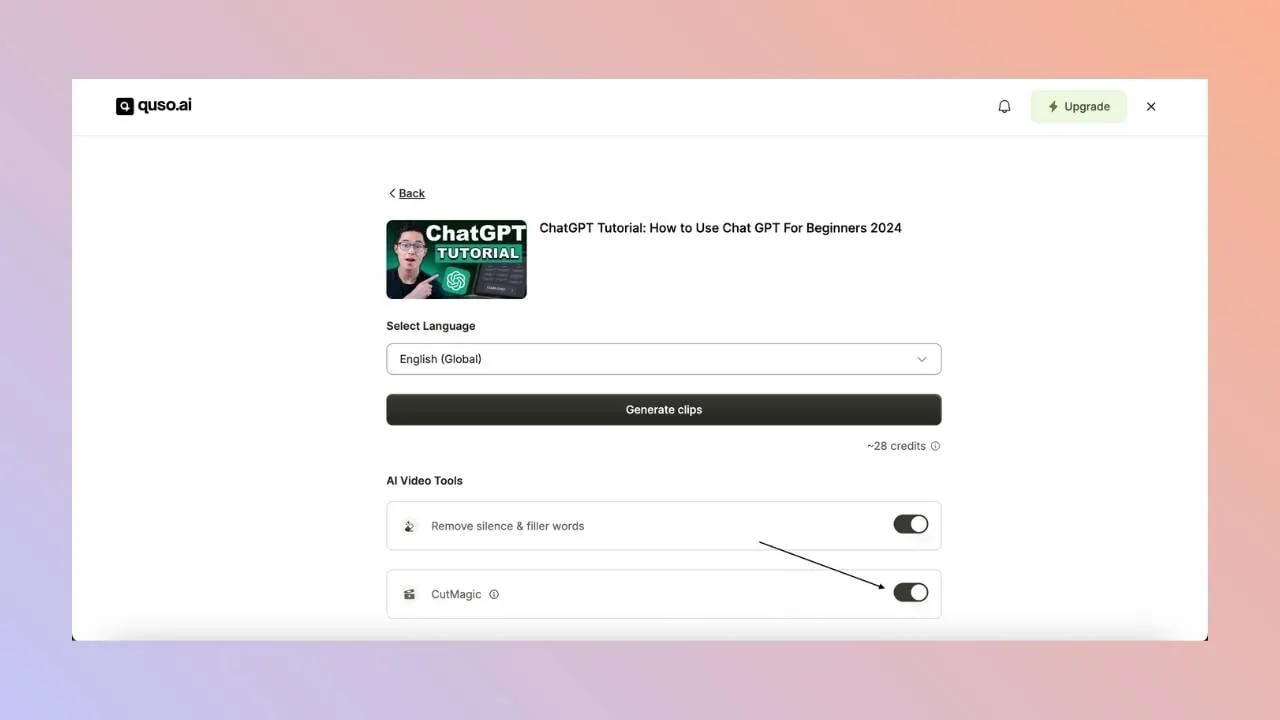
The estimate shows before anything is charged: one credit per minute of video, rounded up. Step 3
Read the ranked list
Clips come back ranked by score, each with a title and timestamps. The order is a reading order, not a verdict. In quso's own export data the clip in first place gets exported 31.7% of the time and clips ranked 11th or lower 7.6%, which mostly shows that people review from the top.
For each candidate, ask whether it starts after the question and ends before the answer trails off, and whether a stranger scrolling past with the sound off would follow it from the captions alone. If not, drop it.
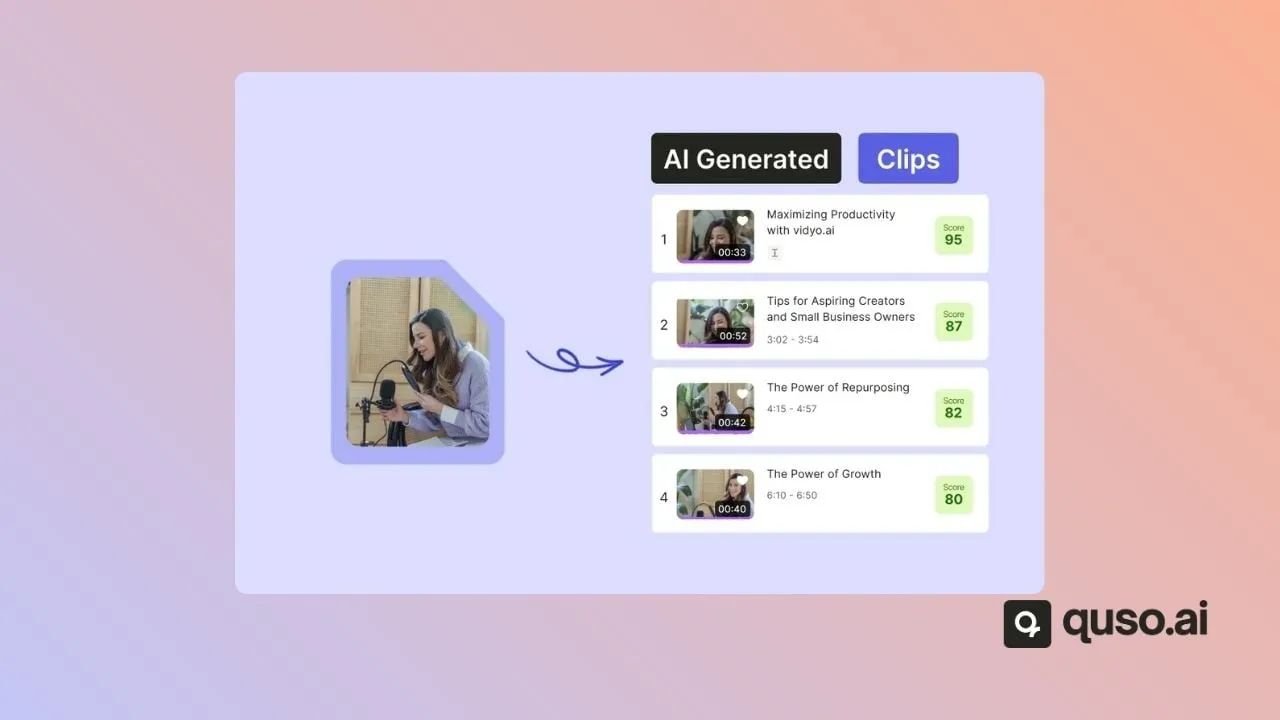
How the clip list is laid out (help-center illustration). Step 4
Cut the exchange it missed
Every episode has a moment the AI skips: a quick back-and-forth, a joke that only works with the reply. Open a custom clip, select those words in the transcript, and that passage becomes a clip. You can also type exact start and end timestamps.
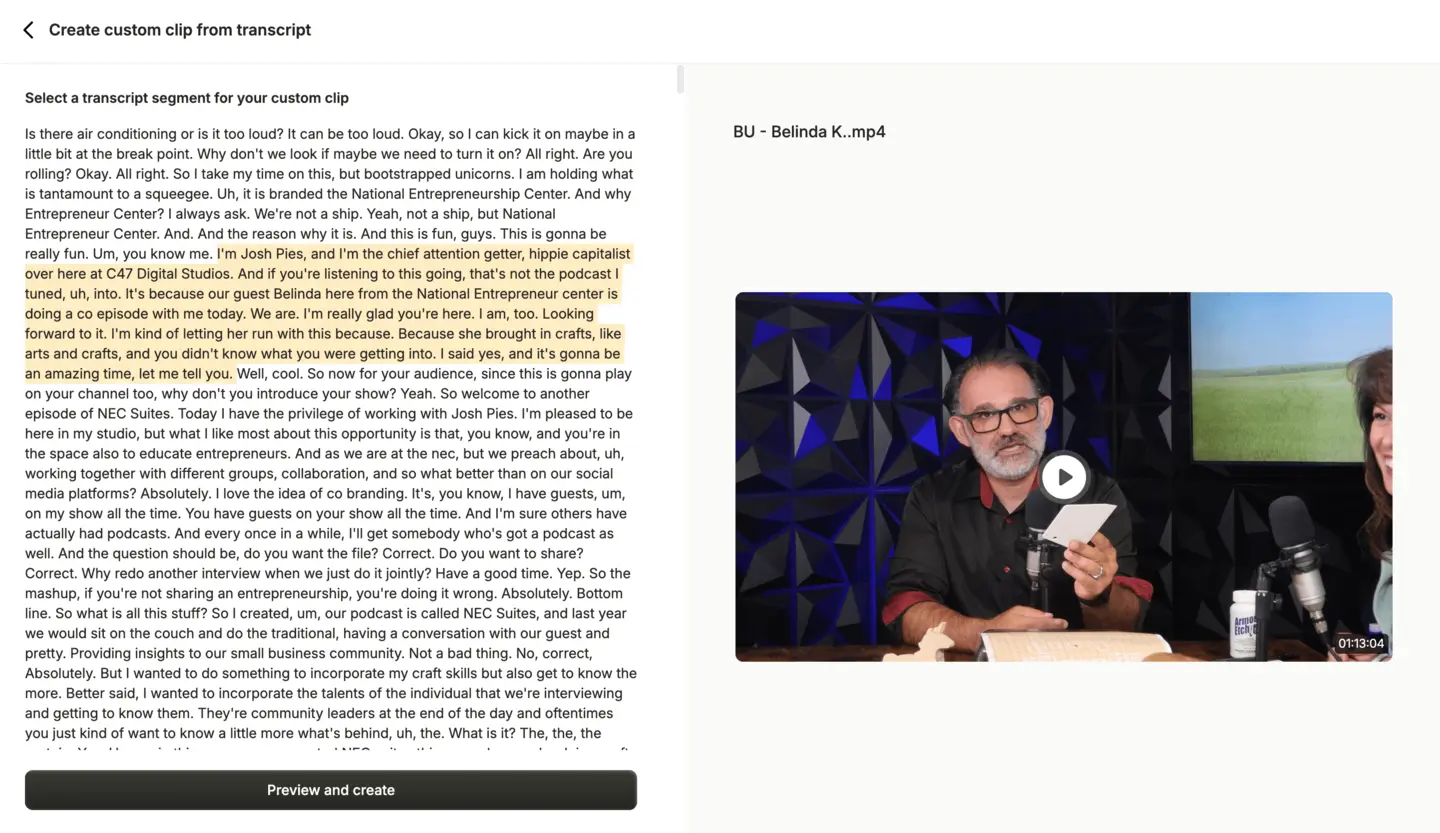
Selecting a passage from a 73-minute studio episode's transcript (help-center screenshot). Step 5
Check the speaker layout, scene by scene
With CutMagic on, each scene gets a layout picked from what is on screen: one speaker full frame, a split for two, a grid for three or four, or a screen share with the speaker below it. Captions are placed so they don't cover faces. Change any scene from the layout dropdown and the preview updates as you hover.
Switching a scene from one speaker to two (help-center recording). Step 6
Fix names in the captions
Captions come from speech recognition, so guest names, company names and product names are where it goes wrong. Each caption line is editable in the Subtitles tab. Change the caption style and animation in the same panel.
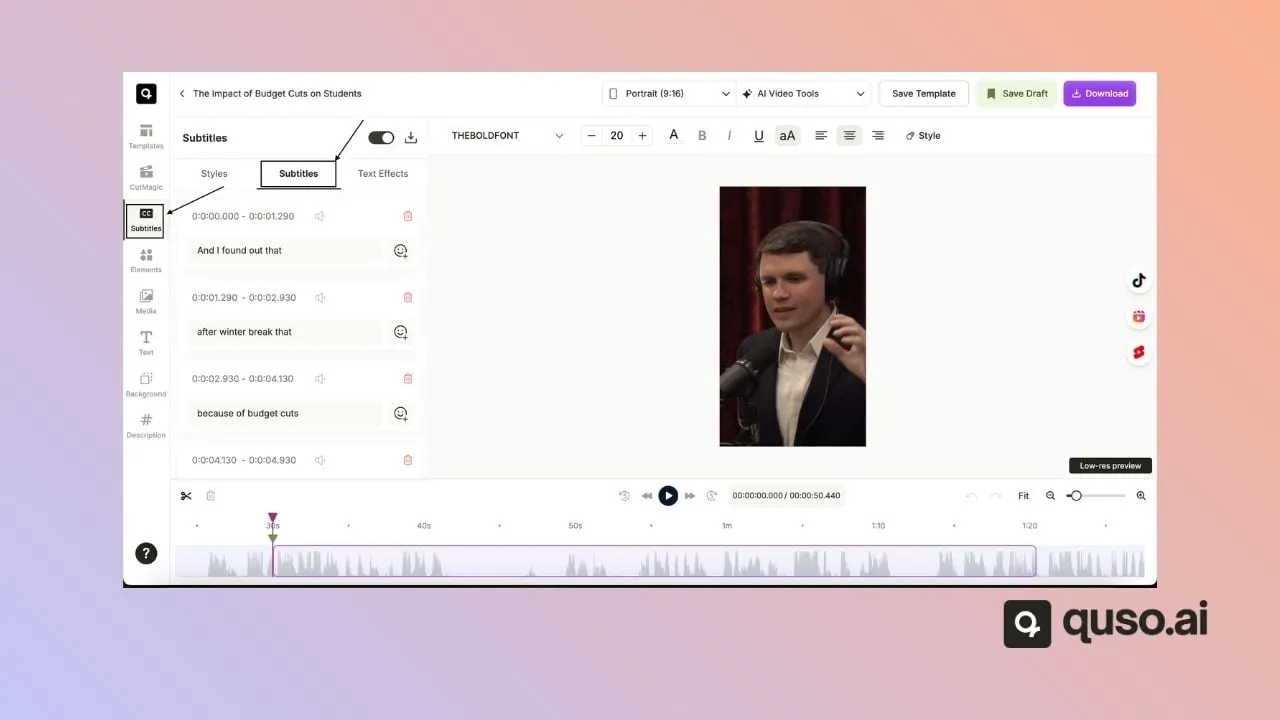
Caption lines with timings, editable one by one. Step 7
Download or schedule
Download any clip as an MP4 and post it yourself, or schedule it. The free and Lite plans publish to TikTok. Essential and Growth schedule to TikTok, YouTube, Instagram, Facebook, LinkedIn, X and Pinterest, with a description per platform, a date and a time. Nothing goes out until you press Schedule or Publish Now.
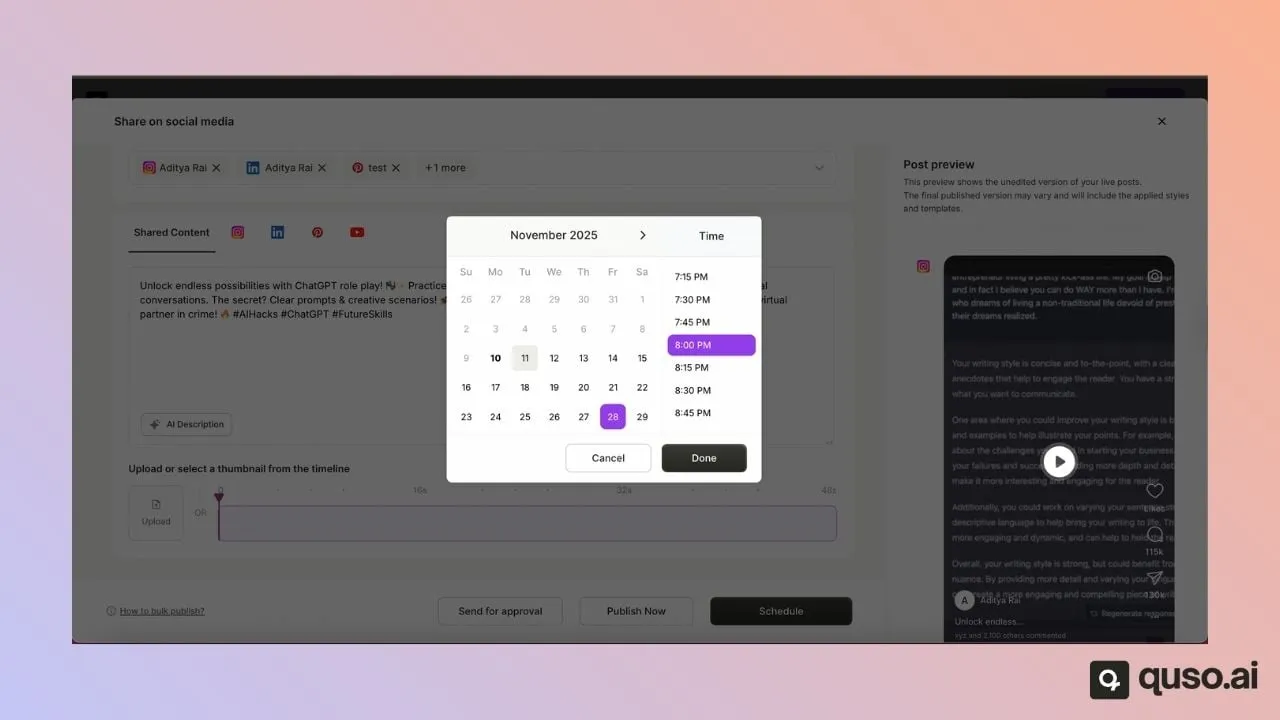
One post, several platforms, a chosen time.
What comes out
A set of 9:16 clips with burned-in captions, longer 16:9 chapters for full segments, and the transcript. The recording below is the editor reframing a podcast guest to vertical with captions on.
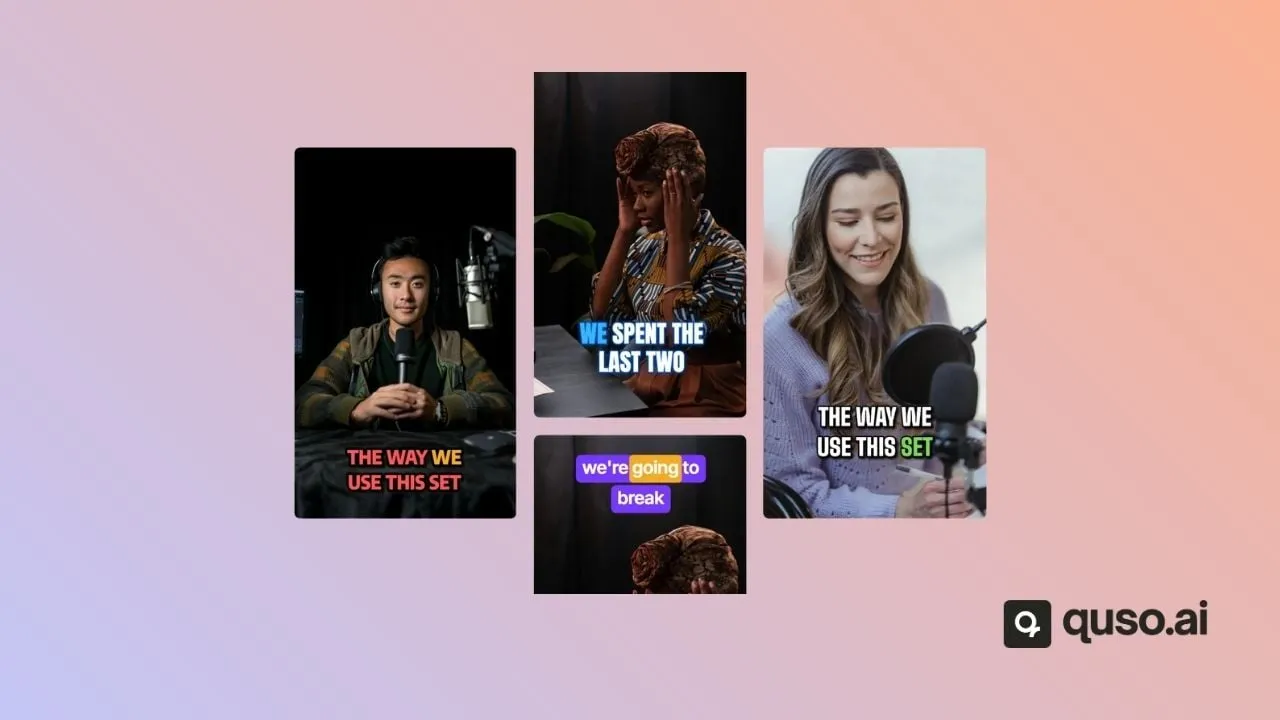
Vertical clips
Mostly 30 to 60 seconds. Exports in 9:16, 1:1 or 16:9. Free renders are 720p with a quso.ai watermark; paid renders are 1080p without it.
Chapters
Longer 16:9 segments sit next to the shorts. A guest's full answer to one question often works better as a chapter on YouTube than as a 40-second cut.
A transcript
Word-level and editable. It's what custom clips are cut from, and it is a starting point for show notes.
From a podcast host who uses it
“When I upload the content to quso.ai (previously vidyo.ai), it promptly provides a structure: ‘Here are 25 one-minute shorts and 12 clips. You decide.’”
Five things that go wrong
The episode is audio only
This is the most common dead end. Clipping needs video, so an MP3 from your host gets nothing. Record the next episode on camera, even a webcam on a Zoom call, or use the YouTube version if you publish one.
No clips come back
Three usual causes, roughly in order of how often they come up: the language setting doesn't match the episode, the video is shorter than 3 minutes, or the speech sits under a music bed loud enough that transcription can't pick it out. Failed videos get their credits back automatically.
The file is too big
A long multi-camera episode can pass the free plan's 5 GB. Paste the YouTube link instead, or export a smaller file from your editor first.
A clip cuts a story in half
The AI ends clips where a thought appears to end, which is not always where the story does. Extend the end point in review, or cut the full story as a custom clip from the transcript.
The guest's name is misspelled
Speech recognition guesses at proper nouns. Read every caption on clips that name a guest or a sponsor before you export. On a 40-second clip this takes about a minute.
How quso.ai compares with the podcast clip tools that rank
These are the three tools that rank alongside quso.ai for "podcast clip maker" and "AI podcast clip generator". Two of them do something quso.ai can't, so the table includes that row.
| quso.ai | OpusClip | Choppity | Podsqueeze | |
|---|---|---|---|---|
| Free plan | 75 credits a month (about 75 minutes); 720p with a watermark | 60 credits a month; watermark; clips stop being exportable after 3 days | 1 hour of AI analysis; no exports on the free plan | No ongoing free plan; one free clip |
| Cheapest paid plan, monthly billing | Lite, $29/month: 100 credits, 1080p, no watermark | Starter, $15/month: 150 credits, no watermark | Starter, $24/month: 3 hours of AI analysis | Starter, $8.99/month: 120 minutes, 8 clips or audiograms |
| Audio-only episodes (MP3) | No, video only | Not stated | Yes: MP3, WAV and M4A | Yes, turned into audiograms |
| Speaker framing | CutMagic layouts for one to four speakers, plus screen-and-speaker; free on your first 3 videos | Keeps the speaker centred; dynamic layout switching | Detects who is talking and switches focus | Not stated |
| Import by link | YouTube, Zoom, Vimeo, Loom, Google Drive, Dropbox and others; no Riverside | YouTube, Riverside, Google Drive, Zoom, Apple Podcasts and others | YouTube or a podcast URL | Search for your podcast by name; YouTube |
| Posting from the app | TikTok on Free and Lite; 7 platforms from Essential, $39/month | Auto-post to YouTube Shorts, TikTok and Reels from Starter; full scheduler from Pro | Scheduling from Starter | Not stated |
Checked on October 21, 2026 on each vendor's own pages. Prices are monthly billing in USD.
Where the others win
- Audio-only shows: Choppity takes MP3, WAV and M4A, and Podsqueeze turns audio episodes into audiograms. quso.ai can't clip an episode with no video.
- Podcast-native import: Podsqueeze finds your show by name, and OpusClip imports Riverside and Apple Podcasts links. In quso.ai a Riverside recording has to be downloaded and uploaded.
- Price of entry: Podsqueeze Starter is $8.99 a month and OpusClip Starter is $15, both below quso.ai's cheapest paid plan. Compare what each includes, though: Podsqueeze Starter caps you at 8 clips a month.
- Long recordings: OpusClip takes videos up to 10 hours and 10 GB uploads on its free plan. quso.ai stops at 5 hours, with 5 GB uploads on the free plan.
Sources: OpusClip pricing, OpusClip podcast clip generator, OpusClip video sources, Choppity pricing, Choppity for podcasters, Podsqueeze pricing, Podsqueeze clip maker.
What a show costs in credits
One credit is one minute of uploaded video, rounded up, so the length of your episodes decides the plan. A 60-minute episode costs 60 credits. Editing, downloading and scheduling the clips afterwards costs nothing extra.
| Plan | Price | Credits a month | What that covers |
|---|---|---|---|
| Free | $0 | 75 | One hour-long episode a month. 720p with a watermark, TikTok publishing, CutMagic on your first 3 videos. |
| Lite | $29/month | 100 | A fortnightly 45-minute show, or four 25-minute episodes. 1080p, no watermark, TikTok publishing. |
| Essential | $39/month | 300 | A weekly hour-long show with room to spare. Adds scheduling to 7 platforms and filler-word removal. |
| Growth | $49/month | 600 | Two hour-long episodes a week, or a network of shorter shows. Adds a brand kit with your show's logo, colours and fonts. |
If you only publish clips to TikTok, Lite covers it. Once you want them on YouTube Shorts and Instagram from the same place, the plan to look at is Essential. The pricing page has the full feature list for each plan.
Questions people ask
- How do I make a clip of a podcast?
- Get the episode's video into quso.ai by pasting a YouTube, Zoom or Google Drive link or uploading the MP4. Pick the episode's language and let it process. You get a ranked list of vertical clips with captions. Watch each one, drop the ones that need context, cut any exchange it missed straight from the transcript, then download the MP4s or schedule them.
- Can I clip an audio-only podcast?
- No. Clipping needs video: an MP4, MOV or WebM file, or a link to a video. An MP3 or WAV is not accepted, and quso.ai does not make audiogram or waveform videos. If your show is audio-only, record the next episode on camera (a Zoom call is enough) or use the YouTube video version if you publish one. Choppity and Podsqueeze both take audio files, so they are the better pick for an audio-only show.
- Is the AI podcast clip generator free?
- There is a free plan with 75 credits a month, about 75 minutes of video, and no card. Free clips render at 720p with a quso.ai watermark, publish to TikTok only, and projects are kept for 7 days. Paid plans start at $29/month for 1080p clips without the watermark. Scheduling to YouTube, Instagram and the other platforms starts on Essential at $39/month.
- How many clips will I get from one episode?
- It depends on the episode, and there is no setting for a fixed number. Across 1,770,924 AI clips made in quso.ai between January and August 2026, a long video produced a median of 9 clips, and most videos landed between 2 and 24. A conversational hour with distinct questions tends to give more usable clips than one long argument. When it misses a moment, you can cut a custom clip from any passage of the transcript.
- How long should a podcast clip be?
- Most land between 30 and 60 seconds. The median AI clip in quso's 2026 benchmark runs 40.6 seconds, and clip length made almost no difference to which clips creators exported: 14.4% under 30 seconds against 16.2% at 45 to 60 seconds. Cut where the thought ends, not to a target length.
- Does it handle two or more speakers?
- Yes, through CutMagic, which detects scene changes and camera angles and picks a 9:16 layout for each scene: single speaker, two, three or four speakers, or a screen with one or two speakers beside it. You can change the layout of any scene by hand. CutMagic has to be switched on in the upload options before processing. The free plan includes it on your first 3 videos; after that it is a paid feature.
- Can I import an episode from Riverside or Spotify?
- Not by link. quso.ai imports links from YouTube, Vimeo, X, Facebook, Twitch, Rumble, Loom, LinkedIn and Zoom, plus Google Drive and Dropbox. For a Riverside recording, download the video file and upload it, or put it in Google Drive first. OpusClip does import Riverside links, if that step matters to you.
- What do podcasters use to edit videos?
- Usually two tools. Most shows cut the long episode in a full editor such as Descript, Premiere Pro or CapCut, then hand the finished episode to a clipping tool that makes the short vertical cuts used to promote it. quso.ai is the second kind: it finds the clips, reframes them to 9:16, captions them and schedules them. It does not edit the full episode for you.
Keep reading
- Short-form benchmarks 2026 — 1.77 million AI clips: how long they run, how many a video yields, and which ones creators export.
- The best hooks for short-form video — 121,820 opening lines sorted into 11 types, with the median views each type gets.
- Podcast clip generators compared — A longer look at the tools podcasters use for clips.
- How to edit podcast shorts — Hooks, pacing and captions for the clips you keep.
- Podcast clips on LinkedIn — The same workflow aimed at a B2B audience.
- Podcast subtitle generator — Subtitles for the full episode rather than for clips.
- Customer stories — Podcasters including Dave Morrow, Dee Hemingway and Monica Tanner on how they use quso.ai.