A Social Media Video Strategy That Actually Works in 2026
The strongest social media video strategy isn’t a pile of trends. It’s a repeatable operating system for turning one idea into the right video, for the right channel, at the right moment. That matters because video is no longer niche, 91% of businesses use video as a marketing tool, up from 61% in 2016, and Cisco-based estimates cited in industry roundups put video at 82% of all internet traffic. Based on that reality, the job isn’t to “make more video,” it’s to build a workflow that keeps publishing without burning out.
Table of Contents
- What Is a Social Media Video Strategy
- Aligning Video Content to Your Marketing Funnel
- Choosing Your Platforms and Video Formats
- Building a Sustainable Repurposing Workflow
- Operationalizing with Captions and Automation
- Measuring What Actually Matters
- Frequently Asked Questions
What Is a Social Media Video Strategy
A social media video strategy is an operational system for planning, producing, repurposing, publishing, and measuring video against a business goal. It is not a list of trending formats, and it’s not a one-off content calendar. It connects the message, the funnel stage, the platform, and the measurement plan before anyone hits record.
The practical reason to think this way is simple. Video already sits inside mainstream marketing workflows, and the scale problem now is distribution, not whether video “works.” If one long recording can become several short assets, a team can publish consistently without rebuilding every post from scratch.
A solid strategy usually has four parts, funnel alignment, format selection, repurposing, and performance measurement. Without all four, you end up with content that looks active but doesn’t move viewers anywhere useful.
Aligning Video Content to Your Marketing Funnel
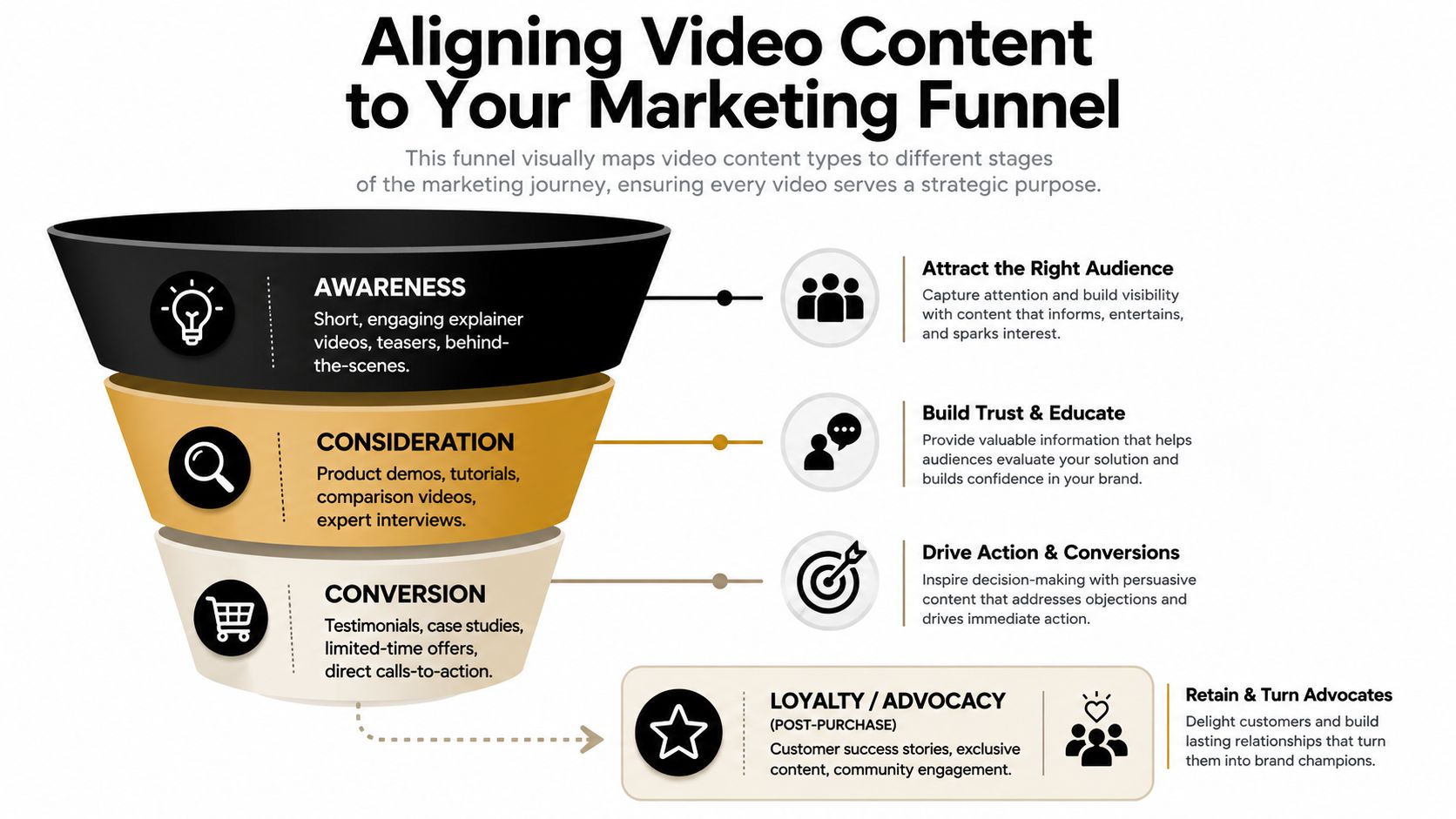
Different videos serve different jobs. A social clip meant to stop the scroll should not be judged by the same standard as a customer proof video meant to close a deal. The funnel gives that content a purpose, and purpose makes editing decisions easier.
Awareness, consideration, and decision need different cuts
Top-of-funnel video should earn attention fast. That usually means short hooks, sharp openings, and one clear idea, like a teaser, a behind-the-scenes clip, or a strong opinion from a founder. Middle-of-funnel content can go deeper, with product demos, how-tos, interviews, and explainer clips that answer objections.
Bottom-of-funnel video should reduce risk. Testimonials, case studies, and direct offer videos belong here because viewers are already closer to a decision. Longer educational cuts also belong in the middle and lower parts of the funnel when the goal is trust, not just reach, which is why recent strategy work distinguishes between short-form hooks and deeper educational assets for podcasters and B2B teams.
Practical rule: if the video is meant to educate, qualify, or convert, don’t force it into a tiny clip just because short-form is popular.
The best funnel setups treat one recording as a source asset, not a finished endpoint. A webinar can produce awareness clips, a demo can produce consideration clips, and a customer interview can produce proof-based decision content. That’s the essential bridge between strategy and production.
Choosing Your Platforms and Video Formats
Platform fit changes how a video lands. The same message can feel native on one channel and awkward on another because audience expectations, pacing, and UI treatment are different. That’s why “post everywhere” usually underperforms compared with adapting the core idea.
Match tone and length to the feed
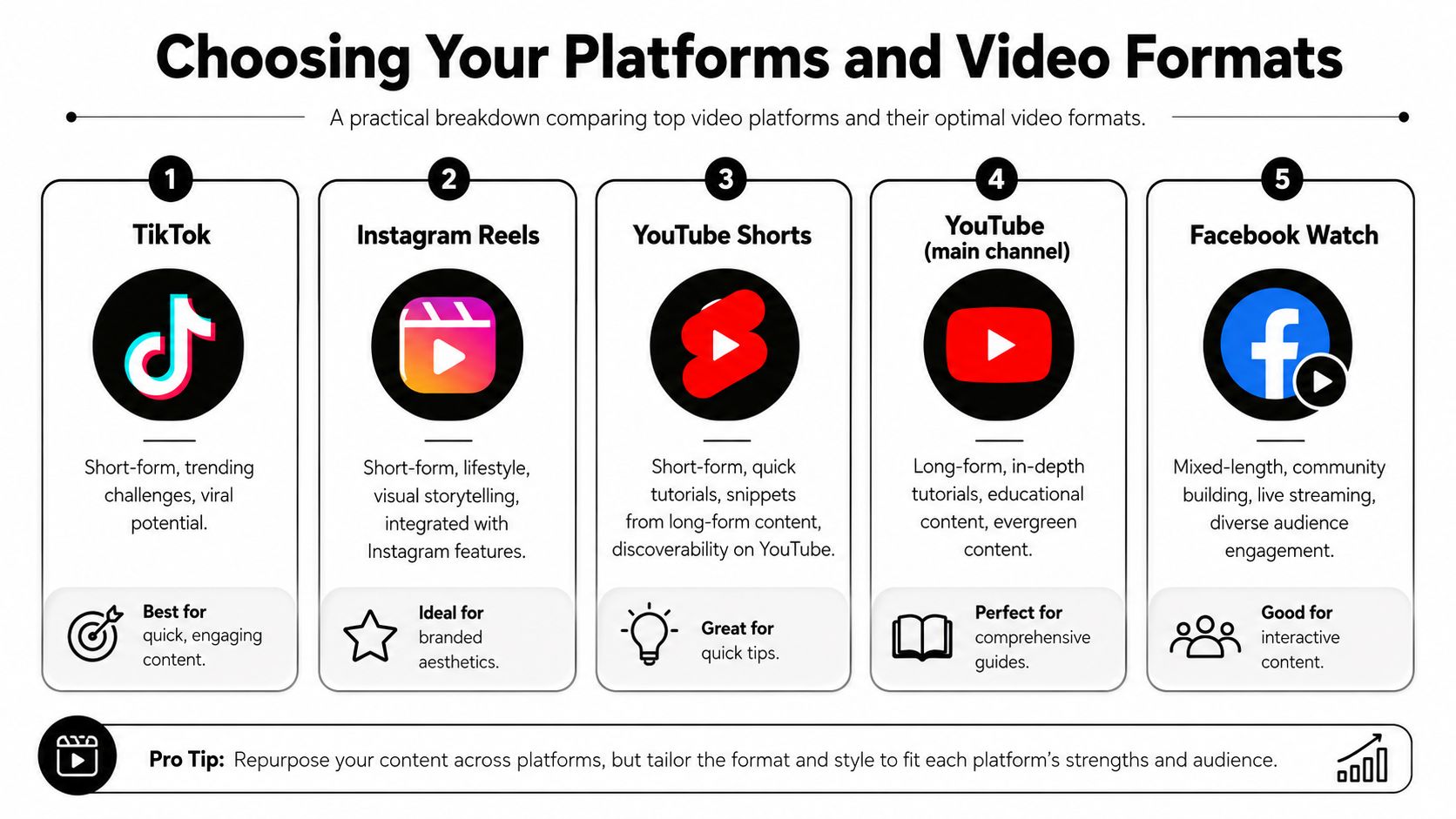
TikTok tends to reward fast hooks and content that feels immediate. Instagram Reels leans into visual polish and brand presentation. YouTube Shorts works well for quick teaching and repurposed snippets, while LinkedIn usually rewards clearer business context and a more direct point of view.
Engagement data shows the right length is platform-specific, not universal. Instagram videos under 60 seconds garner the most engagement, while Facebook videos between 2 and 5 minutes perform strongest, so a single edit should not be pushed unchanged into every channel. That’s also why it helps to keep one master recording and cut versions for each platform’s attention window.
Short doesn’t automatically mean better. The right cut is the one that matches how people actually consume that feed.
The other mistake is ignoring safe zones. Captions, headlines, and calls to action can get covered by buttons, usernames, descriptions, or interface overlays, especially on vertical video. Keep key text centered away from the edges, leave room near the bottom for platform controls, and don’t put important words where the UI can hide them. For a practical reference on specs and placement, use this quick reference guide.
Building a Sustainable Repurposing Workflow
The most durable video system starts with one pillar asset. A podcast episode, webinar, founder interview, or customer conversation can become the raw material for multiple clips, captions, quote posts, and supporting assets. That’s how teams keep publishing when they don’t have time to film every day.
Start with the source, not the clip
First, record one substantial piece of content with enough depth to split into multiple angles. Then pull out the strongest moments, questions, objections, and clean soundbites. After that, cut those moments into short-form posts for each platform, then adapt the same source into text and image assets where useful.
Transcription becomes useful. If you need to turn spoken content into usable text before clipping or reframing, getting text from YouTube videos is a practical way to speed up the extraction step. Once the core ideas are written down, editing gets faster because you’re working from content, not from memory.
The goal is not to make one video go viral. The goal is to make one recording feed a publishing system.
A tool like quso.ai fits that workflow because it repurposes long video into short clips, adds captions, and schedules posts from the same workflow. That matters for creators, podcasters, and B2B teams that need to turn one long session into a week or more of channel-specific output. If you want a deeper framework for the process, see the content repurposing strategy guide.
The big shift is operational. You stop asking, “What do I post today?” and start asking, “What source asset can power this week’s distribution?” That one change reduces production drag and makes consistency a system, not a scramble.
Operationalizing with Captions and Automation
Captions aren’t optional anymore. Many people scroll with the sound off, and if your video depends on audio to make sense, you’ve already lost part of the audience. Captions also help your message stay readable when a viewer is on mobile, in a noisy place, or skimming fast.
Batch the work, then let scheduling do its job
The cleanest process is to batch creation, then batch publishing. Record, clip, caption, and schedule in blocks instead of trying to produce and post in real time every day. That keeps the team out of permanent production mode and leaves more attention for comments, community response, and follow-up content.
Automation matters because consistency is what usually breaks first. A queue of ready-to-go posts is more dependable than a daily rush to find something usable. For a practical list of caption patterns and tool options, Best AI TikTok caption generators is a useful place to compare approaches before you settle on a workflow.
When scheduling is built into the process, the content system becomes easier to maintain across teams and time zones. It also makes it simpler to keep the same message rhythm across platforms without manually posting every single asset.
Measuring What Actually Matters
Views tell you that a video got exposure. They don’t tell you whether people stayed, cared, or acted. The better read is a combined view of watch time, completion or retention rate, engagement rate, and CTR.

Read the full KPI stack, not just one number
Watch time shows whether the content held attention. Completion or retention rate shows where viewers dropped off. Engagement rate tells you whether the content gave people a reason to react, comment, or share. CTR shows whether the video moved them toward a next step.
That stack works because it separates exposure from impact. A clip can be widely seen and still fail if people leave immediately or never click through. For a deeper tracking framework, use this guide to social media analytics alongside your platform dashboards.
The habit to build is simple. Compare each post against its own platform baseline, then adjust the hook, length, caption, or CTA based on where the numbers weaken. That’s how a video strategy gets sharper over time instead of staying stuck at the level of guesswork.
Frequently Asked Questions
How often should I post video on social media?
Post consistently enough that your audience learns your rhythm. A reliable cadence beats bursts of activity followed by silence, especially when you’re repurposing one pillar video into multiple cuts.
Do I need expensive gear to start?
No. A clear message, decent lighting, and clean audio matter more than a fancy setup. Good content loses far more from weak structure than from modest equipment.
Should I post the same video on every platform?
Not unchanged. Keep the core idea, but adjust the length, caption style, and framing so it fits the platform and its UI.
How long should social videos be?
There isn’t one universal length. The right edit depends on the platform, the goal, and whether the video is meant to hook attention, educate, or convert.
When will I know the strategy is working?
When the right metrics improve together, not just views. Watch time, retention, engagement, and CTR will tell you whether the content is doing the job you gave it.
If you want a simpler way to turn one long recording into a steady stream of clips, captions, and scheduled posts, quso.ai is built for that workflow. It’s a practical fit for creators and B2B teams that need a repeatable video system, not another pile of one-off edits.





