Content Repurposing Strategy: Your 2026 Playbook

8:1 is a strong operating target for a content repurposing strategy, and a practical baseline is 5 to 7 repurposed pieces from each long-form asset. Treat it as a system with five parts, audit the right source, atomize it, reformat for each channel, schedule with cadence, and measure what keeps producing traffic and leads.
You’re probably sitting on a pile of webinars, podcasts, blog posts, and customer stories that could do more work. The problem usually isn’t ideas, it’s deciding what deserves another life, what should be left alone, and how to keep the whole machine from turning into random reposting.
Table of Contents
- The Foundation Auditing and Prioritizing Your Content
- The Repurposing Workflow From Pillar to Micro-Content
- Building Your Tech Stack and Assigning Roles
- Smart Distribution and Cadence Management
- Measuring Success and Optimizing Your System
- Frequently Asked Questions About Content Repurposing
The Foundation Auditing and Prioritizing Your Content
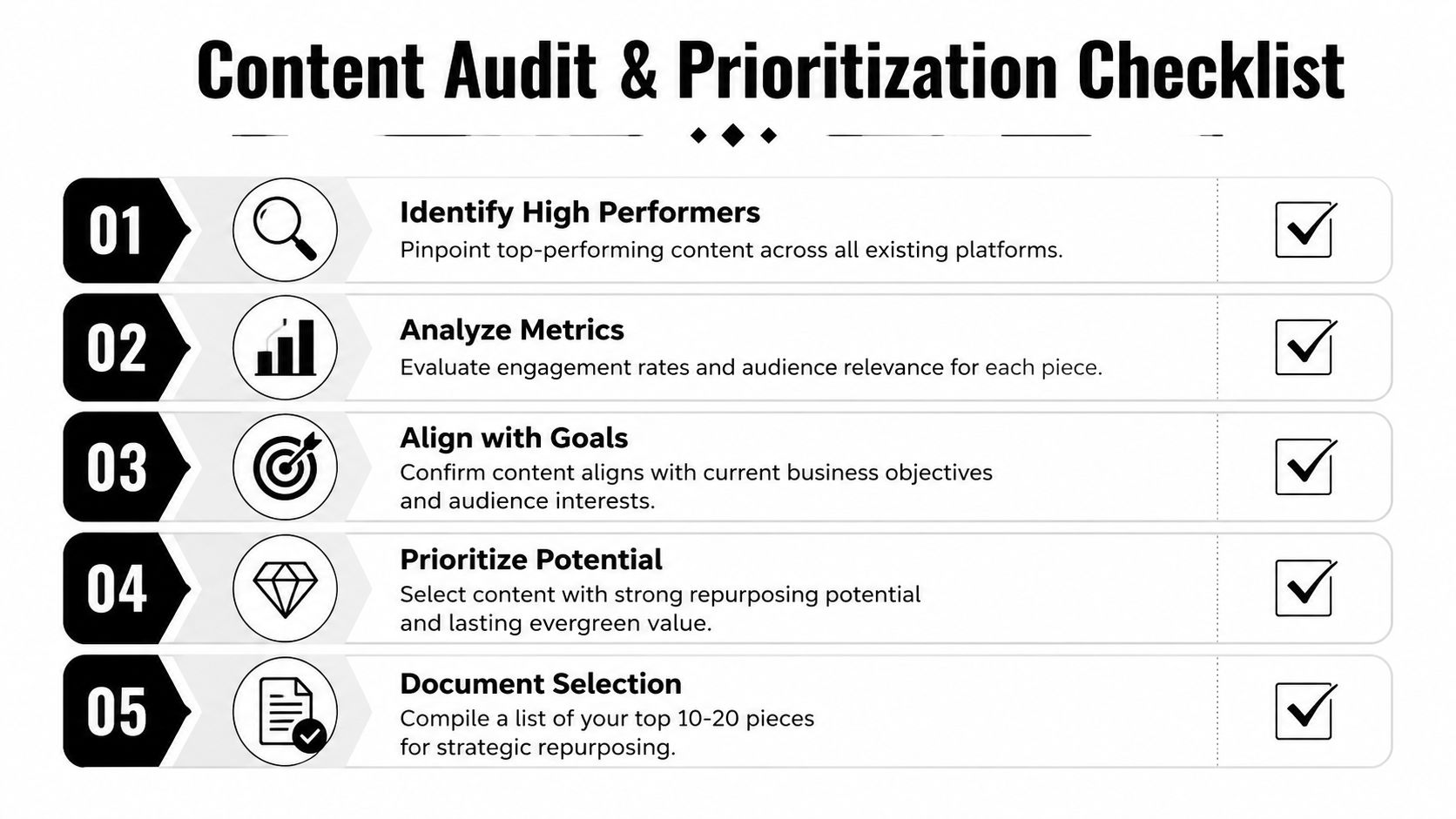
Start with the assets that already earned attention and still matter now. The best candidates for repurposing are evergreen, already high-performing, and relevant to a current success metric, while time-bound or overly specific content is a poor fit, which is why a real audit is a filtering process, not a content inventory (Content Marketing Institute).
What to keep and what to ignore
Practical rule: if a piece no longer matches what you sell, what your audience needs, or what the channel rewards, leave it out of the repurposing queue.
Look at your library through three lenses, traffic, engagement, and conversion. A post with strong traffic but weak relevance can still mislead your team, while a smaller asset that already converts and stays useful is often a better repurposing seed.
The goal is to build a backlog of pillar assets that can feed clips, carousels, newsletters, FAQ posts, and internal sales support. That’s the difference between recycling content and running a repeatable strategy. One UK guide recommends aiming for a content efficiency ratio of at least 8:1, with 5 to 7 repurposed pieces as a baseline from each long-form asset, and scheduling repurposed content 2 to 4 weeks after the original publish date to extend the asset’s lifespan (Aether Agency).
A clean backlog usually looks small on purpose. Keep the strongest pieces, tag the weak ones for refresh or retirement, and move on.
The Repurposing Workflow From Pillar to Micro-Content
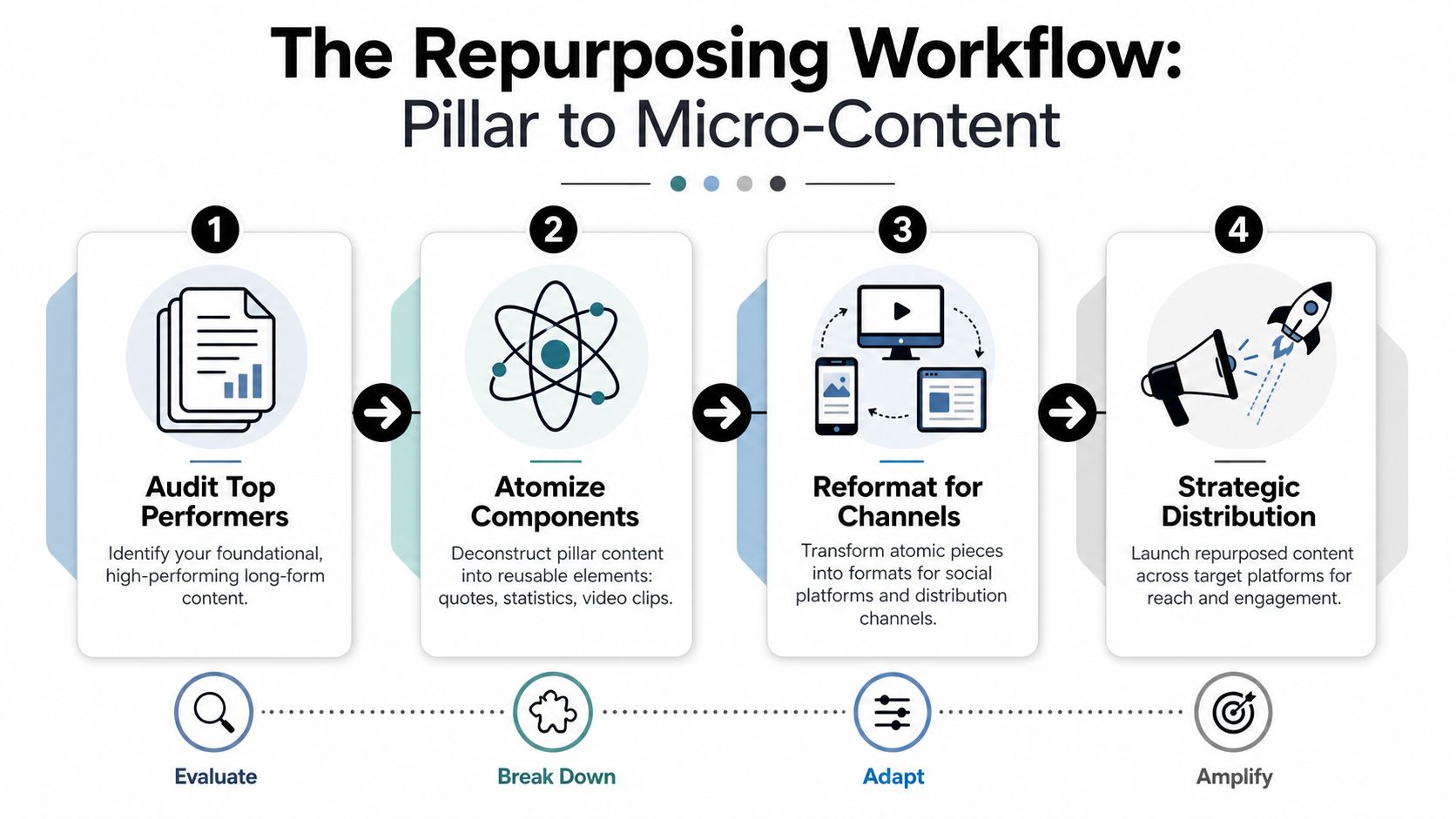
A long asset only becomes useful when the workflow tells each piece what job to do. Start with one source of truth, then pull out reusable atoms such as charts, quotes, takeaways, and clips, and assign each one a format, channel, and primary CTA. That keeps the repurposing process focused on distribution choices instead of endless editing.
Atomize the source before you resize it
A webinar is a good example. Start by finding the moments that can stand alone, a sharp claim, a useful framework, a question worth answering, or a visual explanation. A strong repurposing workflow screens source assets for retention or average view duration, then extracts 3 to 5 standalone moments and writes a fresh opening line for each one.
That matters because a clip is not just a smaller version of the original. It needs its own hook, pacing, and caption treatment. For video teams, an AI content repurposing tool can save the most time when it finds usable moments inside a long recording and turns them into captioned cuts without manual scrubbing.
A good clip should make sense on mute, in-feed, and out of context.
The process stays simple. Audit top performers by traffic, conversions, and longevity. Break them into key stats and actionable steps. Reformat each atom for the target channel, then schedule and distribute the assets (Digital Applied).
If you need a practical example of turning video into more formats, the guide on how to repurpose video content is the closest companion piece to this workflow.
Match each atom to the right format
A quote card works when the wording stands on its own. A stat works when it can support a claim or visual. A short clip works when motion and voice add context that text cannot. Force one asset into every channel, and the output usually gets bland fast.
Build for platform safe zones as well. Captions, lower-third text, and callouts need room away from UI overlays on short-form video platforms, or the content looks fine in the editor and broken in the feed.
Building Your Tech Stack and Assigning Roles
A lean stack beats a bloated one. Pick one tool for source creation, one for clipping or atomizing, one for design, and one for scheduling. If your repurposing work starts with long video, that usually means a recording source, an AI clipping layer, a simple design tool for social assets, and a scheduler that keeps the queue moving.
Keep the stack narrow
The mistake is buying tools before the workflow is clear. The stack should support the system, not define it. Start with one high-value source asset, extract 5 to 15 reusable atoms such as charts, quotes, and takeaways, then map each atom to a format, channel, and one primary CTA. As noted earlier, the goal is to keep the process repeatable, not to create more work for the team.
That mapping step is why team roles matter even in a small setup. The Strategist chooses the source asset, the Producer turns it into clips or graphics, and the Distributor schedules and monitors what goes live. One person can hold all three roles, but the decisions still need to stay separated so the workflow does not turn into one long chain of guesswork.
A good stack also reduces content friction. The more manual copy-paste work your team does, the faster the process collapses into “we’ll repurpose later,” which usually means never. For teams building the planning side of the system, content planning tools can help keep source assets, publish dates, and repurposed variants in one place without scattering the plan across spreadsheets and chat threads.
Use one system for video, captions, and posting
A product like quso.ai fits naturally here because it handles long video repurposing, short-form clips, auto-captions, and scheduling in one place. It is one option inside a broader stack, not a substitute for strategy, but it does cover the work that usually eats the most time and creates the most handoffs.
The point is to keep the operating system simple enough that people use it. If the team has to jump between too many tools, the workflow slows down, version control gets messy, and content sits half-finished until the next planning meeting. A narrower stack makes it easier to assign ownership, review outputs, and keep cadence steady.

Smart Distribution and Cadence Management
Don’t publish everything at once. That’s how teams burn through a good idea too quickly and make the audience feel like they’re seeing the same thing on repeat. A distribution-focused repurposing strategy should plan releases 2 to 4 weeks after the original publication and use batch production blocks to reduce context switching (CloudPresent).
Stretch one idea across weeks
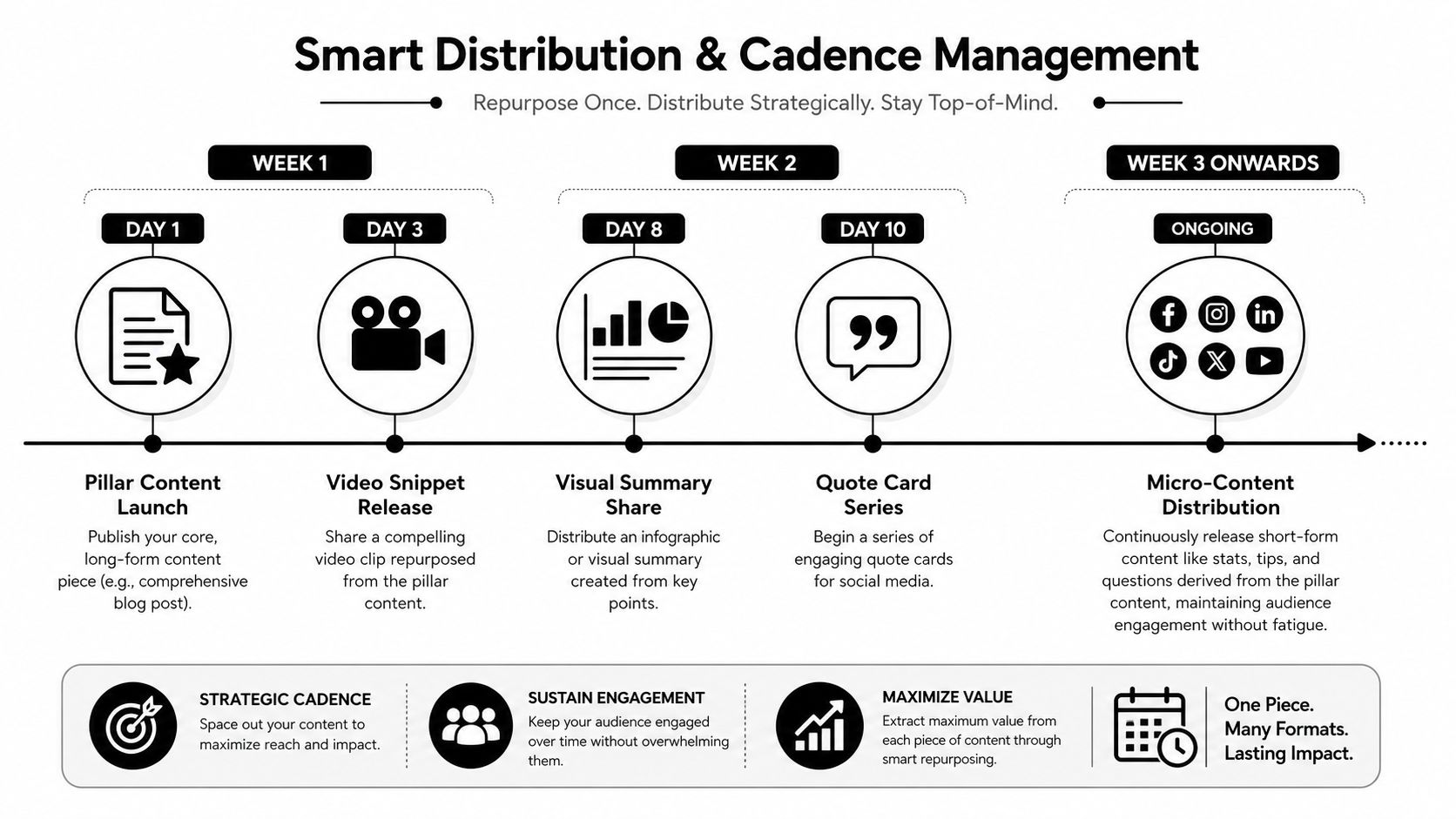
The point of cadence is simple, keep the topic alive without exhausting it. One strong pillar post can launch the theme, then a clip can follow, then a quote card, then a visual summary, then a newsletter excerpt. The topic stays active because each format gives the audience a different way in.
Batching matters because repurposing breaks when production becomes reactive. If you’re switching between clipping, design, captions, and scheduling every day, the workflow gets messy fast. Set aside a block to review source assets, another to produce variants, and another to schedule them.
Cadence beats burst volume when the goal is lifespan, not noise.
The buffer guides and other repurposing playbooks point to staggered distribution and batch workflows, but they don’t give teams a hard frequency rule. That’s exactly why a practical calendar system matters more than trying to squeeze every format into the same week (Buffer).
A simple rollout looks like this, publish the pillar piece, wait, release the first cut, then keep distributing smaller atoms as long as they still fit the message and the channel. If the idea is strong, it can keep paying rent for weeks without feeling stale.
Measuring Success and Optimizing Your System
Measure the system, not just the post. A repurposing setup should track content shelf life, platform-specific engagement, conversion rate from repurposed assets, and time saved versus creating new content. Keep the review focused on assets that still drive traffic and leads, and stop spending production time on pieces that no longer do that (PPC Info).
What deserves another round
One clip getting likes does not prove the source asset is worth another pass. The better signal is whether the original piece keeps producing useful derivatives after the first repurpose. A pillar article that keeps generating strong atoms deserves another cycle. A source that only produced one usable cut probably does not justify more editing time.
Compare repurposed posts against the platform baseline, not just against other repurposed posts. That keeps you from chasing a weak result that is still normal for the channel, or from missing repeated underperformance because one post briefly spikes. A practical rule is to watch for a pattern, not a single dip. If a format keeps landing below the platform median across several posts, it is time to adjust the hook, the cut, or the channel mix.
For social performance tracking, use a dashboard that shows which format, hook, and channel combination keeps drawing attention. If you want a practical framework for that part of the workflow, how to track social media analytics gives you a clean starting point.
Use the numbers to prune, not just to report
If a format does not save time or drive conversions, stop making it. If a source asset keeps bringing in traffic and leads, keep feeding it back into the system. That is the difference between a content library and a content system.
The hard part is deciding what to ignore. Leave out formats that look busy but do not change outcomes, because they add production load without improving results. Keep the cadence tight enough that the audience recognizes the topic, but spaced out enough that each repurposed asset has room to work. A good operating system keeps the backlog moving, the cadence steady, and the effort pointed at the assets that still earn their place.
The goal is not more content. The goal is more useful content from the work you already did.
Frequently Asked Questions About Content Repurposing
| Question | Answer |
|---|---|
| What is the best content to repurpose first? | Start with evergreen, already high-performing content that still matches a current business goal. Avoid time-bound or overly specific pieces unless they’ve been refreshed. |
| How many pieces should one long asset produce? | A practical baseline is 5 to 7 repurposed pieces, and some workflows aim for a higher content efficiency ratio when the source is strong. |
| How long should I wait before repurposing a new post? | A distribution-focused approach often waits 2 to 4 weeks after the original publish date so the topic stays active without feeling repetitive. |
| What should I not repurpose? | Skip weak, outdated, or overly narrow content. If the asset no longer helps a success metric, it usually isn’t worth another production pass. |
| Do I need a new format for every platform? | No. Use platform-native formatting where it matters, but stay focused on the channels you can support consistently with quality. |
If your team has a backlog of strong webinars, articles, or podcasts, turn one of them into a reusable source asset this week, then build the first round of clips, captions, and scheduled posts from it. If you want a faster way to move from long video to short-form output without rebuilding the workflow from scratch, start a trial at quso.ai and use it on your next pillar piece.