Social Media Planner for Small Business: A 2026 Setup Guide
A social media planner isn’t mainly a calendar. It’s the operating system that keeps a small team from turning one useful video into scattered, duplicate work across five feeds. Adoption reflects that shift: 73% of social media marketers use scheduling tools in 2026, compared with 61% in 2024 and 47% in 2022, while the average team manages 5.2 platforms at once, according to ScheduleWave’s social media scheduling benchmark.
That matters for creators, consultants, and B2B marketers who have one long recording, a limited production window, and several audiences to serve. A strong planner connects the recording to clips, captions, review, scheduling, community replies, and measurement. The tool matters, but the workflow matters more.
Table of Contents
- What a Social Media Planner Actually Does for a Small Business
- Set Goals, Content Pillars, and Brand Voice
- Build the Content Calendar Around One Long Video
- Pick a Posting Cadence That You Can Sustain
- Run the Weekly Workflow
- Measure the Four KPIs That Matter
- Avoid the Automation Mistakes That Burn Small Teams
What a Social Media Planner Actually Does for a Small Business
A social media planner for small business sits between strategy and publishing. It records what you’re trying to achieve, which audience problem each post addresses, where the post belongs, who approves it, and what happens after it goes live. A calendar shows dates. An operating layer explains the decisions behind those dates.
Small teams usually feel the cost of a weak system in ordinary ways. A LinkedIn post misses its slot because the owner was with a client. An Instagram Reel uses a caption written for TikTok. A useful podcast clip gets published once, then disappears because nobody logged the next adaptation. At the end of the month, the team sees activity but can’t explain which ideas created qualified attention.
A planner fixes those gaps by giving every asset a place and a status:
- Strategy: The business goal and primary audience action.
- Content pillars: The recurring subjects the brand can own.
- Production: The source recording, clips, captions, graphics, and links.
- Distribution: The network, format, time zone, and publishing status.
- Review: The owner, approval checkpoint, replies, and analytics note.
The system becomes more valuable when one long-form asset feeds multiple channels. A founder can record a detailed video, extract short clips, adapt the strongest point into a LinkedIn post, and reserve a newsletter paragraph without writing every item from an empty document.
Practical rule: If a post has no pillar, owner, destination, or review date, it isn’t scheduled content. It’s an idea.
For a broader view of how small teams organize channels, responsibilities, and repeatable publishing, use this startup social media management playbook. The useful distinction is simple: a planner should reduce decision fatigue, not just remind you to post.
Set Goals, Content Pillars, and Brand Voice
Start with the business outcome, then build the content system around it. A calendar becomes expensive when it fills with posts that earn attention but give the team no clear route toward a sale, enquiry, booking, or demo.
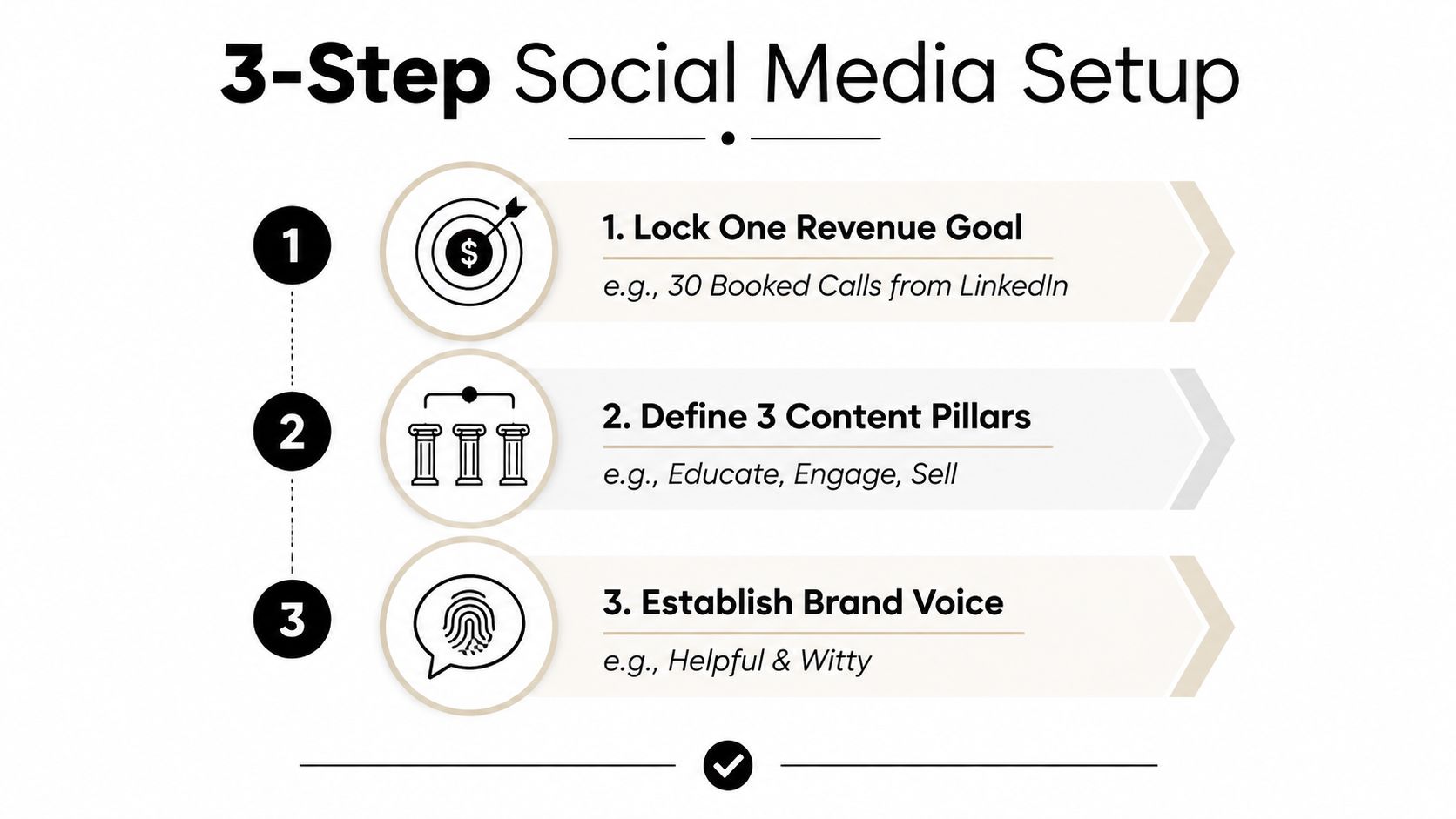
Choose one commercial goal
Pick one revenue-tied objective for the planning period. Examples include booked calls from LinkedIn, ecommerce leads from Instagram, qualified enquiries for a local service, or demo requests from educational video.
Write the goal beside one primary KPI. The relationship should be obvious. If the goal is more qualified calls, the calendar should prioritize posts that answer buying objections, demonstrate expertise, or direct the right audience to a booking page. If the goal is lead capture, the team should make the destination and offer visible in the planning record.
Avoid giving every post a different mission. One post can educate and build trust, but the planner still needs a dominant reason for publishing it.
Build three or four content pillars
Pillars prevent the feed from becoming a string of disconnected opinions. Tie each pillar to a buyer pain, not an internal department.
A practical starter mix is:
- 40% educational: Explain a process, answer a recurring question, or show a useful shortcut.
- 25% proof: Use customer outcomes, demonstrations, objections answered, or behind-the-scenes evidence.
- 20% product or offer: Explain what you sell, who it suits, and what action someone can take.
- 15% culture or behind-the-scenes: Show the people, decisions, standards, and working context behind the brand.
Treat this as a starting point, not a law. A B2B consultancy may need more proof and analysis, while a local retailer may need more product demonstrations and community content. The planner should make that adjustment visible rather than hiding it in instinct.
For a deeper framework, see content pillars for social media.
Write a usable voice brief
Keep the voice guide to one paragraph. Describe the tone, list forbidden words or claims, and write one sentence that captures how the brand should sound. “Clear, calm, specific, and helpful, never hype-driven” gives a writer more direction than a page of abstract adjectives.
Before scheduling, score every draft against three questions:
- Does it serve a defined pillar?
- Does it sound like the brand?
- Does it support the current goal?
If two answers are no, cut the post or send it back for revision.
Build the Content Calendar Around One Long Video
The most efficient small-team calendar builds from one substantial recording, a longer piece that anchors the week’s output across channels. Record a video, interview, webinar, or podcast conversation, then turn its useful moments into platform-specific assets.
A weekly source recording can produce three to five short clips per platform, one carousel built around the strongest quotes, one thread or LinkedIn post, three quote graphics, and a newsletter block. Repurposing still requires editorial work. Each version needs its own opening, caption, crop, and call to action.
Make the source asset easy to reuse
Mark clear moments during recording. Note the question, answer, story, objection, or demonstration that can stand alone. Strong clips contain a complete thought, enough context to make sense without the full episode, and an opening that gives viewers a reason to continue.
Use the planner as the handoff record for every derivative asset. Track these columns:
| Pillar | Network | Format | Copy | Asset link | Publish time |
|---|
A reviewer can compare the entire week before anything goes live. The table also reveals weak reuse, such as sending the same hook to Instagram, TikTok, LinkedIn, Facebook, and X without adapting the message. Document the recording, editing, approval, and scheduling handoffs in a practical content creation workflow.
Protect the frame and the caption
Keep titles, faces, logos, and calls to action inside each platform’s safe area. For vertical production, design within 1080x1350 for Instagram and 1080x1920 for TikTok and Reels, then preview uploads with interface overlays. Buttons, captions, profile details, and other controls can cover information near the edges.
Caption length should match the channel’s job. Keep a Reels hook under 150 characters, keep a TikTok caption under 80 characters, and allow a complete thought on LinkedIn when the idea needs context. These are production constraints, not performance promises.
For visual sequencing ideas, review these best performing Instagram carousel examples, then adapt the underlying structure to your source video.
Pick a Posting Cadence That You Can Sustain
Cadence should fit production capacity and audience behavior. The table below gives a working range for a solo owner and a two-person team. It isn’t a universal benchmark, and it shouldn’t replace native analytics.
| Channel | Solo Owner per week | Two-Person Team per week | Reasoning |
|---|---|---|---|
| 5 to 7 feed posts, plus 3 to 5 Stories | 5 to 7 feed posts, plus 3 to 5 Stories | Use clips, carousels, and Stories without making every item from scratch. | |
| 3 to 5 posts | 3 to 5 posts | Leave room for thoughtful comments, follow-up, and professional context. | |
| TikTok | 4 to 7 posts | 4 to 7 posts | Test different openings and edits from the same source material. |
| 3 to 5 posts | 3 to 5 posts | Reuse suitable Reels and add local or community context. | |
| X | 3 to 5 posts | 3 to 5 posts | Reserve enough time for threads and replies rather than isolated broadcasts. |
The ranges are useful only when the team can maintain quality and response time. Independent research shows that timing varies by network and region. LSE’s analysis found that most reactions occur within the first two hours after publishing, while Baylor’s study found that non-boosted posts performed 8.8% better in the morning and boosted posts performed 21% better in the afternoon. The operational lesson is to test organic morning windows, reserve paid amplification for afternoon slots, and validate the pattern in each platform’s analytics using Baylor’s timing analysis.
Set a capacity ceiling. If the planned slots require more than 10 hours of production time per week, reduce the cadence, narrow the platforms, or simplify the formats. A smaller schedule that gets reviewed and supported will outperform a crowded queue that creates silence after publication.
Run the Weekly Workflow
A Monday planning session should leave the rest of the week with fewer decisions, not more. Keep the operating rhythm visible in Notion or Google Sheets, then use a scheduler such as Later or Buffer for the approved queue.
Monday, select the work
Choose the week’s primary pillar and review the previous analytics notes. Select the source video or recording, decide which audience problem it addresses, and write the intended action beside it. Confirm that every planned derivative has a network and format before production begins.
Tuesday, batch the assets
Record or prepare the long-form video, then create the short cuts, captions, quote graphics, and written adaptations in one production block. The repurposing engine should accelerate clipping, captioning, and resizing, but a person still needs to reject weak moments and add missing context.
Wednesday, schedule and check
Upload the finished assets, adapt the copy for each network, confirm safe zones, test destination links, and assign an approval owner. Schedule only after the reviewer has checked the actual previews. Keep statuses such as draft, review, approved, scheduled, published, and needs response in the calendar.
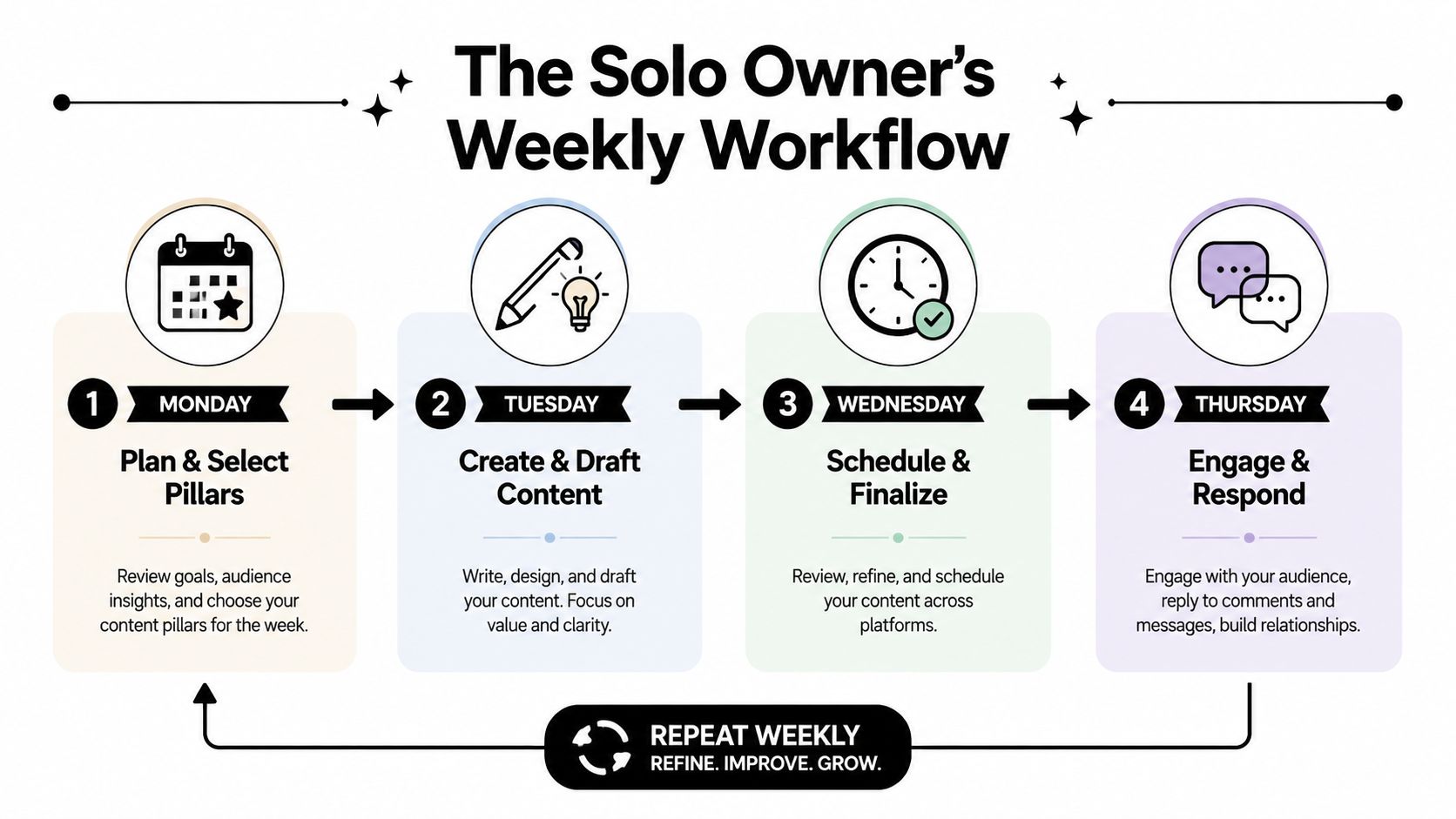
Thursday and Friday, engage and learn
Publishing ends the production task, not the marketing task. Reply to comments, route serious enquiries, record recurring objections, and save useful audience language for the next batch. On Friday, review native analytics and update the calendar with one decision, such as repeat the topic, change the opening, move the time, or retire the pillar.
For platform-specific scheduling cautions, this guide on avoiding TikTok posting pitfalls is a useful supplementary check. Aim to keep the routine compact. A 90-minute time block is a practical target for the planning and review portion, while production can sit in a separate batch.
Measure the Four KPIs That Matter
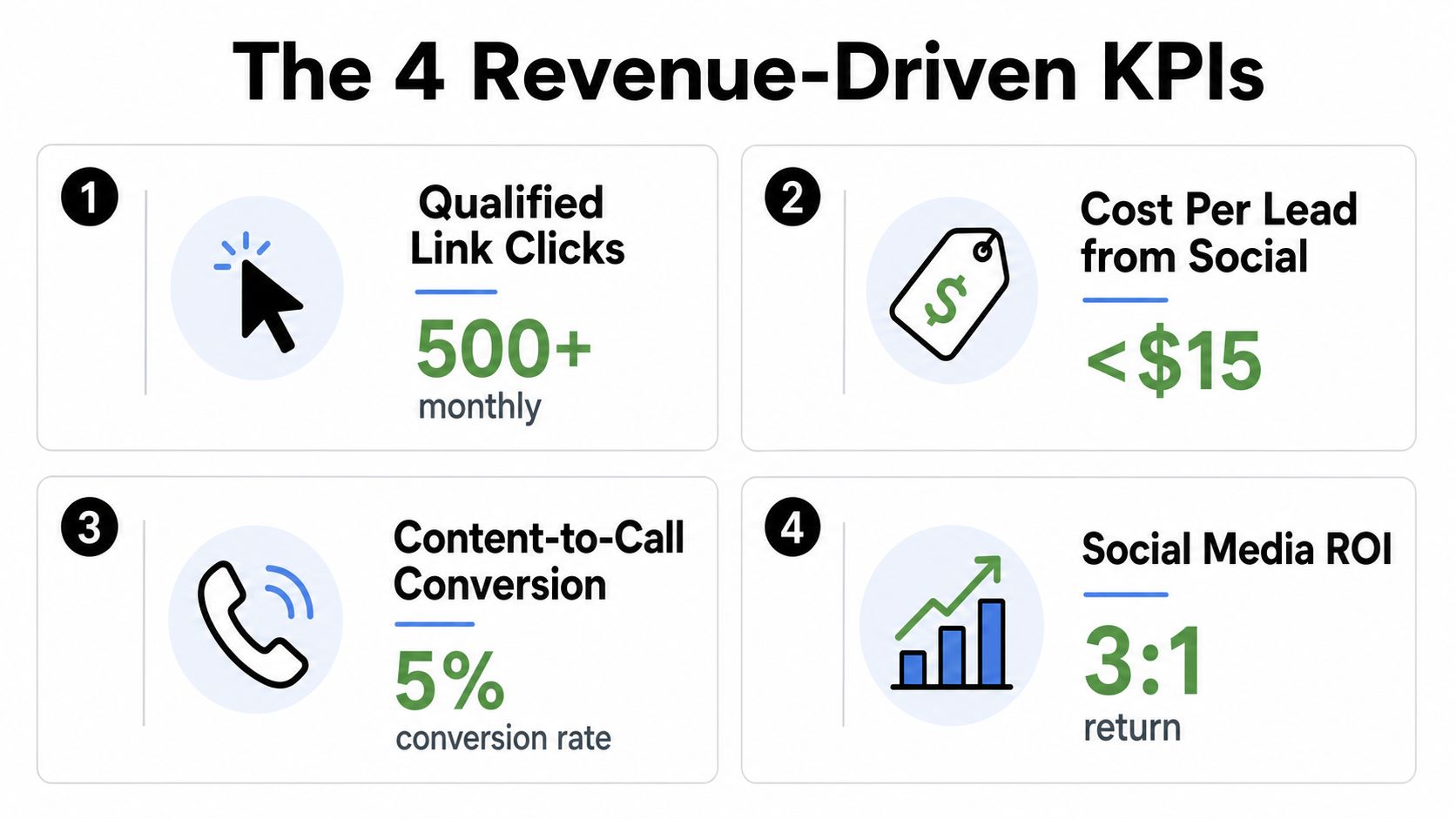
Follower count and impressions can describe distribution, but they don’t tell a small business whether social activity is creating commercial value. Track four measures that connect posts to customer movement.
Qualified link clicks
Formula: clicks from people who match the intended audience, divided by the relevant post or campaign set. Use platform analytics plus UTM-tagged links in your analytics platform. Review weekly, then compare the four-week rolling average to avoid reacting to one unusual post.
Cost per lead from social
Formula: social spend divided by leads attributed to social. Pull spend from the advertising platform and lead counts from the CRM or form system. Separate qualified leads from low-intent submissions, otherwise a cheap lead source can look healthy while wasting sales time.
Content-to-call or content-to-demo rate
Formula: calls or demos attributed to social content divided by qualified visitors, leads, or tracked content interactions. Choose one denominator and keep it consistent. Review weekly by pillar so a weak result points to a message or audience problem rather than automatically triggering more publishing.
Customer lifetime value from social-acquired cohorts
Formula: customer lifetime value for customers acquired through social, grouped by acquisition source and cohort. Pull the source from CRM records and revenue data from the billing or sales system. Review on a longer business cadence because lifetime value develops after acquisition, not immediately after publication.
A simple spreadsheet can use these columns:
| Week | Qualified clicks | Cost per lead | Content-to-call rate | Social-acquired customer value | Four-week average | Review note |
|---|
Add a conditional-format flag when any KPI drops more than 15% week over week. Treat the flag as a prompt for investigation, not proof that the entire strategy failed. Check the relevant pillar, destination page, offer, audience, and publishing slot before changing cadence.
Avoid the Automation Mistakes That Burn Small Teams
Automation should speed up repetitive work while leaving judgment in human hands. A single inaccurate, generic, or poorly framed post can damage trust quickly, especially when the same error is scheduled across several channels.
Use a preflight checkpoint before every post:
- Verify the claim: Confirm that the statement is accurate and supported by the source asset.
- Check dates and times: Review event dates, publication time, time zone, and seasonal references.
- Confirm prices and offers: Make sure the price, terms, availability, and destination match.
- Test destination links: Open every URL and check that it reaches the intended page.
- Add accessibility text: Review captions, alt text, speaker identification, and readable contrast.
- Complete final approval: Assign one person to make the final scheduling decision.
Never publish an AI-written caption without a human edit. Check whether the wording sounds like the business, states a specific benefit, uses correct local spelling, and avoids promises the company cannot support. AI can suggest a concise caption, but a person must decide whether a sensitive claim is appropriate.
Treat safe zones as production rules
A clip that looks correct in an editor can fail in the feed. Keep the face, title, logo, and call to action away from interface areas, then preview the post in its intended placement. The reviewer should check the first frame, subtitle position, crop, and final frame before scheduling.
The planner remains the source of truth for dates, statuses, links, and approvals. A clipping or captioning tool can speed production, but the team still needs one record of what has been reviewed and approved. This content workflow automation guide provides a reference for documenting those handoffs.
Don’t post and ghost
A scheduled post still needs a human response plan. Reserve time after publication to answer comments, acknowledge customers, identify recurring objections, and route urgent messages. Use consistent UTM naming and platform labels so the Friday review can connect activity to outcomes.
Create an exception list for outages, sensitive issues, crisis responses, pricing changes, and time-sensitive announcements. Send those posts to manual review, even when routine clips from one long recording are being repurposed and scheduled automatically.
The system should protect speed and accountability together. It can turn one long recording into a controlled week of useful adaptations, while a person owns accuracy, voice, framing, customer replies, and the final decision to publish.
quso.ai turns long-form video into short-form clips, adds captions, and supports scheduling across the channels in your publishing plan. Use it to build a week of drafts from one source recording, review each asset against your pillars and safe zones, then visit quso.ai to start organizing the workflow.