Content Workflow Automation: A Practical How-To Guide
If your content is getting made, reviewed, and published by different people in different tools, content workflow automation is the fix. The workflow is simple, even if the stack isn’t, idea to brief, creation to review, approval to scheduling, with every handoff made predictable. That matters whether you’re turning one long recording into clips, adding captions, or pushing posts across channels without letting the team drown in Slack threads.
Table of Contents
- What Content Workflow Automation Actually Does
- Auditing Your Current Workflow Before You Automate
- Automating Long Video Into Short Clips, Captions, and Templates
- Where the Human Approval Line Should Sit
- Integrations, Team Roles, and a Real Weekly Cadence
- Measuring Whether the Workflow Is Actually Working
- Frequently Asked Questions About Content Workflow Automation
What Content Workflow Automation Actually Does
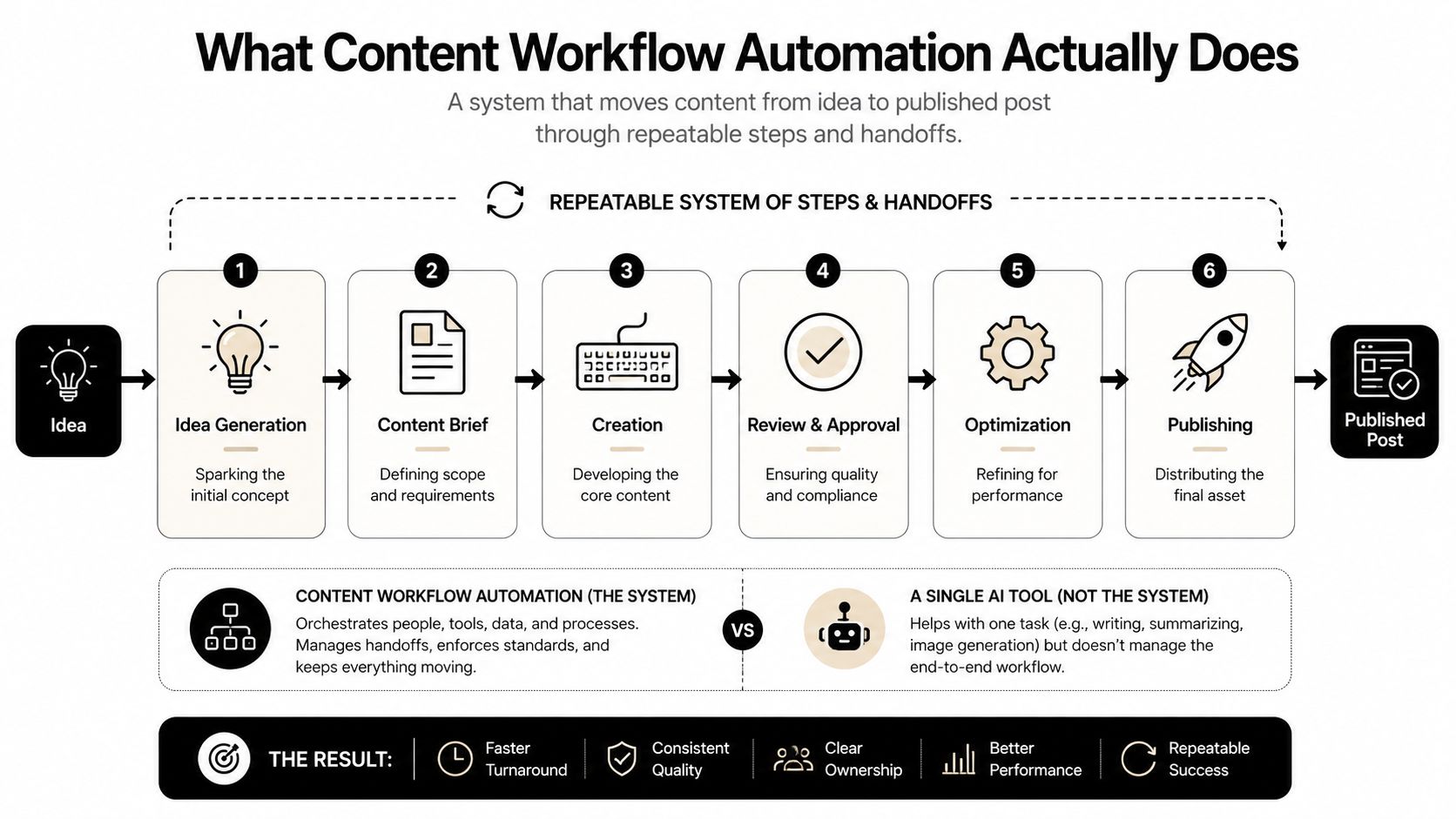
A content team usually moves through idea, brief, creation, review, approval, optimization, and publishing. Content workflow automation doesn’t replace those stages, it routes work between them so the right person sees the right asset at the right time. That’s the difference between automating one task and automating the system around the task.
Automation Is Routing, Not Magic
A useful mental model is trigger → routing and assignment → review and collaboration → approval or issue resolution → completion and validation. That pattern shows up in AI-powered content operations because the AI can assign tasks based on metadata, while humans stay in the loop for anything sensitive or high-value, as Box describes in its workflow model AI-powered content workflows. If you skip the routing and review layers, you don’t get a cleaner workflow, you just move bad inputs faster.
The practical use case is obvious for creators and B2B teams. A long webinar or podcast gets broken into clips, captions get generated, and then the asset is routed for a quick human check before it’s scheduled. That’s the same logic behind compare ROI of sales automation, where the win comes from removing repetitive handoffs, not from pretending every decision can be automated.
For teams building a distribution stack, this also links cleanly to a structured publishing layer like quso.ai’s content distribution platform, because the workflow only works when the asset can move from review into scheduling without manual re-entry.
Practical rule: automate the handoff first, not the creative judgment. That keeps speed gains from turning into quality loss.
Auditing Your Current Workflow Before You Automate
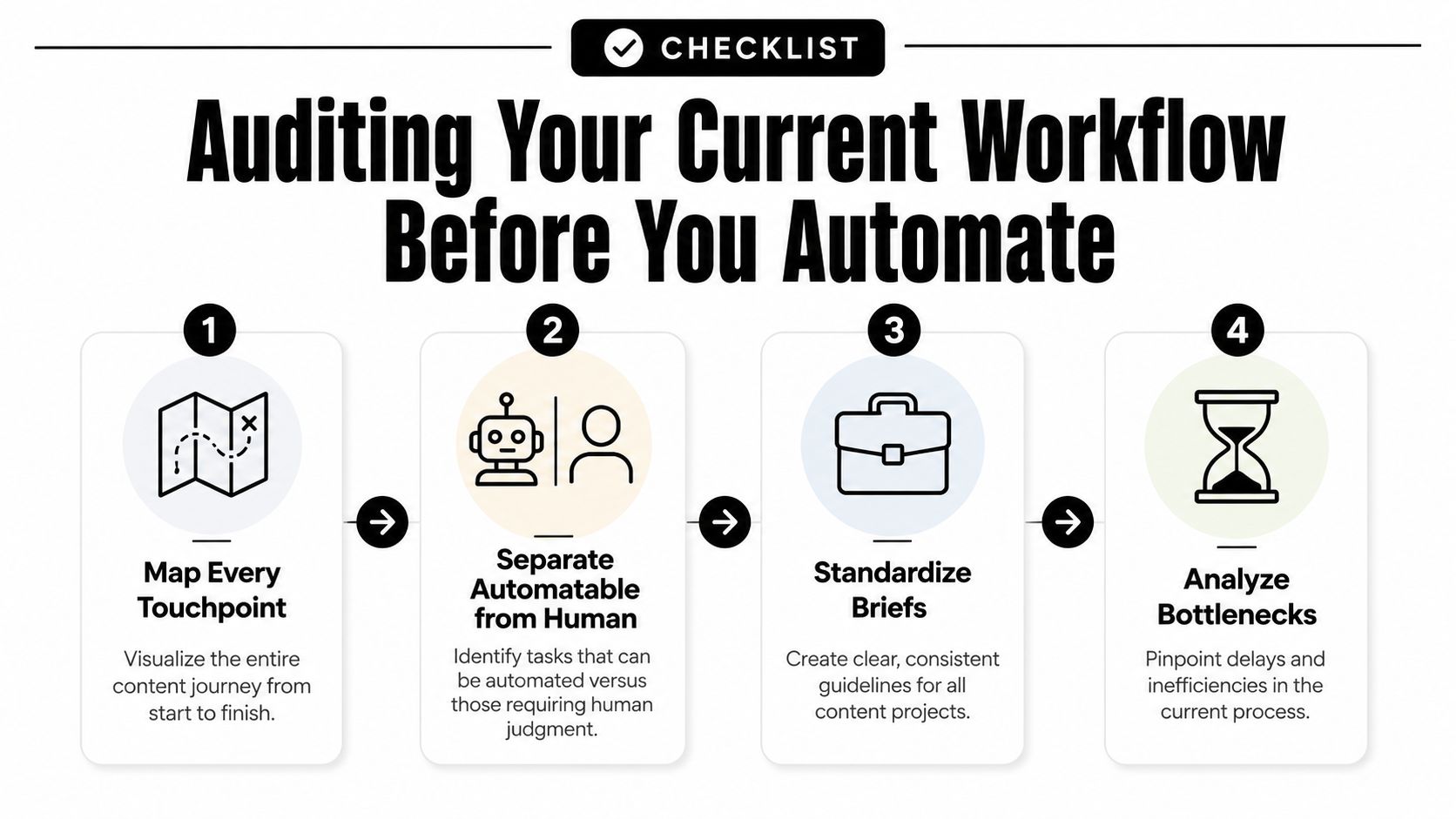
Start with a map of the whole journey, not a tool list. Teams that get this right usually follow four moves, map every touchpoint, separate automatable work from human-required work, standardize briefs and templates, then connect publishing and analytics so the workflow can improve instead of drift. The main failure mode is simple, automating before roles, SLAs, or QA gates exist.
Map the full handoff chain
Write down every touchpoint from asset intake to publish. Include who owns the brief, who edits, who approves, who schedules, and who checks performance after posting. If you can’t name the owner of a step, automation will only hide the gap.
Separate repeatable work from judgment calls
Anything rule-based belongs on the automation side, while brand nuance, factual review, and final publish approval stay human. Guides on workflow automation keep pointing to the same pitfall, automating too early makes inconsistency worse because the system amplifies whatever input it gets workflow setup guidance. That’s why a weak intake form becomes a weak pipeline.
A quick pilot is enough to expose the truth. Test 5–10 pieces before you expand, and watch where the process slows down, where comments repeat, and where approvals stall. The value isn’t in proving the tool works, it’s in proving the workflow holds up under real review pressure.
Standardize inputs before you scale
Use one brief template, one naming system, and one checklist for captions, thumbnails, or post copy. If the input is messy, automation just makes the mess arrive faster. Connect the publishing step to analytics only after the source fields are consistent, or your reporting will be hard to trust.
Automating Long Video Into Short Clips, Captions, and Templates
The cleanest repurposing workflow starts with one long recording and ends with multiple platform-ready outputs. First comes clip extraction, where you identify moments worth cutting from the transcript. Then comes auto-captioning, templating, and multi-platform scheduling, which is where the workflow stops being “video editing” and starts being operations.

For a creator, that might mean one interview becomes a LinkedIn clip, a YouTube Shorts cut, and a Reels version with platform-specific captions. For a B2B team, it may be a webinar cut into product proof, customer insight, and thought-leadership snippets. The key is to standardize the input before the automation runs, transcript quality, aspect ratio expectations, caption style, and the rule set for what counts as a usable clip.
A platform like quso.ai fits here because it collapses repurposing, captions, and scheduling into one stack, which keeps the workflow from bouncing between separate tools. That matters most when the same source asset has to go out to several channels without creating a new approval cycle for every version.
The operating sequence should stay explicit:
- Trigger. A new long video lands in the system.
- Routing. The asset moves to transcript or clip generation.
- Review. An editor checks the selected moments and caption style.
- Approval. The team signs off on what will be published.
- Completion. The clips get queued to distribution.
- Validation. Performance data feeds back into the next round.
The video below shows the practical shape of that workflow in motion.
Keep platform formatting separate from creative decisions. The editor should approve the clip, then the system should handle the repeatable part, resizing, caption placement, and scheduling.
That last detail matters because captions and UI overlap are where a lot of repurposed content breaks. If the text sits too low, platform controls can cover it. If the end card is too busy, the CTA disappears behind the interface. A solid workflow treats safe zones as part of the template, not as a last-minute fix. For a deeper operational walkthrough, how to repurpose video content is the right companion read.
Where the Human Approval Line Should Sit
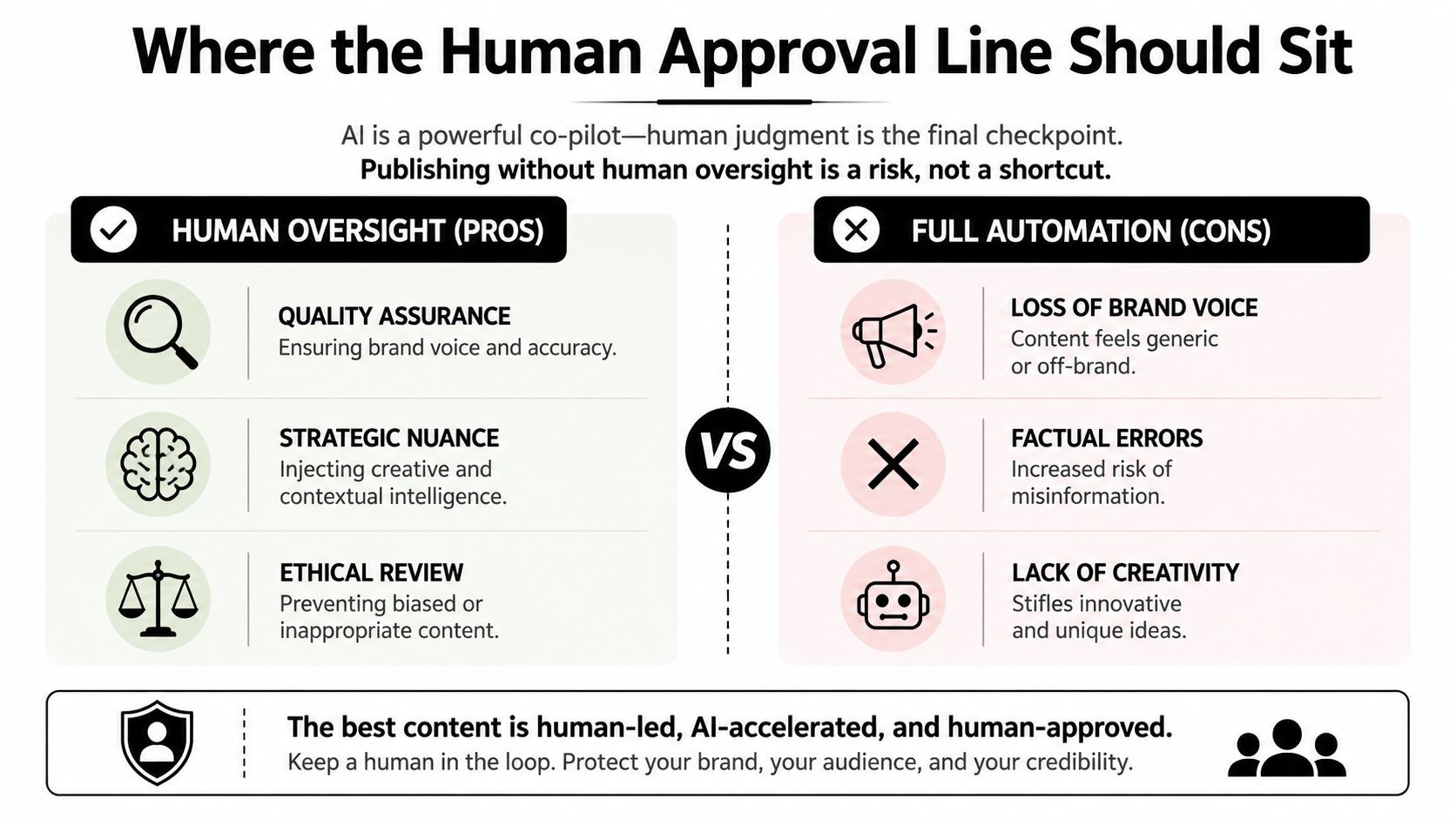
The question isn’t whether to automate, it’s where the human review layer lives. Fully hands-off publishing sounds efficient until an incomplete caption, off-brand hook, or wrong clip lands in the queue and somebody has to clean it up after the fact. That downstream correction cost is why human review still belongs before scheduling.
A defensible default
A good default is straightforward. Human approval should happen after clips and captions are generated, but before anything is scheduled. After approval, automation can handle distribution, reporting, and reformatting for other channels.
That approach lines up with the guidance in a guide for busy professionals on automation, which treats the human-in-the-loop step as a control point, not a delay. It also matches the workflow pattern above, because the review layer is the difference between a validated asset and a fast mistake.
Safe zones matter more than most teams admit
On short-form platforms, the UI can overlap the frame in ways that make a good clip look broken. Captions get clipped, avatars cover the wrong area, and the CTA sits where interface controls can hide it. That’s why templates need safe zones baked in before scheduling starts.
A practical rule is to review the clip in the format it will be published in, not just in a clean editor window. If a lower-third or end card is too close to the edge, it should be fixed before approval. If a caption block is sitting where a platform button will appear, the template needs to change.
Practical rule: if a human can’t explain why the clip is safe to publish, it’s not ready for automation yet.
Integrations, Team Roles, and a Real Weekly Cadence
A one-person social media manager and a part-time editor can run a very clean podcast-to-shorts pipeline if the handoffs are tight. The stack doesn’t need to be fancy, it just needs clear ownership across the transcript source, asset storage, scheduler, and analytics. Once those pieces are linked, the workflow stops feeling like a scramble.
Who owns what
The social media manager usually owns the brief, the channel plan, and the final scheduling queue. The editor owns QA on the selected clips and captions. Reporting can sit with either person, but it has to have one owner, or the feedback loop dies in a shared spreadsheet no one updates.
A simple weekly cadence works well:
- Monday, record the source asset.
- Tuesday, generate clips and captions.
- Wednesday, review and approve.
- Thursday, schedule the rest of the week.
- Friday, check performance and adjust the next batch.
That rhythm matches what workflow systems are good at, moving a piece from one status to the next without constant manual reminders. It’s also where internal links become useful as part of the operating system, not just content decoration. If scheduling is a pain point, how to schedule social media posts is the natural companion piece.
Boundaries keep the system stable
The manager shouldn’t be rewriting captions after approval unless the strategy changed. The editor shouldn’t be guessing which post times to use unless the data is missing. And nobody should be manually copying the same asset into three tools when the workflow can route it once.
A good weekly cadence also makes failure obvious. If Wednesday review keeps spilling into Thursday, the problem is usually the brief or the clip selection, not the scheduler. If Friday reporting shows weak performance, the next test should focus on cut length, caption style, or posting order, not on adding more software.
Measuring Whether the Workflow Is Actually Working
Automation is working when the workflow gets cleaner, not just when output gets louder. The minimum signals are production time per asset, approval cycle length, publish rate per channel, and how repurposed variants perform compared with the original. Volume alone can hide a broken process.
Industry coverage still leaves a gap here, because it often explains automation as a productivity layer but doesn’t give a clear benchmark for which repurposed version should win. That means the right move is to test captions, cut lengths, and posting schedules inside your own workflow instead of copying a generic formula.
A simple review loop keeps the team honest:
- Track the time from source upload to approved clip.
- Watch where approvals stall.
- Compare repurposed posts against the original source asset.
- Change one variable at a time, caption style, clip length, or channel timing.
If a change can’t be tied to a workflow stage, it’s too vague to improve anything.
For teams that want repurposing, captioning, and scheduling in one place, that loop is easier to run when the system isn’t split across separate tools. The point isn’t to chase more content. It’s to make each pass through the workflow more reliable.
Frequently Asked Questions About Content Workflow Automation
What should I measure first? Start with production time per asset and approval cycle length. Those two numbers tell you whether routing and review are getting better or just noisier.
How do I connect automation to my CMS or scheduler? Map the handoff points first, then connect one step at a time. If the input format is unstable, integration will only move the problem downstream.
Where should humans stay in the loop? Keep human review before scheduling and after clip generation. That’s the safest place to catch factual issues, brand drift, and safe-zone problems.
How do I scale from one content type to a full repurposing system? Finish one workflow, usually long video to short clips, before adding another. Once the review gate is stable, expand into adjacent formats instead of automating everything at once.
| Workflow Step | Automation Role | Human Role |
|---|---|---|
| Idea and brief | Route templates, collect inputs | Define angle and goals |
| Clip creation | Extract candidates, format outputs | Pick the strongest moments |
| Captions and templates | Generate and apply styles | Check accuracy and safe zones |
| Review and approval | Assign reviewer, track status | Approve or reject |
| Scheduling and publishing | Queue posts across channels | Confirm timing and channel fit |
| Reporting | Pull performance data | Decide what to change next |
If you’re building a repurposing pipeline, quso.ai can handle the clip, caption, and scheduling steps in one workflow so the human review line stays clear. Use it to tighten your handoffs, then test what improves approval speed and distribution quality. Visit quso.ai if you want to turn one long video into a repeatable content system without adding more manual steps.





