Streamline Your Social Media Agency Workflow: Guide 2026

You can’t scale a social media agency workflow by keeping approvals in Slack, assets in email, and scheduling in a separate tool. The fix is a single operating loop, plan, create, review, approve, schedule, publish, and report, with clear owners and deadlines so work stops bouncing between people. When that loop is tight, teams spend less time chasing feedback and more time shipping client work that gets seen.
Table of Contents
- The Core Social Media Agency Workflow Blueprint
- Stage 1 Nail the Client Intake and Strategy
- Stage 2 Systematize Content Creation and Repurposing
- Stage 3 Build a Bulletproof Client Approval Loop
- Stage 4 Automate Scheduling and Publishing
- FAQ Common Agency Workflow Questions
The Core Social Media Agency Workflow Blueprint
A messy agency stack usually looks the same, a strategist drops notes in one doc, a creator builds assets in another, a client replies in email, and someone else schedules the post from a calendar nobody trusts. The better pattern is a standardized social media agency workflow built around named stages, because distinct handoffs make bottlenecks visible instead of hidden. That six-stage system, strategy and planning, content creation, internal review, client approval, scheduling or publishing, then monitoring and reporting, is the practical baseline for multi-client teams. Sked Social’s agency workflow guide lays out that structure clearly, and AY Automate’s workflow automation agency is a useful reference point if you’re mapping where automation can remove handoffs.
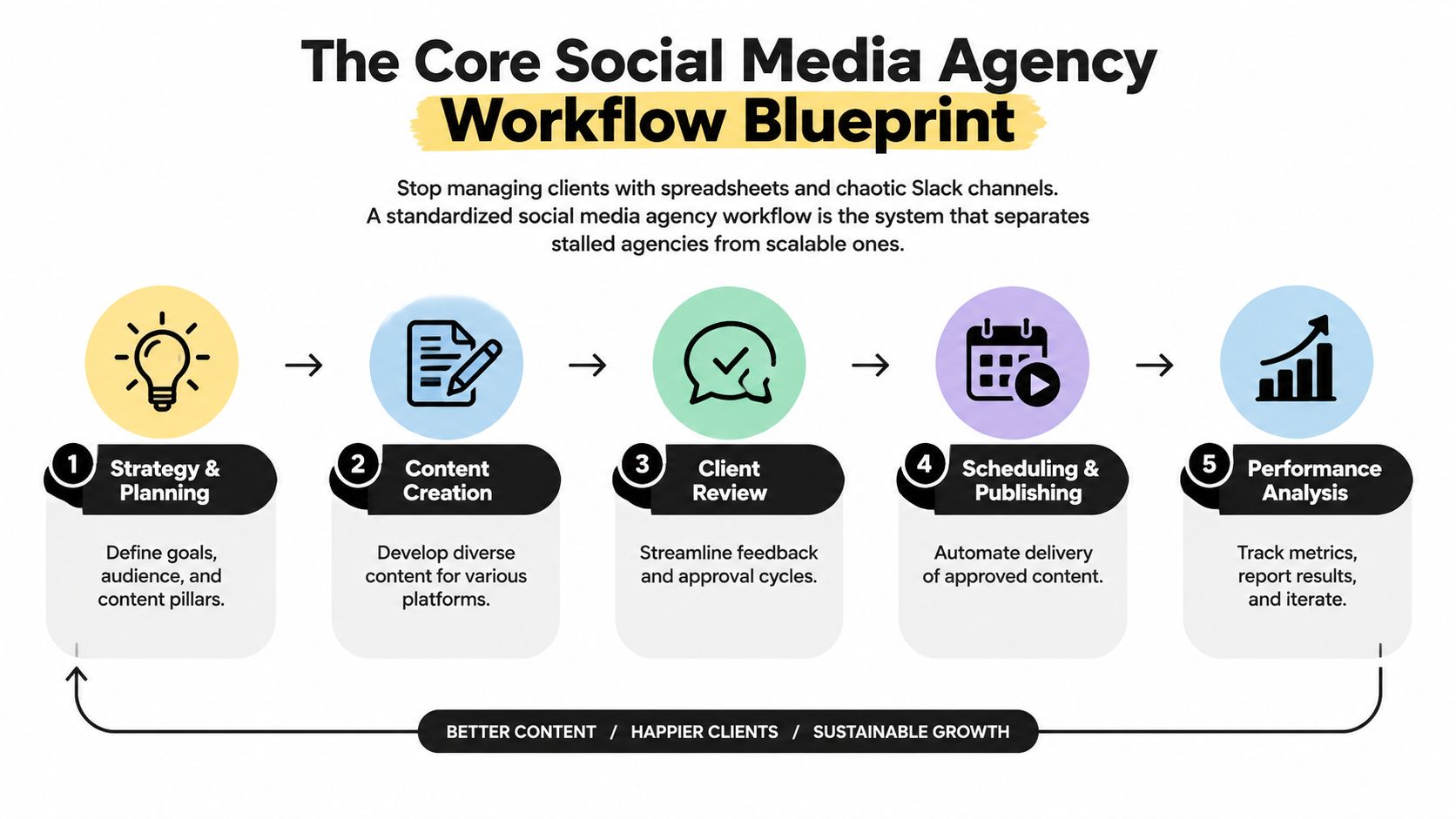
The key benefit isn’t just organization, it’s repeatability. Once every client moves through the same path, your team can spot whether the delay is strategy, creative, review, or publishing, and fix the actual choke point instead of guessing. That’s why a well-run workflow feels boring in the best way, the same inputs move through the same system, and the output gets more reliable with every cycle.
A simple way to think about the operating model is this, content isn’t “done” when it’s written. It’s done when it’s approved, scheduled, published, and measured. If you want a practical starting point for planning that front-end strategy, keep this internal strategy guide close and treat it as the intake layer of the workflow, not a separate project.
Stage 1 Nail the Client Intake and Strategy
Bad workflow usually starts before the first post exists. If the kickoff call is vague, the team spends the rest of the month untangling scope creep, changing priorities, and conflicting expectations. The fix is to make intake the place where you define the single source of truth for the account, goals, voice, assets, permissions, and review owner.
Lock the inputs before production starts
The strongest intake process asks for more than a brand deck. You want the actual deliverables list, who approves what, where assets live, what’s off-limits, and which platform priorities matter first. If you don’t collect those details up front, every later stage becomes a renegotiation.
A practical intake bundle usually includes:
- KPI direction: Define what success means for this client, not just what gets likes.
- Content pillars: Agree on the themes the team can reuse without asking every week.
- Brand voice notes: Capture tone, do-not-use language, and compliance rules.
- Access and assets: Gather logins, product footage, logos, and reference posts before the queue starts.
Practical rule: if the client hasn’t confirmed the inputs, don’t move the work into production. Half-built strategy docs create more confusion than no strategy doc at all.
For note-taking during kickoff, some teams prefer a privacy-first capture layer, and Weeve’s list of privacy-focused AI note-taking apps is worth a look if you want to keep client discussions organized without scattering them across inboxes.
The point of intake isn’t paperwork, it’s protecting the rest of the workflow. A tight kickoff makes it possible for any team member to step in later and understand what the client wants, what’s approved, and what can be reused. That’s what turns onboarding from a one-off meeting into a scalable operating system.
Stage 2 Systematize Content Creation and Repurposing
The fastest agencies don’t create every asset from scratch. They build a repurposing engine around one strong source, a webinar, podcast, customer interview, product demo, or founder video, then break it into clips, captions, quote cards, and text posts. That shift matters because workflow maturity is tied to output efficiency, and independent 2026 reporting on social media content workflows cites a 50% reduction in production time per piece and a 78% reduction in revision cycles when teams standardize templates and batching. SocialRails is the source for those workflow outcomes.

Build around one source, not one post
A repurposing-first team starts with the longest, most useful asset. One good podcast episode can become short clips for LinkedIn, a pull-quote post, a teaser thread, and a follow-up cut for short-form platforms. The important part is that the source gets mined once, then distributed through a repeatable format library.
That’s where tools earn their keep. quso.ai can turn long-form video into short clips, add captions automatically, and schedule posts without rebuilding the process each time, which fits the exact kind of multi-client handoff agencies struggle with. The point isn’t novelty, it’s reducing manual assembly work so editors and strategists stop doing the same prep repeatedly.
Don’t skip safe zones on captions and graphics
A lot of repurposed content looks polished in the editor and broken in the feed. Platform UI overlaps the frame, so captions, logos, and lower-third text can get covered by buttons, profile elements, or engagement controls. That’s a production mistake, not a creative one.
Keep important text away from the edges, and preview every clip in the actual platform layout before it goes live.
If your team wants a deeper playbook on turning long video into social assets, use this repurposing guide as the production layer. The operational takeaway is simple, stop treating each post as a new project. Treat each source asset like inventory.
Stage 3 Build a Bulletproof Client Approval Loop
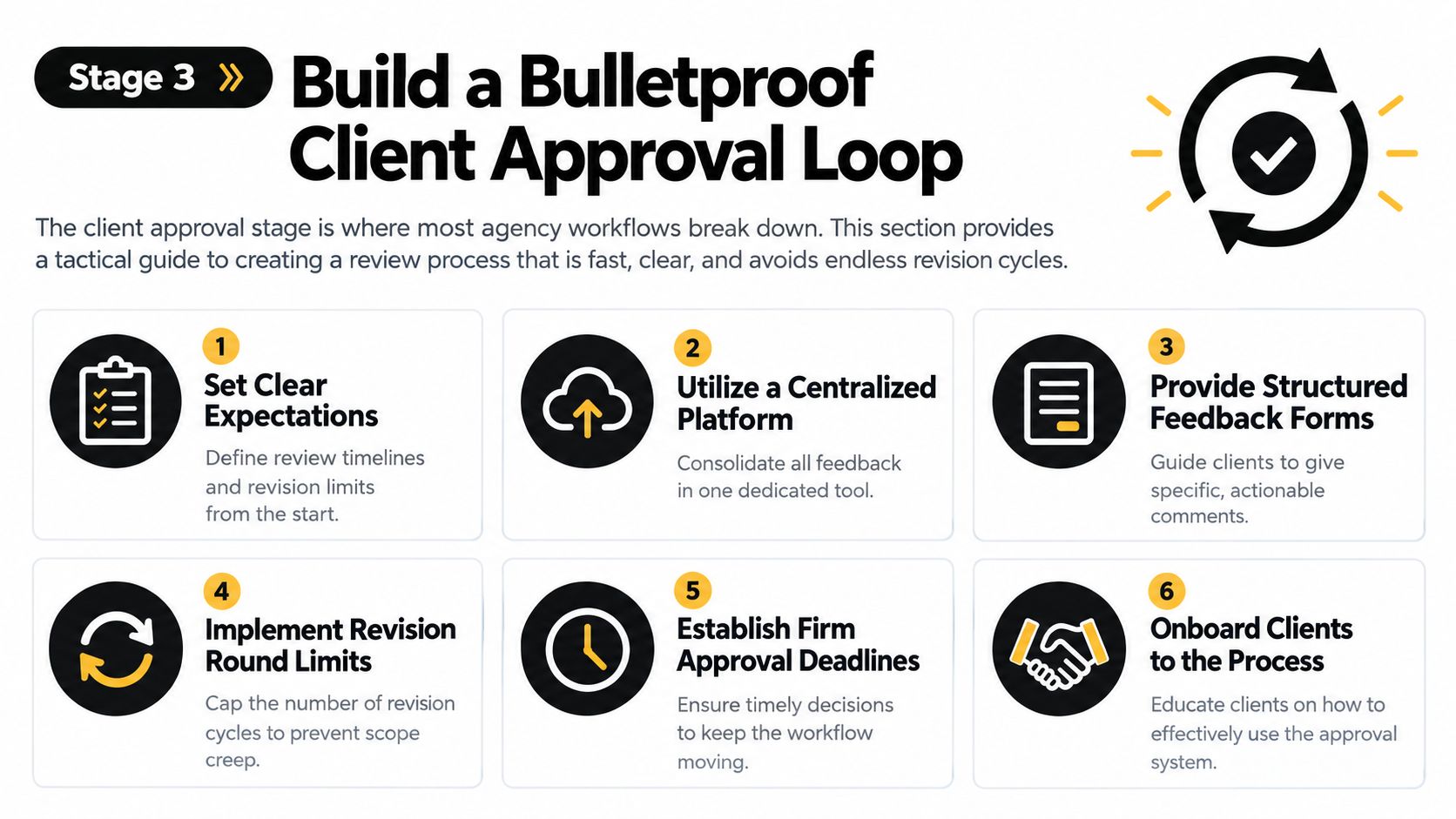
Client review doesn’t have to be the place where work stalls. It becomes a bottleneck when nobody knows who approves what, how long feedback can sit, or what happens after a deadline slips. A proper approval workflow is a defined sequence with named stages, approvers, deadlines, reminders, and records, not a loose request for comments. Kontentino’s approval workflow guide lays out that structure clearly.
Make approval a process, not a conversation
The simplest fix is to assign one approver per stage plus a backup. That removes the classic “I thought someone else was checking it” problem. It also helps to set explicit deadlines, about 24 hours internally and 48 hours for clients, then decide in advance what happens when a deadline passes so the team isn’t stuck waiting for a reply that never comes.
A clean approval loop usually includes:
- Set the review owner. One person signs off, another is the backup.
- Batch the review. Send assets together so the client can compare them in one sitting.
- Use structured comments. Random Slack notes and side emails create version chaos.
- Cap revision churn. If the feedback keeps changing direction, the issue is strategy, not wording.
- Automate reminders. The system should nudge, not the account manager.
Clients move faster when you give them a process they can trust. They slow down when every request looks different.
The embedded review rhythm matters too. Some agencies use a tool like Swydo’s agency approval template to map draft, edit, design, QA, client review, and schedule into one visible path. That kind of structure doesn’t remove judgment, it removes ambiguity, and ambiguity is what eats turnaround time.
Stage 4 Automate Scheduling and Publishing
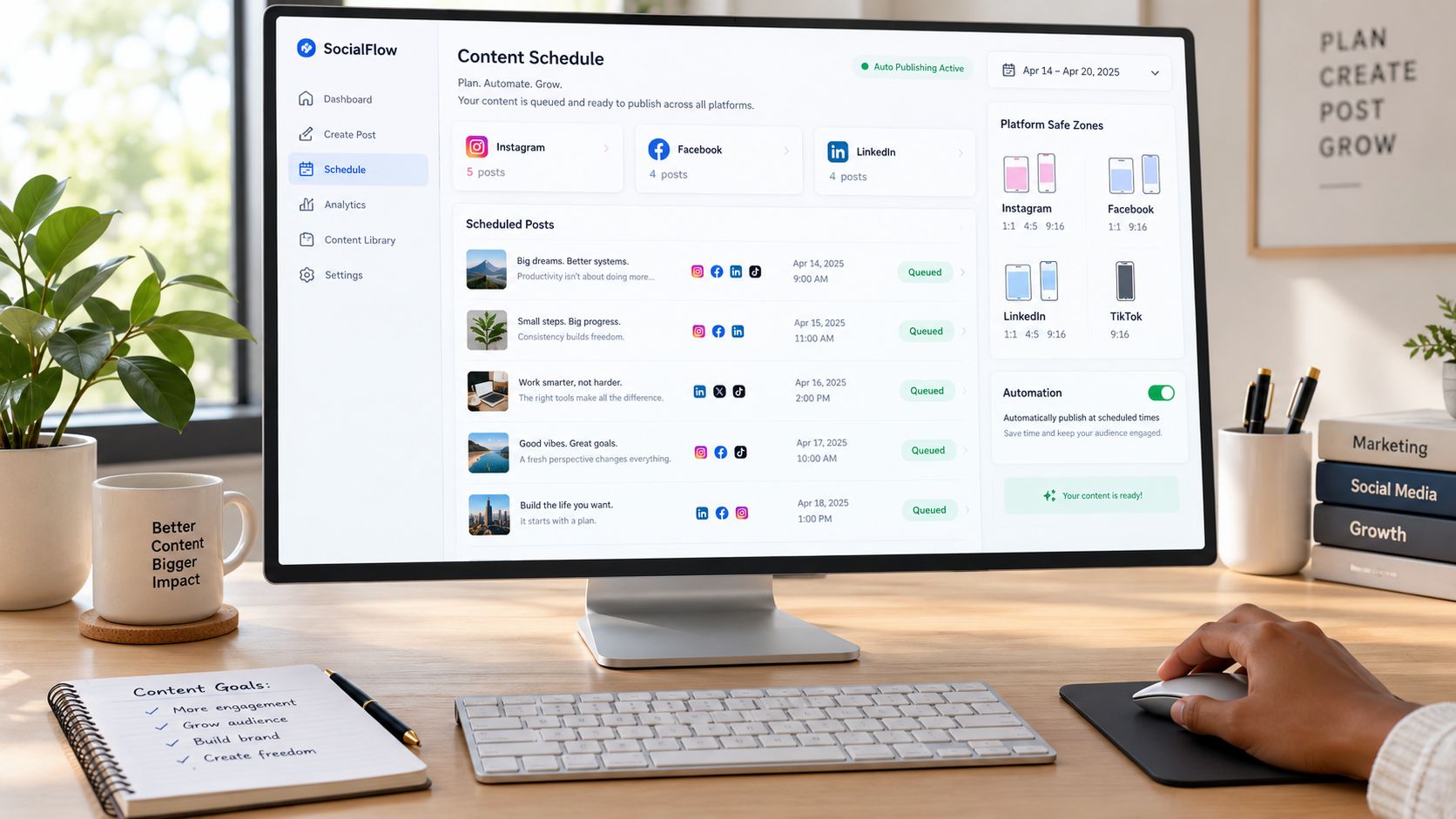
Once content is approved, the job is to publish without adding more manual work. That means batching, queuing, and using platform data instead of guessing the “best” time. A workable scheduling system usually starts with 3 to 5 content pillars, pulls timing from platform analytics, batches content weekly, queues posts 1 to 2 weeks ahead, and keeps about 20% of the calendar open for real-time posts. SocialRails’ scheduling guide is a solid reference for that structure.
Schedule for consistency, not just convenience
A queue is better than a scramble. If the team schedules in batches, clients keep posting even when the account manager is traveling or the creative team is tied up on another deliverable. That’s the difference between a calendar that looks full and a calendar that ships.
If you need a scheduling stack that’s built for repeatable execution, Captiwate’s overview of efficient scheduling tools for revenue teams is a useful place to compare options that keep the process moving. The goal isn’t to post more often just for the sake of it. It’s to make publishing predictable enough that the team can stay focused on creative quality and client strategy.
For a more direct walkthrough of how to put posts into a queue, this scheduling guide fits well as the practical companion. That’s also where a tool like quso.ai fits naturally, because the same system that turns long video into shorts can also help teams schedule approved assets without re-entering them everywhere.
The best scheduling workflow leaves room for timely posts. A calendar with no opening for real-time content is efficient, but it isn’t agile.
FAQ Common Agency Workflow Questions
What software stack should a small agency actually use?
Start with one place for strategy, one place for approvals, and one place for scheduling. If a tool tries to do everything but makes feedback messy, it’s usually adding complexity instead of removing it. The right stack is the one your team can keep using when three clients all need changes on the same day.
How do you handle urgent client requests without breaking the calendar?
Put urgent requests into a separate intake lane. If it is legitimately urgent, the account owner should decide whether it replaces something already queued or waits until the next slot. The important part is making the trade-off visible, because “just squeeze it in” usually pushes the problem downstream.
How should the workflow change for bigger clients?
Bigger clients usually need more checkpoints, not more chaos. Add a clearer sign-off chain, tighter documentation, and stronger version control, then keep the stages themselves the same. The workflow should get more controlled, not more complicated.
What should reporting actually prove?
Reporting should connect output to outcomes, not just list posts. Show what went live, what changed, and what the next adjustment should be. That keeps the workflow tied to decisions, which is how agencies prove that the process is doing real work.
How do you keep the process from getting stale?
Review the slowest stage every few weeks and fix that stage first. If client review is slow, tighten deadlines and reminders. If creation is slow, repurpose more aggressively. If scheduling is slow, simplify the queue and cut unnecessary manual steps.
If your team is still stitching together content, captions, and scheduling by hand, it’s time to tighten the system. quso.ai helps agencies repurpose long video into short-form clips, auto-caption them, and schedule posts from one workflow, which cuts out the handoffs that slow client delivery. Visit quso.ai and see how much cleaner your publishing process feels when the production loop finally lives in one place.