Repurpose YouTube Videos for TikTok: A Guide
You can repurpose YouTube videos for TikTok by treating the YouTube upload like a clip library, not a copy job. The workflow that ships is simple: source 1 to 3 strong YouTube videos, pull the transcript and timestamps, cut 5 to 8 vertical clips per source, then stagger them across TikTok instead of dumping them all at once. If the clip still depends on the original video’s context, it usually underperforms, because TikTok viewers judge the first seconds on their own.
Table of Contents
- What a Working YouTube-to-TikTok Workflow Looks Like
- Picking the Right Moments From a YouTube Video
- Reframing to 9:16 Without Losing the Subject
- Hook-First Editing, Captions, and Length Strategy
- Turning One YouTube Video Into a Week of Clips
- Scheduling Cadence and Tracking What Actually Performs
- Putting the Workflow Together and Common Questions
What a Working YouTube-to-TikTok Workflow Looks Like
If you’ve got a long YouTube upload sitting in your channel and no appetite for a weekend of manual editing, the right move is to turn it into a repeatable pipeline. A working YouTube-to-TikTok workflow is a six-phase process, source, select, cut, reframe, caption, schedule, and each phase has a job to do before the clip ever reaches TikTok. That setup matches the practical operator flow described in current repurposing guidance, which frames long-form video as the raw material for short-form distribution rather than a one-to-one repost problem (instantviews.net/repurpose-youtube-content).
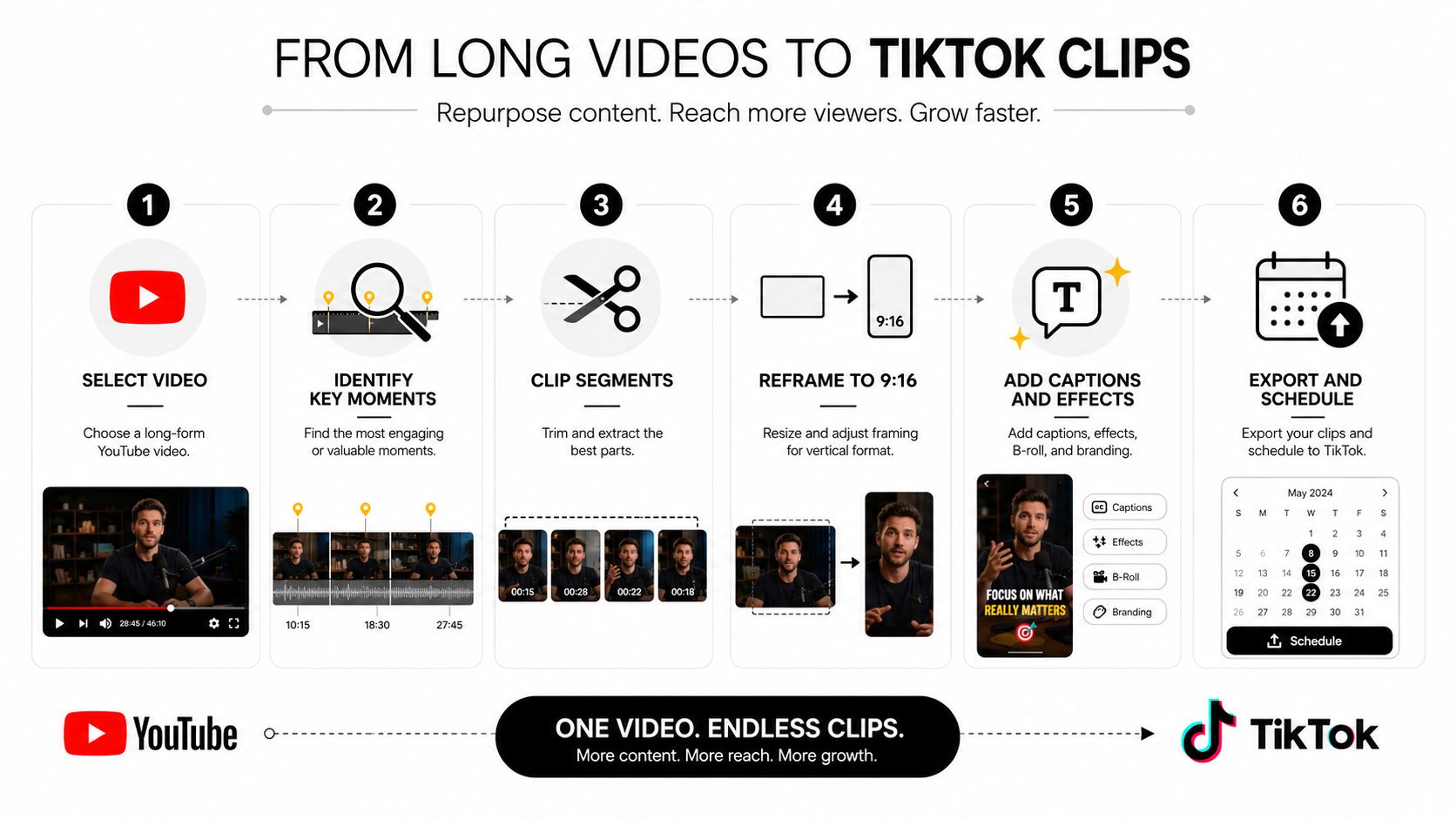
The six phases that keep the work shippable
Source means starting with a full YouTube recording that already has substance. Select means finding moments that can stand alone without the rest of the video carrying them. Cut means trimming precise start and end points so the clip opens cleanly and finishes cleanly.
Reframe converts the 16:9 source into a 9:16 vertical cut for TikTok, and caption adds the text layer that makes the clip usable with sound off. Schedule is the part many creators skip, but it matters because the clips shouldn’t all hit the feed at once. The scheduling piece is exactly where a tool like How to Repurpose Video Content fits, since it’s built around turning one long recording into multiple short clips with captions and planned distribution.
Why this is context removal, not just format conversion
Most weak repurposing starts with the wrong assumption. The creator thinks the job is to crop a YouTube video into a TikTok frame, but the harder part is removing enough context that the new viewer still understands what’s happening. That’s why a clip can look technically fine and still flop. It has the right dimensions, but not the right opening, payoff, or self-contained meaning.
Practical rule: If the clip only makes sense after the first 30 seconds of the YouTube video, it’s not ready for TikTok.
A good workflow gives each phase a yes or no outcome. If the clip doesn’t work in transcript form, don’t cut it. If the subject disappears in a vertical crop, don’t publish it. If the captions cover the speaker’s mouth or the right-side UI, don’t export it yet.
Picking the Right Moments From a YouTube Video
The clip selection step is where time is wasted. They start with a funny moment, a heated exchange, or a random highlight, then wonder why the TikTok audience scrolls past it. The better approach is to pick moments that can stand alone without backstory, because repurposing is really a context test, not a highlight reel exercise.
Transcript scanning is faster than scrubbing
A transcript-first workflow is the fastest way to find self-contained moments. YouTube’s auto-generated transcript can be opened through More → Show transcript, which lets you scan the text without watching the whole video and spot moments with a clean claim, a direct answer, or a complete thought (blitzcutai.com/blog/how-to-repurpose-youtube-to-tiktok). That’s useful when you already know the video has good material but don’t want to scrub linearly through an hour-long recording.
Retention signals help too. When a segment is rewatched, heavily discussed, or clearly carries energy, it often deserves a test cut. The trick is not to confuse energy with clarity. A loud moment can still fail if the new viewer can’t tell what’s going on in the first few seconds.
What makes a clip self-contained
A clip usually works when it has one of four things, a clear claim, a mini-arc, a quotable line, or a visual payoff. A clear claim gives the viewer a reason to keep watching. A mini-arc gives them a setup and a resolution. A quotable line works when the rest of the frame supports it. A visual payoff matters when the result is obvious before the explanation ends.
Skip the opposite. Leave out setup-heavy intros, mid-thought tangents, and references to earlier parts of the video. The common trap is clipping the funniest 8 seconds and assuming the joke will land on its own. If the viewer needs the full YouTube backstory, the clip is carrying dead weight.
If a segment needs a lot of setup, it usually belongs in the YouTube upload, not in the TikTok cut.
Reframing to 9:16 Without Losing the Subject
A horizontal interview or tutorial can look good on YouTube and still fail on TikTok if the subject gets swallowed by the crop. The job isn’t just to make the frame vertical. It’s to preserve the person, the action, or the key text so the clip still reads instantly on a phone. The cleanest starting point is the 9:16 vertical frame, because TikTok won’t give you room to recover bad framing later (quickreel.io/blog/repurpose-youtube-videos-into-viral-tiktoks).
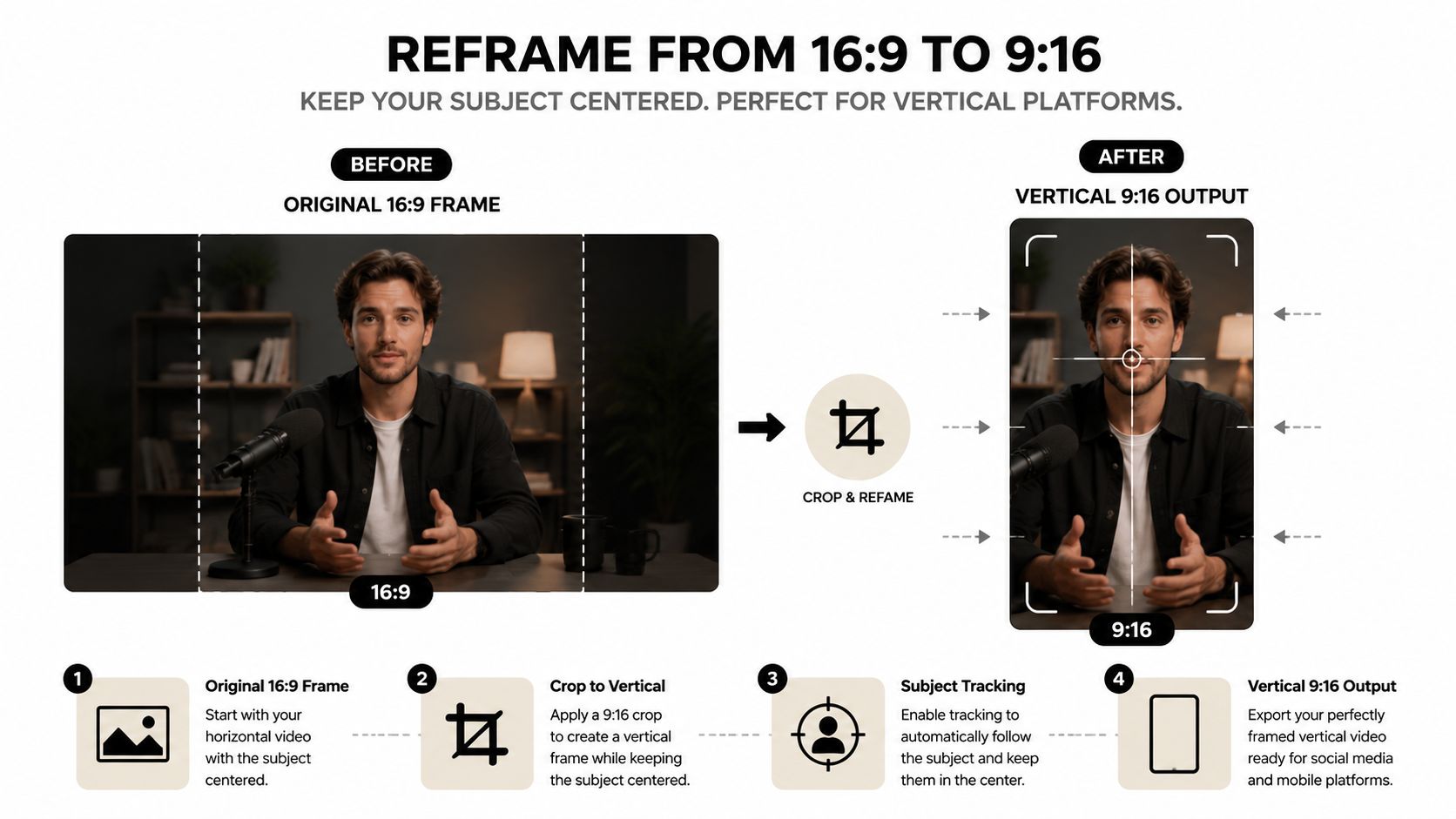
Pick the crop based on the subject
A speaker-tracking crop works when one person is doing most of the talking and their face carries the clip. A split-screen works when the comparison itself matters, or when you want to keep both speaker and supporting visual visible. A dynamic crop helps if the source has motion worth following, while a static centered crop is fine for a tight talking-head clip with little movement.
The mistake I see most often is a crop that turns an interview into two disembodied heads. Technically, both people are still in frame. Practically, the clip feels cramped and loses emotional context. If the subject’s gestures matter, give them room. If a screen demo matters, don’t crop away the interface just to make the frame symmetrical.
Protect the safe zones before export
TikTok’s interface covers more of the frame than most editors plan for. The right-side action bar can sit on top of visual elements. The bottom caption bar can obscure subtitles or lower-third text. The top username and audio attribution overlay can collide with your opening line. The For You comment preview chip can also hide important on-screen copy.
That means the subject’s eyes, mouth, and key text should stay out of those zones. If the speaker is centered too low, the caption bar eats the lower face and your subtitles. If the speaker is pushed too far right, the action rail competes with the face. The safest layout usually keeps the speaker high enough to avoid the bottom overlay and centered enough that the right edge stays clean.
For practical specs and layout habits, the TikTok dimensions guide is the right reference point when you’re checking framing before export.
Hook-First Editing, Captions, and Length Strategy
A TikTok clip lives or dies on the opening. A YouTube intro can take a few beats to settle in, but a repurposed cut has to earn attention immediately, before the viewer has any reason to care about the original video or the topic behind it (ampifire.com/blog/how-to-repurpose-youtube-videos-for-tiktok).
Rewrite the opener before you polish the rest
Good hooks usually do one of three jobs, they make a sharp claim, drop the viewer into the middle of the thought, or show the outcome first. That is why the TikTok version often needs a different opening line than the YouTube version, even when the core footage stays the same.
A weak opener sounds like, “Today I’m going to talk about…” A stronger one sounds like, “This is the mistake that kills most repurposed clips,” or it starts with the result and explains how it happened afterward. The first frame has to answer the viewer’s real question, “Why should I keep watching?”
Key takeaway: For repurposed TikToks, don’t trim for the shortest version. Trim for the version with the strongest opening and the clearest payoff.
Caption styling has to survive muted autoplay
Most viewers watch with the sound off, so captions are part of the hook, not an afterthought. Keep them large, bold, and easy to scan, and place them where they do not fight the bottom app chrome or sit on top of the speaker’s mouth. Two-line captions usually read cleaner than long blocks, especially when the subject moves or the frame changes quickly.
Word-by-word highlighting can work when the clip has a tight rhythm and the sentence structure supports it. A simpler static caption often performs better if the speaker talks quickly and the visual already carries enough interest. The core requirement is contrast. If the background is busy, the text has to stand out right away. If the face sits low in the frame, the caption needs to move higher.
Length should match the idea, not a habit
TikTok’s Creator Rewards Program qualifies videos over 1 minute, which changed how creators think about repurposed cuts (ampifire.com/blog/how-to-repurpose-youtube-videos-for-tiktok). That does not mean every clip should be long. It means the old habit of forcing everything into a tiny edit is not always the right move. Current guidance also points to a length range of 60 seconds to 3 minutes when the idea needs room, while keeping the opening tight and the clip vertical and captioned from the first frame (ampifire.com/blog/how-to-repurpose-youtube-videos-for-tiktok).
Best Video Length for TikTok is the right reference if you are testing different cuts from the same source. A tutorial may need more space to keep the logic intact. A punchline or fast opinion can still win with a shorter cut. The rule is simple, use the length the idea needs.
Turning One YouTube Video Into a Week of Clips
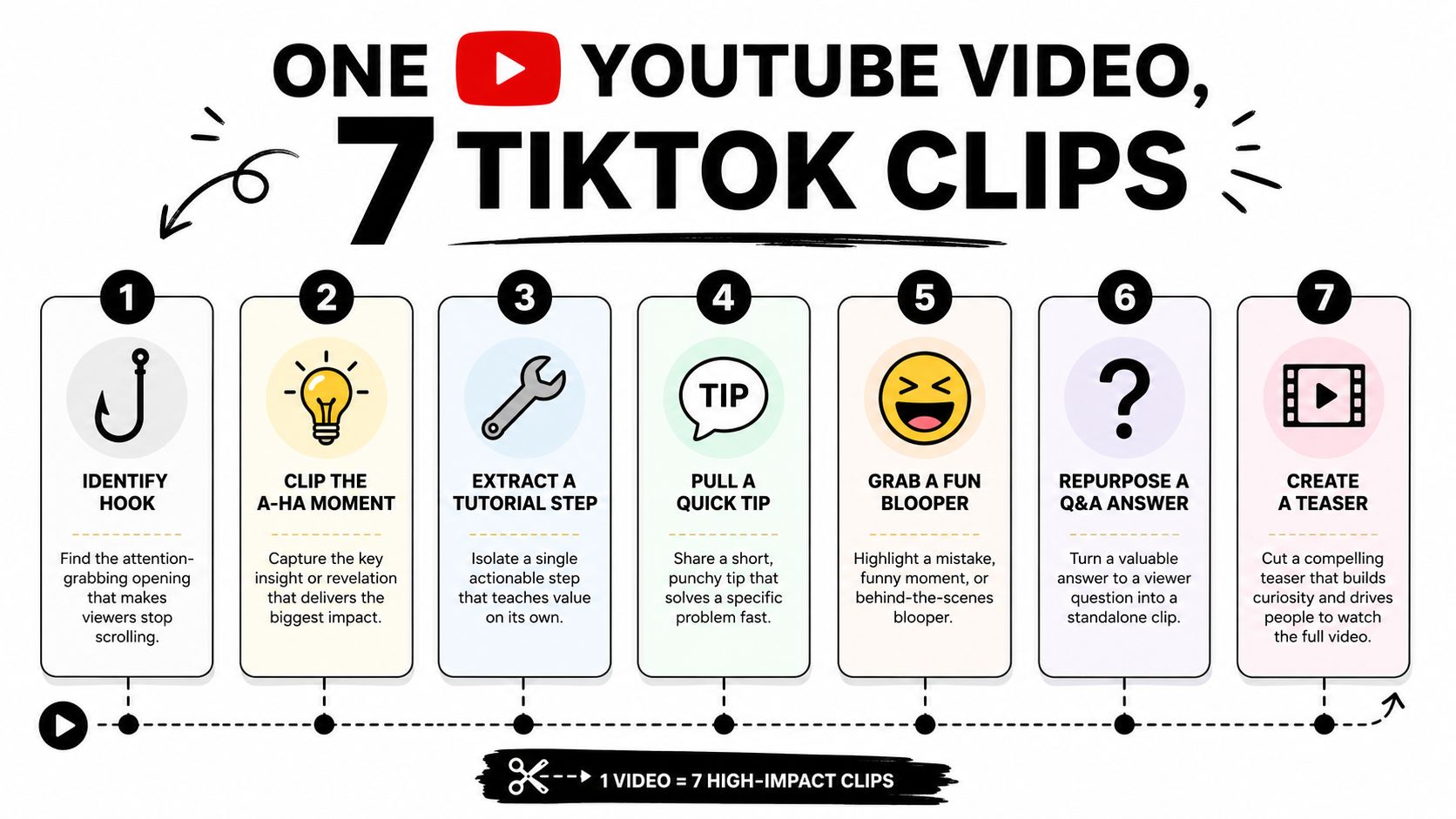
A single YouTube upload should usually become several TikTok tests, not one perfect clip. That’s the only way to give the source video a fair chance. Different hooks, different openings, and different lengths can all pull different reactions from the same recording, which is why batch repurposing beats betting on one edit.
A realistic weekly pass
A creator publishes one long YouTube video on Monday. On Tuesday, they scan the transcript, mark the strongest claims, and pull a handful of timestamps. By Wednesday, those moments become 5 to 8 clips with different hooks, one version more direct, one more educational, one more opinionated. Some are tighter. Some keep more setup. Some lead with the payoff.
That mix matters because TikTok doesn’t reward the same angle every time. A clip that feels too plain can still serve as a useful test if the opening is different. A clip that feels obvious on YouTube can land harder on TikTok if the first frame is punchier and the captions are cleaner.
Sound choices change the clip’s feel
Original YouTube audio can work when the voice itself is the asset. That’s common with explainers, commentary, and interviews. A trending TikTok sound can help when the visual rhythm matters more than the exact spoken audio, but it shouldn’t muddy the message. If the clip is already doing heavy lifting with words, keep the audio simple.
The other practical issue is attribution. If you swap sounds, make sure the platform displays the audio correctly and the clip still feels native. A repurposed post shouldn’t look like a YouTube export dropped into a TikTok shell. It should feel like something made for the feed.
Scheduling Cadence and Tracking What Actually Performs
Posting all the clips on the same afternoon usually wastes the library you just built. Spacing them out gives each version a clean shot, and it helps you learn which hook style, length, or angle works. A good cadence is to spread 5 to 8 clips across 7 to 10 days, not compress them into one upload burst.
Track the numbers that change decisions
Not every metric deserves a weekly look. The useful ones are views, average watch time, completion rate, and profile visits. Views tell you whether the opening got any traction. Average watch time and completion rate tell you whether the body held up. Profile visits tell you whether the clip created enough interest to drive a deeper click.
| Minimum Weekly Metrics to Track After Repurposing | What It Tells You | Action To Take |
|---|---|---|
| Views | Whether the hook earned initial attention | Test a new opening if the number stalls early |
| Average watch time | Whether people kept watching through the middle | Tighten the body or move the payoff earlier |
| Completion rate | Whether the clip finishes strongly | Shorten the clip or cut dead space |
| Profile visits | Whether the clip created curiosity | Add clearer positioning or a stronger end card |
Why the workflow needs one system
When teams stitch together a separate editor, captioning tool, and scheduler, the work adds up fast. The more handoffs the process has, the easier it is to stall on one source video and never publish the clips. That’s why all-in-one repurposing tools exist, because the bottleneck isn’t always creative, it’s operator friction.
If you’re managing multiple creator or brand accounts, the weekly rhythm should be repeatable. Source on one day. Select and cut on another. Schedule the batch with spacing, then review the metrics once the posts have had time to breathe. That cadence keeps the output moving without turning TikTok into a dump folder for leftover YouTube edits.
Putting the Workflow Together and Common Questions
The clean version is simple. Start with a long YouTube video. Use transcript scanning or retention cues to choose moments that make sense without backstory. Reframe each clip to 9:16, protect the UI safe zones, rewrite the opener so the hook lands fast, add captions that stay readable on mute, then schedule the clips across the week instead of batching them together.
That’s the part quso.ai is built for, turning one long recording into multiple short clips, auto-captioning them, and scheduling them in one workflow instead of making you jump between tools. If your team keeps stalling at the editing step, the problem is usually process, not content. A tighter pipeline solves more than a nicer export preset does.
FAQ
Can I use the original YouTube audio on TikTok?
Yes, if the audio is your own or you have the rights to use it. Keep in mind that TikTok viewers still need a clip that makes sense on its own, audio rights don’t fix a weak opening or missing context.
Should I delete or hide the YouTube version after cross-posting?
Usually no. Cross-posting different formats is normal. Keep the YouTube upload live unless there’s a rights, privacy, or strategy reason to remove it.
What clip length works best for educational videos versus entertainment?
Educational clips often need enough time to finish one idea cleanly. Entertainment clips usually need a faster hook and a quicker payoff. Use the length the idea needs, not the length you prefer to edit.
How long should the full repurposing workflow take once it’s dialed in?
Once the pipeline is set, it should feel like a repeatable batch process, not a one-off weekend project. The time saver comes from selecting, captioning, reframing, and scheduling in one pass instead of rebuilding the same clip multiple times.
What if my YouTube video doesn’t feel clip-worthy?
Use the transcript and look for a standalone claim, answer, or visual moment. If you can’t find one, the video may still work as a YouTube asset but not as a TikTok source.
If you’re repurposing YouTube videos for TikTok every week, stop stitching together a different tool for each step. quso.ai handles the long-video to short-clip workflow, captions, and scheduling in one place, so you can spend more time choosing the right moments and less time re-editing the same source. Visit quso.ai if you want a cleaner path from one recording to a full short-form queue.