TikTok Dimensions 2026: The Ultimate Spec & Safe Zone Guide
TikTok dimensions are simple on paper and unforgiving in practice. The standard TikTok video size is 1080 × 1920 pixels in a 9:16 aspect ratio, and that exact format is the baseline for reach, clean playback, and full-screen viewing.
Many content creators get the headline spec right and still lose performance because they treat TikTok like a generic vertical video platform. They export the right canvas size, then drop captions, hooks, and CTAs into areas TikTok’s interface covers. They also upload horizontal clips “as is” and assume the platform will sort it out. It won’t.
If you only remember one thing from this guide, remember this: TikTok dimensions are not just about canvas size. They’re about screen fill, safe-zone discipline, and native framing.
Table of Contents
- The Only TikTok Dimensions You Need to Know
- TikTok Dimensions Quick Reference Table 2026
- Understanding the TikTok Safe Zone
- Why Native 9:16 Video Outperforms Other Ratios
- Optimal Video Export Settings for TikTok
- Dimensions for Profile Photos and Carousels
- Frequently Asked Questions About TikTok Dimensions
The Only TikTok Dimensions You Need to Know
The core spec is 1080 × 1920 pixels at 9:16. That’s the native format TikTok records in-app and the format the feed is built around.
That matters because TikTok is a full-screen, mobile-first environment. Based on analysis of 170K+ posts across 1,100+ creators, vertical videos in 9:16 achieve 2.3x higher engagement than videos in 1:1 or 4:5 formats, according to Aspect Ratio Calculator’s TikTok aspect ratio breakdown.
Practical rule: If the video doesn’t fill the screen cleanly, you’re starting at a disadvantage before the first second even plays.
A lot of teams overcomplicate this. Don’t. Set the project to 1080 × 1920, frame for vertical viewing, and keep critical elements away from the UI overlap zones covered later in this guide.
If you want a second reference point on optimal TikTok video dimensions, SleekPost’s guide is useful for checking how TikTok treats aspect ratio choices in practice.
TikTok Dimensions Quick Reference Table 2026
Here’s the scannable version.
| Asset Type | Dimension (pixels) | Aspect Ratio | Max File Size | Format |
|---|---|---|---|---|
| In-feed video | 1080 × 1920 | 9:16 | Not clearly specified in the verified data for this guide | MP4, MOV |
| Cover image / video cover | 1080 × 1920 | 9:16 | Not clearly specified in the verified data for this guide | Use a TikTok-compatible image format |
| Photo carousel image | 1080 × 1920 recommended | 9:16 | Not clearly specified in the verified data for this guide | Use a TikTok-compatible image format |
| Profile photo | No verified recommended upload dimension beyond TikTok supporting very small display minimums in background research | 1:1 | Not clearly specified in the verified data for this guide | Use a TikTok-compatible image format |
| Landscape video upload | 1920 × 1080 source if native landscape | 16:9 | Not clearly specified in the verified data for this guide | MP4, MOV |
| Square video upload | Platform supports square input | 1:1 | Not clearly specified in the verified data for this guide | MP4, MOV |
A few notes matter more than the table itself:
- Default to vertical: The TikTok video size guide from ScreenSnap reinforces that 1080 × 1920 in 9:16 is the recommended full-screen format.
- Treat other ratios as fallback: TikTok may accept them, but support is not the same as parity.
- Keep covers simple: Your cover should match the vertical frame so it previews cleanly.
A spec sheet helps you ship faster. Safe-zone placement is what keeps the finished post from looking broken.
Understanding the TikTok Safe Zone
Most TikTok spec pages stop at 1080 × 1920. That’s where mistakes start.
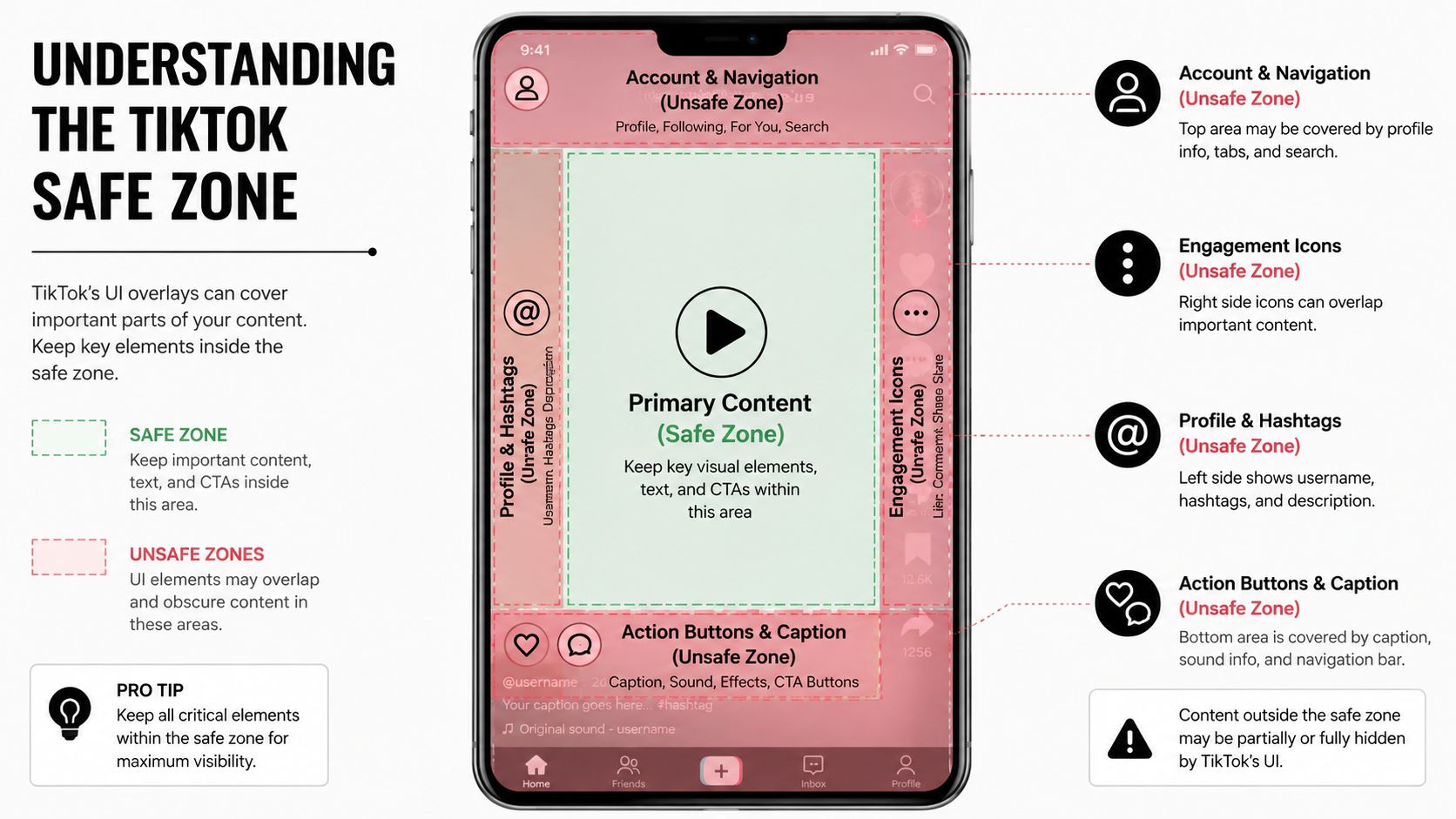
Where TikTok UI overlaps the frame
TikTok’s interface sits on top of the video. If you place subtitles, names, lower-thirds, pricing, or a CTA too low or too far right, the app covers them.
The critical safe-zone numbers are straightforward: keep key content above the bottom 270px and left of the right 100px. That guidance comes from Moda’s TikTok size resource, which also notes that, based on analysis of 170K+ posts across 1,100+ creators, videos that violate this zone see 22% lower completion rates.
That’s the practical failure point many teams miss. They export a correct 9:16 file, then place the hook in the lower third and let the UI bury it.
For a cross-platform comparison, the same safe-area mindset matters on Reels too, which is why this Instagram Reel dimensions guide is worth bookmarking if you’re repurposing one clip across both platforms.
A simple placement rule
Use the center of the frame for anything a viewer must read or act on.
- Hooks: Put opening text in the upper-middle portion of the screen.
- Captions: Keep them positioned above the bottom interface area.
- CTAs: Don’t place “follow,” “comment,” or “watch part 2” on the right side where engagement buttons sit.
- Faces and products: Avoid tight crops that push the subject into the unsafe edge zones.
If a viewer can’t read the caption or see the CTA without fighting the interface, the creative is misbuilt, even if the edit itself is strong.
Why Native 9:16 Video Outperforms Other Ratios
TikTok supports horizontal and square uploads. That doesn’t mean they perform the same.
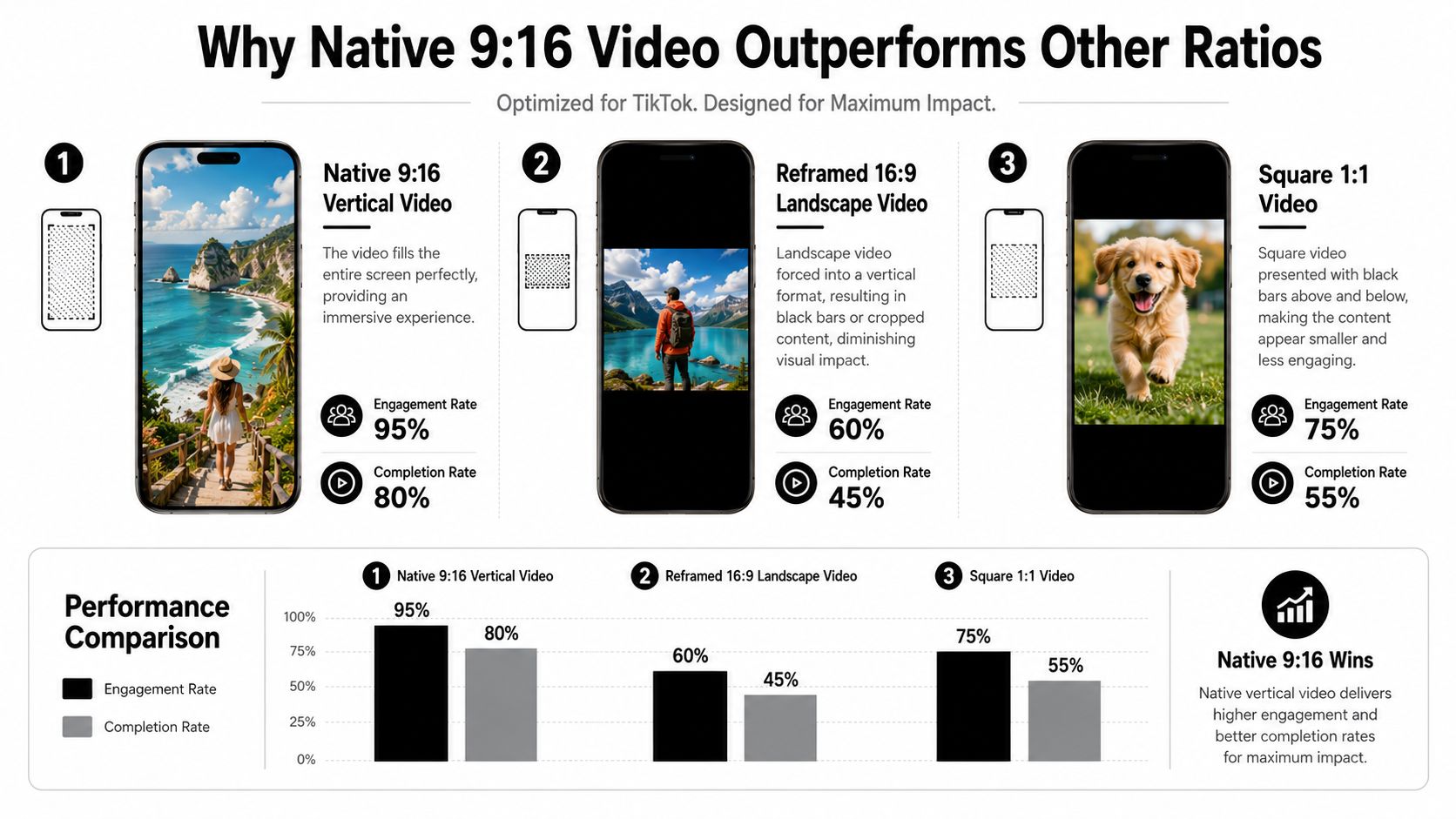
What goes wrong with landscape uploads
Horizontally oriented clips occupy less of the screen, so they feel smaller and easier to skip. According to Linearity’s TikTok size guide, horizontally oriented videos occupy 38% less screen space than 9:16 vertical, leading to 31% lower dwell time and 27% fewer shares. The same source states that, based on analysis of 170K+ posts, properly reformatted vertical clips outperform native horizontally oriented uploads by 44% in engagement.
That lines up with what most operators see in the feed. Black bars, dead space, or awkward center-cropping make the content feel repurposed instead of native.
If you want another framing reference, ClipCreator has a useful TikTok aspect ratio guide that walks through why vertical-native composition matters.
What to do when the source video is widescreen
Don’t just shrink a podcast, webinar, or YouTube clip into a vertical canvas. Reframe it.
That means:
- Track the speaker or subject so the focal point stays centered.
- Punch in deliberately instead of preserving the whole wide shot.
- Move text overlays into safe areas after the crop, not before.
- Cut for vertical pacing because a 16:9 edit rarely works untouched in a 9:16 feed.
This is where a repurposing workflow matters. When turning long video into clips, quso.ai can automatically reframe and export for TikTok-native vertical dimensions instead of leaving you with a letterboxed widescreen upload. If you’re trying to improve overall organic results after the formatting step, this guide on how to grow on TikTok is a solid next read.
Optimal Video Export Settings for TikTok
Dimensions are the first filter. Export quality is the second.
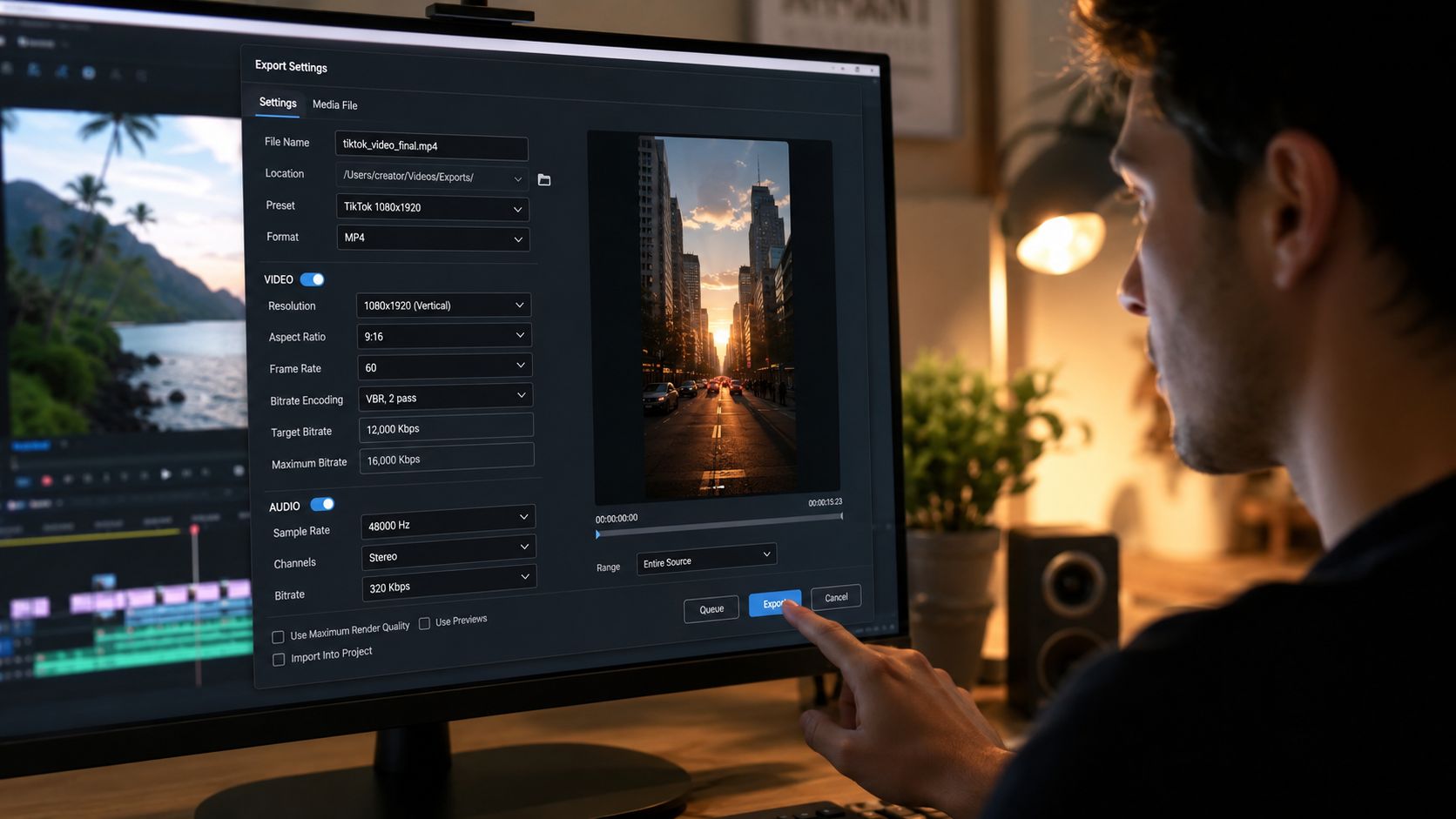
Export checklist
Use this as the default handoff standard for TikTok posts:
- Canvas: 1080 × 1920
- Aspect ratio: 9:16
- Format: MP4 or MOV
- Resolution target: Export at 1080 × 1920, not a stretched or upscaled version
- Caption placement: Keep text out of the bottom 270px and right 100px
- Cover frame: Choose a frame that still works when partially cropped in profile and feed contexts
If uploads keep looking soft after posting, review the basics first. Compression problems usually start before the file reaches TikTok. This guide on how to improve video quality covers the usual failure points.
Operator note: The cleanest TikTok exports usually come from simple settings and disciplined framing, not from overprocessing the file.
Length and pacing
Length now matters alongside dimensions.
Based on analysis of 170K+ posts across 1,100+ creators, videos between 45–60 seconds in 9:16 format achieve the highest average engagement rate of 4.2%, according to Posterly’s TikTok guide.
That doesn’t mean every clip should be stretched to a minute. It means if you’re repurposing longer content, don’t default to ultra-short fragments when a stronger 45–60 second cut holds attention better.
A good workflow looks like this:
- Pick a self-contained segment with a clear beginning.
- Front-load the payoff so the first seconds still work as a hook.
- Trim dead air hard because longer doesn’t excuse slower.
- Schedule for consistency after export, not as an afterthought.
If posting cadence is part of the problem, pair dimensions work with timing discipline using this guide on the best time to post on TikTok.
Dimensions for Profile Photos and Carousels
Video drives the feed, but brand presentation still matters.
Profile photo specs
For profile images, keep the asset square. Background research commonly points to 200 × 200 pixels as a recommended TikTok profile photo size, while smaller display minimums also exist across web references. In practice, use a crisp square image with the subject centered because TikTok displays profile imagery in a circular crop.
If your profile setup still needs work beyond the avatar, this guide on how to manage TikTok bio links is useful for cleaning up the conversion path.
Carousel image specs
For photo carousels, the safest default is to build at 1080 × 1920 in 9:16 so images fill the phone screen cleanly. Square and other portrait ratios may work, but they won’t deliver the same full-screen effect.
The same creative rules apply here:
- Keep text central: Don’t push headlines into UI overlap zones.
- Design per slide: Each image should survive as a standalone frame.
- Use platform-sized assets: A broader image-size reference helps if your team is cutting across channels, and this social media image sizes guide covers that well.
Frequently Asked Questions About TikTok Dimensions
Can you post 16:9 video on TikTok?
Yes, TikTok supports it. You usually shouldn’t leave it in its native horizontal orientation. As covered earlier, video in this wider orientation uses less screen space and tends to underperform compared with properly reformatted vertical video.
What are the best TikTok dimensions?
The standard and recommended size is 1080 × 1920 pixels with a 9:16 aspect ratio.
Where is the TikTok safe zone?
Keep important content above the bottom 270px and left of the right 100px so captions, hooks, and CTAs don’t get covered by the UI.
What video length works best on TikTok?
Based on the cited post analysis earlier in this guide, 45–60 second vertical videos showed the highest average engagement rate when they held viewer attention.
Why does my TikTok look blurry after upload?
Usually it’s one of four things: the export wasn’t built at 1080 × 1920, the source clip was low quality, the crop was done poorly, or the file was over-compressed before upload.
If you’re repurposing webinars, podcasts, interviews, or long-form talking-head video into TikTok clips, quso.ai can help you reframe to 9:16, keep captions readable, and get clips ready for publishing without rebuilding each asset manually.