How to Repurpose Video Content: A 2026 Workflow
Repurposing one long-form video can produce 30+ distinct social posts, and the workflow that works has five stages: strategic planning, clip identification, platform-native editing, smart distribution, and performance analysis. If you’re sitting on a webinar, podcast, demo, or tutorial and still feel like you have “nothing to post,” the problem usually isn’t content creation. It’s packaging and distribution.
This describes a typical situation. They record something valuable, publish the full version once, maybe cut a clip or two, then move on to the next recording. The result is a constant production treadmill. A better system starts before you hit record, keeps editing tight and platform-specific, then continues after publishing with testing and iteration. That’s how to repurpose video content without turning your week into a manual editing job.
Table of Contents
- The Repurposing Flywheel Your Content Needs
- Plan Your Long-Form Video for Easy Clipping
- Edit Clips for Vertical Video and Silent Viewers
- Build a Smart Distribution and Scheduling System
- Optimize and Track Your Repurposed Content
- Frequently Asked Questions About Repurposing Video
The Repurposing Flywheel Your Content Needs
Organizations often don’t have a content shortage. They have a distribution bottleneck.
One strong recording can drive a large publishing calendar if you stop treating the long-form asset as the end product. A 2026 content efficiency framework notes that one long-form video can generate 30+ distinct social posts, including short clips, text posts, carousels, and quote graphics. That’s the operating model. Record once, publish many times, and vary the packaging by platform and audience intent.
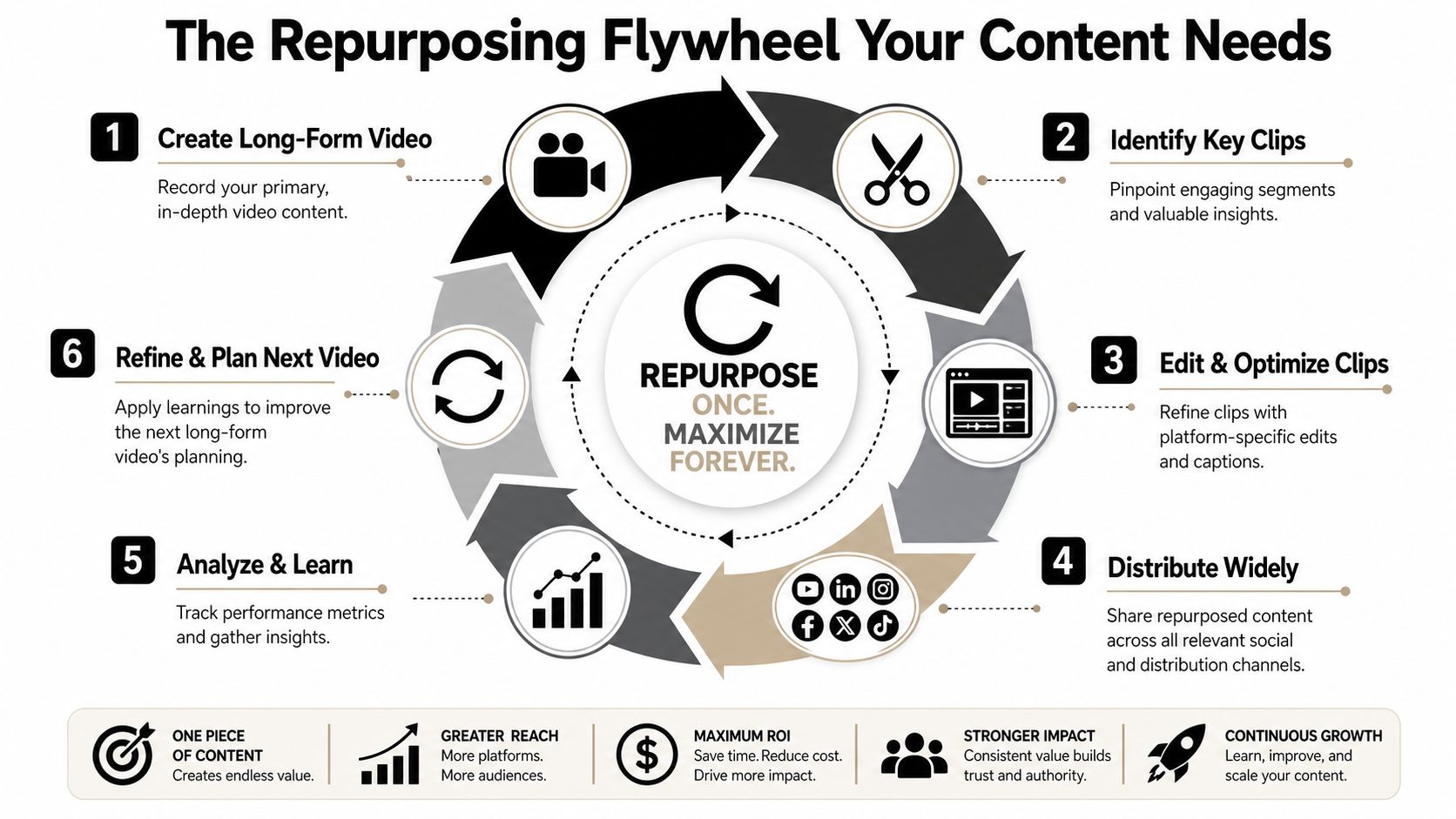
The useful way to think about repurposing is as a flywheel, not a one-off editing task:
- Plan the recording so it contains self-contained moments.
- Identify clips with clear starts, payoffs, and takeaways.
- Edit for the platform instead of exporting one generic version.
- Distribute on a schedule so the content ships.
- Analyze results and feed those lessons into the next recording.
Practical rule: If your process ends at “export clip,” you don’t have a repurposing system. You have an editing habit.
That loop matters because each stage improves the next one. The next webinar gets cleaner segments. The next podcast gets better openings. The next batch of shorts gets stronger hooks. If you want a broader primer on the automation side, Sight AI explains content repurposing in a way that complements this operator-focused workflow.
Plan Your Long-Form Video for Easy Clipping
The fastest editing workflow starts before recording.
If you wait until post-production to find clips, you’ll spend too much time scrubbing through footage that was never structured for short-form. The cleaner approach is to build “clippability” into the source asset.
Build segments that can stand alone
Long-form content repurposes well when each section has its own beginning, point, and conclusion. That applies whether you’re recording a podcast, demo, customer education session, founder update, or webinar.
A practical structure looks like this:
- Open each segment with a claim: State the idea fast so the clip can start mid-conversation and still make sense.
- Add mini-summaries: Brief recaps make it easier to cut clean endpoints.
- Keep examples self-contained: Don’t make the audience depend on context from ten minutes earlier.
- Signal transitions out loud: Phrases like “the mistake is…” or “the fix is…” create natural clip boundaries.
This guide to video hook ideas is useful when you’re scripting or outlining, because weak openings in the source footage usually become weak short clips later.
Plan segments like each one might become a standalone post. Because some of them should.
Create a clip map before editing
A Kemecon workflow on turning long videos into shorts recommends inserting mini-hooks or summaries every few minutes and marking 20–40 potential start and end times in a spreadsheet or timestamp tool such as Notion, Airtable, or Google Sheets. That pre-planned clip map changes the editing job completely.
Instead of asking “what can I cut from this?”, you’re asking “which of these marked segments deserves to ship first?”
A simple clip map should track:
| Field | What to note |
|---|---|
| Segment timestamp | Start and end time |
| Core idea | One sentence only |
| Best platform fit | Reels, Shorts, TikTok, LinkedIn, or text post |
| Hook angle | Contrarian, tactical, mistake, checklist, lesson |
| Follow-up asset | Carousel, post, quote card, newsletter blurb |
Put the second media element here after you’ve established the process:
This step feels administrative, but it saves real time. It also improves quality because you stop choosing clips based only on what sounds good in the moment. You’re choosing based on whether a segment can survive outside the full episode.
Edit Clips for Vertical Video and Silent Viewers
A good clip is not just a trimmed excerpt. It’s a reframed asset built for feed behavior.
That usually means vertical composition, faster pacing, cleaner first seconds, and text that stays readable inside crowded mobile interfaces. If you publish horizontal webinar crops into vertical feeds with subtitles slapped on top, the result usually looks like a repackaged afterthought.
Reframe for the feed, not the original recording
When you convert long-form footage into vertical clips, the frame has to do a different job. The audience is scanning quickly, often on mobile, and deciding in seconds whether the clip deserves attention.
Focus on these edits:
- Center the subject deliberately: Don’t let the speaker drift toward the edges where UI elements can interfere.
- Cut dead air early: Intros that work in a webinar usually drag in a short clip.
- Tighten to one idea per clip: If the segment contains two different lessons, split it.
- Use visual emphasis: Zooms, punch-ins, and speaker swaps help maintain momentum when the original footage is static.
Face tracking can do the centering for you. 2short.ai, for example, keeps the active speaker in the middle of the vertical frame automatically, and our 2short.ai review covers what else it does and what it costs.
If you want a practical captioning reference, this subtitles workflow article covers readability basics that still apply even if you’re not using a desktop editor.
Handle captions and safe zones correctly
This part isn’t optional. PlayPlay’s repurposing guide notes that 83% of viewers watch videos without sound, which is why captions are a core part of clip editing, not a finishing touch.
Operational takeaway: Burned-in captions aren’t decoration. They carry the message when audio is off.
Two mistakes show up constantly:
- Captions placed too low, where platform UI overlaps them.
- Too much text on screen, which makes the clip feel dense and hard to follow.
Keep captions in the central lower-middle portion of the frame, but not on the very bottom edge. Leave room for platform controls, profile elements, and action buttons. The same safe-zone thinking applies to headlines, progress bars, and CTAs. If important words sit at the edges, some viewers will never see them clearly.
For teams that want to compress this workflow, quso.ai is one option for turning long video into short-form clips, adding auto-captions, and scheduling posts without bouncing between separate tools. The useful part is the workflow compression, not some flashy editing effect.
Vizard is another, with a content calendar for scheduled posts on its Creator plan ($29 a month for 600 minutes of video); our Vizard AI review compares the two.
Build a Smart Distribution and Scheduling System
Editing in batches is what keeps repurposing sustainable. Posting ad hoc is what breaks it.
A documented schedule turns one recording into a steady stream of assets and removes the daily “what should we publish?” question. That matters for solo creators, social teams, and B2B marketers alike.
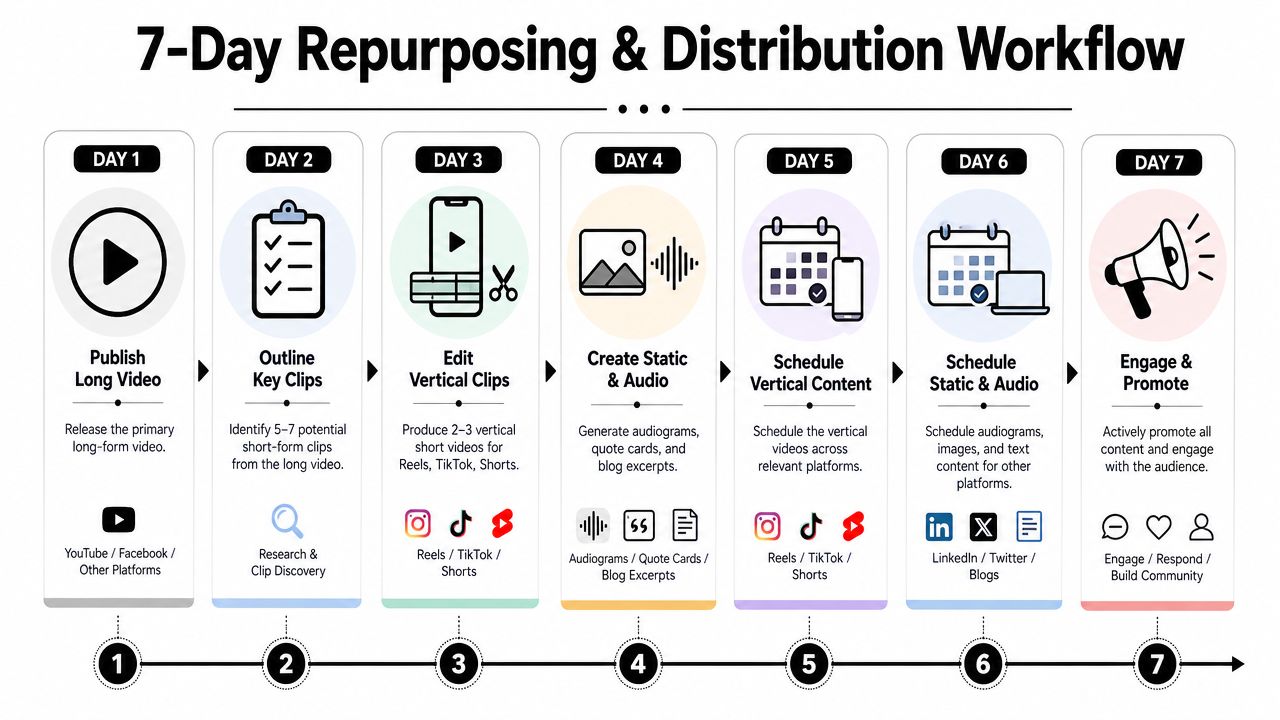
Use a batched seven-day production cycle
A seven-day repurposing workflow lays out a concrete pipeline: Day 1 generates 15–30 clip candidates, Day 2 selects the top 10–20 and writes hook headlines, Day 3 edits the first 5 clips in vertical format, and Day 5 adds captions before exporting clean versions without watermarks.
That sequencing works because each day has one job.
- Day 1: Review the source asset and pull all candidate moments.
- Day 2: Rank segments by standalone value, then write hook options.
- Day 3: Edit the first batch of vertical clips with tight pacing.
- Day 4: Turn the same ideas into text posts, carousels, or quote assets.
- Day 5: Add captions, check safe zones, export final versions.
- Day 6: Load posts into your scheduler by platform and publish window.
- Day 7: Monitor comments, save early learnings, and note ideas for the next source video.
This content distribution platform article is a helpful reference if your bottleneck is the publishing side rather than the editing side.
Distribute by angle, not by copy-paste
The same clip doesn’t need the same framing everywhere.
A product lesson can become:
- A tactical Reel for broad reach
- A LinkedIn clip framed around a business lesson
- A carousel that breaks the point into steps
- A short text post using the strongest quote from the video
That’s how you avoid repetition while still using one source asset. If X is one of your channels, this guide on how to increase X followers is a useful companion because distribution performance depends as much on packaging as on the clip itself.
It runs the other way too. Tools such as Crayo turn a written script or a Reddit post into a faceless short with an AI voiceover, and our Crayo AI review covers what it costs and where it falls short.
Optimize and Track Your Repurposed Content
Most repurposing guides stop too early. They cover editing, then assume publishing is the finish line.
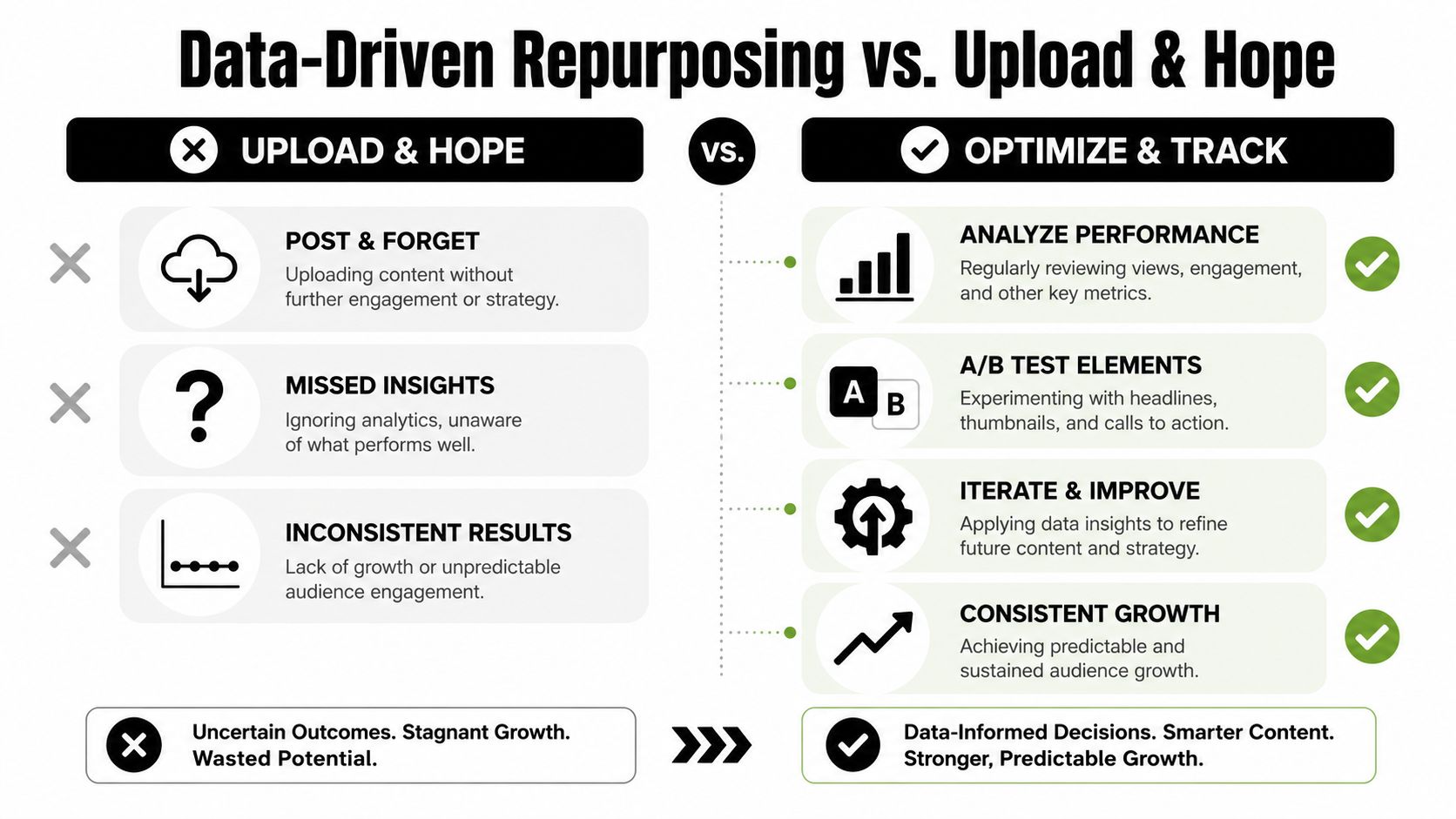
It isn’t. The key lies in a post-publish loop where you compare versions, identify what held attention, and use that signal to shape the next batch.
Test hooks instead of re-editing everything
A useful overlooked practice is testing different openings on the same clip body.
The Sparkhouse notes that 70% of guides mention captions or thumbnails, but only 15% detail running A/B hook tests on identical clips, and that repeated testing can boost engagement by 25–40%. That’s the gap many content creators overlook. They keep changing the whole asset when the actual problem is often the first line.
A simple hook test can vary:
| Variable | Example |
|---|---|
| Opening line | “Most webinars fail here” vs. “One fix improved this clip” |
| First visual | Face close-up vs. slide highlight |
| On-screen text | Question vs. direct claim |
| Framing | Mistake-based vs. checklist-based |
Don’t test five variables at once. Change the hook, keep the body stable, and learn what actually caused the difference.
If you care about search and discoverability on video platforms, modern video rank tracking strategies are worth reviewing alongside engagement data.
Track the signals that shape the next recording
The practical metrics aren’t mysterious. You’re looking for which clips earned attention, which ones held it, and which formats got shared or saved enough to justify repeating the angle.
Watch for:
- Retention patterns: Where viewers leave tells you where the clip lost clarity or energy.
- Shares and saves: These usually signal practical value.
- Comment quality: Are people asking for more detail, disagreeing, or tagging peers?
- Hook performance: Which opening line gave the same core idea the best chance?
Use that feedback upstream. If tactical lists outperform broad opinions, record more tactical segments next time. If direct “mistake” hooks beat generic previews, build those into your source outline. That’s how repurposing becomes a system instead of a content chop shop.
Frequently Asked Questions About Repurposing Video
What kinds of long-form videos are easiest to repurpose?
Podcasts, webinars, tutorials, demos, interviews, and Q&A sessions usually work best. They naturally contain multiple subtopics, clear transitions, and teachable moments that can stand alone as clips or text assets.
How do I keep repurposed content from feeling repetitive?
Change the angle, not just the format. One segment can become a short clip, a founder opinion post, a carousel checklist, and a newsletter takeaway. The core idea stays consistent, but the framing changes for the channel and audience context.
Should every clip link back to the full video?
Not always. Some clips should work as complete standalone assets. Others should act as teasers that push viewers to the full webinar, podcast, or demo. The right choice depends on whether your goal is reach, engagement, or deeper consumption.
Can I repurpose video into non-video content?
Yes. A strong clip map makes this easier because each marked segment already has a defined takeaway. That takeaway can become a LinkedIn post, blog section, carousel, sales enablement snippet, newsletter blurb, or quote graphic.
What’s the biggest mistake people make when repurposing video?
They start too late. If the original recording wasn’t structured for clipping, the whole process becomes slower and the output gets weaker. The second biggest mistake is publishing without testing hooks or reviewing performance patterns.
If you want a simpler way to turn one recording into usable short-form content, add captions, and queue posts without patching together multiple tools, quso.ai is built for that workflow.





