How to Build a Social Media Marketing Planner That Works
You don’t need another blank content calendar. You need a social media marketing planner that tells you what to publish, why it matters, where it goes, and how you’ll know if it worked. If you’re juggling multiple platforms, recycling old clips, and guessing which posts deserve more time, the fix is a planner that behaves like a workflow system, not a grid.
Table of Contents
- What a Social Media Marketing Planner Actually Is
- Setting Goals, Audience, and Content Pillars
- Building the Calendar Structure and Post Templates
- Repurposing Long Video Into a Week of Posts
- Scheduling, Automation, and the Weekly Operator Loop
- Tracking KPIs and Running the Weekly Review
- Planner Checklist and Frequently Asked Questions
What a Social Media Marketing Planner Actually Is
You’ve got five platforms open, last month’s clips half-edited, and three posts waiting for captions. That’s not a planner, that’s a pile of tasks with dates attached.
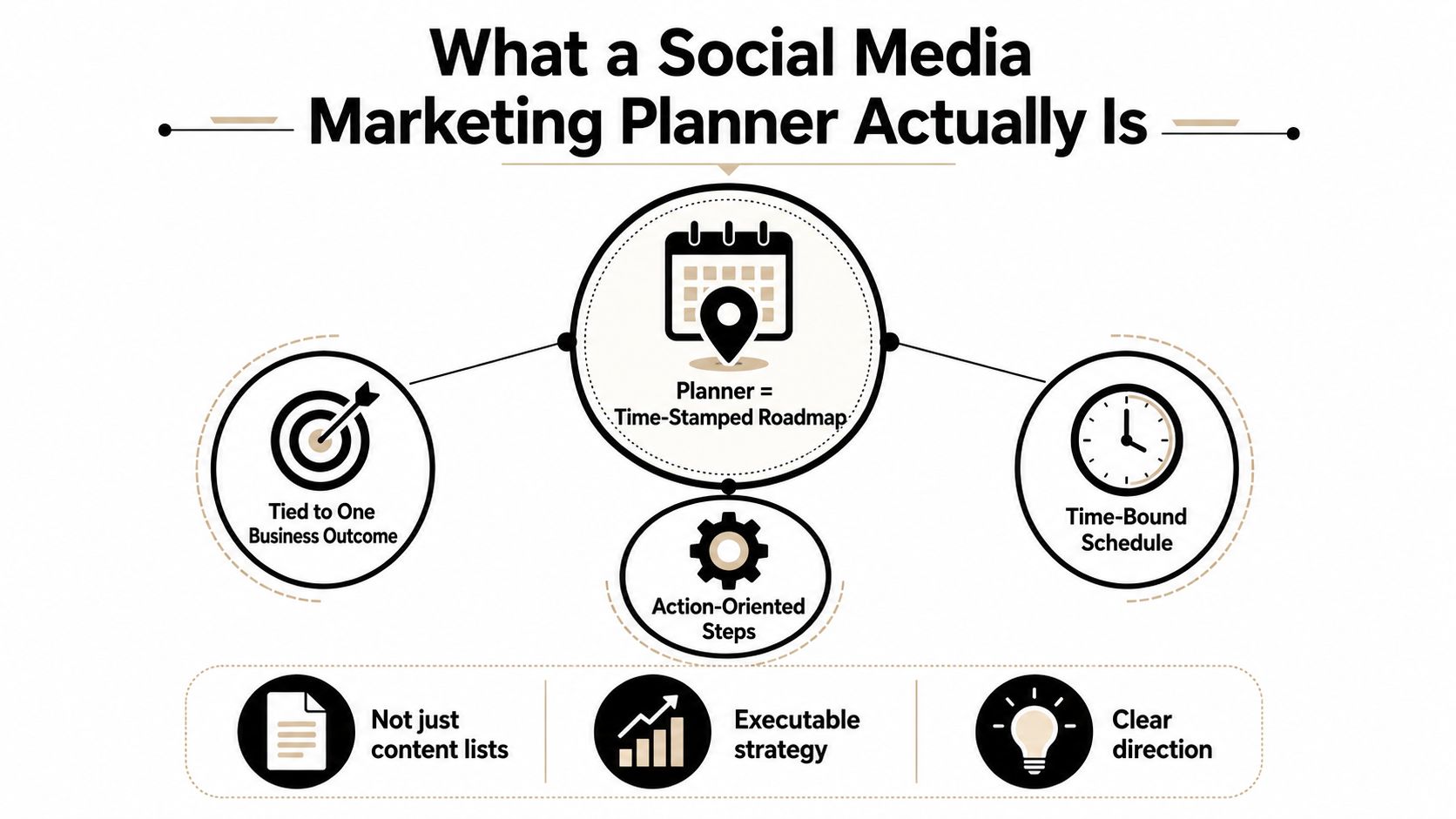
A real social media marketing planner is a time-stamped roadmap for social activity, tied to one business outcome. Sprinklr’s definition is useful here, because it frames planning as a sequence of daily actions against a predefined goal, not a loose brainstorm or a static content list. That matters when your team is deciding what to repurpose, when to post, and what to measure next. Sprinklr’s social media planning definition makes the distinction clear.
The planner needs four building blocks. First, a goal, because every post should point at a business result. Second, an audience segment, because “everyone” is too vague to write for. Third, content pillars, because you need repeatable themes, not random ideas. Fourth, a cadence, because consistency only works when it’s planned around actual bandwidth.
Practical rule: if a post can’t be tied to one goal and one audience, it doesn’t belong in the planner yet.
A calendar grid tells you when something goes live. A planner tells you what the post is for, who it’s for, what format it should take, and how you’ll judge it later. That’s the difference between staying busy and building a system.
The market context explains why this structure matters. Social platforms reached 5.66 billion active users in 2026, the average person used 6.75 different social networks per month, and people spent about 2 hours and 40 minutes per day on social apps, according to Sprout Social’s statistics roundup. Social ad spend is projected to reach $317.33 billion in 2026, while 80% of marketing leaders expect to shift budget into social and 87% expect paid social spend to rise. Sprout Social’s social media statistics are a reminder that planning can’t live inside one platform anymore.
Setting Goals, Audience, and Content Pillars
A planner gets sharp when the foundation gets narrow. Start with one primary objective, then build the whole system around it.
For operators, the cleanest setup is a goal-first measurement stack. Social Insider and the AMA recommend defining one objective, tracking only 2–3 metrics tied to it, setting a baseline, comparing against competitors, and reviewing on a consistent cadence. That’s the right order because it prevents dashboard overload and stops teams from mistaking activity for progress. Social Insider’s measurement framework is the closest thing to a practical operating manual here.
A B2B SaaS example that stays usable
If the business goal is qualified demos, the planner doesn’t need ten KPIs. It needs a small set that maps to the funnel. In a B2B SaaS setup, that might be click-through rate, demo requests, and LinkedIn engagement rate. The audience might be mid-market operations leaders who already know the category but want less friction in their workflow.
Pick the business outcome first, then write the content to serve it. If the content is popular but doesn’t move the goal, it’s noise.
The content pillars should reflect what that audience keeps asking. For the SaaS example, three pillars usually cover the job well, product education, customer proof, and founder POV. Those pillars give you enough variety to avoid repetition without turning the plan into a random mix of memes, product pushes, and generic thought leadership. If you want a deeper breakdown of pillar design, use this content pillars guide as a planning reference.
The baseline matters because you need a point of comparison before you change anything. Once that’s set, competitor comparison becomes useful instead of performative. Then the planner can answer one clean question each week, did this post bring us closer to the goal, or did it just fill the feed?
Building the Calendar Structure and Post Templates
The calendar is where strategy starts taking shape. Without it, even good content turns into last-minute scrambling.
A workable planner assigns each week a cadence, maps pillars to specific days, and leaves room for reactive posts. I like to reserve the week around repeating themes, then keep one or two slots open for timely material, customer wins, or product updates. That keeps the feed stable without making it rigid.
Match format to platform, not habit
Different platforms reward different post shapes. Reels and Shorts are better for quick hooks and visual movement. Carousels work when the idea needs sequencing. Text posts can still carry weight on LinkedIn when the point is clear and the opening line earns the stop. LinkedIn video is useful when the message needs a face, a voice, and a business context.
Caption templates help the planner move faster without sounding robotic. A simple hook-value-CTA structure is enough for most posts, but the hook should match the platform. A hard take works on LinkedIn. A curiosity gap works better on short-form video. A teaching line usually beats a promotional opener on everything else.
If the template makes every post sound the same, it’s too rigid. Templates should speed up decisions, not flatten voice.
Safe zones matter here, especially for vertical video. Platform UI can overlap the frame and bury captions, handles, or calls to action, so the planner should include a review step for text placement before anything gets scheduled. That’s the practical mistake that ruins otherwise solid clips.
A useful calendar doesn’t just say “post on Tuesday.” It says which pillar goes live, which format fits that platform, what caption structure the post uses, and whether the frame leaves room for on-screen UI. If you want a clean starting point, this social media calendar template is the kind of structure worth adapting instead of inventing from scratch.
Repurposing Long Video Into a Week of Posts
The fastest way to stop overproducing is to treat one strong long video as the source for a whole week of posts. That’s the better trade-off for small teams, fewer ideas, stronger adaptation.
Recent planning guidance is heading in that direction. The win isn’t posting more, it’s turning one core idea into multiple angles and adapting it by platform and format. That’s why a planner should organize around quality and format adaptation, not raw volume.
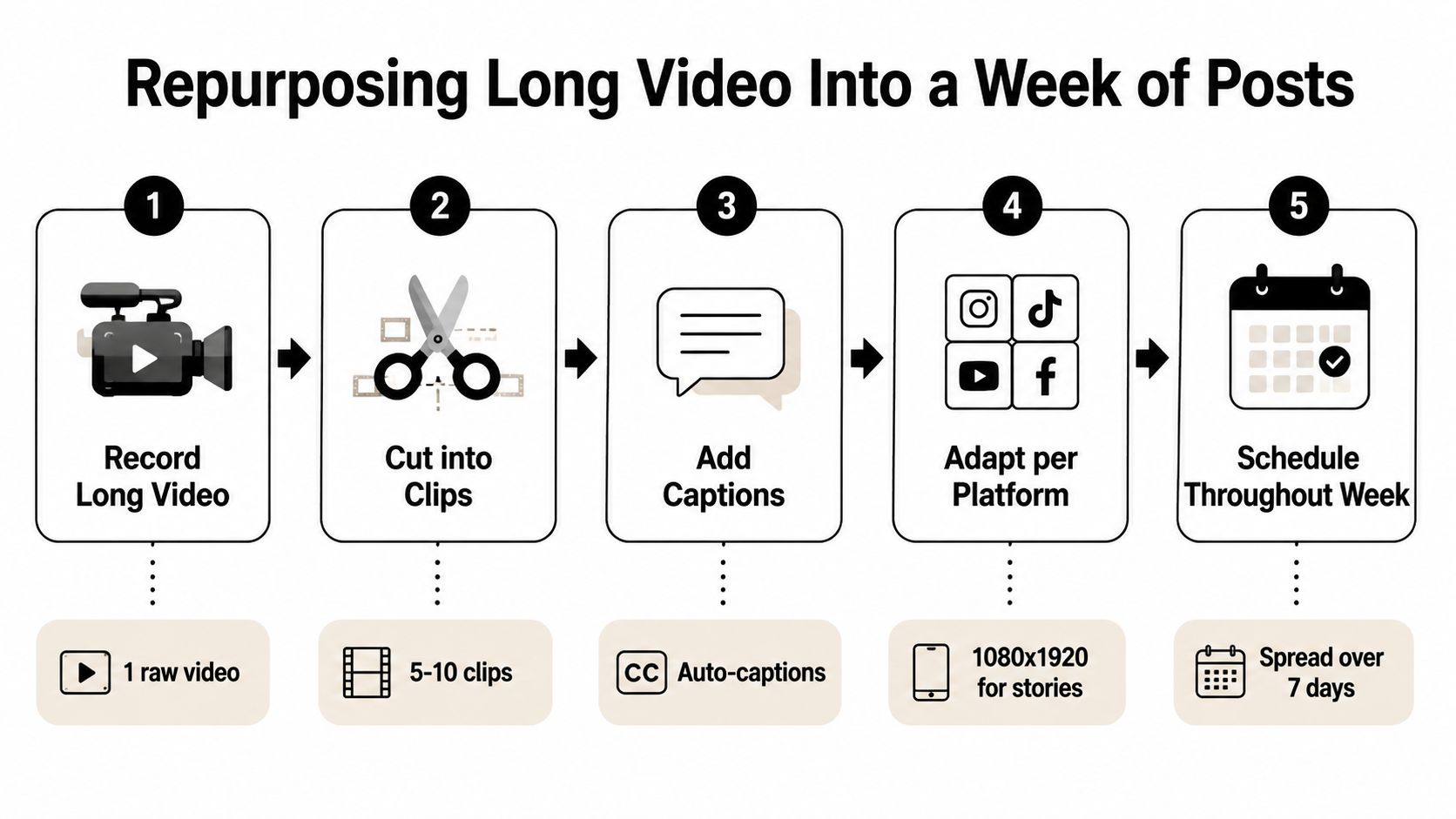
The mechanic is simple. Pick one long-form asset each week, identify 3–5 short-clip angles, then adapt each angle for Reels, Shorts, LinkedIn, and podcast clips. Captapi’s repurposing strategy tips are useful because they reinforce the same operator logic, start from one asset, then split it into platform-native pieces.
Use benchmarks to keep your expectations realistic
Rate-based measurement is the cleaner lens. Engagement rate normalizes performance by audience size, which makes it more useful than raw volume when the same clip is distributed across different channels. KISSmetrics-style benchmarking is also the reason UTM-tagged links matter, because they connect the social click to downstream conversion and revenue.
KISSmetrics’ benchmark guide gives a useful context for interpretation, with average engagement rates around 0.5–1% on Facebook, 1–3% on Instagram, 0.02–0.05% on X, and 2–6% on LinkedIn for B2B content. A mature channel usually needs targets about 10–20% above baseline, not a fantasy leap that ignores the platform. KISSmetrics’ analytics guide is worth using when you’re deciding whether a clip improved.
The planning takeaway is straightforward. Fewer, stronger ideas are easier to repurpose, easier to caption, and easier to benchmark.
Scheduling, Automation, and the Weekly Operator Loop
The planner stops being a document and starts becoming a weekly operating rhythm. The goal is to collapse repurposing, captions, and scheduling into one repeatable loop so the team isn’t rebuilding the wheel every Monday.
A clean version of that loop looks like this, upload one long video, generate short clips, add captions for silent-scroll viewing, then schedule the resulting posts across platforms from one place. That’s the workflow fit where quso.ai makes sense, because it’s built for repurposing long video into short-form clips, auto-captioning, and scheduling across social platforms in the same flow. Use of automation to nurture leads becomes much easier when the content side isn’t scattered across tools.
A weekly rhythm that protects time
Monday can be the upload and clip-generation day. Tuesday is for clip review and selecting the strongest angles. Wednesday is for captions and safe-zone checks. Thursday is scheduling. Friday is review and adjustment.
That leaves room for the work analytics and iteration. If the loop is tight, the planner stops stealing time from strategy and starts feeding it.
The point isn’t to automate creativity. It’s to reduce the manual friction that keeps good ideas from getting published. When a planner includes a real scheduling spine, it’s easier to stay consistent without turning social into a full-time production chase. For the posting side of that workflow, this scheduling guide is a useful companion.
Tracking KPIs and Running the Weekly Review
A planner without a review cadence is a wish list. The weekly review is what turns a publishing habit into a management system.
Start by separating decision metrics from vanity metrics. Followers and impressions can be useful context, but they don’t tell you whether the planner is doing its job. Engagement rate, click-through rate, and qualified leads are much better signals when the goal is to move business outcomes.
What to check weekly
Weekly reviews should be short and strict. Check the posts you scheduled, note which formats pulled attention, and compare the results against your baseline. If links were used, confirm that every outbound URL was UTM-tagged so social traffic can be traced through to downstream activity and revenue.
A simple 15-minute review can cover three questions.
- What moved the KPI: Identify the post, format, and hook that performed closest to the goal.
- What missed the mark: Flag the clips or captions that didn’t earn attention or clicks.
- What changes next week: Adjust one pillar, one format, or one CTA instead of rewriting the whole planner.
If you can’t connect the post to a tracked outcome, don’t call it performance. Call it publishing.
The value of rate-based measurement is that it keeps you honest across channels. A strong result on one platform may look weak on another if the audience size is different, so engagement rate is the cleaner comparison. The earlier benchmark ranges give you the context to read that difference without overreacting to raw reach.
Monthly reviews can be wider, but weekly reviews should stay disciplined. Track the signal, compare it to the baseline, and change only what the data supports.
Planner Checklist and Frequently Asked Questions
Use this as the clean version of your planner.
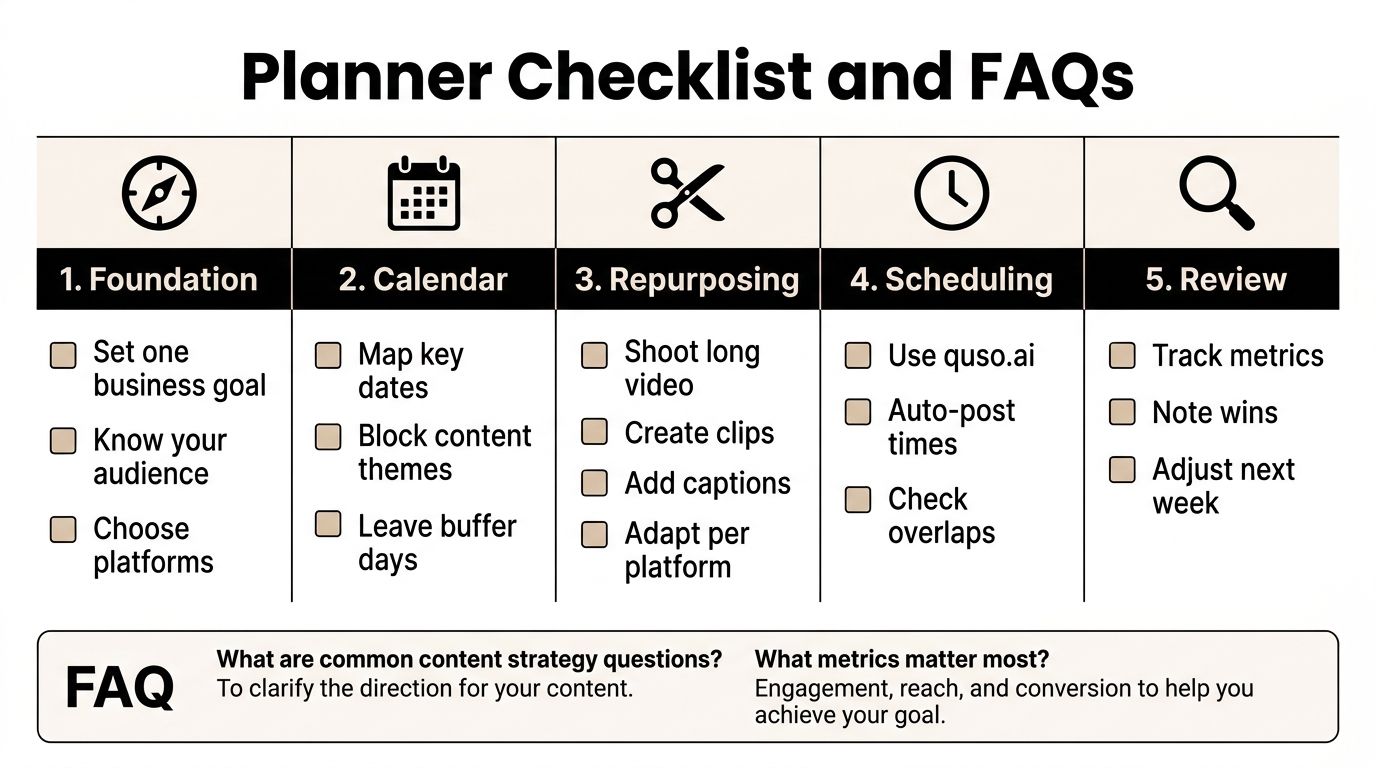
- Foundation: set one business goal, define the audience, choose the platforms, pick 2–3 KPIs.
- Calendar: map themes to days, leave buffer space, and match formats to the platform.
- Repurposing: start from one long-form asset, cut multiple clips, add captions, and adapt the hook.
- Scheduling: batch the workflow, auto-post from the planner, and check safe zones before publishing.
- Review: track the right metrics, note what worked, and adjust next week’s plan.
A 30-60-90 ramp works well. In 30 days, build the foundation. In 60, lock the calendar and repurposing flow. In 90, the weekly review should be shaping the next cycle instead of just reacting to it.
How often should I update the planner? Weekly for execution, monthly for structure. If the goal, audience, or platform mix changes, update the foundation immediately.
Are templates worth using? Yes, if they speed up decisions. Templates should reduce friction, not flatten the voice or force every post into the same shape.
What’s the difference between a planner and a content calendar? A calendar lists dates and posts. A planner connects the goal, audience, format, cadence, and KPI review into one system.
How should I handle a platform algorithm change? Don’t rebuild the whole planner. Adjust the format mix, watch the KPI tied to that channel, and keep the weekly review tight so you can spot the shift early.
If you want one place to turn long video into short clips, auto-caption them, and schedule them without stitching together a messy stack, visit quso.ai and build your planner around the actual workflow. It’s a practical way to keep repurposing, publishing, and review in one loop, without letting the calendar run the business.





