Social Media Plan for Small Business: A Practical Playbook
Your social media plan for small business should answer one question fast, what can you publish every week without dropping the ball? The right answer is usually a narrow, repeatable system, not a giant strategy deck that dies after the first busy week. With 5.24 billion social media users globally and 79% of Americans on at least one network, the problem isn’t whether to post, it’s how to stay consistent in a channel your customers already use every day. Social media statistics for small businesses
Table of Contents
- Why Most Small Business Social Plans Fail
- Setting Goals and Researching Your Audience
- Choosing the Right Platforms for Your Business
- Building Content Pillars and Repurposing Workflows
- Video Marketing for a Small Business: One Recording a Week
- Creating a Sustainable Posting Cadence and Schedule
- Measuring Performance and Optimizing Monthly
- FAQ
Why Most Small Business Social Plans Fail
Most small business social plans fail because they are built like wish lists. The owner wants Instagram, TikTok, LinkedIn, Facebook, YouTube, and maybe a newsletter tie-in, then reality shows up, usually in the form of client work, store traffic, sales calls, or a packed delivery schedule. A plan that depends on heroics is not a plan.
The better model is a repeatable operating system. Start with an audit, set goals, pick 1 to 2 primary platforms, define a few content pillars, and build a cadence you can maintain. That sequence keeps the work tied to business outcomes instead of random posting, and it is the same kind of operating logic used in practical buyer persona templates and audience research.
Strategy deck versus working plan
A strategy deck says what you would like to do. A working plan tells you what gets made on Monday, what gets scheduled on Tuesday, and what gets reviewed at the end of the week. The difference matters because social platforms reward presence, not intention.
Practical rule: if a plan cannot survive a busy week, it is too fragile to run the account.
The strongest plans also accept a simple truth, consistency beats novelty for small teams. A short-form clip clipped from a webinar, a captioned customer story, or a repurposed podcast segment can do more for your output than another blank-content brainstorm. That is why batching matters. If you record one long-form piece, then cut it into several posts and schedule them in one sitting, you reduce the daily scramble and keep the feed active. Tools like quso.ai’s scheduling workflow fit that reality because they support repurposing, captions, and scheduling in one place without asking you to start from zero every day.
A second reason plans fall apart is that they are built without a recovery path. Small businesses do not need a perfect calendar, they need a system that still works when a week goes sideways. If the owner can only post manually, the plan collapses the first time customer work spikes. If the content pipeline already includes drafted clips, caption templates, and scheduled slots, the account keeps moving while the team handles the business.
Another common failure is trying to produce too much original content. That burns time fast and usually lowers quality. A better workflow starts with one strong asset, then turns it into smaller posts, story frames, emails, and platform-specific cuts. Repurposing is not laziness. It is how a small team keeps volume up without paying for it in attention and overtime.
Setting Goals and Researching Your Audience
A good social media plan for small business starts with goals that connect to revenue, not vanity metrics. Follower count looks nice on a dashboard, but it does not book calls, fill carts, or keep repeat customers coming back. One practical planning guide notes that strategic social work can return about $2.80 for every dollar invested, which is the kind of benchmark worth tying to a real business outcome. social media marketing plan for small business
Write SMART goals that match the business model
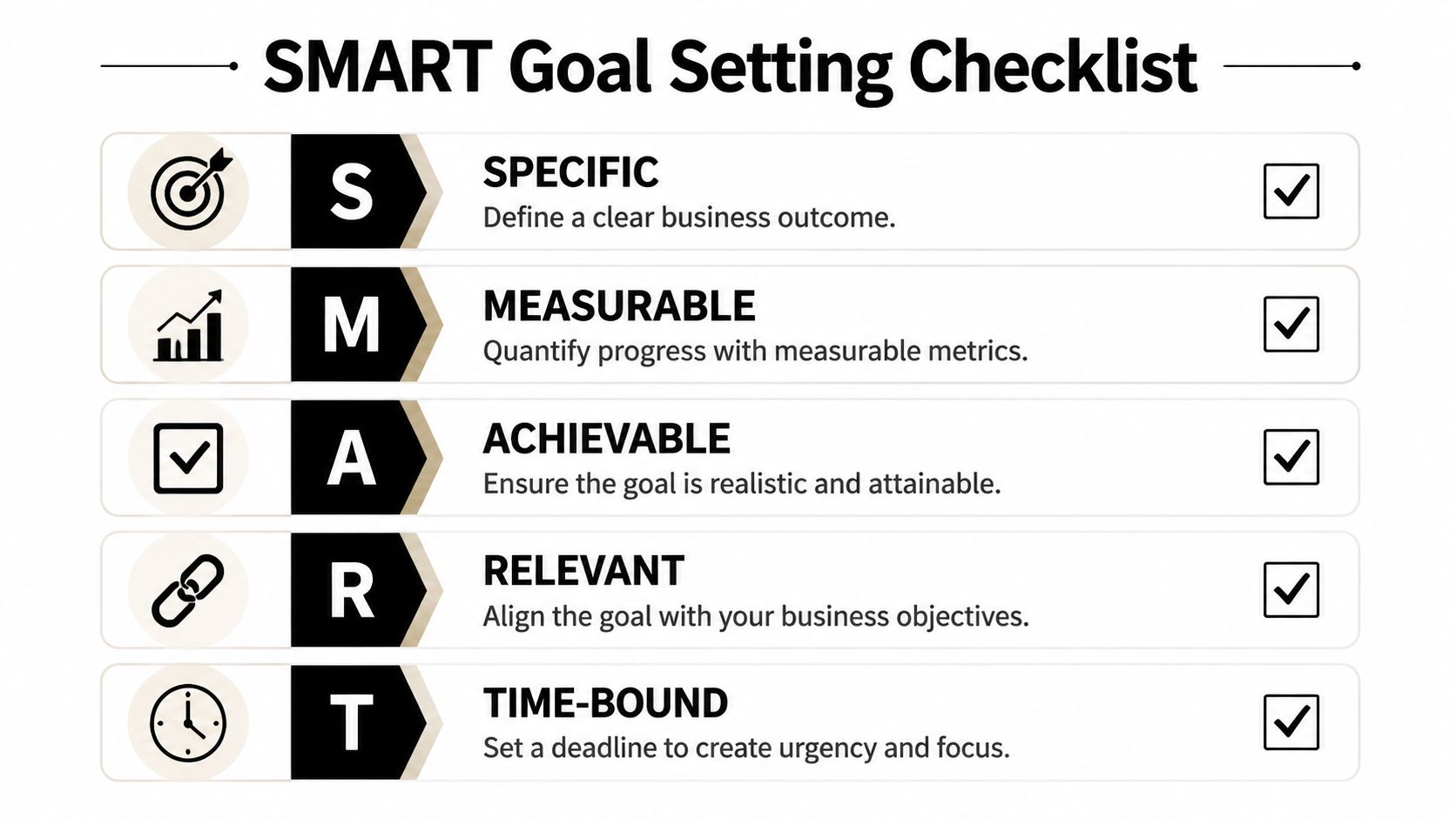
Use SMART goals so the work stays measurable and the team knows what to stop doing. A service business might aim to generate discovery calls from educational posts. An e-commerce brand might push product clicks from short-form demos. A B2B SaaS team might use social to drive qualified sign-ups from a webinar clip or product walkthrough.
A simple goal framework looks like this:
- Specific: Book more qualified consult calls from LinkedIn content.
- Measurable: Track click-throughs and completed form fills.
- Achievable: Focus on one service line, not every offer you sell.
- Relevant: Tie posts to pipeline, not vanity engagement.
- Time-bound: Review the goal at the end of the month.
Research the audience where they already spend time
Audience research should answer three questions: where people spend time, what they respond to, and what they skip. That is more useful than broad demographic guesses. Platform use still varies by age group, so channel choice and content tone need to match the people you are trying to reach. social media statistics for small businesses
For a clean competitor audit, review three accounts:
- One direct competitor: Look at what formats they post most often.
- One aspirational brand: Note what gets shared, saved, or commented on.
- One weak account: Spot the gaps, thin bios, inconsistent visuals, poor captions, or no clear call to action.
If you need a practical persona template to organize that research, browse buyer persona templates and map the answers back to your content pillars. Keep the output tight, two or three measurable objectives, one target audience profile, and a clear note on what kind of content that audience consumes.
Choosing the Right Platforms for Your Business
The wrong platform mix is one of the fastest ways to burn out a small team. Every channel asks for different creative formats, different pacing, and different levels of community management. A shop owner posting everywhere usually ends up weak everywhere.
Use a simple decision rule. Pick the platform where your audience already spends time, where your content format fits naturally, and where your team can produce without grinding production to a halt. If you want a broader platform-selection framework, browse social media platform advice and then narrow it back to your own capacity.
Platform fit by business type
| Platform | Best For | Content Format | Weekly Cadence |
|---|---|---|---|
| B2B, consultants, SaaS | Text posts, carousels, clips from webinars or demos | 3 to 4 times per week | |
| Local brands, creators, visual products | Reels, Stories, carousels | 3 to 4 Reels per week plus daily Stories | |
| TikTok | Discovery-led offers, personality-driven brands | Short vertical video | 3 to 5 times per week |
| Local services, community-based businesses | Posts, video, group participation | 4 to 5 times per week | |
| YouTube | Educational brands, long-form trust building | Tutorials, interviews, explainers | Sustainable long-form cadence, then repurpose |
Those cadence benchmarks are useful, but they’re still only benchmarks. The key question is whether your team can keep up without posting sloppy work or missing engagement. A small business with limited time is usually better off mastering one or two channels than maintaining five half-active profiles. small-business social strategy guide
Choose for fit, not fear
LinkedIn makes sense when expertise drives the sale. Instagram fits products, visual storytelling, and behind-the-scenes proof. TikTok rewards speed, personality, and repeatable short video. Facebook still matters for local reach and community groups. YouTube becomes powerful when your audience needs depth and search-friendly educational content.
Don’t spread content across every platform just because the platform exists. Spread it where the audience and format already match.
The practical move is to choose one primary channel and one secondary channel, then earn the right to expand later. That keeps your small business from building a content machine it can’t feed.
Building Content Pillars and Repurposing Workflows
A content plan gets easier once you stop inventing ideas from scratch every day. Set 3 to 5 content pillars that match the business and the audience, then map each pillar to a format the team can produce quickly. For most small teams, that means a mix of short-form video, carousels, text posts, and Stories.
Define pillars that pull their weight
The best pillars are broad enough to generate a steady stream of posts, but specific enough to keep the feed coherent. A service business might use education, proof, process, and behind the scenes. A B2B SaaS team might use product education, customer wins, founder insight, and industry commentary. A product brand might focus on use cases, testimonials, how-tos, and launch content.
If you want a fuller framework, read the content pillars guide and then translate it into your actual offers. Don’t build pillars that sound polished in a meeting and become impossible to sustain on a Tuesday afternoon.
Repurpose one strong asset into many posts
Repurposing is the biggest efficiency gain in the whole plan. One webinar, podcast, or tutorial can become multiple short clips, pull quotes, captioned reels, and a couple of text posts without asking the team to start over. That matters because people spend a lot of time on social platforms, and mobile-first, silent-friendly content is built for that attention pattern.
The cleanest workflow looks like this:
- Record one long-form source: A webinar, customer interview, training, or demo.
- Clip the strongest moments: Pull the clear answers, objections, and takeaways.
- Add captions: Silent viewing is normal, so captions are required.
- Resize and format: Match the platform and keep important text inside safe zones, where UI elements will not cover it.
- Schedule the batch: Queue the clips so the feed stays active.
That last point matters because captions and safe zones are where a lot of small businesses lose performance. A strong clip can still underperform if the hook text is buried under the app interface or the subtitles sit too low on the frame.
For teams that want one tool to handle clipping, auto-captions, and scheduling, quso.ai fits that workflow without changing the rest of the process. If you want examples of how a repurposed asset can be adapted across formats, browse headshot style guides and notice how the same visual asset can be used for different surfaces and contexts.
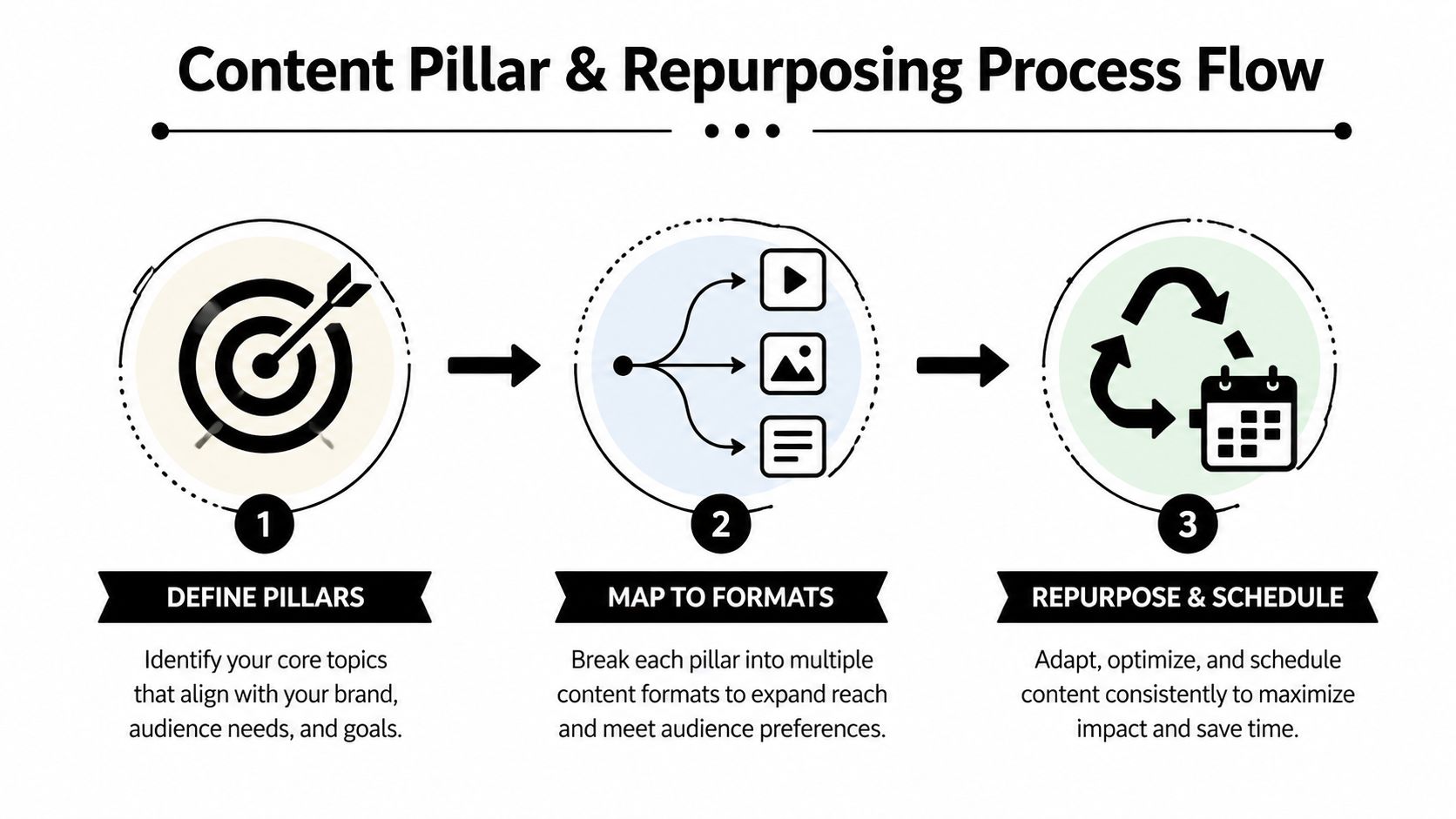
The goal is not to publish more random content. It is to build a content matrix that tells you what to post, where to post it, and what source asset it came from, so the work stays organized when the week gets messy.
Video Marketing for a Small Business: One Recording a Week
Most owner-operators do not have time to film every day. One recording a week is enough if it is the right kind. Rotate four formats: a walkthrough of the shop, kitchen, or job site; a customer question answered on camera; a product or service demo; and a before-and-after. Put the phone on a tripod, talk for 10 to 20 minutes, and stop. No script needed, and the rough edges read as real.
A recording that long usually holds more than one usable moment. Import the file, let an AI clips generator propose candidate clips, then review them yourself and keep the 2 to 4 that answer a question customers ask. Add captions, since most people watch with the sound off, and schedule the clips across the week. The review step is where the owner’s judgment matters: the software finds candidates, it does not know which one will make the phone ring. There is a walkthrough of this routine in how small businesses use quso.ai. The free plan covers about 75 minutes of video a month (75 credits) at 720p with a watermark and publishes to TikTok; paid plans start at $29/month for 1080p with no watermark, and the plans that include scheduling connect seven platforms.
Before anything goes out, check three things. Customer faces: if a client is visible, get their OK first. Prices: a clip that quotes a price keeps circulating after the price changes, so say “starting at” or leave the number out. Claims: “fastest in town” needs backing; “we usually turn it around in two days” is something you can stand behind.
Track what a small business can act on: saves and shares (people plan to come back or are recommending you), profile visits, and the calls, bookings, or walk-ins you can trace to a clip, even if that means asking new customers how they found you. Views on their own rarely change a decision.
Creating a Sustainable Posting Cadence and Schedule
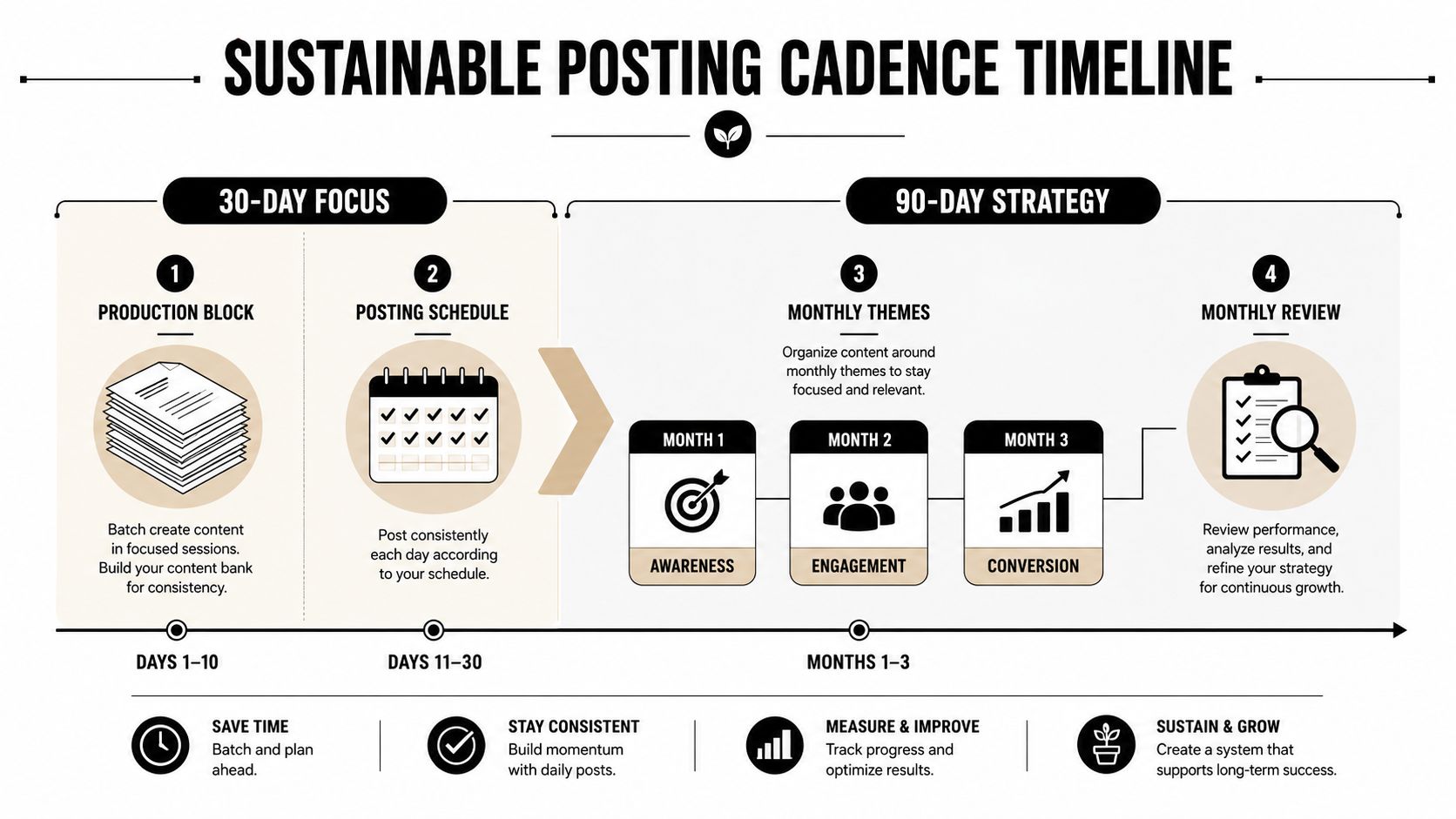
A sustainable cadence beats an ambitious calendar that collapses after two weeks. For most small businesses, the sweet spot is a 30-day plan for immediate execution and a 90-day plan for theme-level consistency. That gives you enough structure to stay visible without turning the account into a full-time job.
Build the week around batching and engagement
Operational discipline is where most plans win or lose. One industry guide notes that 43% of small business owners spend just 6 hours weekly on social media effectively, which is why batching content in dedicated blocks matters so much. step-by-step small-business strategy guide
Use a simple weekly rhythm:
- Monday, production block: Record clips, write captions, build carousels, and prepare Stories.
- Tuesday, scheduling block: Queue posts for the week and check formatting.
- Daily, engagement block: Spend a short window replying to comments, DMs, and relevant posts.
That rhythm works because it separates creative effort from community management. If you try to do both in the same scattered window every day, the work expands and your consistency drops.
Use the calendar to reduce decision fatigue
Your 30-day calendar should show the actual post types, not vague themes. Mark which pillars appear each week, which clips come from which long-form asset, and which days are reserved for lighter execution like Stories or text posts. The 90-day view should track campaign themes, launches, educational series, and proof points.
Scheduling rule: don’t post manually if the job can be queued cleanly in advance. Manual posting steals time from the part that actually moves accounts, content quality and engagement.
That’s where scheduling tools earn their keep. They keep the plan moving when the owner is in a meeting, on a job site, in a store, or handling customer support. If you want to reduce daily friction, use automation for publishing and keep human energy for comments, replies, and content that needs a live voice.
Measuring Performance and Optimizing Monthly
Measure the metrics that connect to business outcomes. Engagement rate, click-through rate, lead conversions, and cost per lead tell you far more than follower count or raw impressions by themselves. If content gets attention but does not move people toward a lead form, booking page, or checkout, the content needs work.
Run weekly checks, then make monthly decisions
Weekly reviews should answer one question, did the cadence hold? Check whether posts went out on time, whether comments got answered, and whether any format was ignored by the audience. Monthly reviews should go deeper and compare pillar performance, content type, and the quality of traffic or leads coming in.
A useful reporting template stays simple:
- Top-performing posts: Which clips, captions, or topics earned the strongest response.
- Weak performers: Which posts underperformed and why.
- Traffic and leads: Which posts drove clicks, forms, bookings, or purchases.
- Next action: Cut, revise, or repeat.
If you need a cleaner way to organize that review, track your social media analytics and use the report to decide what gets repeated next month. If your team needs a broader way to compare social scraping tools for pulling performance data into one place, do that before you spend time rebuilding reports by hand. The point is not a polished dashboard, it is faster decisions with less guesswork.
Cut what doesn’t earn its place
A monthly optimization loop keeps the plan from drifting into busywork. If a content pillar is not helping, trim it. If one format keeps winning, give it more space in the calendar. That is how a small business avoids posting everywhere and learning very little.
For teams that want a tighter production-to-publish workflow, scheduling and repurposing do the heavy lifting together. Repurpose one strong long-form video into short clips, captions, and text posts, then batch the edits and queue them in advance. That keeps the account active without turning social into a daily manual chore.
If your small business needs a system for turning long video into short clips, adding captions, and scheduling posts without rebuilding everything by hand, take a look at quso.ai. It is built for the repurposing and scheduling workflow this playbook depends on, and it gives small teams a practical way to stay consistent without living inside the posting process.
FAQ
How do I create a social media plan for a small business
Start with an audit, set one to three SMART goals, choose one or two platforms, define your content pillars, and build a posting cadence you can sustain. Then review results weekly and optimize monthly.
What platforms should a small business use for social media
Use the platforms where your customers already spend time and where your content format fits the channel. Most small teams do better with one primary platform and one secondary platform than with a presence everywhere.
How often should a small business post on social media
A common benchmark is 3 to 5 posts per week, with platform-specific cadence depending on the channel and the team’s capacity. The best answer is the cadence you can keep consistent without lowering quality.
What content should a small business post
Use content pillars that support education, proof, behind the scenes, customer stories, and product or service value. Repurpose one strong long-form asset into multiple clips, captions, and text posts so you’re not starting from scratch.
How do you measure whether social media is working for a small business
Track engagement rate, click-through rate, lead conversions, and cost per lead. Ignore follower count unless it helps explain a real business outcome.





