B2B Video Marketing Guide for 2026
You’ve recorded the webinar, published the announcement, and watched the post disappear from the feed. Meanwhile, the strongest answer from the Q&A is still buried in a 45-minute file. B2B video marketing works better when that recording becomes a planned sequence of useful assets, not a one-time post.
The practical model is simple: record one strong source asset, then adapt it for awareness, consideration, and decision-stage buyers. Match the clip’s length, format, captions, and distribution channel to the question the buyer is asking.
Table of Contents
- What B2B Video Marketing Means in 2026
- Matching Video Format to the Buyer Journey
- The Four B2B Video Formats That Carry the Weight
- Repurposing One Recording Into a Full Clip Library
- Auto-Captions as a Performance Lever, Not an Afterthought
- Sequencing Clips Across the Lead-Nurture Workflow
- Platform Safe Zones and the Caption Sizing Mistake
- The Weekly Operator Workflow and FAQ
What B2B Video Marketing Means in 2026
Your team records a strong webinar, posts one announcement, and then leaves the best answers buried in the full file. B2B video marketing turns that source recording into connected assets that help a defined account list move from initial interest to a sales conversation.
The operating model is simple: one well-recorded source asset can feed an entire quarter of nurture clips, social posts, landing-page videos, and email content. Use a webinar, founder demo, customer interview, or expert discussion as the foundation. Then choose each format and runtime according to the buyer’s stage and question, rather than the production team’s preference.
A common failure is treating every video as a separate creative project. The team spends time producing an asset, posts it once, and moves on. The result is a folder of isolated videos with no clear relationship between awareness, evaluation, and pipeline.
The shift from campaign asset to content system
B2B video now has a regular place in many content budgets. An industry roundup reported that 87% of B2B marketers use video in their content strategy, while 84% of B2B content marketers use video and 69% expected to increase video investment in 2024. The same source reported that 88% of B2B buyers had watched videos to learn about a company’s products or services in the previous three months, with product reviews and product demos each named by 39% of buyers as the videos they watched most recently. See the B2B video marketing statistics roundup for the underlying figures.
That behavior changes the weekly job. Buying committees research before contacting vendors, short clips can carry a specific answer further than a trailer, and AI-assisted captioning makes it practical to turn one recording into a repeatable clip library.
Video also supports broader discoverability work, helping teams boost AI visibility for B2B content through structured, searchable assets. Before publishing, map each clip to its buyer stage, destination, caption, and call to action.
Matching Video Format to the Buyer Journey
There’s no universally correct B2B video length. A 20-second problem clip and a 12-minute customer story can both be effective, but they answer different questions for different buyers.
At the awareness stage, use 15 to 45-second vertical thought-leadership clips pulled from a longer talk. The viewer may not know your company, so the clip needs one clear point, a fast hook, and almost no setup. Shorter content is easier to complete when the audience has made no commitment.
At consideration, shift to 60 to 90-second product demo snippets. Don’t produce a feature tour that lists everything. Show one workflow before and after the product, because the buyer is asking, “What changes for my team?” A focused comparison gives the viewer a reason to continue toward a product page or deeper demo.
Decision-stage buyers need more context. Use 8 to 12-minute case study or webinar recordings when the prospect has self-selected and wants evidence, implementation detail, and objection handling. A longer asset can work here because the viewer’s intent is stronger.
Use benchmarks as guardrails, not commandments
Available benchmarks reinforce the importance of matching runtime to intent. Videos under one minute achieved a 65% completion rate, while videos over 20 minutes dropped to 20%, according to Komet Media’s B2B video content statistics. Wistia’s 2022 report recorded average engagement of 50% for videos under one minute, 48% for one to three minutes, 49% for three to five minutes, 38% for five to 30 minutes, 25% for 30 to 60 minutes, and 15% for videos over 60 minutes in its dataset. Those figures appear in Wistia’s State of Video Report.
The mistake is putting a 45-minute webinar in front of cold prospects or spending heavily on a 90-second brand film when a 20-second insight would earn more initial attention. Let the buying question determine the production slate.
The Four B2B Video Formats That Carry the Weight
A reliable B2B library usually starts with four formats. Each one earns its recording slot because it can produce several useful cuts without requiring a separate shoot for every channel.
Demos
Record a 20 to 30-minute unscripted walkthrough around one real customer use case. Keep the founder or product manager on camera for the opening 90 seconds, then capture the screen and voice for the working demonstration. Cut problem, solution, and result arcs into 60 to 90-second clips, plus one longer three-minute version for a demo request page.
Remove the throat-clearing, broad company introduction, and setup that doesn’t change the buyer’s understanding.
Webinars
Record the full 45-minute session, including Q&A. The questions often contain the strongest objections, so transcribe the discussion first and pull five short answer clips before editing the headline presentation. Those answers can support sales follow-up, retargeting, and consideration-stage posts.
Case studies
Film a 20-minute interview with one named customer and ask the same five questions each time. Create a 90-second results reel, a two-minute story arc, and a four-minute detailed version for sales follow-up. Keep the customer’s language intact, but remove repetitive answers and generic praise.
Thought leadership
Record a 10-minute talking-head riff on a contrarian industry point. Cut six to eight vertical clips, each built around one quotable line. The strongest clips usually begin with the claim, not the speaker’s biography.
Recording rule: Capture enough context to make editing possible, but don’t confuse raw duration with finished-asset length.
Repurposing One Recording Into a Full Clip Library
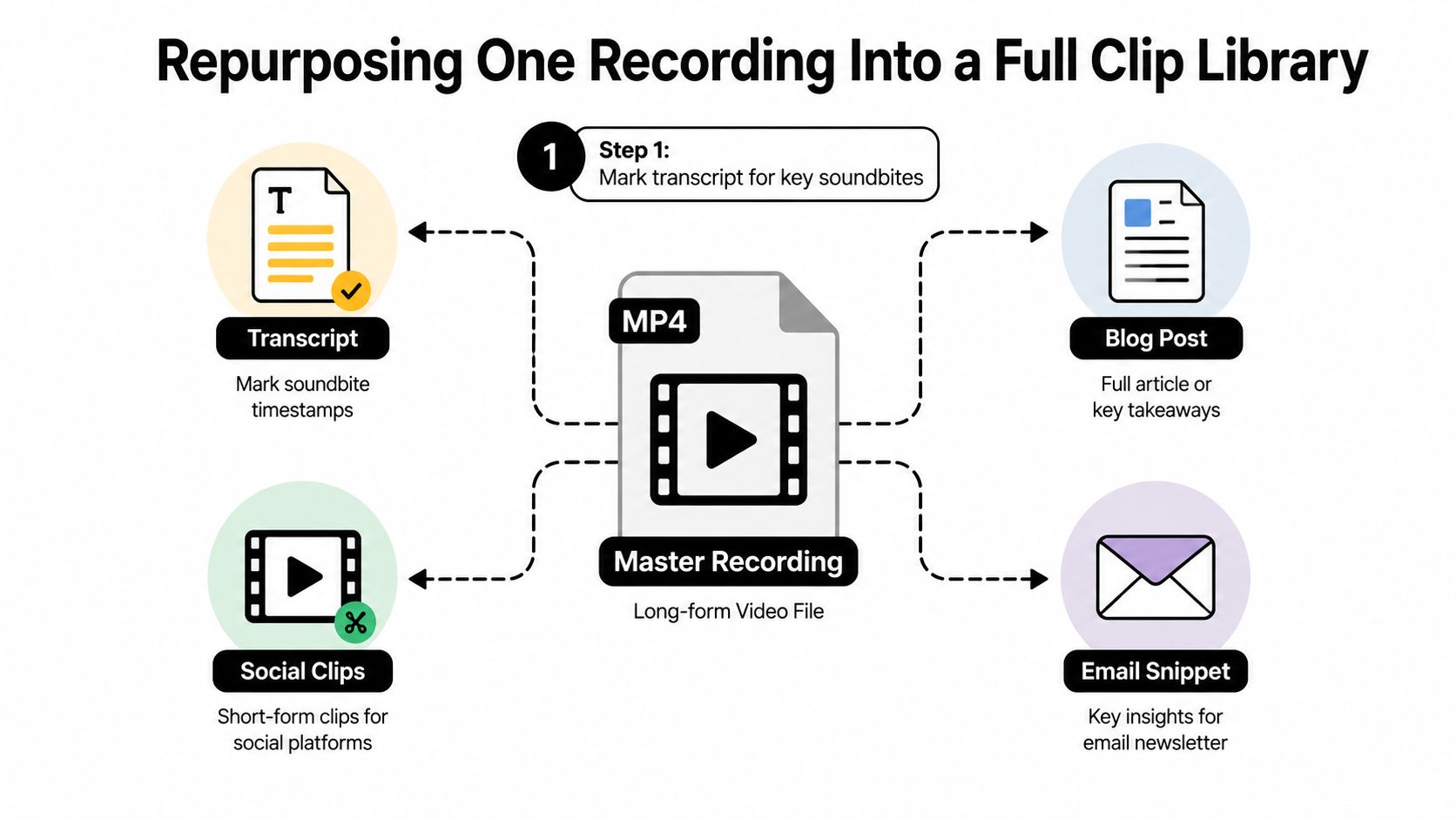
Treat the long recording as raw material, not the finished asset. The workflow starts with the transcript, because timestamps let you find useful moments without scrubbing through the entire file repeatedly.
- Mark the transcript. Flag moments that solve one problem or make one claim. Look for a feature demonstration, a customer explanation, a host rebuttal, or a clear call to action.
- Pull hard-cut clips. Build 30 to 90-second segments around one idea. Remove introductions, transitions, pauses, and throat-clearing.
- Assign the buyer stage. Tag each clip as awareness, consideration, or decision based on the question it answers.
- Create channel versions. Use 9:16 portrait for LinkedIn and Shorts, 1:1 for feed posts, and a tightly cropped 16:9 version for website placements or YouTube pre-roll.
- Check framing and captions. Reframe the speaker or product screen, then verify the words against the transcript.
- Schedule the sequence. Put each version into a publishing plan rather than releasing every cut on the same day.
- Log the asset. Record the stage, channel, CTA, owner, approval status, and source timestamp.
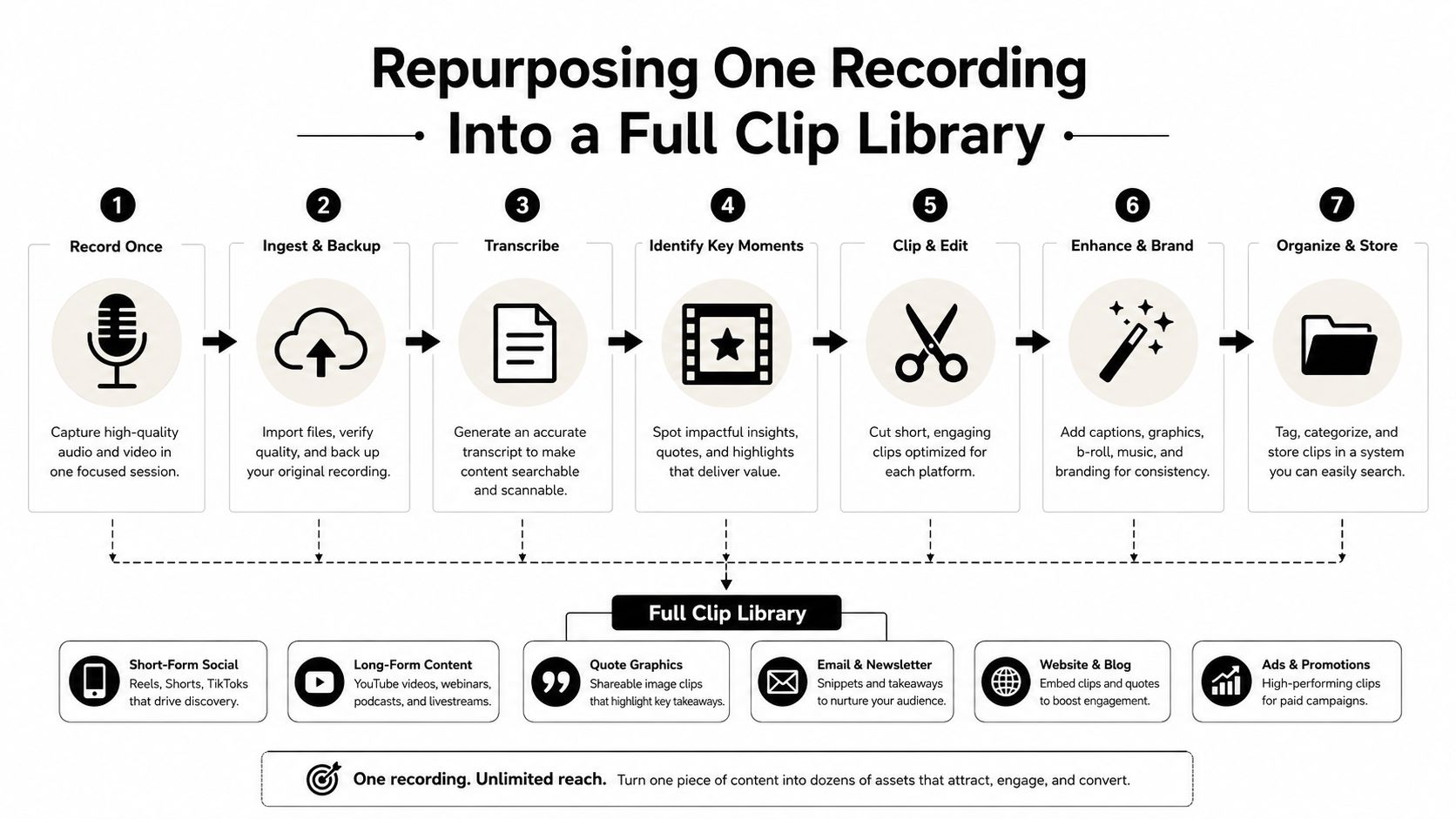
A practical target is a steady library from one weekly recording session, without adding separate shoot days. The repurposing process described in this content repurposing strategy keeps the source recording connected to every output.
For teams using quso.ai, the platform can identify candidate segments, create vertical reframing, generate caption-ready versions, and prepare channel-specific exports. The human review still matters. Confirm names, product terms, claims, screen changes, and CTAs before anything goes live.
Auto-Captions as a Performance Lever, Not an Afterthought
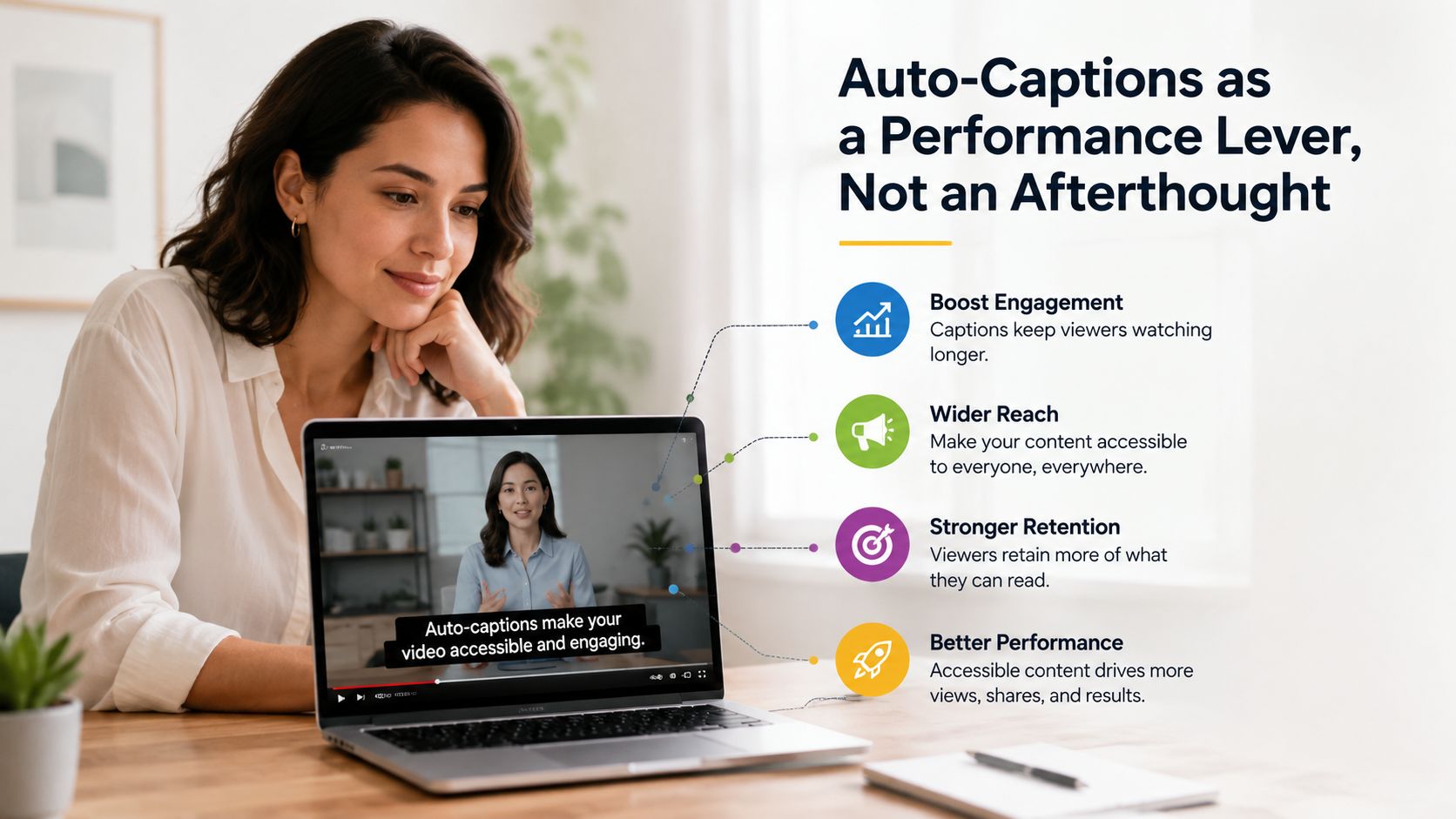
Captions aren’t merely compliance work. They help a viewer understand the hook while scrolling, and they add a second reading layer that reinforces the spoken message.
An A/B test reported 16% higher reach, 17% higher reactions, nearly 15% lower shares when captions were removed, and a 26% drop in CTA clicks without captions. The figures are documented in AI Media’s engagement and retention whitepaper.
That makes captioning part of the export workflow, not a final task handed to a designer after the creative work is finished. Generate captions early, then have a human check terminology, punctuation, names, and timing.
Caption decisions that affect clarity
- Burned-in social captions: Use them where silent viewing is common and platform-rendered captions may vary.
- SRT files for hosted video: Keep a clean caption file for website and YouTube publishing, where editable text supports accessibility and maintenance.
- Two-line maximum: Keep the viewer’s attention on the speaker, product, or evidence rather than a dense text block.
- High contrast: Place text against a stable background and avoid covering faces, interfaces, or important lower thirds.
For a practical implementation walkthrough, use this guide on how to add captions to Instagram Reels. Captions should support the buyer’s understanding, not compete with the content.
Sequencing Clips Across the Lead-Nurture Workflow
A clip without a sequence is a content calendar entry. A clip with a sequence gives the buyer another useful answer at the right moment.
Start with the cold prospect. Publish a problem-focused clip around 30 seconds long, with a CTA to a newsletter or educational resource. Once the viewer understands the problem, follow with a roughly 60-second demo clip that shows a workflow rather than reciting features.
Late-stage prospects need proof. Use a 90-second case-study clip with a booking link, implementation detail, or customer outcome. The CTA should match the viewer’s readiness, not repeat the same generic “learn more” instruction on every asset.
A workable nurture pattern
- First touch: Thought leadership that names the operational problem.
- Second touch: A demo clip that shows how the workflow changes.
- Third touch: Customer proof that addresses risk or credibility.
- Fourth touch: A deeper webinar excerpt or landing-page video for self-directed evaluation.
Build a six-week schedule that reaches each segment twice, using different angles rather than reposting the same cut. Stagger distribution across LinkedIn, YouTube Shorts, and email so the buyer can encounter the idea on more than one surface.
The sequence should feel coherent without becoming repetitive. A problem clip can introduce the issue, while a later demo shows the mechanism and a case study answers the trust question.
Platform Safe Zones and the Caption Sizing Mistake
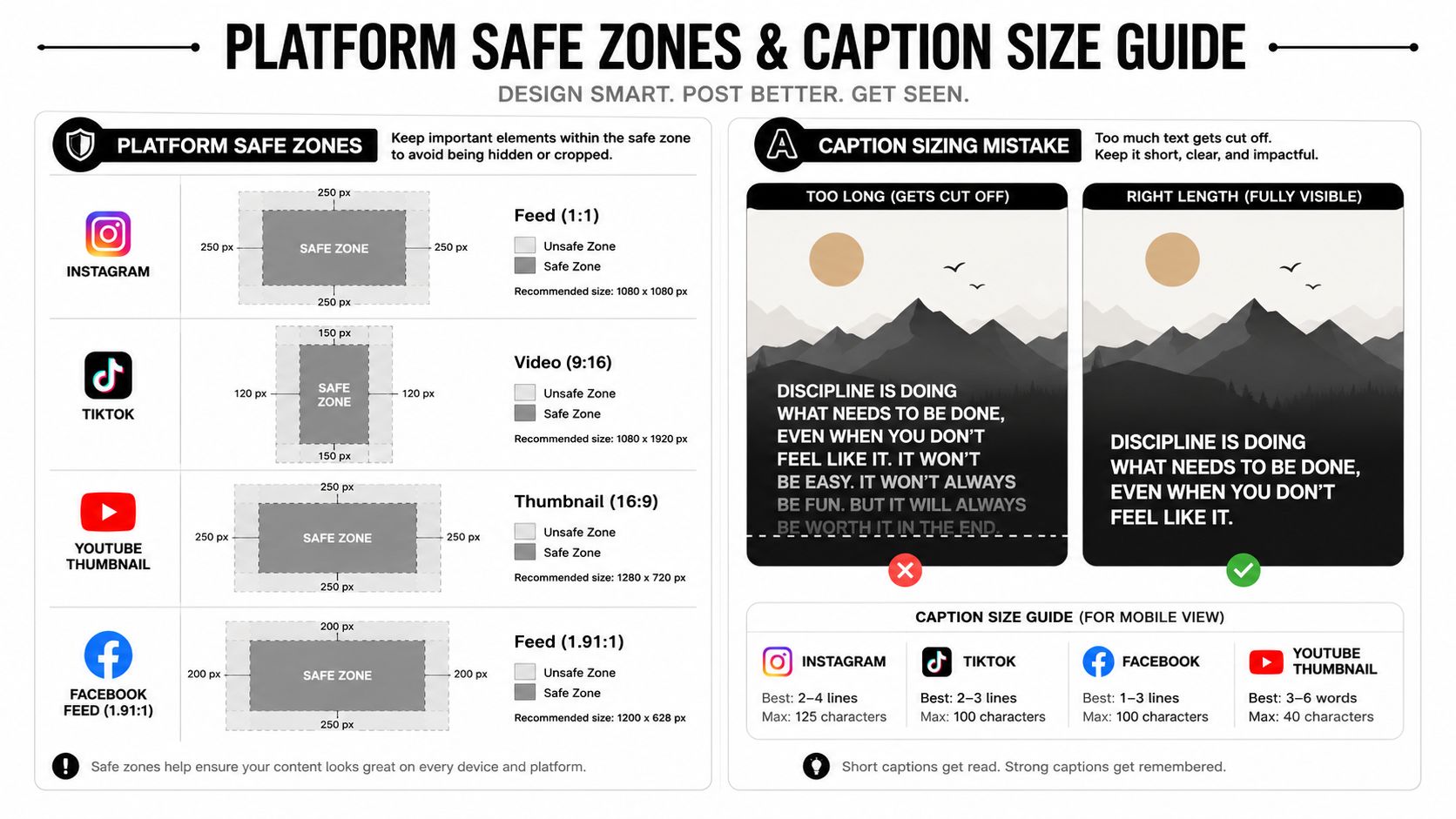
Every clip needs a master file and platform-specific exports. Instagram Reels, TikTok, LinkedIn video, YouTube Shorts, and Stories use different interface overlays, crops, and thumbnail behavior, so resizing one file and publishing it everywhere creates avoidable problems.
Build a 9:16 1080×1920 source with the speaker’s face, product screen, and essential text inside a central safe zone. Keep separate 1:1 and 16:9 versions for LinkedIn feed placements and landing pages. Check every export on a physical phone, because controls and crop issues are easier to spot there than in a desktop preview.
The checks that prevent bad exports
- Protect the lower edge: Leave padding for platform controls and descriptions.
- Keep lines short: Burned-in captions should generally stay under 42 characters per line.
- Protect faces and interfaces: Move captions when they obscure the speaker, product UI, or key visual evidence.
- Review crop previews: Verify line breaks, contrast, reading speed, and CTA placement before scheduling.
- Maintain a change log: Record which export belongs to each channel so an outdated ratio doesn’t return to the queue.
If paid distribution is part of the plan, an attribution platform such as Cometly can help connect channel activity with downstream measurement. The creative still needs correct framing first. Attribution can’t repair a caption that obscures the product screen.
For reference, keep the relevant Instagram Reel dimensions close to the export checklist.
The Weekly Operator Workflow and FAQ
Run video as a weekly operating system, not a monthly scramble. Begin by reviewing the previous release across watch time, completion rate, click-through rate, qualified responses, and influenced pipeline. The point isn’t to reward the clip with the most views. It’s to identify which hook attracted the right kind of attention.
Select the next source recording and mark five to eight moments with clear buyer-stage intent. Use the repurposing workflow to find the moments, create channel variants, add captions, and prepare the schedule. A human reviewer should verify terminology, names, claims, framing, and CTAs before approval.
The operator checklist
- Review the last release: Compare attention and qualified response against the intended stage.
- Choose one source: Start with a webinar, demo, interview, or expert recording that contains real answers.
- Mark the moments: Select clips that solve a single problem or prove a specific point.
- Prepare variants: Create the appropriate aspect ratio, caption treatment, thumbnail, and CTA.
- Schedule the sequence: Lead with education, follow with demonstration, then introduce proof.
- Capture attribution: Use UTMs and keep engagement tied to the destination and buyer stage.
- Feed learning forward: Put the strongest hook into next week’s recording brief.
Maintain a versioned content log with the asset owner, destination, approval status, publish date, source timestamp, and CTA. The operating rule is simple: repurpose from a strong source, validate every generated cut, and judge the system by qualified engagement and pipeline, not volume alone.
Frequently asked questions
What is B2B video marketing?
It’s the planned use of video to educate, influence, and support business buyers across the buying journey. Effective programs connect source recordings to specific stages, channels, CTAs, and sales outcomes.
What video format works best for B2B?
The best format depends on intent. Short vertical thought-leadership clips suit awareness, focused demos suit consideration, and deeper case studies or webinar excerpts suit decision-stage evaluation.
How long should a B2B marketing video be?
There isn’t one universal answer. Use short clips when the viewer is unfamiliar with your company, and longer recordings when a self-selected buyer needs evidence, detail, or objection handling.
Should B2B videos include captions?
Yes. Captions support silent viewing, accessibility, comprehension, and CTA clarity. Generate them as part of production, then review accuracy and placement before publishing.
How do you repurpose a B2B webinar?
Transcribe it, mark timestamps for useful answers, cut each segment around one idea, create platform-specific versions, add captions, tag each clip by buyer stage, and schedule the assets as a sequence.
Use quso.ai to turn a strong webinar, demo, interview, or podcast into short-form clips, auto-captioned exports, and scheduled social posts. Start with one source recording this week, build the buyer-stage sequence, and give every useful answer a second life.