Instagram Reel Dimensions: The Complete 2026 Guide
The correct Instagram Reel dimensions are 1080 x 1920 pixels, a full-screen vertical video with a 9:16 aspect ratio. Getting this right is the most critical technical step for your Reel to perform. If your video doesn't match Instagram's native format, the platform will automatically compress, crop, or add black bars, hurting both viewer experience and your reach.
Instagram Reels Technical Specifications Cheat Sheet 2026
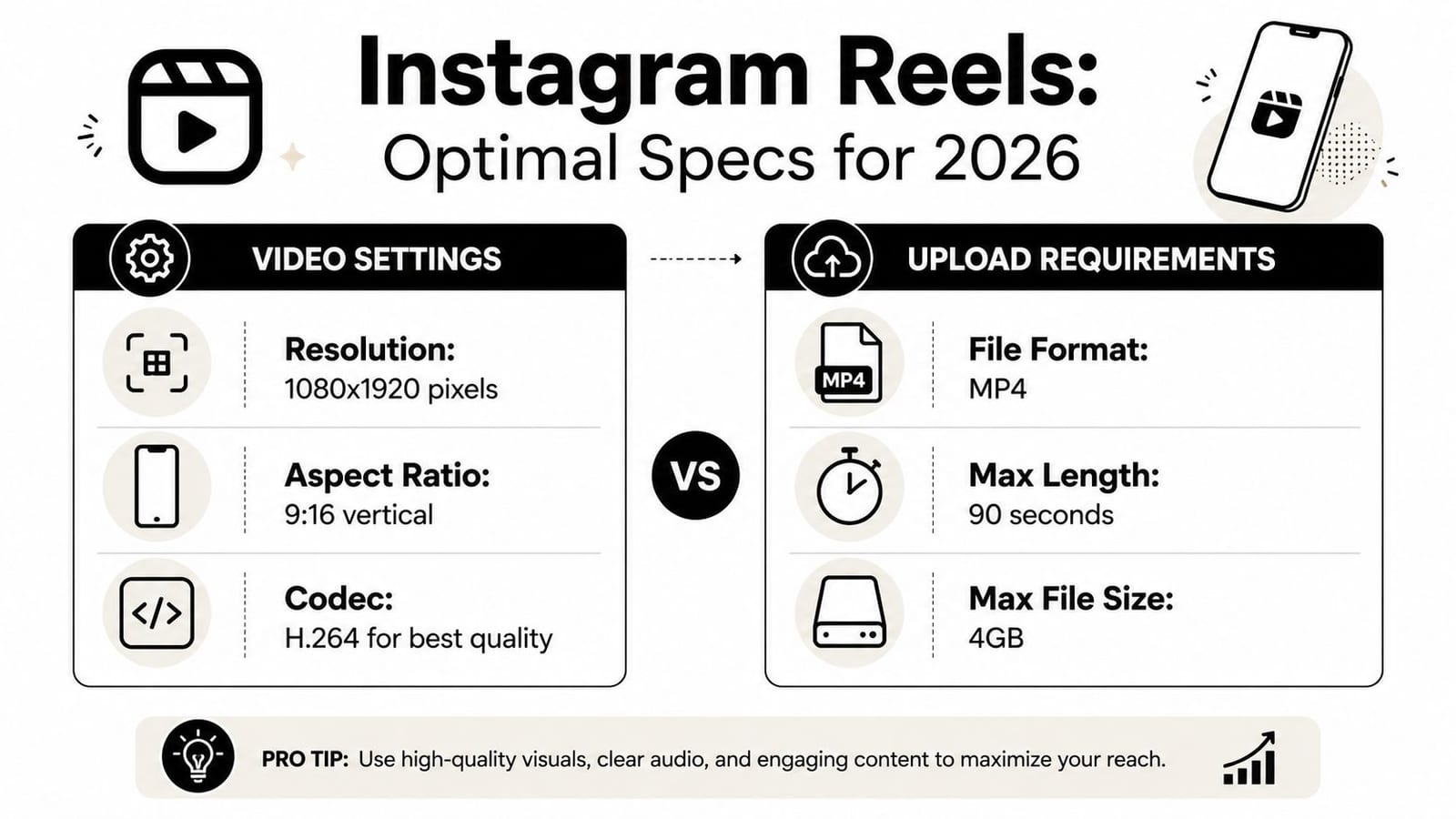
For a quick reference, here are the exact specs for uploading high-quality Reels:
| Specification | Requirement |
|---|---|
| Dimensions | 1080 x 1920 pixels |
| Aspect Ratio | 9:16 (vertical video) |
| File Format | MP4 (with H.264 codec) |
| Frame Rate | 24-60 FPS (30 FPS recommended) |
| Max Length | 90 seconds |
| Max File Size | 4GB |
Table of Contents
- Instagram Reels Technical Specifications Cheat Sheet 2026
- Why Off-Spec Reels Kill Your Reach
- The Anatomy of a Reel Safe Zone
- What are the Instagram Reel dimensions?
- What is the difference between Reel and Story dimensions?
- What is the Instagram Reel cover size?
- Should I film Reels in 4K?
- How do I fix a Reel with black borders?
Why Off-Spec Reels Kill Your Reach
Getting your dimensions wrong is more than a small technical slip-up. To the Instagram algorithm, it’s a red flag that signals low-quality content, and that can kill your reach.
Uploading a video that isn’t 1080x1920 pixels forces Instagram to either awkwardly crop it or slap ugly black bars on the sides. This creates a jarring experience for the viewer, and in the world of fast-scrolling, that’s an instant reason to swipe away. Our analysis of over 170,000 posts confirms that this initial drop in watch time and completion rates signals to the algorithm not to push the content.
The most damaging mistake, however, is placing crucial information like your hook or CTA where the Instagram UI will cover it. If your opening line is hidden behind the username or your call-to-action is blocked by the share button, your message is lost. Viewers will not stick around to figure out a poorly formatted Reel, and that immediate drop-off tells the algorithm not to show your content to a wider audience.
Navigating Instagram Reel Safe Zones to Protect Your Content
Getting your Reel to 1080x1920 pixels is just the first step. The real mistake operators make is forgetting that Instagram’s interface will cover parts of their video. If your hook, captions, or call to action ends up hidden behind a username or a button, you’ve lost your viewer.
Think of your full 9:16 video frame as a canvas with built-in “no-go” zones at the top, bottom, and right side. This is where Instagram overlays profile info, the song title, your caption, and all the engagement buttons.
The Anatomy of a Reel Safe Zone
To make sure every crucial element is visible, keep your key content within the central safe area.
- Top: Leave approximately 250 pixels of clearance at the top.
- Bottom: Leave approximately 480 pixels of clearance at the bottom for the caption, audio details, and buttons.
- Center Safe Zone: This leaves a central canvas of roughly 1080 x 1190 pixels. This is your sweet spot—anything you put here is guaranteed to be seen clearly.
Ignoring these safe zones hurts your reach. When a viewer can’t read your hook, they scroll away instantly. That drop-off signals to the algorithm that your content isn’t engaging, and your video’s visibility plummets.
How Instagram Crops Reels for the Feed and Profile Grid
Your Reel doesn't just show up in the full-screen viewer. It appears in multiple places across the app, and Instagram automatically crops it to fit each one. If you don't account for this, you'll end up with awkwardly framed videos and cut-off text.
While your original video is a full 9:16 (1080x1920 pixels), it gets reframed for two other critical spots:
- In the Main Feed: As users scroll their home feed, your Reel is cropped to a 4:5 aspect ratio. This means they're only seeing the center of your video, at 1080x1350 pixels.
- On Your Profile Grid: When someone visits your profile, your Reel’s cover photo is cropped even further into a 1:1 square, measuring 1080x1080 pixels.
Visualizing the Different Reel Crops
This automatic cropping means any important visuals or text placed outside the very center of your video will get cut off. The key is to compose your shots for the smallest final placement—the 1:1 profile grid—while still making sure the 4:5 and full 9:16 versions look balanced.
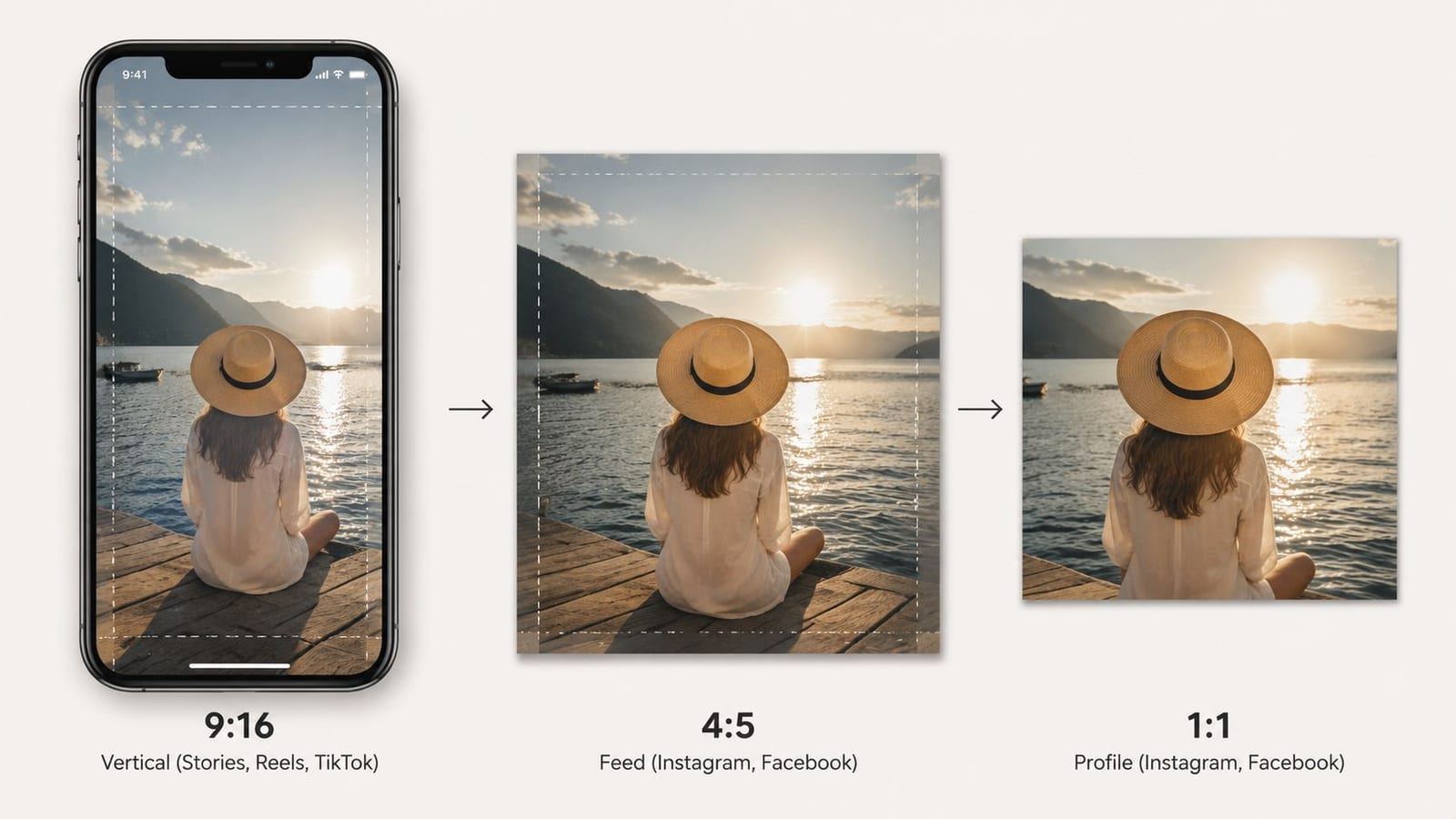
The biggest mistake is designing only for the full 9:16 frame. Always compose your shots and place your graphics as if you’re designing for a square. This ensures your key message is never accidentally hidden when a user sees your Reel on their feed or your profile grid.
For a deeper dive into optimizing for the grid, our guide to Instagram square dimensions offers more detailed templates and best practices.
How to Export Your Video with the Right Instagram Reel Dimensions
The best way to ensure perfect dimensions is to set up your project correctly from the start.
- Create a 9:16 Project: In your video editor, create a new sequence or project with a custom resolution of 1080x1920 pixels.
- Set Frame Rate to 30 FPS: While Instagram accepts 24-60 FPS, 30 FPS is the standard and provides a good balance between smoothness and file size.
- Position Content in Safe Zones: As you edit, keep the safe zone overlay in mind. Place all text, important graphics, and subject framing within the center-safe area.
- Export as MP4: When exporting, choose the H.264 codec and an MP4 container. Keep the resolution at 1080x1920 and ensure the file size is under 4GB.
For a full breakdown of specs across the platform, see this resource on 2026 Instagram video dimensions.
Optimizing Your Reel Cover for Maximum Clicks
Your Reel cover is the tiny billboard fighting for attention on your profile grid and the Explore page. A great cover gets the click; a poorly designed one gets scrolled past.
While you upload a full 1080x1920 pixel vertical image, design it with the grid crop in mind. Instagram will cut your cover down to a 1:1 square (1080x1080 pixels) on your profile. Anything outside that central square will be chopped off.
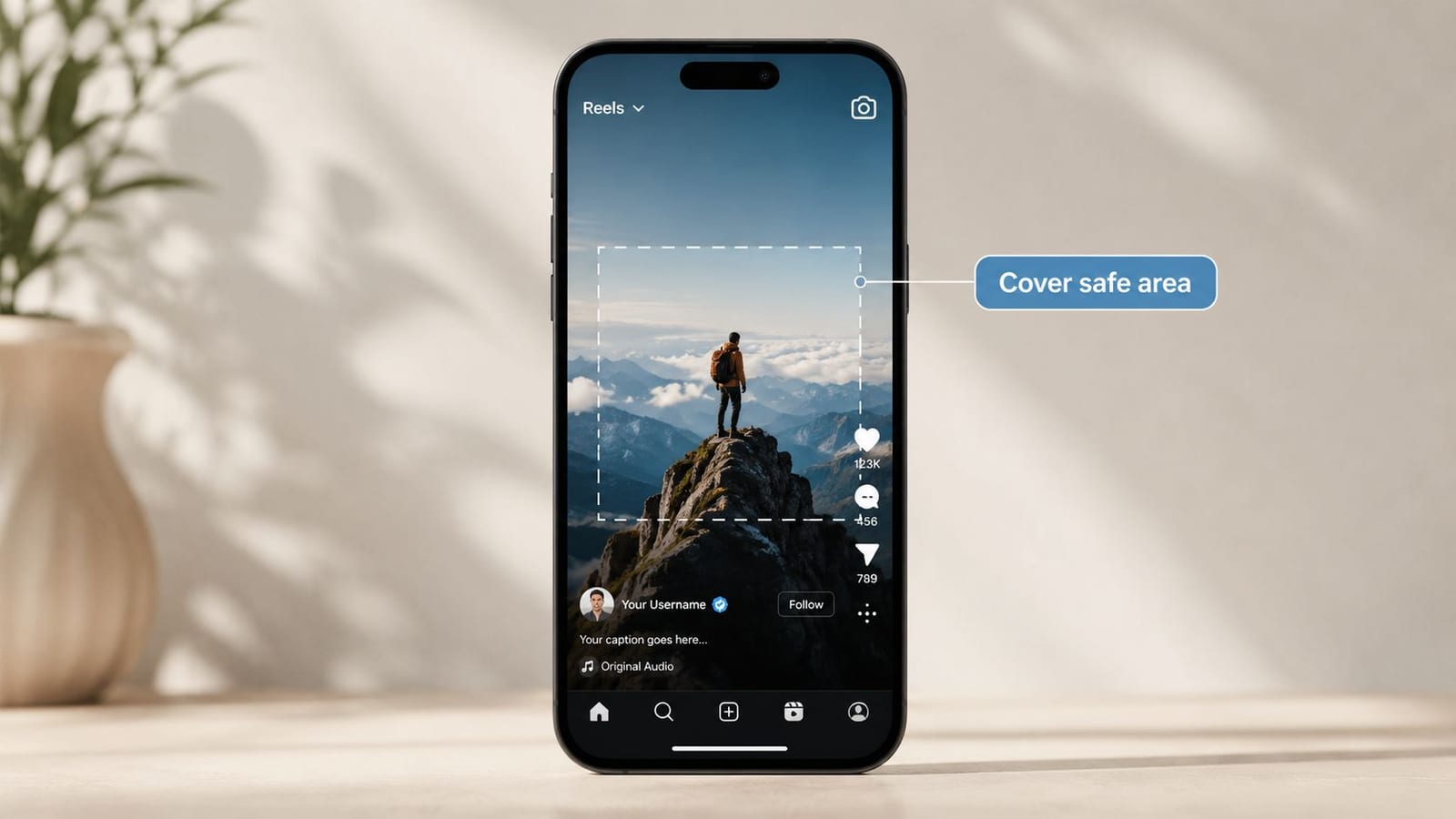
Best Practices for Clickable Reel Covers
- Center Your Title: Place your main headline and any critical design elements squarely in the middle 1080x1080 pixel safe area.
- Use High Contrast: Your cover will appear tiny. Bold fonts and high-contrast colors make a title readable at a glance.
- Stay On-Brand: Stick to your brand fonts and colors to build recognition and a cohesive profile grid.
- Pick a Compelling Frame: Grab a clear, engaging still frame from your video. Avoid blurry or chaotic moments that obscure your text.
Manually converting horizontal video and designing covers can be a huge bottleneck. An AI-powered tool like quso.ai automatically reframes landscape clips into the perfect Instagram Reel dimensions, identifies viral-worthy moments, adds auto-captions, and keeps everything in the UI-safe zones. It's a faster way to repurpose long-form content like podcasts and webinars into dozens of social-ready clips.
By leaning on automation, you can skip the tedious editing and focus on creating great content. To learn more about creating winning content, check out our guide on Instagram Reels best practices.
Frequently Asked Questions About Instagram Reel Dimensions
Here are straightforward answers to the most common questions about getting Reel dimensions right.
What are the Instagram Reel dimensions?
The official Instagram Reel dimensions are 1080 pixels wide by 1920 pixels tall, which is an aspect ratio of 9:16. This ensures your video fills the entire screen on mobile devices without black bars or awkward cropping.
What is the difference between Reel and Story dimensions?
While both Instagram Reels and Stories use the same fullscreen 9:16 aspect ratio (1080x1920 pixels), the user interface is different. Reels have more persistent on-screen elements (username, caption, audio, engagement buttons) covering the edges, making it critical to keep important text and visuals within the central "safe zone" to ensure they are visible.
What is the Instagram Reel cover size?
The Instagram Reel cover photo should be uploaded at 1080x1920 pixels. However, on your profile grid, Instagram will crop it to a 1:1 square (1080x1080 pixels). You must design your cover so that all essential text and imagery are within that central square.
Should I film Reels in 4K?
You can film in 4K, but Instagram will compress your final video down to 1080p. Filming in 4K can sometimes result in a slightly sharper video after compression, but it creates much larger files and is not a requirement for a high-quality Reel. Sticking to 1080p is more efficient for most creators.
How do I fix a Reel with black borders?
Black borders mean your video was not uploaded with the correct 9:16 aspect ratio. To fix this, you must re-edit the video, setting the project or sequence dimensions to 1080x1920 pixels, and then re-upload it. Using a 9:16 project from the start prevents this issue.