YouTube to Shorts: How to Repurpose Long Videos Fast
You’ve got a library of webinars, interviews, podcasts, and tutorials, but turning each long video into useful Shorts still feels like a production project. The hard part isn’t cutting a vertical clip. It’s choosing a moment that works without context, keeping faces and captions out of the interface, and publishing often enough that the clips support your main channel instead of competing with it. A disciplined YouTube to Shorts workflow solves those problems by treating selection, editing, captioning, and scheduling as one operating system.
YouTube Shorts first entered public beta in India on September 15, 2020, then expanded globally on July 12, 2021. By September 2022, Alphabet said Shorts generated more than 30 billion views per day, and the format had reached around 4 billion monthly users by 2025, according to the YouTube Shorts overview. That reach makes repurposing owned long-form content attractive, but reach alone doesn’t guarantee subscribers or long-form viewers.
Table of Contents
- The YouTube to Shorts Repurposing Workflow
- Where Time Disappears in Manual Clipping
- Formatting Specs and Safe Zones That Matter
- When Shorts Help or Hurt Your Long-Form Channel
- Scheduling and Publishing for Maximum Reach
- Frequently Asked Questions About Repurposing to Shorts
The YouTube to Shorts Repurposing Workflow
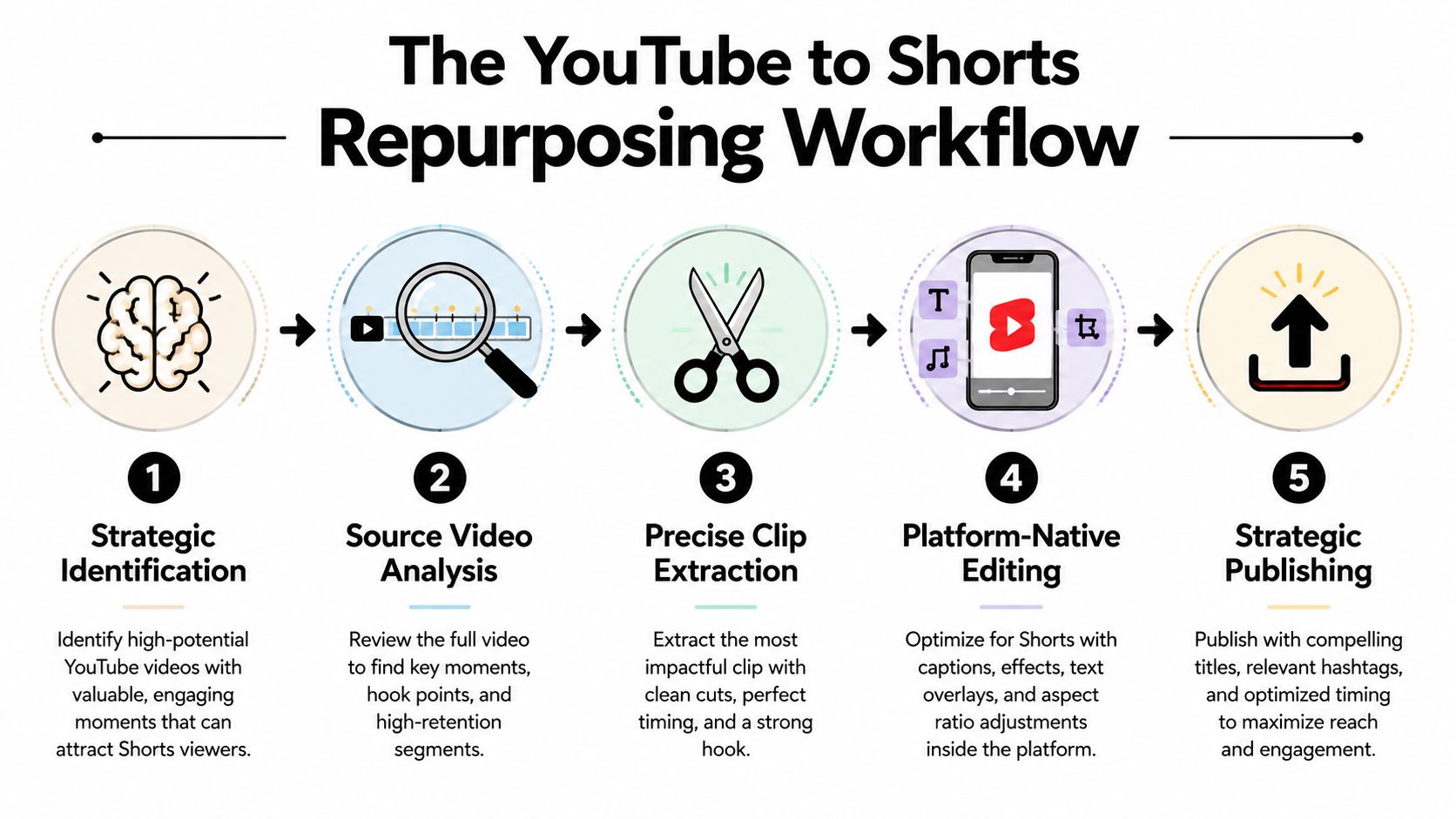
The reliable sequence is simple: analyze the source video, select self-contained moments, extract the clip, reframe it vertically, add captions, check the safe zone, and schedule staggered releases. Most wasted time comes from reversing that order. Creators open an editor, scrub aimlessly, and hope a “viral moment” appears.
Start with YouTube Analytics. Look for audience-retention timestamps, rewatch behavior, comments that identify a strong question, and sections where the speaker reaches a clear conclusion. A high-retention moment is only a candidate, though. The clip still needs a complete micro-story, such as a surprising answer, a mistake followed by a correction, a useful demonstration, or an unresolved question that points naturally to the full video.
Select before you edit
Review the source with a timestamp sheet rather than making rough cuts immediately. If you would rather start from suggestions, paste the video URL into a YouTube clip maker and grade its candidate clips against the checklist below instead of scrubbing the full recording. Record the start and end point, the central idea, whether the clip works without previous context, the likely audience, and the bridge back to the parent video. This approach aligns with broader guidance on automated content repurposing, where repeatable selection rules matter as much as the editing automation.
A practical checklist before export:
- Hook: The first frame creates a clear reason to keep watching.
- Context: The viewer understands the topic without seeing the full upload.
- Payoff: The clip delivers a useful answer, reveal, or tension point.
- Framing: The speaker, product, or demonstration stays visible in a vertical crop.
- Captions: The transcript is accurate, readable, and timed to speech.
- Bridge: The viewer has a specific reason to watch the original video.
YouTube’s current classification allows qualifying square or vertical uploads up to three minutes when they’re made after October 15, 2024, as explained in YouTube’s Shorts guidance. For repurposing, shorter clips are often easier to package and test, but the source moment should determine the final length. For a deeper operational walkthrough, see how to repurpose video content.
Where Time Disappears in Manual Clipping
A 30-second Short can consume an hour before export. The work sits in selection, review, formatting, and publishing decisions, not only in cutting footage. The provided workflow estimates put timestamp review at 20 to 30 minutes, rough clipping at 15 to 20 minutes, reframing at 10 to 20 minutes per clip, hook review at 5 minutes per clip, captions at 5 to 10 minutes per clip, metadata at 5 minutes per clip, and scheduling at 2 to 3 minutes per clip.
Those figures describe a practical workflow, not a guaranteed production time. Noisy recordings, multiple speakers, screen shares, and frequent camera changes add review cycles. A creator repurposing a back catalog also spends time checking whether a clip repeats an existing Short or gives away the strongest part of the parent video.
Primary bottlenecks
Timestamp review is the first filter. Weak selections stay weak after faster editing, so scan for a complete idea, a clear payoff, and enough context to stand alone. Rough clipping follows, then vertical reframing. A horizontal interview may require subject tracking, crop adjustments, and repeated checks whenever the speaker moves.
Captions add another quality-control pass. Auto-generated text reduces transcription work, but names, technical terms, product language, and overlapping speakers still need correction. Publishing then creates a separate task for every clip: titles, descriptions, links, upload settings, and scheduling all require review.
| Workflow step | Manual | With quso.ai |
|---|---|---|
| Timestamp review | 20–30 minutes | AI-assisted review, human approval |
| Rough clipping | 15–20 minutes | Suggested clip extraction |
| Reframing | 10–20 minutes per clip | Automated vertical reframing, human QA |
| Hook check | 5 minutes per clip | Human approval |
| Captions | 5–10 minutes per clip | Auto-captions, human correction |
| Title and description | 5 minutes per clip | Metadata drafting, human approval |
| Scheduling | 2–3 minutes per clip | Queued publishing workflow |
The table separates automation from judgment. quso.ai fits the repetitive part of this workflow by helping surface moments, reframe footage, draft captions, and prepare metadata, while the operator approves the edit and protects the connection to the long-form catalog.
For teams standardizing extraction across a back catalog, this guide to capturing YouTube moments for Reels treats clipping as a repeatable production task rather than a one-off edit.
Practical rule: Automate repetitive transformations, then spend human review on selection, context, brand fit, and the bridge back to the parent video.
Formatting Specs and Safe Zones That Matter
A repurposed clip can meet YouTube’s format requirements and still fail on a phone screen. A qualifying Short uses a vertical 9:16 or square 1:1 format. YouTube allows uploads up to three minutes for square or vertical videos uploaded after October 15, 2024, while older uploads retain their original status, according to YouTube’s help explanation. The rollout initially required creators to use the regular upload flow for longer Shorts because the Shorts camera did not support them immediately, as described in YouTube’s rollout note.
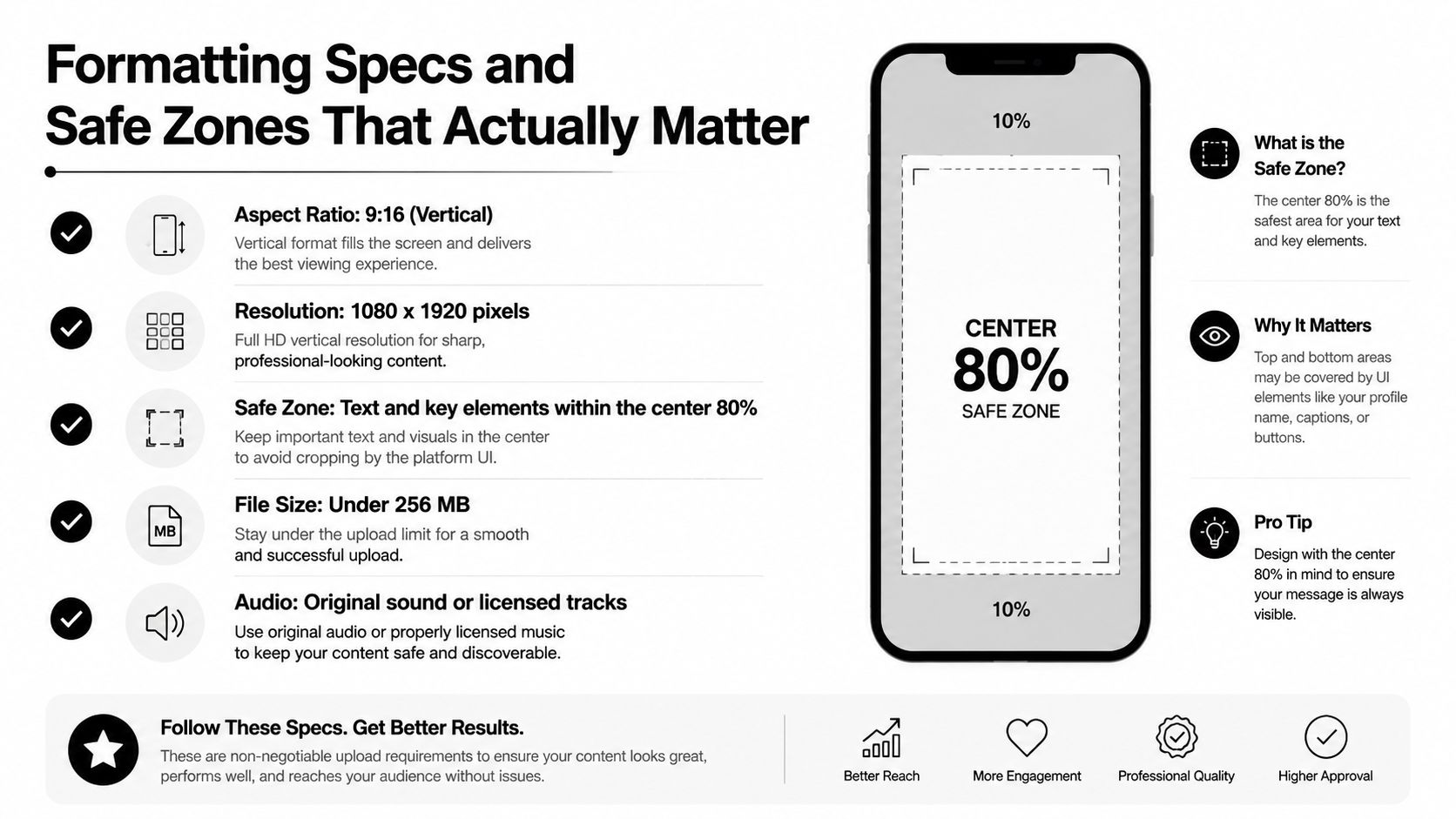
For most long-form footage, export at 1080 by 1920 pixels in a mobile-friendly format such as MP4 or MOV. Preserve clean source audio, and publish only music or footage you have permission to use. Before creating an export preset, check this guide to YouTube Shorts dimensions and duration. A preset saves time, but it does not replace a phone-level review.
Frame for the interface, not just the subject
The Shorts player places controls and metadata over the video. A crop can preserve the speaker while hiding the product, caption, or demonstration that makes the clip worth watching. Keep faces, product details, and key actions away from the edges. Place captions and text in the central area, with space above and below for interface changes.
A frequent framing error is centering the face while letting the caption block fall into the lower interface area. Another is putting a call to action along the right edge, where engagement controls can obstruct it. Set generous headroom, keep the main subject near the visual center, and test the clip on a phone before publishing.
Run this safe-zone check:
- Subject visibility: Eyes, hands, products, and demonstrations remain clear after cropping.
- Caption placement: Text avoids the bottom metadata layer and right-side controls.
- Contrast: Captions stay readable over bright and dark footage.
- Movement: Face tracking does not cut off a second speaker or important screen content.
- First frame: The opening image communicates the topic without relying on a thumbnail.
Safe zones do not create a hook. They remove a preventable swipe trigger after you have already selected a worthwhile moment. Recheck them whenever the clip uses screen recordings, two-person dialogue, or captions that change position.
When Shorts Help or Hurt Your Long-Form Channel
Shorts can introduce your channel to new viewers, but they don’t automatically create long-form growth. A 2024 paper found that after Shorts were introduced, long-form views and engagement declined significantly for creators with larger subscriber bases (paper summary). That finding doesn’t mean repurposing is harmful. It means the relationship depends on what the clip promises and what it delivers.
A clip that answers the entire question may earn attention without creating a reason to visit the parent video. A clip that frames a disagreement, previews a result, or demonstrates only part of a process can create a stronger bridge.
| Clip structure | Open-loop strength | Long-form click-through | Cannibalization risk |
|---|---|---|---|
| Complete answer with no added context | Low | Usually weak | Higher |
| Teaser that previews a surprising result | Strong | More promising | Lower |
| Unresolved debate or objection | Strong | More promising | Lower |
| Partial tutorial with the next step withheld | Moderate to strong | More promising | Moderate |
| Isolated joke or reaction | Low | Usually weak | Moderate |
| Dense excerpt requiring the full episode | Weak | Weak if confusing | Moderate |
Measure more than views. Review viewed-versus-swiped-away behavior, subscribers gained, comments that reference the original video, and traffic from the Short to the long-form upload. One recent guide notes that a Short with 10,000+ views can produce only 12 to 18 subscribers even when the topic is closely adjacent to the channel (Shorts research guide). The same source’s related analysis says Shorts-to-long-form click-through is usually under 2% on small channels unless creators deliberately add a pinned comment, an on-screen cue, and a same-week companion upload.
Use those figures as a warning against vanity reporting, not as a forecast for your channel. Build each clip around a clear relationship with the parent video, then compare the resulting audience quality with viewers who discover the long-form catalog directly.
Scheduling and Publishing for Maximum Reach
Publishing every selected clip together hides the operational differences between hooks, topics, and framing. Release Shorts in a staggered sequence so each one has time to generate viewer behavior, comments, and subscriber signals before another clip from the same source competes for attention.
Start with a small batch, then adjust the calendar based on audience response. Separate clips from the same parent video by topic or angle, place the strongest bridge close to the long-form upload, and leave room for editorial review. Posting everything at once can create audience fatigue and makes it harder to identify which packaging choice worked.
Build the bridge before you queue
Prepare the publishing package before scheduling:
- Title: Lead with the specific tension or outcome, rather than copying the parent video’s full title.
- Description: Give brief context and direct viewers to the complete video.
- Pinned comment: Explain what the full upload adds, then include its direct link.
- On-screen cue: Point viewers toward the longer version without cutting off the payoff.
- Companion timing: Publish a related long-form video while the Short’s subject remains relevant.
Group the queue by topic, source video, and intended audience. A YouTube Shorts scheduling guide can help configure the calendar, but scheduling alone does not decide which clip deserves priority. Keep a record of the source, hook, planned bridge, and publication window so repeated clips do not gradually cannibalize the same long-form asset.
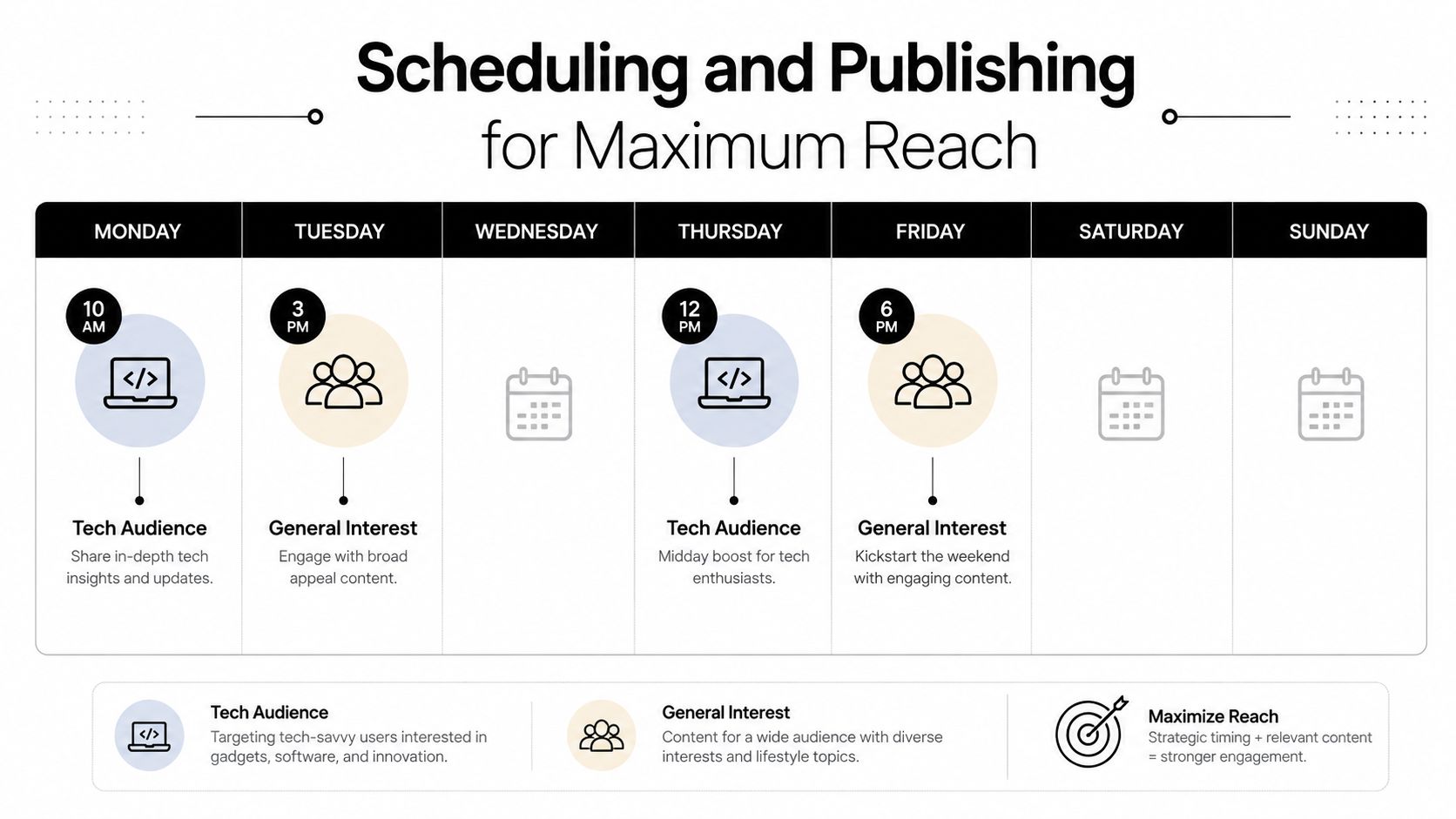
Use audience-active periods as a starting point. Keep a time slot only when retention, subscriber conversion, and meaningful movement toward the parent video justify it. The schedule should protect consistency while preserving a final check for captions, framing, links, and overlap with other uploads.
Frequently Asked Questions About Repurposing to Shorts
Can you repost the same Short after 90 days?
You can revisit an older idea, but don’t assume the identical file will perform the same way. Recut the opening, update the captions, or use a different moment from the source so the repost has a clear editorial reason.
Should you delete Shorts that underperform?
Usually, leave them live unless they contain an error, outdated information, a rights problem, or a brand risk. A low-view clip can still provide useful catalog context, while repeated deletion removes evidence that could help you improve selection and packaging.
What about third-party music or footage?
Check licensing before clipping. Repurposing your own long-form video doesn’t transfer rights for music, stock footage, guest material, or other third-party assets. Replace restricted elements or use material cleared for the intended platform and distribution.
How long should the original video be?
There’s no minimum long-form duration that guarantees viable Shorts. A concise interview can contain several strong micro-stories, while a much longer recording may contain none if the discussion lacks clear transitions and payoffs. Select by narrative completeness, not runtime.
Should Shorts live on the main channel?
Use the main channel when the Short serves the same audience and reinforces the long-form catalog. A separate channel may make sense when the topics, viewer intent, or publishing identity are substantially different. Track subscriber quality and long-form behavior rather than choosing based only on Shorts reach.
quso.ai turns owned long-form videos into short-form clips, adds auto-captions, and supports queued publishing for a repeatable YouTube workflow. Visit quso.ai to review the repurposing workflow, then start with one source video and judge each Short by the quality of the audience it brings back.





