How to Get More Views on Shorts: A 2026 Operator Playbook
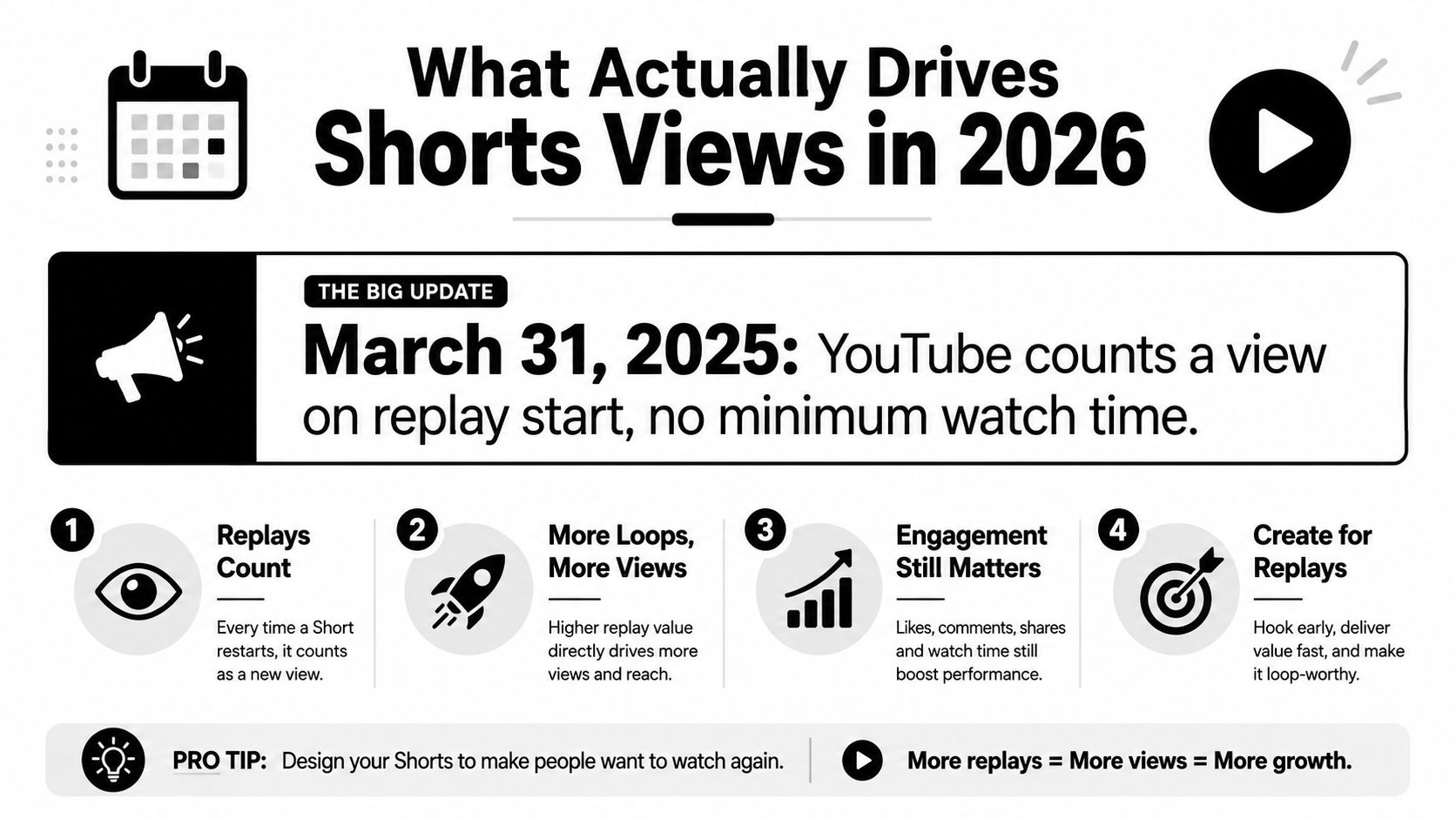
You can get more views on Shorts by fixing the first 1 to 3 seconds, tightening the edit for completion, and reading Viewed vs. Swiped Away before you chase more uploads. Since YouTube changed Shorts counting on 31 March 2025, a view now logs as soon as the Short starts or replays, with no minimum watch-time threshold according to Metricool’s breakdown of the Shorts update. That means raw views can rise while watch quality stays weak, so the job isn’t just to get a number to move, it’s to get people to stay, rewatch, and act.
The playbook is simple once you stop treating Shorts like tiny long-form clips. Start with the hook, then the frame and captions, then audio and editing, then metadata, then cadence, then a structured iteration loop. If you want the broader algorithm context, YouTube Shorts algorithm strategy gives the surrounding mechanics, while a useful companion on AI video workflow for YouTube shows how teams turn longer footage into short-form faster.
Table of Contents
- What Drives Shorts Views in 2026
- Hook the Viewer in the First 1 to 3 Seconds
- Design the Frame, Captions, and Safe Zones
- Use Audio, Trends, and Editing to Earn Rewatches
- Post on a Cadence and Cross-Post Without Diluting Signal
- Run a 4-Week Iteration Loop Using Analytics
- FAQ
What Drives Shorts Views in 2026
On 31 March 2025, YouTube changed how Shorts views are counted, and that change matters more than older advice about simple upload volume. A view now registers the moment a Short starts playing or replays, with no minimum watch-time threshold in the count, as noted in Metricool’s update summary. That means raw views can climb from autoplay and repeat starts while the clip still fails to hold attention.
Separate view count from watch quality
The first read on a Short should not be “how many views did it get?” by itself. A better read is whether the clip earned enough attention to keep moving after the first exposure. If people replay, watch through, or avoid swiping away immediately, the Short is doing real work.
Practical rule: treat view count as a volume signal and retention as the quality signal.
Open YouTube Studio and check Viewed vs. Swiped Away and Average View Duration before you change the edit, the topic, or the thumbnail frame. Those two metrics show whether the problem is the hook, the pacing, or the topic fit. If you want the surrounding mechanics, quso’s Shorts algorithm guide gives the cleanest platform-level explanation.
The six levers that matter
Everything else in Shorts performance sits under six levers. Hook decides whether the feed stops. Frame and captions decide whether the idea is legible on mute. Audio and editing decide whether the viewer stays long enough to finish. Metadata and hashtags help the clip get classified. Cadence and cross-posting control how consistently you can test. Structured iteration tells you what to repeat.
For creators who repurpose long videos, the useful move is to cut for the strongest opening first, not the longest segment. The AI video workflow for YouTube reference is useful here because short-form often wins or loses before the second sentence lands. A clip with a weak opening can still collect starts, but it will usually underperform on the signals that matter once the feed starts testing it against other Shorts.
Hook the Viewer in the First 1 to 3 Seconds
The first second decides a lot. If the opening does not earn attention fast, the rest of the Short has to fight uphill. The best openings lead with the result, the tension, or the surprise, and they do it without warming up.
Open with payoff, not setup
A weak opener sounds like, “Hey guys, so today I wanted to talk about why Shorts underperform.” A stronger opener is, “Three reasons your Shorts flop.” The second version tells the viewer what they will get, without making them sit through throat-clearing.
That difference shows up fast in practice. The generic opener spends precious seconds on social padding. The direct opener creates curiosity and gives the viewer a reason to keep watching for the explanation. Creators who repurpose long videos should look for moments with a self-contained payoff, then cut everything before that point.
Auto-captions matter here too, but only if they support the hook instead of burying it in clutter. The opening has to make sense with sound off and sound on, so the first frame should carry the premise visually as well as verbally.
Cut the dead air out of the opening
The best Shorts do not feel “edited,” they feel immediate. That usually means removing greetings, long pauses, and any sentence that repeats what the visual already says. If the clip starts with the answer, then backs up to the explanation, the viewer understands the structure in seconds.
A Short is not a trailer for value. It is the value itself, trimmed to the point where nothing nonessential survives.
After YouTube’s March 31, 2025 view-count change, the opening matters even more because raw view inflation and real watch quality no longer tell the same story. A clip can get starts and still fail if viewers do not stay. That is why the hook should be judged against Viewed vs. Swiped Away and Average View Duration, not just the view total.
Test hooks in a 4-week loop
The practical move is to treat hooks like experiments, not one-off creative guesses. Run one opening style for a week, keep the topic angle stable, and compare it against the next version in the following week. If a direct payoff opener holds attention better than a curiosity opener, keep that pattern for the next batch. If a punchier first line brings in more starts but weaker retention, that is useful too, because it tells you the hook is overpromising.
For repurposing teams, quso.ai fits naturally as a workflow tool for cutting stronger openings, adding captions for silent viewing, and scheduling test variants so you are not hand-editing every version. The point is not to post more and hope. It is to isolate one change, measure the result, then carry the winning hook into the next four-week cycle.
Design the Frame, Captions, and Safe Zones
A lot of Shorts die for boring visual reasons. The text sits behind a like button, the speaker’s face gets clipped by the username strip, or the cover frame looks fine in the editor but fails inside the app UI. If the viewer has to work to read the clip, you’ve already lost momentum.
Keep the important stuff in the middle third
Short-form video lives inside a 9:16 frame, but the usable space is smaller than most think once platform controls appear. On YouTube Shorts, Instagram Reels, and TikTok, the safest move is to keep the core message in the center third, because the edges are where UI interference starts. That means avoiding tiny text near the bottom, and never placing the main payoff at the very top of the frame.
Here’s the practical standard that holds up across platforms:
- Text should stay clear of UI buttons: Keep captions away from the area where like, comment, and share controls sit.
- Faces shouldn’t be chopped by interface strips: Don’t let the username band cut through the forehead or chin.
- Cover frames need breathing room: Leave enough margin so the first readable words don’t sit at the extreme top or bottom.
For creators who shoot vertical content from the start, this is mostly a framing discipline. For repurposers, it’s a selection issue. A clean 30 seconds with a clear central subject usually beats a visually busy minute that needs too much cropping.
Make captions do the legibility work
Captions need to be short, high contrast, and easy to scan. Two lines is usually enough for most Shorts, and the main keyword should appear early so the viewer understands what the clip is about before the line wraps. Mid-frame captions are safer than edge-heavy layouts because they survive UI overlays better.
If you’re building car, product, or hands-on demo content, the framing lessons are even harsher. This car photography angle guide is useful context for seeing how subject placement changes the perceived focus of a shot, even when the medium is different.
Use Audio, Trends, and Editing to Earn Rewatches
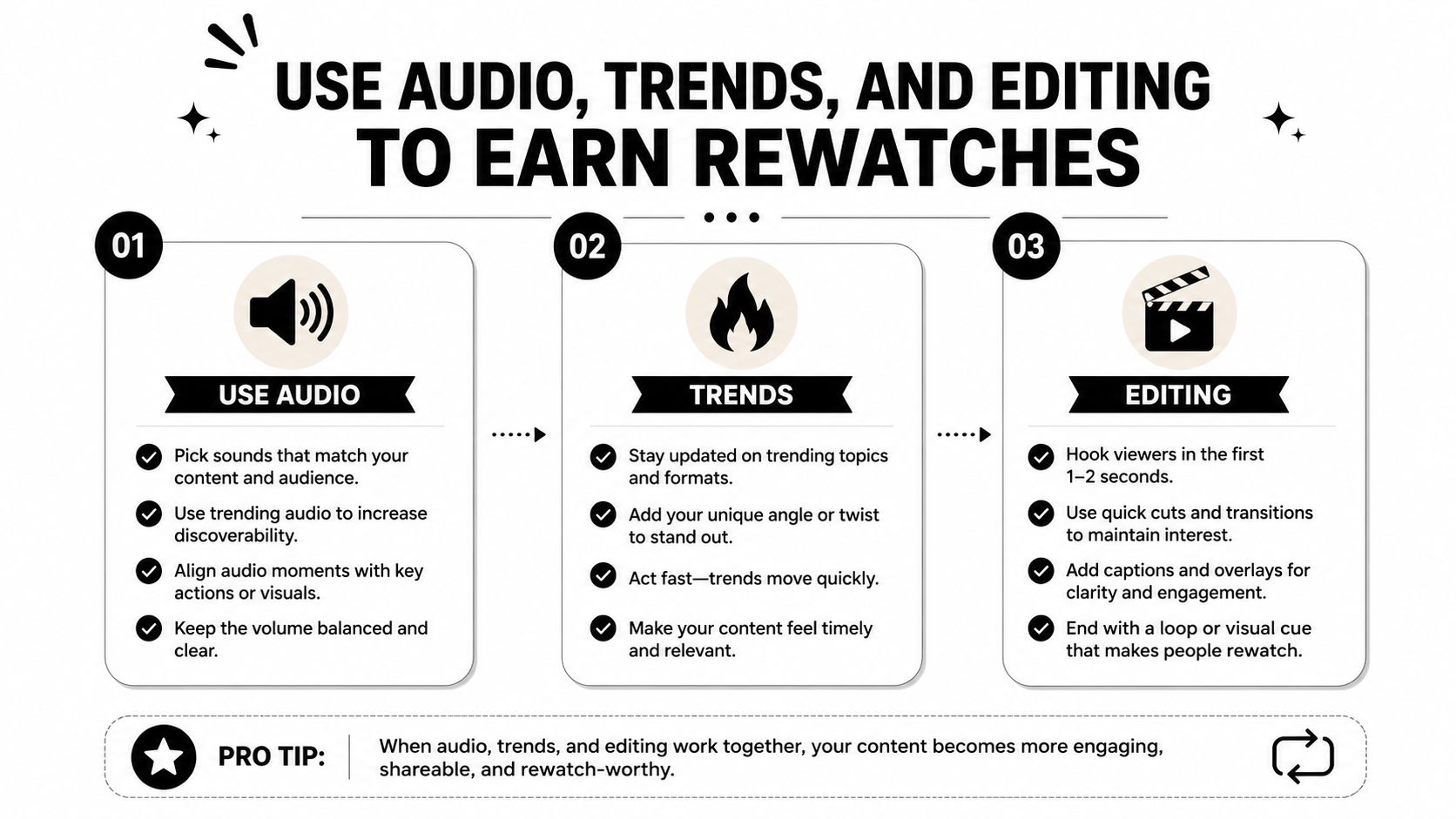
Audio does more than decorate a Short. It shapes whether the viewer stays long enough to replay it. A strong sound choice sets the rhythm and supports the point, while the wrong one makes even a sharp idea feel flat.
Pick sounds for fit, not popularity
Use trending audio when the trend matches the topic, not when it doesn’t. A familiar sound can support a point or give the clip a cleaner rhythm, but forced trend-chasing makes the video feel disconnected from the message. For talking-head or educational content, a voiceover often beats a loud licensed track because the viewer gets the point faster and does not have to fight the mix.
Captions and synced beats help on text-heavy clips because they keep the eye moving. The goal is not to make every Short flashy, it is to make the clip readable and watchable enough that people do not leave before the payoff.
Edit for motion every few seconds
A static shot of one speaker standing in the same frame while the point drags on for twenty seconds gives the viewer nothing new to process. Cutting every 2 to 3 seconds, alternating between face and B-roll, and using a quick zoom on the key word all help keep attention moving. Pattern interrupts matter too, a sudden angle change, a graphic callout, or a hard cut can reset attention before the viewer drifts.
The retention target that matters most here is completion. Creator guidance says Shorts with 70–90% completion in the 20–40 second range can double view count within a day according to ClickyApps’ creator guide. That does not mean every Short should hit that range, but it does show why tight pacing beats rambling edits.
Keep metadata tight and readable
Metadata is a discovery layer, not a place to dump keywords. Keep titles under 40 characters, put the main keyword first, and use 3 to 5 hashtags so the topic reads cleanly. A disciplined set of tags is easier for the platform to classify than a cluttered stack that tries to say everything.
| Messy approach | Disciplined approach |
|---|---|
| 12 generic hashtags, vague title, keyword buried at the end | 3 to 5 focused hashtags, keyword-first title, short payoff-driven description |
A title should answer why someone would search or stop scrolling for the clip. That framing works better than trying to summarize every detail in one line.
Post on a Cadence and Cross-Post Without Diluting Signal
A steady posting cadence usually beats sporadic bursts because it gives you a clean read on what the audience responds to. Keep the output tied to a few repeatable pillars, then use each Short to test one angle, one hook, or one payoff. One strong long video can still produce several usable Shorts if you cut the hooks, quotes, and payoff moments into separate pieces instead of squeezing everything into one upload.
Use cadence as a testing system
A workable baseline is 5 to 7 Shorts per week across 2 to 3 content pillars, with one stronger post during weekday evenings and lighter posts on weekends. A common starting window is 6 to 9 PM local time on weekdays and 12 to 2 PM on weekends, but audience behavior should override any generic schedule.
Posting on a cadence matters more than chasing one perfect time slot because it lets you compare clips under similar conditions. If a Short performs well on a week where you posted consistently, you can trust the signal more than a one-off spike from an isolated upload. That matters even more after YouTube’s March 31, 2025 view-count change, because raw view inflation can look healthier than the watch quality behind it. The practical read is simple, separate views that came from broad surface exposure from the clips that kept people watching.
Cross-posting works only when each version feels native to the platform. Reposting the exact same file everywhere often weakens performance because the first few seconds, caption treatment, and engagement patterns do not match how people use each app. Export platform-specific versions instead, even if the core clip stays the same.
If you want a practical repurposing framework, Taap.bio’s content repurposing guide is a useful reference point for thinking in variants, not one-off uploads. That is the mindset that keeps a small team from flooding feeds with near-duplicate posts.
Keep the 4-week loop attached to the cadence
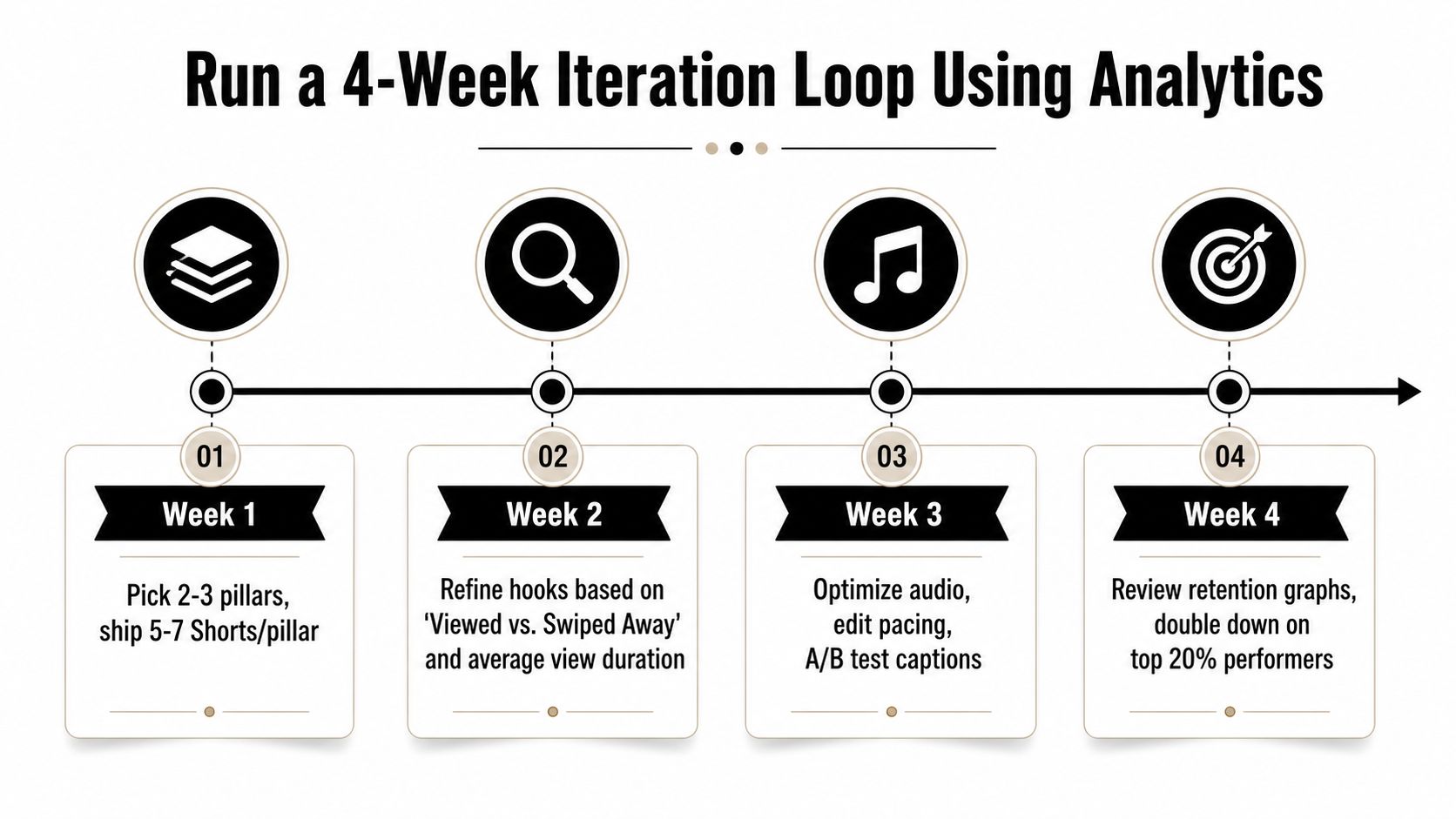
Cadence only helps if you review the output on a schedule. I use a simple 4-week loop, publish consistently, review which pillars held attention, then adjust the next batch instead of guessing from a single upload. Week 1 is for volume across the chosen pillars. Week 2 is for hook changes based on the first-frame and early-drop behavior. Week 3 is for tightening the cuts and improving the packaging. Week 4 is for repeating the pattern that kept viewers watching, while cutting the versions that only looked good at a glance.
That approach keeps posting from turning into noise. It also makes cross-posting safer, because you can see which version format holds attention on each platform before you scale it.
Track the right signals
Views alone do not tell you whether the cadence is working. Watch the clips that bring repeatable retention, comments, shares, and subscriber movement, then compare them against the posts that only inflated the count. A Short that gets broad reach but weak watch quality is not the same as one that keeps attention and earns follow-on views.
Use the same log for each upload so the pattern is obvious:
- Publish date: So you can compare timing against result.
- Hook line: So you know which promise worked.
- First-frame style: So you can see which opening visual stopped the scroll.
- Length: So you can connect duration to completion.
- Views and engaged views: So you do not confuse surface reach with real interaction.
- Average view duration and average percent viewed: So you can read retention, not just volume.
- Likes, comments, shares, and subscriber lift: So you can see whether the clip built an audience or just filled a feed.
That log is what separates steady growth from random spikes.
Run a 4-Week Iteration Loop Using Analytics
Views lag. Retention leads. If you read Shorts like a scoreboard instead of a funnel, you’ll keep repeating clips that got lucky and abandoning clips that were structurally close to working.
Week by week, tighten one variable at a time
Week 1 is for volume across a few pillars. Week 2 is for hook refinement based on Viewed vs. Swiped Away and Average View Duration. Week 3 is for retention work, tighter cuts, better captions, cleaner audio. Week 4 is for scaling the pattern that held attention instead of the one that only looked good in raw views.
Log every Short the same way so the pattern becomes obvious:
- Publish date: So you can compare timing against result.
- Hook line: So you know which promise worked.
- First-frame style: So you can see which opening visual stopped the scroll.
- Length: So you can connect duration to completion.
- Views and engaged views: So you don’t confuse surface reach with real interaction.
- Average view duration and average percent viewed: So you can read retention, not just volume.
- Likes, comments, shares, and subscriber lift: So you can see whether the clip built an audience or just passed through the feed.
The useful part of the loop is that it keeps you honest. If the hook weakens, the metric shows it. If the pacing improves, the graph usually tells you before the comment section does.
Scale only what’s already proving itself
A series is more valuable than a random pile of clips because it lets the algorithm and the audience recognize the pattern faster. Once you find a winning structure, keep it, then vary the angle without changing the core promise. That’s how you turn one good clip into a repeatable format.
For teams that want this workflow without the manual grind, quso.ai can repurpose long video into Shorts, auto-caption the clip, and schedule platform-specific exports in one place. Use it to cut five candidate Shorts from one long recording, test them across the week, and keep the winners on a consistent posting rhythm.
If you want a faster way to turn one long video into multiple Shorts, quso.ai can handle the repurposing, auto-captions, and scheduling without forcing you into a heavier edit workflow. It’s built for creators and teams that want to test hooks, pacing, and posting cadence without bottlenecks. Visit quso.ai and use it to ship more Shorts with less manual clipping.
FAQ
How long should a Short be for more views
The most practical range is 20 to 40 seconds when the clip can hold attention through the end, because completion matters more than raw length. Very dense clips can work under 15 seconds if the payoff lands fast and the edit stays tight.
Do hashtags actually help Shorts get views
Yes, but only when they’re focused. A tight set of 3 to 5 hashtags helps classification, while stuffing the description with too many tags usually muddies the signal.
What’s the best time to post YouTube Shorts
A useful starting point is 6 to 9 PM local time on weekdays or 12 to 2 PM on weekends. Use that as a baseline, then confirm it against your own YouTube Studio audience activity.
How often should you post Shorts
A steady cadence beats random bursts. 5 to 7 Shorts per week across 2 to 3 pillars gives you enough volume to test hooks without turning the feed into noise.
What metrics matter most for Shorts views
Start with Viewed vs. Swiped Away and Average View Duration. Those two tell you whether the Short earned the click and kept the viewer, which matters more than raw view count after the Shorts counting change.