What Is Snapchat Spotlight and How to Post to It (Including From a Computer)
What is Snapchat Spotlight? The short answer
Snapchat Spotlight is a feed of short, vertical videos inside Snapchat, made by anyone and shown to people who don't follow the creator. It works like TikTok's For You feed or Instagram Reels: you post a video Snap of 5 seconds or more, Snapchat may review it, and the Snaps it picks are shown well beyond your friends. Posts can come from the Snapchat app or from a computer at profile.snapchat.com, and creators who qualify for Snapchat's Monetization Program can earn from them.
Every rule below was checked against Snapchat's own Support and creator pages on November 6, 2026. Each section links its source, and Snapchat changes its app often, so check the source if a button has moved.
Spotlight vs Story vs Saved Story
Snapchat has three places a public post can go, and they reach different people.
| Story | Saved Story | Spotlight | |
|---|---|---|---|
| Who sees it | Your friends or subscribers | Visitors to your Public Profile | Anyone, through the Spotlight feed, Search and Stories |
| How long it stays | 24 hours | On your profile until you remove it | Until you delete it |
| Format | Photo or video | Photo or video | Vertical video with sound |
| Best for | Day-to-day updates for people who already follow you | Collections you want new visitors to find | Reaching new people |
Spotlight is the one built for discovery. A Story mostly reaches people who already know you; a Spotlight Snap can reach people who have never heard of you, which is why creators and brands use it to grow.
Snapchat Spotlight rules
Snapchat spreads its rules across a few Support pages. Put together, a Snap has to meet all of these to be shown in Spotlight:
- You're 16 or older, and you're in a region where Spotlight posting is turned on.
- The video is at least 5 seconds long. Shorter Snaps don't get the Post option.
- It's a vertical video with sound. Snapchat says still photos, horizontal Snaps, blurry Snaps and text-only Snaps won't show up in Spotlight.
- It follows the rules. That means Snapchat's Community Guidelines, the Spotlight Guidelines, the Terms of Service and the Spotlight Terms. Snaps can be reviewed before they're shown, and Snapchat's Content Guidelines for Recommendation Eligibility decide what gets recommended beyond your friends and subscribers.
- Your name shows only with a Public Profile. Snapchatters without one can still post, but their display name won't appear on the Snap.

Two things surprise people. First, a Spotlight post can show up outside Snapchat too: Snapchat says Spotlight Snaps may appear in Search results and Stories, on or off Snapchat, now or in the future. Second, posting from the main camera also shares the Snap to your Story by default. You can turn that off on the New Spotlight Post page before you submit.
How to post to Snapchat Spotlight from your phone
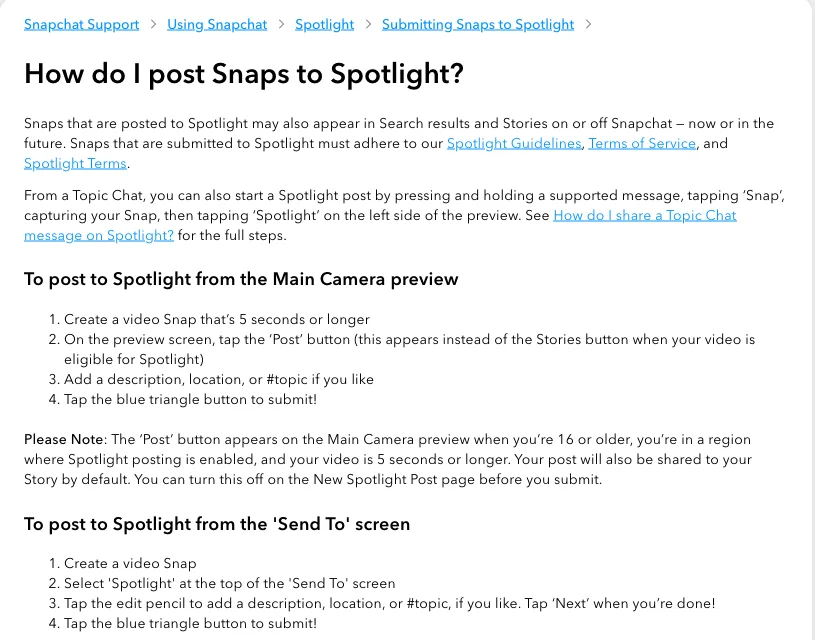
There are two main routes in the app. The quickest is from the camera:
- Record a video Snap that's 5 seconds or longer.
- On the preview screen, tap Post. It replaces the Stories button when the video qualifies.
- Add a description, a location or a #topic if you like.
- Tap the blue triangle to submit.
Or from the Send To screen:
- Record a video Snap and open Send To.
- Select Spotlight at the top.
- Tap the pencil to add a description, location or #topic, then tap Next.
- Tap the blue triangle to submit.
You can also post from My Account, from the "+" card while you're watching Spotlight, or by replying to a Spotlight post with a Snap Comment, which becomes a Spotlight post of its own. If you're 16 or older you can choose whether others can remix your Snap and whether it shows on your Public Profile. Both are off by default for ages 16 to 17 and on by default from 18.
How to post to Snapchat Spotlight from a computer
Snapchat has a web uploader, so you don't need your phone if the video is already on your computer. That's handy when you edit on a laptop.
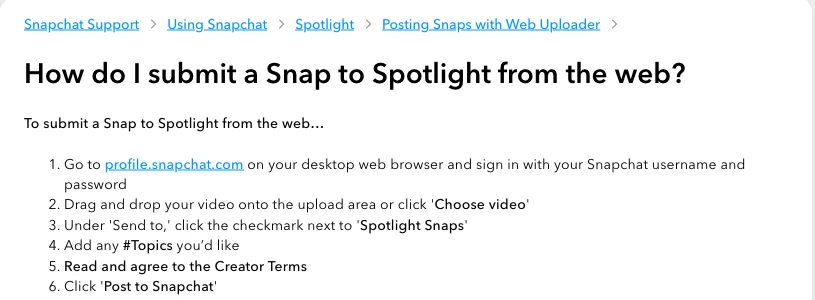
- Go to profile.snapchat.com in a desktop browser and sign in with your Snapchat username and password.
- Drag your video onto the upload area, or click Choose video.
- Under Send to, tick Spotlight Snaps.
- Add any #topics you want.
- Read and agree to the Creator Terms.
- Click Post to Snapchat.
The web uploader posts one video at a time, right away. To plan posts ahead, or to send the same clip to Snapchat and your other networks together, use a scheduler.
Post and schedule Spotlight Snaps with quso.ai
quso.ai is our product, so weigh this section accordingly. It's useful when your Spotlight videos are cut from longer videos, such as podcasts, streams or YouTube uploads, or when the same clip is also going to TikTok, Reels and Shorts.
- Make vertical clips from a long video with the AI clip generator, or upload a finished video.
- Open Posts, click Manage accounts and click Link on the Snapchat tile to connect your account.
- Click New post, pick Snapchat, and choose Story, Saved Story or Spotlight.
- Attach the clip and write the caption, then publish now or pick a date and time.
The limits, plainly. quso.ai posts one image or video per Snap, and no text-only Snaps. Videos must run 5 to 60 seconds, and quso.ai flags anything outside that before you publish. Spotlight takes video only. Captions can be up to 500 characters, but Spotlight shows only the first 160, so put the important part first. Publishing to Snapchat is on the Essential and Growth plans; the free plan publishes to TikTok only. More detail is on the Snapchat integration page, and the social media scheduler covers all 12 networks.
How to make money on Snapchat Spotlight
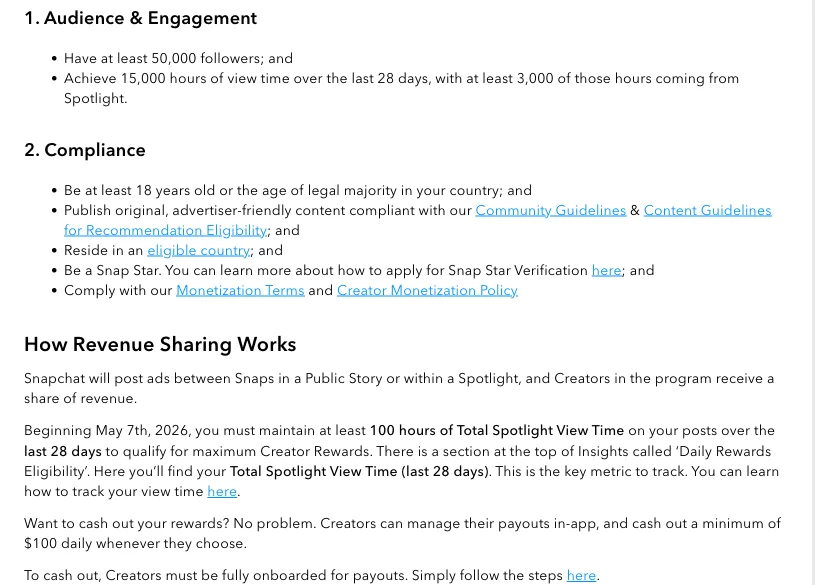
Snapchat pays creators through its Monetization Program, which places ads between Snaps in Stories and Spotlight and shares the revenue. You can't apply. Snapchat reviews creators and invites the ones who meet its criteria by email.
- Audience: at least 50,000 followers, and 15,000 hours of view time over the last 28 days, with at least 3,000 of those hours from Spotlight.
- Compliance: 18 or older (or the age of majority where you live), original advertiser-friendly content, an eligible country, Snap Star status, and the Monetization Terms.
- Video length: a Spotlight video has to be at least 30 seconds long to earn revenue.
- Top rewards: since May 7, 2026, you need 100 hours of Total Spotlight View Time over the last 28 days to qualify for the maximum Creator Rewards.
Snapchat says it never charges for an invitation, and no third party controls who gets in. Anyone offering a paid shortcut into the program isn't working with Snap.
Tips for getting your Spotlight Snaps seen
Snapchat is upfront that not every submitted Snap makes it into Spotlight. These are the things you control:
- Fill the frame. Shoot or crop to vertical 9:16. Snapchat filters out horizontal and blurry video. Our vertical video explainer covers the format.
- Keep the sound on. Spotlight is a sound-on feed. Snapchat's Sounds library has licensed music if you need it, under its Sounds guidelines.
- Add a #topic. Snapchat suggests a topic on every Spotlight Snap so people can find and explore similar Snaps.
- Make it at least 30 seconds if you want to earn. Shorter Snaps can still be shown, but only 30-second-plus videos earn revenue in the Monetization Program.
- Set up a Public Profile. It puts your name on your Spotlight Snaps, so viewers who like one can find and follow you. A memorable name helps; see our Snapchat username ideas.
- Post regularly. The Monetization Program counts view time over the last 28 days, so it rewards a regular posting habit over a single hit.
Frequently asked questions
What is Snapchat Spotlight?
Spotlight is Snapchat's feed of short vertical videos from the whole community, similar to TikTok's For You feed or Instagram Reels. Anyone 16 or older in a supported region can submit a video Snap of 5 seconds or more, and Snapchat shows the ones it picks to people who don't follow the creator.
How do I post on Snapchat Spotlight?
Record a video Snap of at least 5 seconds, tap Post on the preview screen (or pick Spotlight on the Send To screen), add a description or #topic if you want, and tap the blue triangle. On a computer, upload the video at profile.snapchat.com and tick Spotlight Snaps under Send to.
Can you post to Snapchat Spotlight from a computer?
Yes. Sign in at profile.snapchat.com, upload the video, tick Spotlight Snaps, agree to the Creator Terms and click Post to Snapchat. Schedulers such as quso.ai can also post or schedule Spotlight Snaps from a browser.
How long can a Snapchat Spotlight video be?
Snapchat's minimum is 5 seconds. To earn money through the Monetization Program, a Spotlight video must be at least 30 seconds. If you post through quso.ai, Snapchat videos must be 5 to 60 seconds.
Who can see my Spotlight Snaps?
Anyone. Spotlight Snaps are public, can be shown to people who don't follow you, and may appear in Search results and Stories on or off Snapchat. Your display name appears on them only if you have a Public Profile.
Why are my Spotlight Snaps getting no views?
Snapchat says not every submitted Snap makes it into Spotlight. The usual reasons are that the Snap isn't eligible (horizontal, a still photo, blurry, text-only or without sound) or doesn't meet the Spotlight Guidelines or the Content Guidelines for Recommendation Eligibility.
How do you get paid on Snapchat Spotlight?
Through Snapchat's Monetization Program, which is invitation-only. Snapchat looks for creators with at least 50,000 followers and 15,000 hours of view time in 28 days (3,000 of them from Spotlight), who are 18 or older, in an eligible country and a Snap Star. Spotlight videos must be at least 30 seconds to earn.