Opus Clip Pricing in 2026: Full Plan Breakdown (+ Cheaper Alternative)
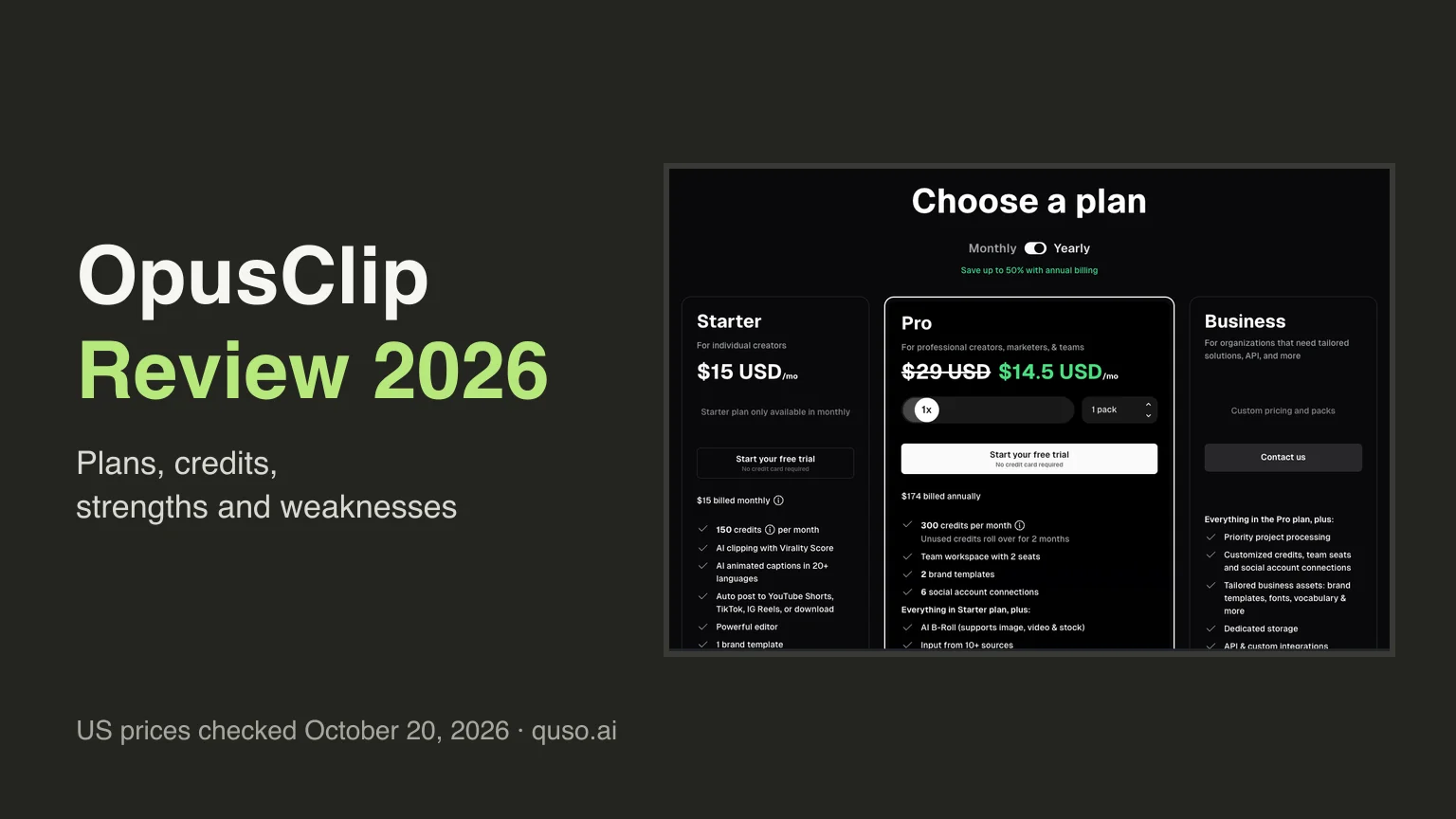
Opus Clip pricing, the short answer: in the US, OpusClip Free is $0 for 60 credits a month, Starter is $15 a month for 150 credits (monthly billing only), Pro is $29 a month or $14.50 a month billed yearly ($174 a year) for 300 credits, and Business is custom. One credit is one minute of the video you upload, so Starter and monthly Pro both cost about $0.10 a minute and yearly Pro about $0.05. Pro is the plan most creators end up on, because Starter has no social scheduler and exports 9:16 clips only.
Prices checked on October 21, 2026, against opus.pro/pricing (US prices, USD).
Opus Clip's pricing looks simple on the surface. There's a free plan, a $15 tier and a $29 tier. But the number that actually decides your bill isn't the monthly price. It's credits, and one credit equals one minute of video processing. Get that wrong and a single podcast season can burn through a plan in a week.
This is a full, current breakdown of what every Opus Clip plan costs in 2026, what a credit really buys, where the pricing quietly gets expensive, and how the per-minute math compares to an all-in-one alternative. Every Opus Clip price and plan term here was checked against opus.pro/pricing (US prices) on October 10, 2026, and the prices again on October 21, 2026; credit rounding and the cost of posting to X come from Opus Clip's help center.
Opus Clip pricing at a glance (2026)
Opus Clip (officially "OpusClip") runs four tiers. These are US prices, in USD. Opus Clip charges less in some countries.
| Plan | Price | Credits / month (= source-video minutes) | Watermark | Scheduler |
|---|---|---|---|---|
| Free | $0 forever | 60 (60 min) | Yes, on captions/clips | No |
| Starter | $15/mo (monthly only) | 150 (150 min) | Removed | No |
| Pro | $29/mo, or $14.50/mo billed annually ($174/yr) | 300/mo per pack, on monthly or annual billing | Removed | Yes |
| Business | Custom (contact sales) | Custom credit packs | Removed | Yes |
Two things most comparison articles miss: Starter has no annual option (it's month-to-month at $15 only), and Starter has no social scheduler. That feature starts at Pro. So the "cheap" $15 plan still leaves you paying for a separate scheduling tool.
What is an Opus Clip credit?
This is the whole game. On Opus Clip, one credit is consumed for every minute of the original video you import, not per clip you generate. So a 60-minute podcast costs 60 credits whether Opus turns it into 5 clips or 20.
- Rounding: credits are billed in whole minutes. A video shorter than 1 minute costs 1 credit; longer videos round partial minutes down, so a 4.5-minute video costs 4 credits.
- Posting to X costs credits too, at 3 credits per clip per X account, on top of the processing you already paid for.
- Unused credits roll over only briefly. On Starter and monthly Pro, unused credits roll over for 1 more month; on annual Pro they roll over for 2 months.
Translate the plans into hours of source footage and the real ceiling appears: Free = 1 hour/month, Starter = 2.5 hours/month, Pro = 5 hours/month per pack. A creator publishing two 45-minute podcast episodes a week is already past the Starter cap.
Not every tool bills by the minute. Crayo charges one workflow credit per finished video instead, with 250 credits a month on its Hobby plan, and our Crayo AI review explains who that unit suits and why its export-minute cap can run out first.
Opus Clip Free plan: what you actually get
The free plan is a genuine try-before-you-buy. It's also built to make you upgrade:
- 60 credits/month (60 minutes of source video).
- Renders up to 1080p, with auto-reframe and AI captions (emoji + keyword highlighting).
- A watermark is added to your clips.
- No editor. You take what the AI produces.
- Clips expire after 3 days and can no longer be exported. Miss the window and you re-process (spending credits again).
Starter ($15/mo): the watermark-free entry point
Starter is the cheapest way to lose the watermark. You also get an editor:
- 150 credits/month (150 minutes).
- Watermark-free exports at the highest available resolution.
- AI clipping with Virality Score, animated captions in 20+ languages, text & timeline editing.
- Auto-post to YouTube Shorts, TikTok and Instagram Reels (manual posting, not scheduling).
- Caps: 20 AI voice-overs/day, 3 AI image B-roll and 3 stock B-roll clips per month, 1 brand template.
- Storage expires after 29 days. Monthly billing only, with no annual discount.
Pro ($29/mo, or $14.50/mo billed annually): the "real" plan
Pro is the real plan. It is where Opus Clip becomes a full workflow, with a scheduler, a team workspace, more import sources and more aspect ratios, and it is where its annual pricing gets genuinely aggressive:
- 300 credits/month per pack on monthly or annual billing; annual costs $174 a year (an effective $14.50/month). Unused credits roll over for 1 month on monthly billing and 2 months on annual. Add packs for more credits (up to 5 on monthly, 15 on annual).
- Everything in Starter, plus: social media scheduler, team workspace (2 seats), 6 social connections.
- Prompt to clip and topic search, moving object tracking, AI video B-roll, 50 AI image B-roll clips a day and unlimited stock B-roll.
- Import from 10+ sources, multiple aspect ratios (9:16, 1:1, 16:9), 100GB storage.
- Export to Adobe Premiere Pro & DaVinci Resolve, custom fonts, speech enhancement, video dubbing, limited API.
If you commit to a year and process right around 300 minutes a month, that $14.50 effective rate is one of the lowest per-minute prices in the category. The catch is the lock-in. You pay $174 up front, and unused credits roll over for only 2 months.
Vizard sells minutes the same way. Its Creator plan is $29 a month for 600 credits on monthly billing, one credit per minute, so it buys twice the minutes of OpusClip Pro at the same monthly price, and our Vizard AI review covers what those minutes come with.
Business (custom): teams and API
Business is quote-based. It adds priority processing, customized credit packs and seats, SSO/SLM security, a Master Service Agreement, dedicated storage, full API access and a dedicated Slack channel. Need auto-import from a CMS or cloud servers, or more than ~4 seats? This is the tier.
The real cost: Opus Clip pricing per minute
Because credits map 1:1 to source minutes, you can reduce every plan to a true unit price:
| Plan | Price | Minutes/mo | Cost per source minute |
|---|---|---|---|
| Starter | $15/mo | 150 | ~$0.10 |
| Pro (monthly) | $29/mo | 300 | ~$0.10 |
| Pro (annual) | $14.50/mo | 300 | ~$0.05 |
The takeaway? Paying monthly, Starter and Pro cost about the same per minute (~$0.10), so moving up from Starter to Pro on monthly billing buys you a bigger bucket of minutes and more features, but not a cheaper minute. You're just buying a bigger bucket. The only way to meaningfully cut the per-minute rate on Opus Clip is the annual Pro commitment.
You pay for the minutes you upload, not the clips you keep, and most clips don't get kept. In quso.ai's short-form clip benchmarks, which cover 1,770,924 AI clips made on quso.ai from January 1 to August 31, 2026, a typical long video yielded a median of 9 AI clips, and creators exported 15.5% of all AI clips. Budget by the hours you record each month.
Want the cheapest minute of all? 2short.ai's Lite plan covers 5 hours of YouTube video for $9.90 a month, and our 2short.ai review and comparison sets it against quso.ai plan by plan, including what it leaves out, such as posting and scheduling.
Where Opus Clip pricing gets expensive
- Rollover is short. Unused credits roll over for 1 month on monthly plans and 2 months on annual Pro, so you can't bank several quiet months to cover a busy one.
- Scheduling isn't in the cheap plan. Starter posts manually; to schedule you need Pro, or a separate tool like Buffer or Hootsuite on top.
- Free clips disappear in 3 days. Forget to download and you re-spend credits to regenerate them.
- Posting to X burns credits at 3 per clip per X account.
- Annual lock-in for the best rate. The $14.50 headline requires paying $174 upfront, and Starter offers no annual discount at all.
Opus Clip pricing vs. quso.ai (same workload)
Most people compare Opus Clip pricing for one reason. They want to sanity-check it against an all-in-one tool. quso.ai uses the same credit model (one credit ≈ one minute of processed video), which makes a like-for-like comparison honest. Here's how the same monthly workloads line up:
| Monthly workload | Opus Clip | quso.ai |
|---|---|---|
| Free tier | 60 min, watermark, clips expire in 3 days | 75 min, 720p, watermark, 7-day retention |
| Entry paid | Starter $15/mo · 150 min · no scheduler | Lite $29/mo · 100 min · publishes to TikTok, no scheduler |
| ~300 min/mo | Pro $29/mo, or $14.50/mo billed yearly · 300 min | Essential $39/mo · 300 min + scheduling to 7 platforms |
| ~600 min/mo | Pro, 2 packs: $58/mo, or $29/mo billed yearly · 600 min | Growth $49/mo · 600 min + scheduling to 7 platforms |
| Social scheduling & publishing | Posting from Starter (YouTube Shorts, TikTok, Instagram Reels); scheduler from Pro (9 platforms) | TikTok publishing from Free; scheduling to 7 platforms from Essential |
quso.ai prices are monthly. Opus Clip Pro is shown at both its monthly and its yearly-billing price.
Read this honestly: on price alone, Opus Clip is cheaper at most workloads, and its yearly Pro plan is the cheapest option in this table. quso.ai costs less only at about 600 minutes a month on monthly billing (Growth at $49 against $58 for two Opus Clip Pro packs). Where quso.ai is ahead is the free plan: 75 minutes a month instead of 60, link import from every source, TikTok publishing and 7-day retention, against clips that stop being exportable after 3 days on Opus Clip Free. Scheduling starts on quso.ai Essential (7 platforms) and on Opus Clip Pro (9 platforms).
If you're weighing the switch, the full feature-by-feature breakdown lives on our Opus Clip alternative page.
Want the hands-on view? Read our OpusClip review.
Frequently asked questions
Is Opus Clip free?
Yes. Opus Clip has a free-forever plan with 60 credits (60 minutes of video) per month and rendering at up to 1080p. The trade-offs are a watermark on your clips, no editor, and clips that expire and become non-exportable after 3 days.
How much is Opus Clip?
Paid plans are Starter at $15/month (monthly billing only), Pro at $29/month or $14.50/month billed annually ($174/year), and Business at custom pricing. Starter includes 150 credits/month and Pro includes 300 credits/month per pack.
What is an Opus Clip credit?
One credit equals one minute of video processing, charged in whole minutes regardless of how many clips are produced. Posting to X costs 3 credits per clip per X account, and unused credits roll over for 1 month on monthly plans and 2 months on annual Pro.
Does Opus Clip have annual billing?
Pro offers annual billing at $174/year (an effective $14.50/month) for 300 credits a month per pack, and unused credits roll over for 2 months. Starter is monthly only; Business is a custom contract.
Is there a cheaper Opus Clip alternative?
On price alone, usually not. Opus Clip Pro costs less than quso.ai at 300 minutes a month ($29/month, or $14.50/month billed yearly, against $39 for quso.ai Essential). At 600 minutes a month on monthly billing, quso.ai Growth ($49/month) costs less than two Opus Clip Pro packs ($58/month). quso.ai's free plan gives more: 75 minutes/month (vs 60), TikTok publishing and 7-day retention. See the Opus Clip alternative comparison for the full picture.
Opus Clip prices and plan terms checked against opus.pro/pricing (US prices) on October 10, 2026, and the prices rechecked on October 21, 2026; quso.ai prices checked against quso.ai/pricing on October 10, 2026. Credit rounding and the X posting cost come from Opus Clip's help center. Plans and credit allowances change, so check the official pages before purchasing.