Vizard AI Review 2026: Features, Pricing, Pros & Cons (vs quso.ai)
Part of the AI Video Clipping guide →
Vizard AI review: the short answer
Vizard AI is an AI clipper that turns long videos into short captioned clips for TikTok, YouTube Shorts and Reels, then schedules them to your social accounts. It is worth using if you want a lot of minutes for the money: the Creator plan is $29 a month for 600 credits (600 minutes of video) with 4K export and no watermark, and the free plan gives 60 credits a month at 720p. Pick quso.ai instead if you want chapters as well as short clips from each upload, a Content Planner, or a free plan with 7-day retention instead of 3-day storage.
Prices checked on October 20, 2026, against vizard.ai/pricing with monthly billing selected (USD), and quso.ai/pricing.
What is Vizard AI?
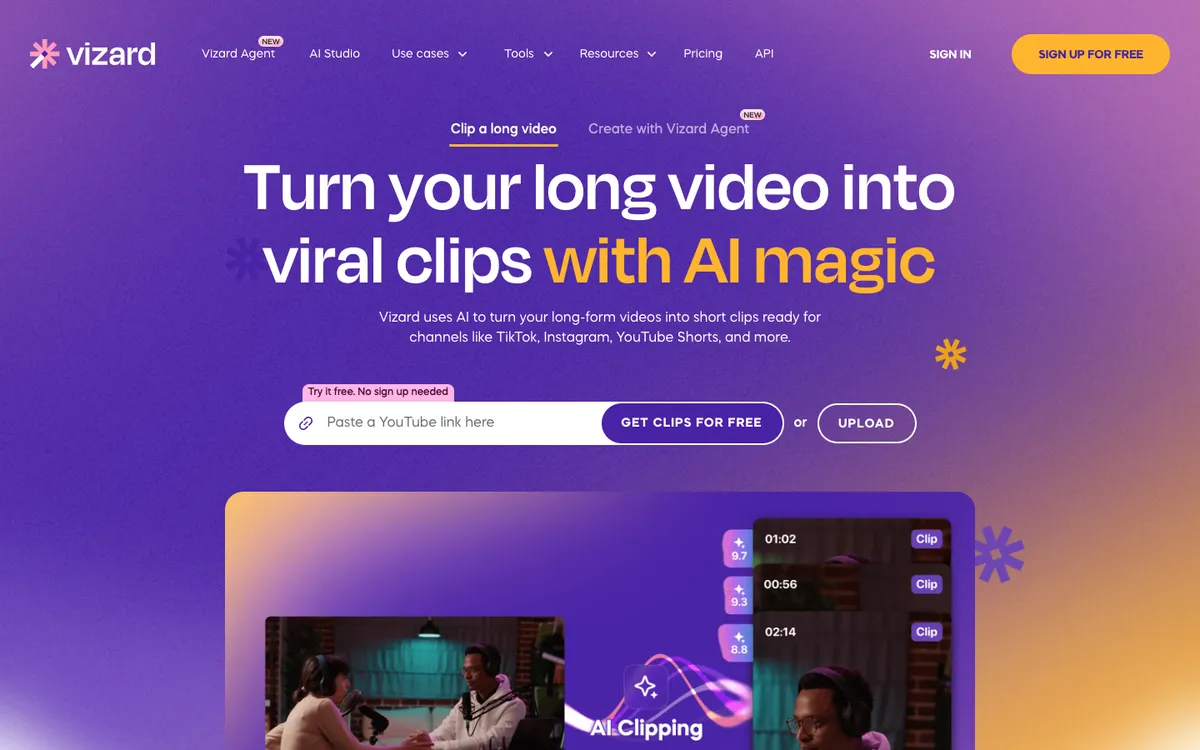
Vizard AI is a video repurposing tool. You paste a YouTube link or upload a recording, such as a podcast, a webinar or an interview, and its AI picks the moments most likely to work as short clips, reframes them to vertical and adds captions. quso.ai’s free AI clip maker works the same way.
Each clip comes with a score.
From there you edit clips in a timeline and transcript editor, then publish or schedule them to your social accounts from a content calendar. Around the clipper, Vizard has added an AI video agent, an ad maker for talking-head and UGC-style ads, an API and phone apps on the App Store and Google Play, so the product now reaches well past clipping for a team that wants one tool for most of its short-form video work.
Is Vizard AI free?
Yes, there is a free plan, and it is usable. You get 60 credits a month, where one credit is one minute of video, plus AI clips, the full video editor, 720p exports and one connected social account. The limits are the catch: uploads can be up to 60 minutes and 1GB, exports up to 10 minutes, and projects are stored for 3 days. Creator removes the watermark, adds 4K export and raises those caps.
Vizard AI features
- AI clipping. Finds highlights in a long video and cuts them into short clips, each with a score. Vizard's newer clipping model reads the full context of the video.
- Auto reframe, captions and keyword highlights. Clips are reframed for vertical, auto-subtitled, and can get AI emojis and highlighted keywords.
- Subtitle translation. Subtitles can be translated, and Vizard has a tutorial on bilingual subtitles.
- Editor. A timeline and transcript editor with AI B-roll, custom outros, templates and brand templates.
- Publishing. Direct publishing, a content calendar for scheduled posts, and AI post suggestions. Free connects 1 social account, Creator 6 and Business 20.
- Teams. Business adds a shared workspace, project sharing, a brand kit with custom fonts, and team seats at $10 a month each.
- API. Every plan has API access with a rate limit, from 10 calls an hour on Free to 60 on Business.
Vizard's own walkthrough of its clipping model, from the official Vizard YouTube channel (linked from vizard.ai).
Vizard AI pricing (October 2026)
Vizard bills in credits, and one credit is one minute of video. The paid plans start at 600 credits a month and go up in steps to 6,200.
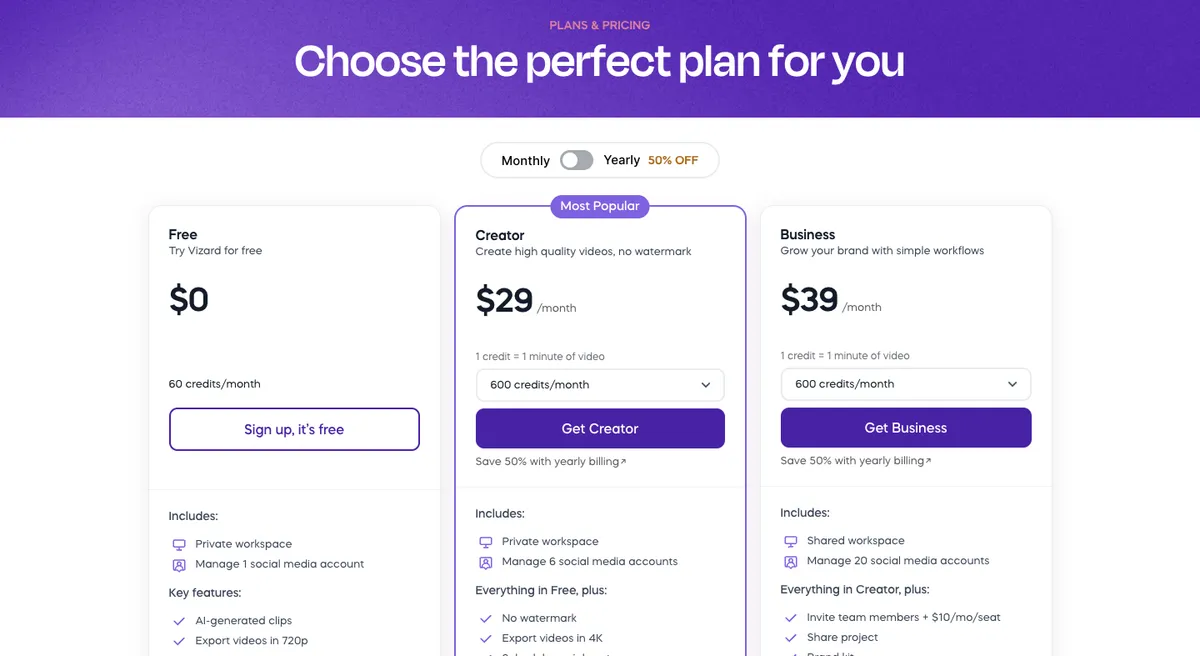
| Plan | Monthly price | Credits a month | Export | Storage | Social accounts |
|---|---|---|---|---|---|
| Free | $0 | 60 | 720p, up to 10 minutes | 3 days | 1 |
| Creator | $29/mo | From 600 | 4K, any length, no watermark | 100GB | 6 |
| Business | $39/mo | From 600 | 4K, any length | Unlimited while you subscribe | 20, plus a shared workspace and a brand kit |
Vizard also discounts yearly billing. We quote monthly prices here so the plans compare like for like.
Vizard AI pros
- A lot of minutes for the money. Creator gives 600 minutes for $29 a month, about 5 cents a minute.
- 4K export on both paid plans.
- A free plan with the full editor, so you can judge the clips before you pay.
- Scheduling on the cheapest paid plan, with 6 social accounts.
- Clip scores, subtitle translation and AI B-roll built in.
- An API and phone apps for teams that want to automate or work on mobile.
Vizard AI cons
- The free plan is tight. 720p only, a 10-minute export limit, a 60-minute upload limit and 3-day storage.
- Brand kit and shared workspace need Business. Creator does not include the brand kit.
- Seats cost extra. Each team member on Business adds $10 a month.
- The product is sprawling. Clipping, an agent, an ad maker and an AI studio share one menu, which can make the clipper harder to find for someone who only wants clips.
Vizard vs quso.ai
Both tools clip long videos, caption the clips and post them. On price per minute, Vizard wins clearly.
| Vizard AI | quso.ai | |
|---|---|---|
| Free plan | 60 credits a month, 720p, 3-day storage, 1 social account | 75 credits a month, 720p with a quso.ai watermark, TikTok publishing, 7-day data retention |
| Cheapest paid plan | Creator $29/mo, from 600 credits, 4K, no watermark | Lite $29/mo, 100 credits, unlimited 1080p clips |
| About 300 minutes a month | Creator $29/mo (600 credits) | Essential $39/mo (300 credits) |
| About 600 minutes a month | Creator $29/mo | Growth $49/mo |
| Scheduling starts on | Creator (6 social accounts) | Essential (7 platforms) |
| Output | Short clips | Chapters and short videos in 16:9, 9:16 and 1:1 |
| Planning and cleanup | Content calendar | Content Planner and AI filler and silence removal on Essential |
| Branding | Brand kit on Business ($39/mo) | Custom Brand Kit and templates on Growth ($49/mo) |
| Analytics | Not listed on its pricing page | Social media analytics on Growth |
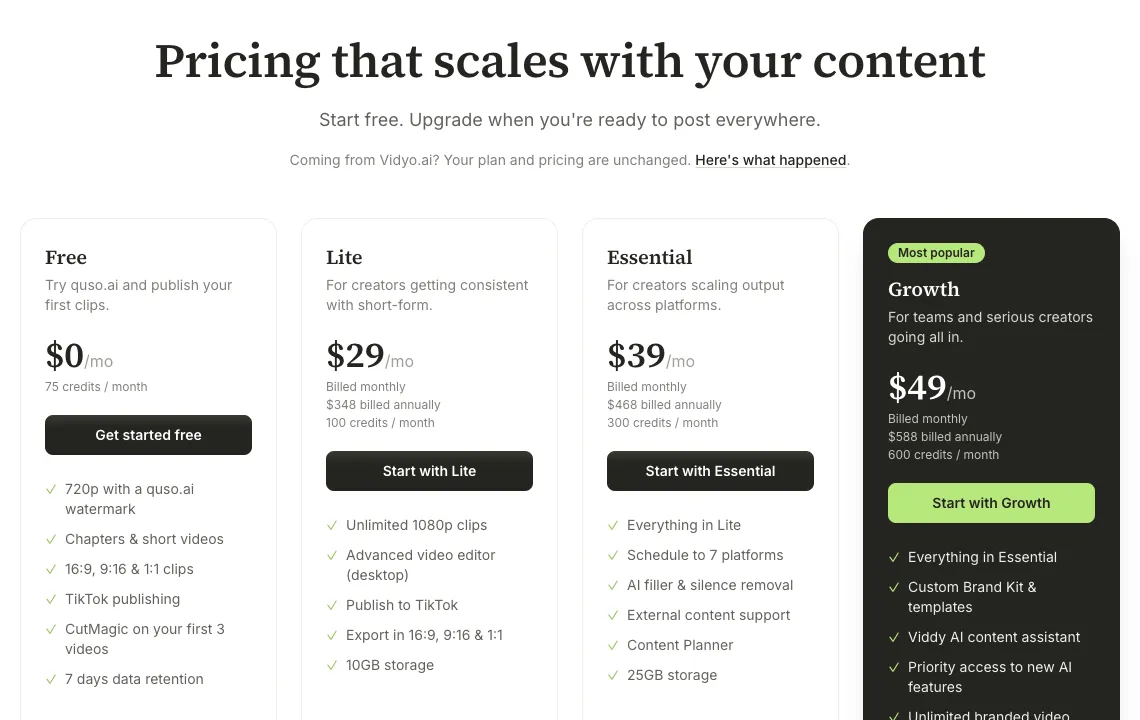
Read it honestly: if your bill is mostly minutes of video, Vizard is the cheaper tool at every paid volume in this table. quso.ai earns its price elsewhere. The free plan keeps projects for a week instead of 3 days and publishes to TikTok, every plan exports chapters as well as short clips, and Essential adds a Content Planner and AI filler and silence removal. See quso.ai's plans for the full list.
How quso.ai turns a long video into clips, from the quso.ai YouTube channel.
Who should use Vizard AI
- Podcasters and YouTubers who process several hours of video a month and want the lowest price per minute.
- Small teams that need a shared workspace and a brand kit at $39 a month.
- Developers who want clipping through an API.
Pick quso.ai if you want chapters and short videos from the same upload, a Content Planner, or a free plan that keeps your work for a week and publishes to TikTok. Making faceless videos rather than clips? Our Crayo AI review covers a generator built for that. Only clipping YouTube videos on a budget? Our 2short.ai review covers a tool that charges $9.90 a month for 5 hours of video.
Vizard AI review FAQ
What is Vizard AI?
Vizard AI is an AI video clipping and editing tool. You paste a YouTube link or upload a long video, and it finds the best moments, cuts them into short clips with captions and reframing, and lets you edit, schedule and publish them to social media. It also has an AI video agent, an ad maker, an API and phone apps.
Is Vizard AI free?
Yes, with limits. The free plan gives 60 credits a month (one credit is one minute of video), 720p exports, the full video editor and one social account, but uploads are capped at 60 minutes, exports at 10 minutes and storage at 3 days. Paid plans start at $29 a month.
How much does Vizard AI cost?
Billed monthly, Vizard Free is $0 with 60 credits, Creator is $29 a month from 600 credits with 4K export, no watermark and 6 social accounts, and Business is $39 a month from 600 credits with a shared workspace, a brand kit, 20 social accounts and team seats at $10 a month each. Yearly billing is discounted. Prices checked on vizard.ai/pricing on October 20, 2026.
Is Vizard AI worth it?
For most solo creators, yes. Creator gives 600 minutes of video for $29 a month, which is cheaper per minute than any quso.ai plan, and adds 4K export and scheduling. The free plan is best treated as a test: 720p, a 10-minute export limit and 3-day storage.
Does Vizard support multi-language captions?
Yes. Vizard's pricing page lists auto subtitling and subtitle translation, and its YouTube channel has a tutorial on adding bilingual subtitles. Check the editor for the exact language list before you commit.
Vizard vs quso.ai: which is better?
Vizard is better value per minute: $29 a month buys 600 minutes, where quso.ai Lite is $29 for 100 credits and Essential is $39 for 300. quso.ai is the pick if you want chapters as well as short clips from each upload, a Content Planner, AI filler and silence removal, or a free plan with 7-day retention and TikTok publishing.
Is there a free Vizard AI alternative?
Yes. quso.ai's free plan gives 75 credits a month (about 75 minutes of video), 16:9, 9:16 and 1:1 clips, TikTok publishing and 7-day data retention, with 720p exports and a quso.ai watermark. Vizard's free plan gives 60 credits and 3-day storage.
Vizard prices, credits, limits and features checked against vizard.ai/pricing with monthly billing selected (USD) on October 20, 2026; product details from vizard.ai and the official Vizard YouTube channel the same day. quso.ai prices and plans come from quso.ai/pricing. Both companies can change prices at any time, so check the official pages before you buy.