AI Subtitle Generator
Turn the speech in any video into timed subtitles in 99 languages. Fix the words, pick a caption style, and download the video or the SRT file.
Creating an account is free. See pricing for your country.
The short answer
quso.ai's AI subtitle generator turns the speech in your video into timed, editable subtitles in 99 languages. You pick one of 10 caption styles and download the video with the captions burned in. Every paid plan can also export the subtitles as an SRT file. It transcribes in the language that's spoken; it doesn't translate.
Checked against the quso.ai app and help center. Updated
See the caption styles on a real render
These clips are the preview renders inside the quso.ai editor. On the left is Basic Subtitles, plain timed lines. On the right is the animated style you pick.
What the SRT file looks like
An example export: the same four lines as they'd come out of a video spoken in each language. SRT download is on every paid plan.
1
00:00:00,000 --> 00:00:02,600
Captions help people follow along with the sound off.

2
00:00:02,600 --> 00:00:05,200
Upload a video and choose the language it's spoken in.

3
00:00:05,200 --> 00:00:07,800
quso.ai transcribes it and times every line.

4
00:00:07,800 --> 00:00:10,400
Fix any word, pick a style, and export.1
00:00:00,000 --> 00:00:02,600
Los subtítulos ayudan a seguir el video sin sonido.
2
00:00:02,600 --> 00:00:05,200
Sube un video y elige el idioma en el que se habla.
3
00:00:05,200 --> 00:00:07,800
quso.ai lo transcribe y sincroniza cada línea.
4
00:00:07,800 --> 00:00:10,400
Corrige cualquier palabra, elige un estilo y exporta.1
00:00:00,000 --> 00:00:02,600
सबटाइटल से लोग बिना आवाज़ के भी वीडियो समझ पाते हैं।
2
00:00:02,600 --> 00:00:05,200
वीडियो अपलोड करें और उसकी भाषा चुनें।
3
00:00:05,200 --> 00:00:07,800
quso.ai उसे ट्रांसक्राइब करके हर लाइन का समय सेट करता है।
4
00:00:07,800 --> 00:00:10,400
कोई भी शब्द ठीक करें, स्टाइल चुनें और एक्सपोर्ट करें।1
00:00:00,000 --> 00:00:02,600
تساعد الترجمة المصاحبة على متابعة الفيديو بدون صوت.
2
00:00:02,600 --> 00:00:05,200
ارفع الفيديو واختر اللغة المنطوقة فيه.
3
00:00:05,200 --> 00:00:07,800
يكتب quso.ai النص ويضبط توقيت كل سطر.
4
00:00:07,800 --> 00:00:10,400
صحّح أي كلمة، واختر نمطًا، ثم صدّر الملف.1
00:00:00,000 --> 00:00:02,600
字幕があれば、音を消していても内容が伝わります。
2
00:00:02,600 --> 00:00:05,200
動画をアップロードして、話されている言語を選びます。
3
00:00:05,200 --> 00:00:07,800
quso.ai が文字起こしをして、各行のタイミングを合わせます。
4
00:00:07,800 --> 00:00:10,400
言葉を直して、スタイルを選び、書き出します。How to generate subtitles in 3 steps
Step 1
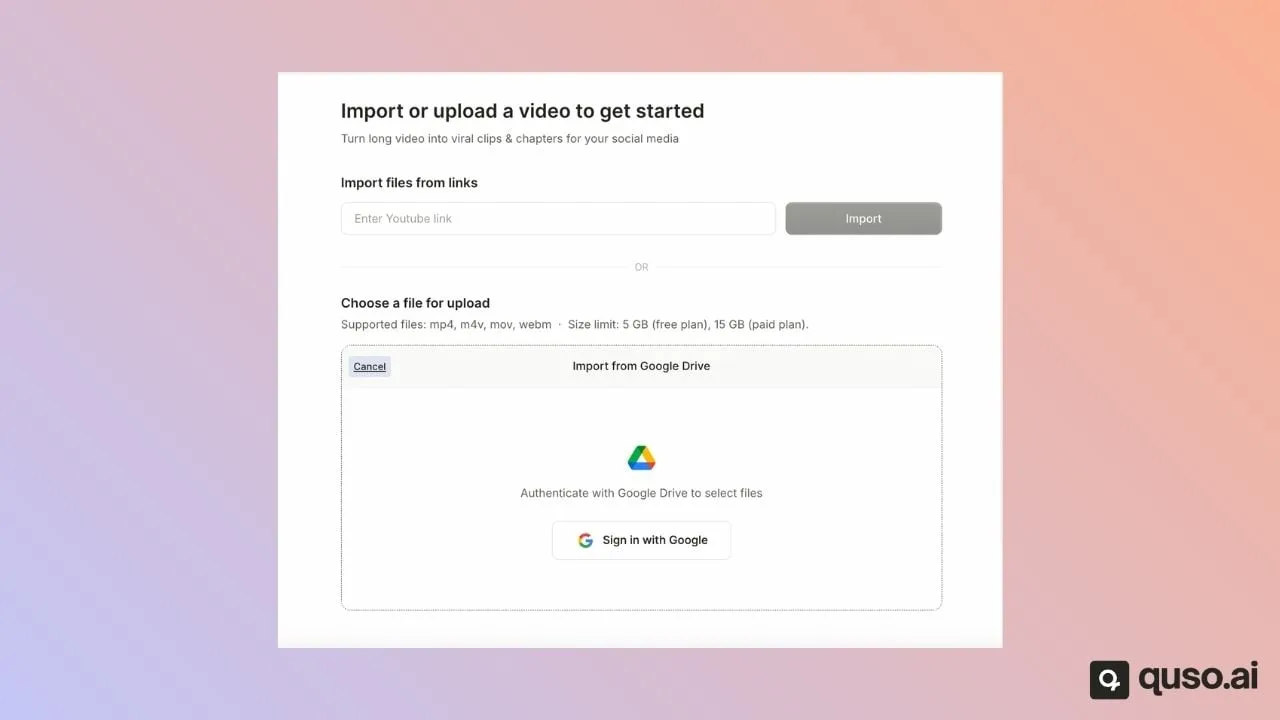
Upload a video or paste a link
Drop in an MP4, MOV, M4V or WebM file, or paste a YouTube link. Choose the language the video is spoken in; it has to match the audio. Videos can run up to 5 hours.
Step 2
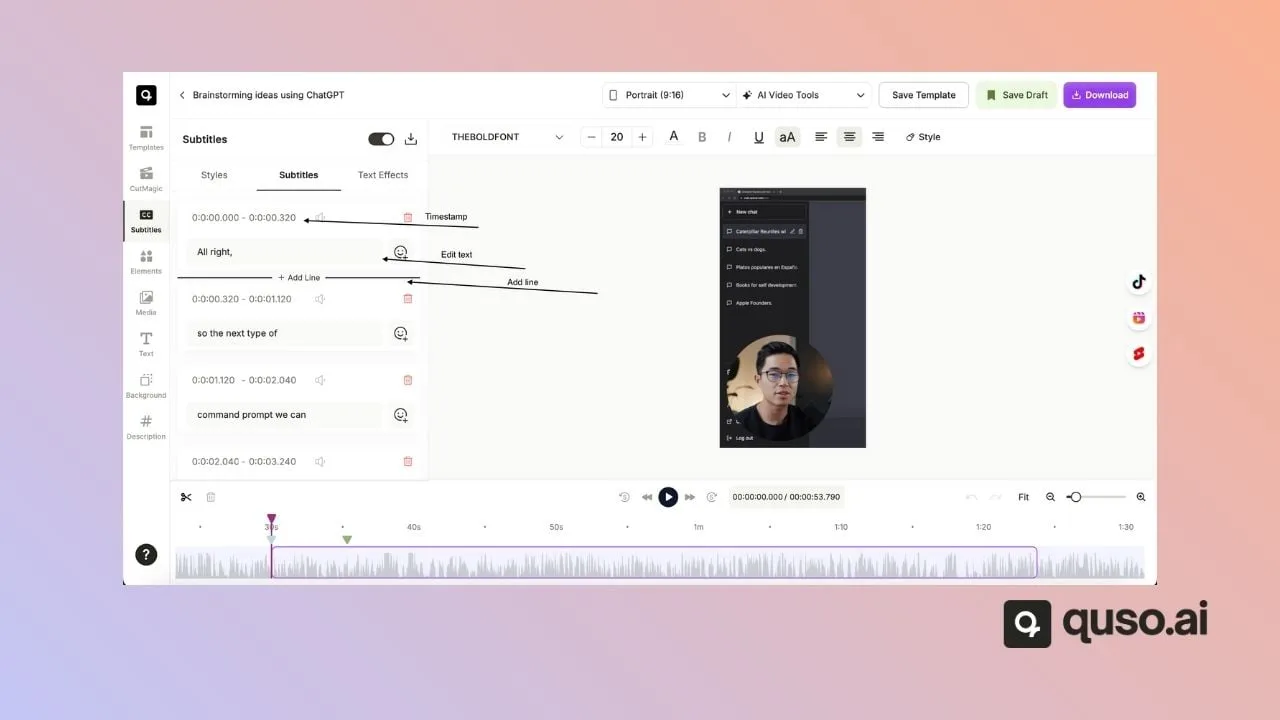
Fix the text and pick a style
Every line shows its start and end time. Edit a word, change the timing, delete a line or add a missing one. Then open Styles to choose one of the caption presets and set the font, colors, outline and position.
Step 3
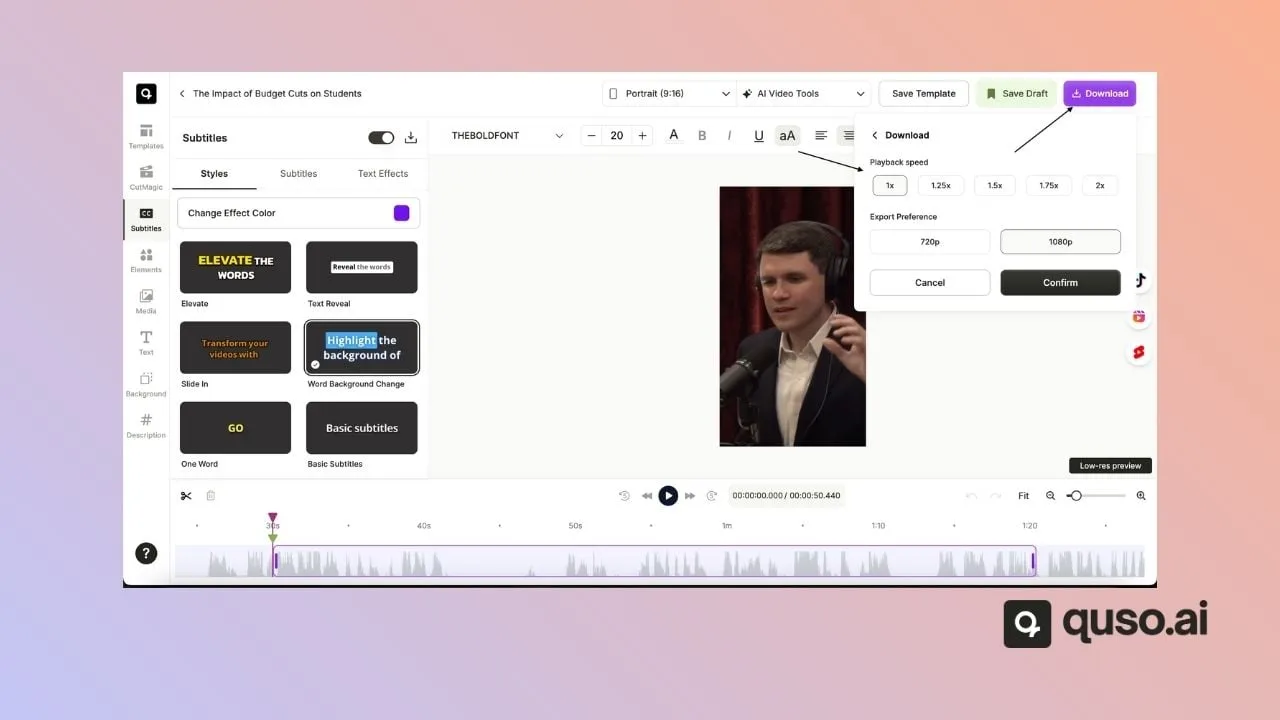
Download the video or the SRT
Download the video with the captions burned in: 720p on the free plan, 1080p on paid plans. On a paid plan, the download icon in the Subtitles panel also saves the subtitles as an .srt file.
Screenshots from the quso.ai help center.
All 10 caption styles
Each preset is a starting point. Change the font (or upload your own), colors, outline, shadow and background, and drag the captions where you want them.
Basic Subtitles
Plain lines, no animation. The safe choice for long videos, interviews and anything you'll also upload as an SRT.
Elevate
Bold capitals with the spoken word lifted out in color. Built for Shorts, Reels and TikTok.
Text Reveal
The whole line sits in a white box and each word darkens as it's spoken.
Slide In
Words slide into place one after another, so the line builds with the speaker.
Word Background Change
A colored block jumps from word to word behind the text, karaoke style.
One Word
A single word on screen at a time. Fast and punchy, best for short, energetic clips.
Two Word
Two words at a time: easier to read than One Word, still quick.
Word Color Change
The line stays put and the current word changes color as it's said.
Word Appended
Words add on to the line as they're spoken until it's complete.
Highlight Impactful Word
Picks out the words that carry the point and colors those, not every word.
Languages and export formats
| Video with burned-in captions | Yes. 720p with a quso.ai watermark on the free plan, 1080p without it on paid plans. |
|---|---|
| SRT subtitle file | Yes, on every paid plan (Lite and up). Not on the free plan. |
| VTT subtitle file | No. Convert the SRT if a platform asks for VTT. |
| Subtitle translation | No. Subtitles come out in the language that's spoken. |
| Uploads | MP4, MOV, M4V and WebM files, or a YouTube or public video link. Up to 5 hours per video. |
| Cost | 1 credit for each minute of video. Where quso.ai offers a free plan, it includes 75 credits a month. Paid plans start at $29 a month. |
The 99 languages
Choose the one your video is spoken in when you upload. English comes as Global, US, UK or Australia.
- English
- Spanish · Español
- French · Français
- German · Deutsch
- Italian · Italiano
- Japanese · 日本語
- Korean · 한국어
- Chinese · 中文
- Portuguese · Português
- Russian · Русский
- Arabic · العربية
- Bulgarian · Български
- Czech · Čeština
- Slovak · Slovenčina
- Azerbaijani · Azərbaycan
- Belarusian · Беларуская
- Vietnamese · Tiếng Việt
- Hausa
- Yoruba · Yorùbá
- Turkish · Türkçe
- Afrikaans
- Swahili
- Romanian · Română
- Hungarian · Magyar
- Malay · Bahasa Melayu
- Polish · Polski
- Bosnian · Bosanski
- Urdu · اردو
- Punjabi · ਪੰਜਾਬੀ
- Pashto · پښتو
- Sindhi · سنڌي
- Sinhala · සිංහල
- Tamil · தமிழ்
- Bengali · বাংলা
- Nepali · नेपाली
- Hindi · हिन्दी
- Marathi · मराठी
- Telugu · తెలుగు
- Gujarati · ગુજરાતી
- Kannada · ಕನ್ನಡ
- Khmer · ខ្មែរ
- Persian · فارسی
- Hebrew · עברית
- Tatar · Татар
- Ukrainian · Українська
- Serbian · Српски
- Kazakh · Қазақ
- Dutch · Nederlands
- Albanian · Shqip
- Amharic · አማርኛ
- Armenian · Հայերեն
- Assamese · অসমীয়া
- Bashkir · Башҡорт
- Basque · Euskara
- Breton · Brezhoneg
- Burmese · မြန်မာစာ
- Catalan · Català
- Croatian · Hrvatski
- Danish · Dansk
- Estonian · Eesti
- Finnish · Suomi
- Faroese · Føroyskt
- Georgian · ქართული
- Greek · Ελληνικά
- Galician · Galego
- Haitian Creole · Kreyòl Ayisyen
- Hawaiian · ʻŌlelo Hawaiʻi
- Icelandic · Íslenska
- Indonesian · Bahasa Indonesia
- Javanese · Basa Jawa
- Lao · ລາວ
- Latin · Latina
- Lithuanian · Lietuvių
- Latvian · Latviešu
- Lingala · Lingála
- Luxembourgish · Lëtzebuergesch
- Macedonian · Македонски
- Malagasy
- Malayalam · മലയാളം
- Maltese · Malti
- Maori · Māori
- Mongolian · Монгол
- Norwegian · Norsk
- Norwegian Nynorsk · Norsk Nynorsk
- Occitan
- Sanskrit · संस्कृतम्
- Shona · ChiShona
- Slovenian · Slovenščina
- Somali · Soomaali
- Sundanese · Basa Sunda
- Swedish · Svenska
- Tagalog
- Tajik · Тоҷикӣ
- Thai · ไทย
- Tibetan · བོད་སྐད་
- Turkmen · Türkmen
- Uzbek · O'zbek
- Welsh · Cymraeg
- Yiddish · ייִדיש
How quso.ai compares with other subtitle generators
Free tiers, watermarks, languages and the cheapest plan that removes the watermark. Competitor figures were checked on their official pages on , in US dollars, billed monthly. Every figure links to its source.
| Tool | Free tier | Watermark on free | Subtitle languages | Cheapest plan without watermark | SRT / VTT | Translation |
|---|---|---|---|---|---|---|
| quso.ai | Where quso.ai offers a free plan: 75 minutes of video a month, 720p exports | Yes | 99 | Lite, $29 a month | SRT on every paid plan; no VTT | No |
| Kapwing | 10 minutes of auto subtitles, exports up to 4 minutes, 720p | Yes | No number stated | Pro, $24 a month | SRT and VTT on Pro and up | Yes, metered: 5 minutes on Free, 500 a month on Pro |
| VEED | 10 minutes of auto subtitles, exports up to 10 minutes, 720p | Yes | 125+ | Creator, $25 a month | SRT, VTT and TXT on paid plans | Pro and up, 50+ languages |
| Canva | Free plan; Canva calls its subtitle feature free | Not stated | No number stated | Pro, $18 a month | Not stated (MP4 download) | Pro (Canva Translate, 134 languages) |
| Clideo | 10 AI credits a month, 500 MB per file, 720p | Yes | 100+ | Pro (500 credits), $12 a month | SRT and TXT; VTT not stated | Yes, uses credits (Free and Pro) |
| HappyScribe | One-time 10-minute trial, not monthly | Yes, on burned-in MP4 exports | 150+ | Basic, $17 a month | SRT on all plans; VTT on Pro and up | Yes, 80+ languages, all plans |
- Kapwing gives no count for subtitle languages. Its pricing page says translation covers 60+ languages and its subtitles page says 100+.
- Canva's caption pages call subtitles free, while its Pro page lists them among Pro features. No Canva page says free video exports carry a watermark.
- Clideo's Pro price rises with the credit tier. HappyScribe's free minutes are a one-time trial. VEED and Clideo may show local currency outside the US.
- quso.ai pricing depends on your country: in some countries there is no free plan and you buy one-time credit packs. See pricing.
quso.ai isn't the cheapest here, it doesn't list the most languages, and it doesn't translate. Clideo is cheaper; VEED and HappyScribe cover more languages; Kapwing, VEED, Clideo and HappyScribe translate. quso.ai fits when subtitles are one step in a bigger job: cutting long videos into captioned short clips and scheduling them from the same place.
Making TikToks, Reels or Shorts? The AI caption generator is set up for animated social captions on short clips. Need a definition first? See what an SRT file is and subtitles vs captions.
Frequently asked questions
Where can I get subtitles for a video for free?+
Three free routes work for most people. YouTube Studio and TikTok both write automatic captions for videos you post there. quso.ai's free plan, where your country has one, gives you 75 minutes of video a month: upload the video, choose the spoken language and download it with captions burned in, at 720p with a quso.ai watermark.
Can ChatGPT add subtitles to video?+
No. OpenAI's help center says ChatGPT may not analyze a whole video or interpret its audio accurately, and it doesn't describe making subtitle files or burning captions into a video. Developers can get an SRT or VTT file from OpenAI's transcription API, but you still need an editor to put it on the video. A subtitle generator such as quso.ai does both steps.
How to get subtitles on a video without subtitles?+
Generate them from the audio. Upload the video to a subtitle generator such as quso.ai, choose the language that's spoken, fix any wrong words, then download the video with the captions burned in or, on a paid plan, as an SRT file. If you only need to read along yourself, YouTube's automatic captions and Android's Live Caption show captions on screen without changing the file.
How can I add subtitles to a video on my phone?+
Use the captions built into the app you post with: TikTok and Instagram Reels can add automatic captions, and CapCut has an auto-captions tool. To keep the captions in the file, open quso.ai in your phone's browser, upload the video and download it with captions burned in. Apple's Clips app also turns speech into on-screen Live Titles on iPhone.
How many languages does quso.ai's subtitle generator support?+
99 languages, from English, Spanish and Hindi to Urdu, Burmese and Yoruba. English comes in four variants: Global, US, UK and Australia. The full list is on this page.
Can I download the subtitles as an SRT file?+
Yes, on any paid plan. Open the Subtitles panel in the editor and use the download icon to save an .srt file. The free plan downloads the video with captions burned in instead. quso.ai doesn't export VTT.
Does quso.ai translate subtitles?+
No. quso.ai writes subtitles in the language your video is spoken in. To get subtitles in another language, translate the exported SRT file with a separate tool.
Is there a watermark?+
On the free plan, yes: videos export at 720p with a quso.ai watermark. Paid plans export at 1080p without the watermark.
Add subtitles to your next video
Creating an account is free. See pricing for your country.