X (Twitter) Scheduler
Schedule tweets and whole threads to X, and send the same post to Threads, Bluesky and LinkedIn in one go.
Scheduling is on Essential ($39/month) and Growth ($49/month).
The short answer
To schedule a tweet with quso.ai, link your X account, write the post, and pick a date and time. Long text can go out as a thread: switch on Post as a thread and quso.ai splits it into numbered posts of up to 280 characters, with a preview of each. Scheduling to X is on the Essential and Growth plans.
Checked in the quso.ai app. Updated
Writing a thread on X is fiddly: count the characters, cut the text by hand, paste each part as a reply, and hope you posted them in the right order. Scheduling one is harder still.
quso.ai's X scheduler takes the whole text at once. Switch on Post as a thread, check the numbered preview, and schedule it. The same composer posts to Threads, Bluesky, LinkedIn, Instagram and the rest of the 12 networks quso.ai publishes to. For an overview of the X integration, see quso.ai for X.
How to schedule tweets and threads with quso.ai
Step 1
Link your X account
Open Posts in the left menu, click Manage accounts, then Link on the X card and sign in to X.
Linking a network: Posts, then Manage accounts, then Link. Step 2
Write the tweet, or the whole thread
Create a post and select X. A single tweet takes up to 280 characters, plus photos or a video.
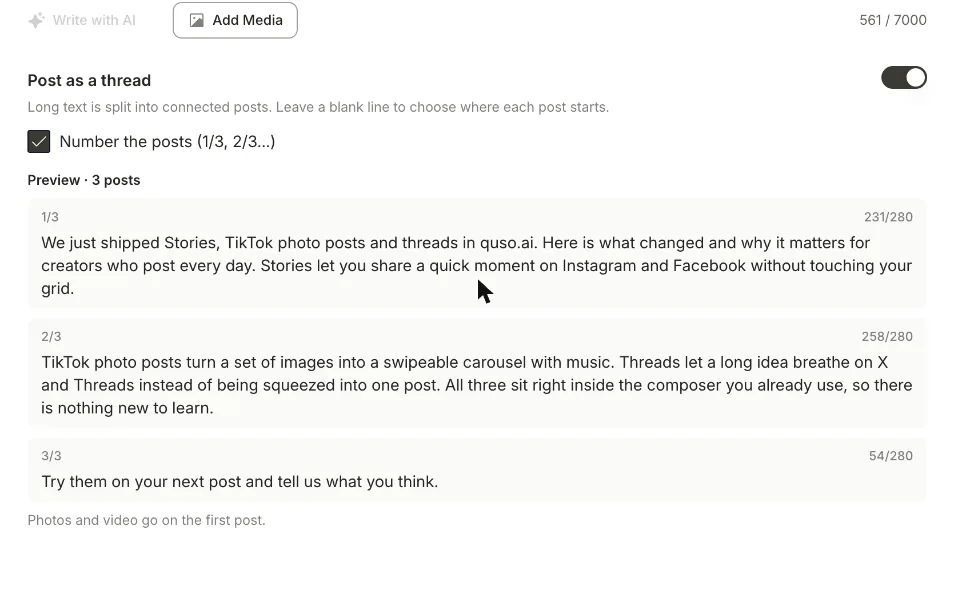
For a thread, write everything in one go and switch on Post as a thread. quso.ai breaks at blank lines first, then between whole sentences. Tick Number the posts for 1/3, 2/3, 3/3. The screenshot at the top of this page shows a three-post preview.
Step 3
Check each post
The preview lists every post with its character count out of 280. If one breaks in an odd place, add a blank line where you want the split and the preview updates.
Photos and video go on the first post.
Step 4
Schedule it
Click Schedule, pick the date and time, and confirm. Add Threads, Bluesky or LinkedIn to the same post if you want it there too. Everything you've scheduled or published is under Posts, with a View post link once it's live.
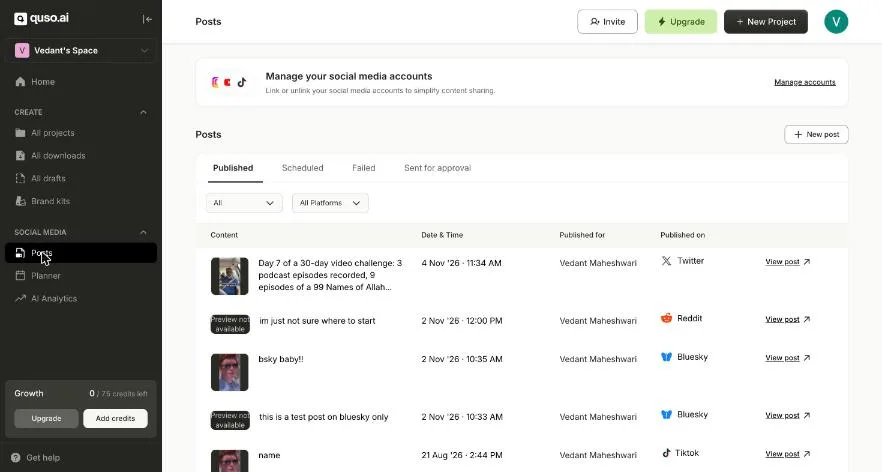
Posts: scheduled, published and failed posts across networks, each with a link to the live post.
What an X post can hold in quso.ai
| Text | 280 characters per post |
|---|---|
| Thread length | Up to 25 posts |
| Where it splits | At blank lines first, then between whole sentences |
| Numbering | Optional: 1/3, 2/3, 3/3 |
| Media | Photos or a video, on the first post of a thread |
| Video size | Up to 512 MB |
Not yet: editing a thread after it's scheduled, and a different photo on each post in a thread.
X's own scheduler vs quso.ai
Depending on your account, X can schedule a single post from its web composer, and X Pro, part of X Premium, schedules from a desktop dashboard. If you post a few tweets a week and nothing else, that may be all you need.
quso.ai earns its place when X is one of several networks. It splits a long piece into a thread for you, sends the same post to Threads, Bluesky and LinkedIn, and schedules the video clips it cuts from your podcasts, webinars or streams. See the best time to post on X before you pick a slot.
How to write a thread on X that people finish
Make the first post stand alone. Most people only see post 1 in their feed. Put the claim or the result there, with the image.
One idea per post. Leave a blank line between ideas and quso.ai uses it as the split, so no post ends mid-sentence.
Number anything over three posts. 1/6 tells readers how long the thread is.
End with one ask. A follow, a link, or a question. Pick one.
What it costs
Free and Lite
Publish to TikTok only. No scheduling to other networks.
Essential, $39/month
Scheduling to every connected network, the Content Planner, and 300 credits a month for clipping.
Growth, $49/month
Everything in Essential, plus brand kits, social media analytics and 600 credits a month.
Monthly prices in USD. Prices can differ by country; the pricing page shows yours.
Questions people ask
- How do I schedule a tweet?
- In quso.ai, link your X account under Posts, then Manage accounts. Create a post, select X, write the tweet (up to 280 characters) and add photos or a video. Click Schedule, pick the date and time, and confirm. It needs the Essential or Growth plan.
- Can you schedule posts on X without a third-party tool?
- On some accounts, yes. X lets you schedule from its own web composer or from X Pro, which comes with X Premium. A scheduler like quso.ai adds threads that split themselves, the same post to Threads, Bluesky, LinkedIn and others at once, and clips cut from your long videos.
- How do I schedule a Twitter thread?
- Write the whole thread as one piece of text and switch on Post as a thread. quso.ai splits it at your blank lines first, then between whole sentences, so no post goes over 280 characters. Tick Number the posts to add 1/3, 2/3 and so on, check the preview, then schedule it like a single post. A thread can run to 25 posts.
- Can I post the same thread to X and Threads?
- Yes. Select both networks. The thread splits at 280 characters for X and 500 for Threads, and you can change the text for either network in its own tab.
- Where do photos and videos go in a scheduled thread?
- On the first post. Per-post media inside a thread isn't in the composer yet. Put the image or clip that goes with your hook at the top.
- Is the X scheduler free?
- No. quso.ai's free plan publishes to TikTok only. Scheduling to X and the other networks is on the Essential and Growth plans.
More ways to schedule
- quso.ai for X: the X integration in one page
- Threads scheduler: the same thread tools for Threads, at 500 characters a post
- Bluesky scheduler: schedule Bluesky posts with photos or video
- Reddit post scheduler: schedule text and image posts to a subreddit
- Social media scheduler: every network quso.ai publishes to, on one calendar