Threads Scheduler
Write once, schedule to Threads, and let long posts split into a numbered thread on their own.
Scheduling is on Essential ($39/month) and Growth ($49/month).
The short answer
quso.ai schedules posts and whole threads to Threads from your browser. Link your Threads account, write the post, turn on Post as a thread if it runs over 500 characters, and pick a date and time. The same post can go to X, Bluesky and 9 other networks at once. Scheduling is on the Essential and Growth plans.
Checked in the quso.ai app. Updated
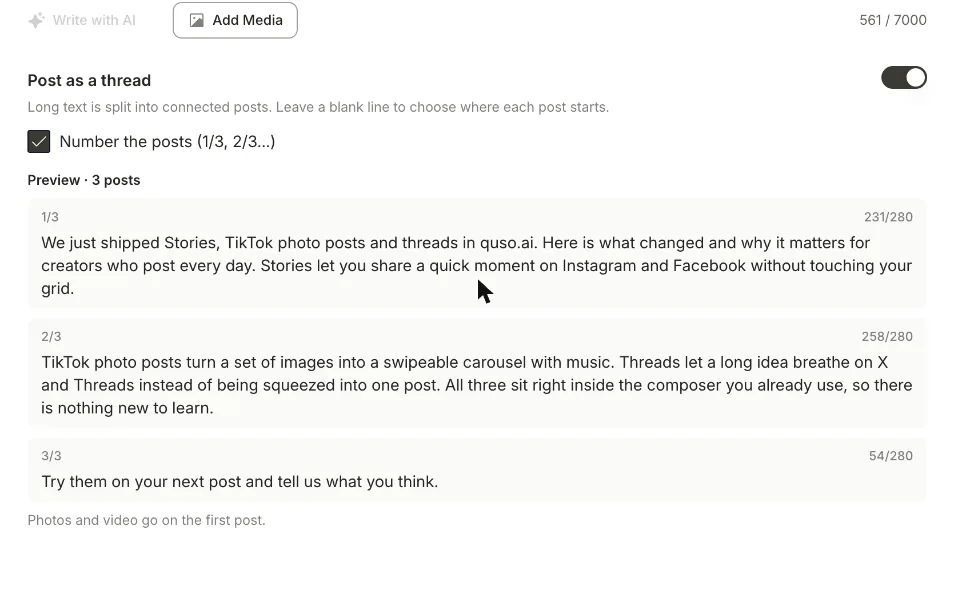
Threads has its own scheduler in the app, and for a single account posting a few times a week it does the job. What it doesn't do is plan from a computer alongside your other networks, or turn a long piece of writing into a thread for you.
quso.ai's Threads scheduler sits in the same composer you use for TikTok, Instagram, LinkedIn and X. Write once, pick the networks, and schedule. When the text is too long for one post, quso.ai splits it into a thread and shows each numbered post before anything goes out.
How to schedule Threads posts with quso.ai
Step 1
Link your Threads account
Open Posts in the left menu, click Manage accounts, then Link on the Threads card and sign in. Threads sits next to the other 11 networks quso.ai publishes to.
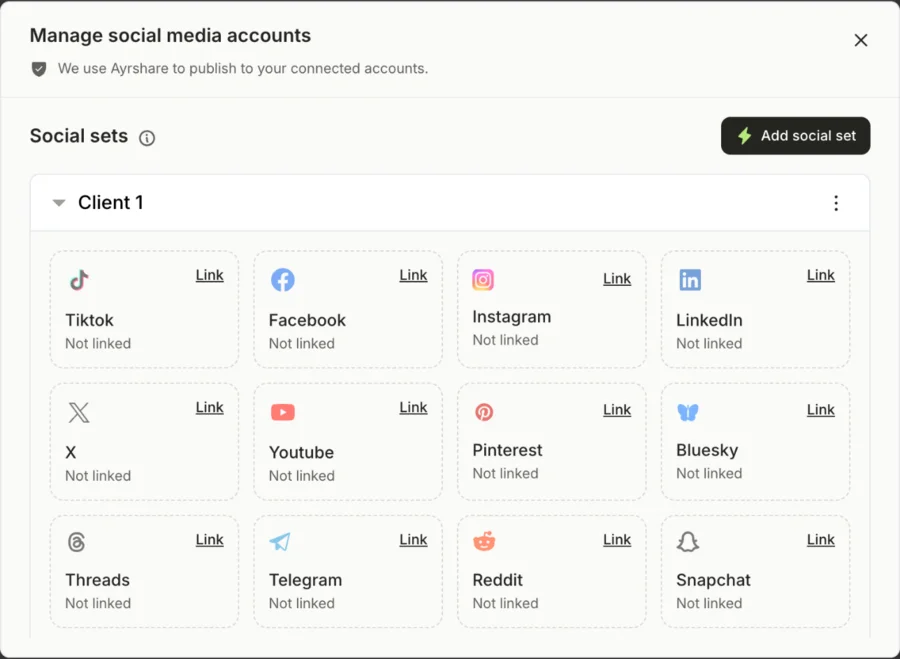
Manage accounts: click Link on a network's card and sign in. Step 2
Write the post, or a whole thread
Create a post, select Threads, and write. Add up to 20 photos and videos if you like.
Over 500 characters? Switch on Post as a thread. quso.ai splits at your blank lines first, then between whole sentences, and can number the posts (1/3, 2/3…). The preview shows every post and its character count, as in the screenshot at the top of this page.
Step 3
Add X or other networks
Select X, Bluesky, LinkedIn or any other linked network in the same post. Shared Content goes to all of them; open a network's tab to change its text. Threads also work on X, split at 280 characters.
Sharing the same idea on Reddit? Add Reddit to the post, then give it a title and a subreddit; see the Reddit post scheduler.
Step 4
Pick a date and time
Click Schedule, choose when it should go out, and confirm. Scheduled and published posts sit under Posts, with a link to each live post once it's out.
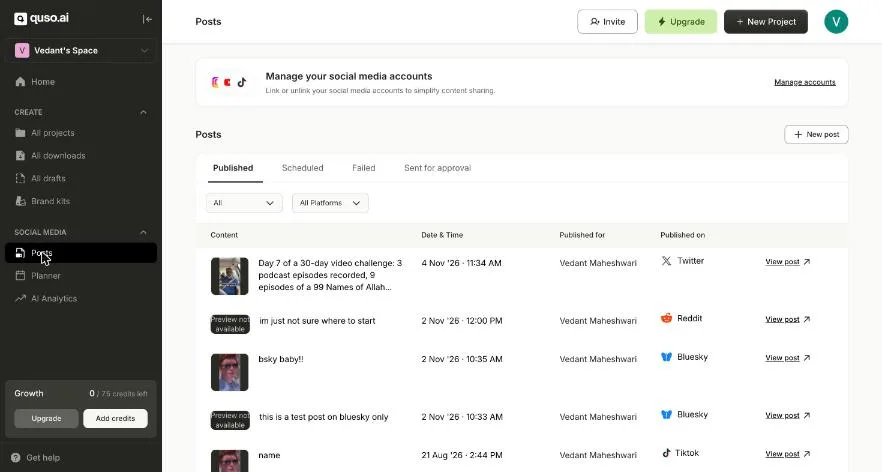
Posts: scheduled, published and failed posts across networks, each with a link to the live post.
What a Threads post can hold in quso.ai
| Text | 500 characters per post |
|---|---|
| Thread length | Up to 25 posts, split at blank lines, then whole sentences |
| Numbering | Optional: 1/3, 2/3, 3/3 |
| Media | Up to 20 photos and videos, mixed, on the first post of a thread |
| Video length | Up to 5 minutes |
| Image size | Up to 8 MB each |
Not yet: editing a thread after it's scheduled, threads in the Content Planner's composer, and AI Analytics for Threads posts.
Threads' own scheduler vs quso.ai
Threads added scheduling to its app in January 2025 (TechCrunch). It's free and fine for one account. Use it if Threads is the only place you post.
quso.ai is for when Threads is one stop of several. The same post can go to X, Bluesky, LinkedIn, Instagram, Facebook and the rest from one composer, long text becomes a thread without copy-pasting each part, and the posts can be clips quso.ai cut from your long videos.
Writing a thread that splits well
Leave a blank line where you want a new post. quso.ai always breaks there first, so each post can carry one idea.
Put the hook in the first post. It's the one people see in their feed, and it's where your photos and video go.
Number long threads. 1/5 tells readers there's more coming. Turn numbering off for two- or three-post threads if it feels heavy.
Check the preview. Each post shows its character count, so you'll see a post that ended mid-thought before it's live.
What it costs
Free and Lite
Publish to TikTok only. No scheduling to other networks.
Essential, $39/month
Scheduling to every connected network, the Content Planner, and 300 credits a month for clipping.
Growth, $49/month
Everything in Essential, plus brand kits, social media analytics and 600 credits a month.
Monthly prices in USD. Prices can differ by country; the pricing page shows yours.
Questions people ask
- Can you schedule posts on Threads?
- Yes. The Threads app has had its own scheduler since January 2025: write the post, open the menu in the composer and pick a date and time. A scheduler like quso.ai is useful when you want to plan Threads posts from a computer, split long text into a thread for you, and send the same post to X, Bluesky or LinkedIn at the same time.
- How do I schedule a post on Threads from my computer?
- In quso.ai, open Posts, click Manage accounts and link Threads. Then create a post, pick Threads (and any other networks), write the text or add up to 20 photos and videos, click Schedule and choose the date and time. Scheduling needs the Essential or Growth plan.
- Can I schedule a whole thread, not just one post?
- Yes. Turn on Post as a thread and quso.ai splits your text into connected posts of up to 500 characters each. It breaks at blank lines first, then between whole sentences, and shows a numbered preview so you can check every post before it's scheduled. If a caption runs over the limit, a Turn into a thread link does the same thing.
- Can I post the same thing to Threads and X?
- Yes. Select both networks and write once in Shared Content. Each network gets its own tab if you want to change the text for one of them, and threads work on both: X splits at 280 characters, Threads at 500.
- Is the Threads scheduler free?
- No. quso.ai's free plan publishes to TikTok only. Scheduling to Threads and the other networks starts on Essential. If you only post to Threads and don't mind using your phone, the scheduler in the Threads app costs nothing.
- What are the Threads limits in quso.ai?
- 500 characters per post, up to 20 photos and videos in one post, videos up to 5 minutes and images up to 8 MB. A thread can run to 25 posts, and its photos and video go on the first post.
More ways to schedule
- X (Twitter) scheduler: the same thread tools for X, at 280 characters a post
- Bluesky scheduler: schedule Bluesky posts with photos or video
- Instagram Story scheduler: schedule Instagram and Facebook Stories
- Reddit post scheduler: schedule text and image posts to a subreddit
- Social media scheduler: every network quso.ai publishes to, on one calendar