Bluesky Scheduler
Plan Bluesky posts ahead, with photos or video, alongside X, Threads and the rest of your networks.
Scheduling is on Essential ($39/month) and Growth ($49/month).
The short answer
quso.ai schedules posts to Bluesky. Link your Bluesky account, write up to 300 characters, add up to 4 images or one video, and pick a date and time. The same post can go to X, Threads, LinkedIn and 8 other networks at once. Scheduling is on the Essential and Growth plans.
Checked in the quso.ai app. Updated
Bluesky's app doesn't schedule posts: whatever you write goes out when you tap Post. If you want a post to land at 9 a.m. while you're asleep, or to plan a week of posts in one sitting, you need a scheduler.
quso.ai added Bluesky in November 2026. It sits in the same composer as X, Threads, LinkedIn, Instagram, TikTok and the rest, so a post you write once can go to Bluesky and everywhere else on the same schedule.
How to schedule Bluesky posts with quso.ai
Step 1
Link your Bluesky account
Open Posts in the left menu and click Manage accounts. Click Link on the Bluesky card and sign in.
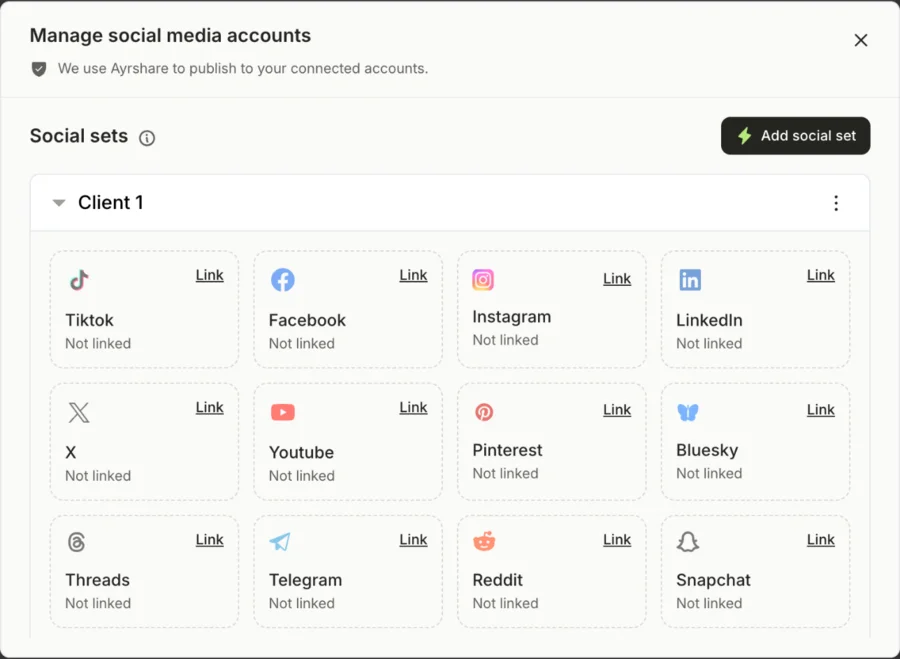
Manage accounts: click Link on a network's card and sign in. Step 2
Write the post
Create a post and select Bluesky. Write up to 300 characters and add up to 4 images or one video. If an image is over 1 MB or the video is over 300 MB, quso.ai flags it before you can publish.
Step 3
Add other networks if you want
Tick X, Threads or LinkedIn in the same post. Use each network's tab to give it its own text: a longer version for Threads, a shorter one for Bluesky.
Step 4
Pick a date and time
Click Schedule, choose when it goes out, and confirm. Published posts show under Posts with a View post link to Bluesky.
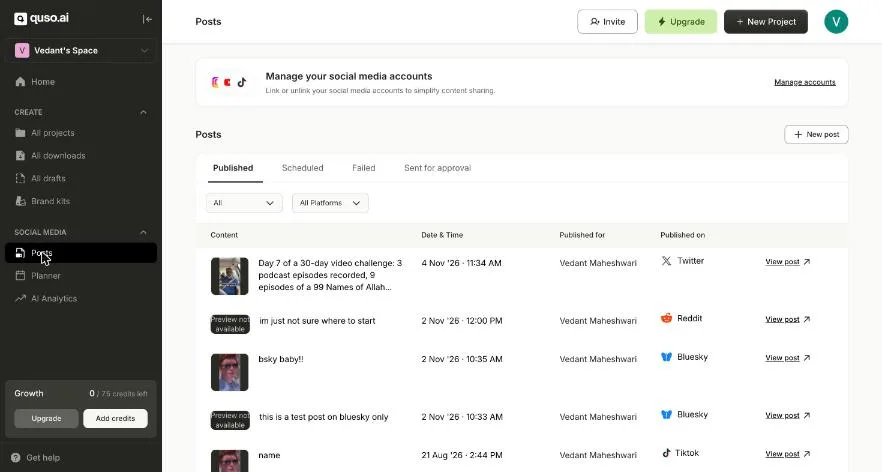
Posts: scheduled, published and failed posts across networks, each with a link to the live post.
What a Bluesky post can hold in quso.ai
| Text | 300 characters |
|---|---|
| Images | Up to 4, each up to 1 MB |
| Video | One, up to 10 minutes and 300 MB |
| Threads | Not on Bluesky yet (X and Threads only) |
| Analytics | Not yet: AI Analytics doesn't cover Bluesky posts |
When quso.ai is the right Bluesky scheduler, and when it isn't
Good fit: you post the same updates or video clips to Bluesky and several other networks, and want one place to plan them. quso.ai also cuts short clips from long videos, so a podcast episode can become a week of posts across Bluesky, X, Threads and TikTok.
Not the best fit: Bluesky is your only network, or you mainly write long Bluesky threads. quso.ai doesn't split Bluesky threads yet, and scheduling starts on a paid plan, so a Bluesky-only tool will cost less.
What it costs
Free and Lite
Publish to TikTok only. No scheduling to other networks.
Essential, $39/month
Scheduling to every connected network, the Content Planner, and 300 credits a month for clipping.
Growth, $49/month
Everything in Essential, plus brand kits, social media analytics and 600 credits a month.
Monthly prices in USD. Prices can differ by country; the pricing page shows yours.
Questions people ask
- Can you schedule posts on Bluesky?
- Not in Bluesky's own app at the time of writing: a post goes out when you tap Post. To schedule Bluesky posts you need a third-party scheduler such as quso.ai, which publishes to Bluesky at the date and time you pick.
- How do I schedule a Bluesky post?
- In quso.ai, open Posts, click Manage accounts and click Link on the Bluesky card to sign in. Create a post, select Bluesky, write up to 300 characters and add up to 4 images or one video. Click Schedule and pick the date and time. Scheduling needs the Essential or Growth plan.
- What are Bluesky's limits for scheduled posts?
- 300 characters of text, and either up to 4 images (1 MB each) or one video of up to 10 minutes and 300 MB. quso.ai checks the file sizes before it lets you publish, so a post doesn't fail at Bluesky's end.
- Can I post the same thing to Bluesky, X and Threads?
- Yes. Select all three in one post. Shared Content goes to each of them, and each network's tab lets you change the text, for example to fit Bluesky's 300 characters when the X and Threads versions run longer.
- Can quso.ai schedule a Bluesky thread?
- Not yet. The Post as a thread switch, which splits long text into numbered posts, works on X and Threads. On Bluesky, quso.ai posts a single post of up to 300 characters.
- Is there a free Bluesky scheduler?
- quso.ai's isn't free: its free plan publishes to TikTok only, and scheduling to Bluesky starts on Essential. Some other schedulers include Bluesky on a free tier, so check them if Bluesky is the only network you post to.
More ways to schedule
- Threads scheduler: schedule Threads posts and auto-split threads
- X (Twitter) scheduler: schedule tweets and threads
- Instagram Story scheduler: schedule Instagram and Facebook Stories
- Reddit post scheduler: schedule text and image posts to a subreddit
- Social media scheduler: every network quso.ai publishes to, on one calendar