Instagram Story Scheduler
Schedule Instagram and Facebook Stories from your browser, next to your posts, Reels and the rest of your networks.
Scheduling is on Essential ($39/month) and Growth ($49/month).
The short answer
To schedule an Instagram Story in quso.ai, create a post with one photo or one video, open the Instagram tab and set Post format to Story, then click Schedule and pick a time. Facebook Stories work the same way. Stories show full screen for 24 hours with no caption, and videos should be 60 seconds or less. Stories are on the Essential and Growth plans.
Checked in the quso.ai app. Updated
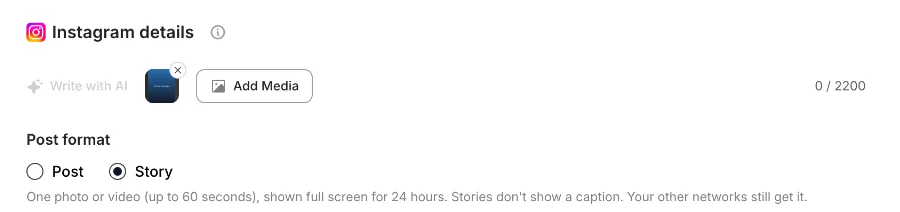
The Instagram app schedules posts and Reels, but not Stories. That's why “how to schedule an Instagram Story” is such a common question, and why most people end up in Meta Business Suite or a third-party tool.
quso.ai added Stories to its composer in November 2026. Pick Story as the post format on the Instagram or Facebook tab, and the Story goes out at the time you set, alongside the same content on your other networks.
How to schedule an Instagram Story with quso.ai
Step 1
Link Instagram (and Facebook)
Open Posts in the left menu, click Manage accounts, then Link on the Instagram card. Link Facebook too if you want the Story on both.
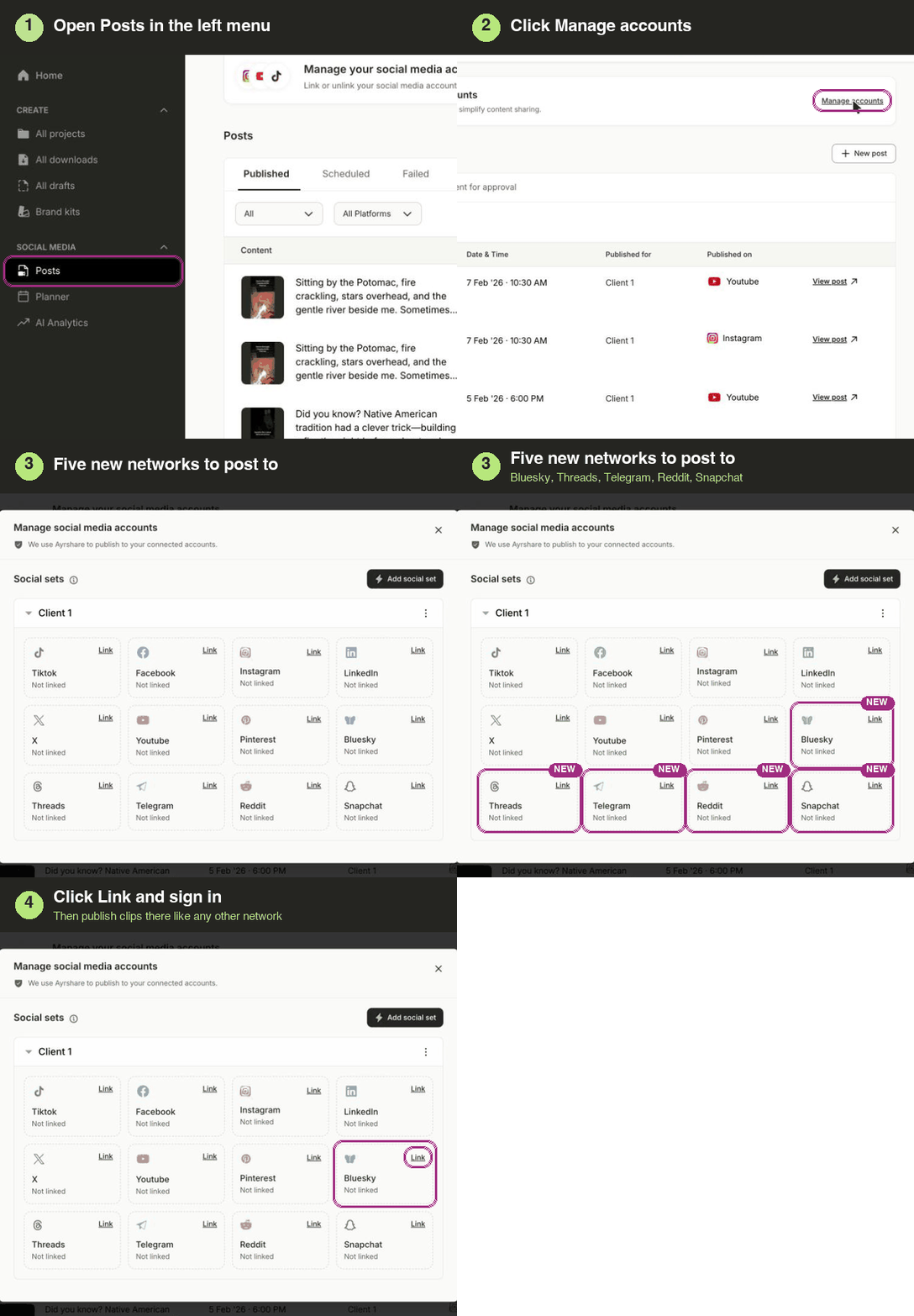
Linking a network: Posts, then Manage accounts, then Link. Step 2
Add one photo or one video
Create a post and add a single photo or video. A Story holds exactly one. Vertical 9:16 fills the screen; see Instagram Story dimensions for sizes.
Videos: 60 seconds or less.
Step 3
Set Post format to Story
Open the Instagram tab and choose Story under Post format. Settings that don't apply to a Story, such as the cover, feed sharing, auto-resize and collaborators, hide themselves.
Stories don't show a caption. Your other networks still get it.
Step 4
Schedule it
Click Schedule, pick the date and time, and confirm. The Story goes up at that time and stays for 24 hours, the same as one you post from your phone.
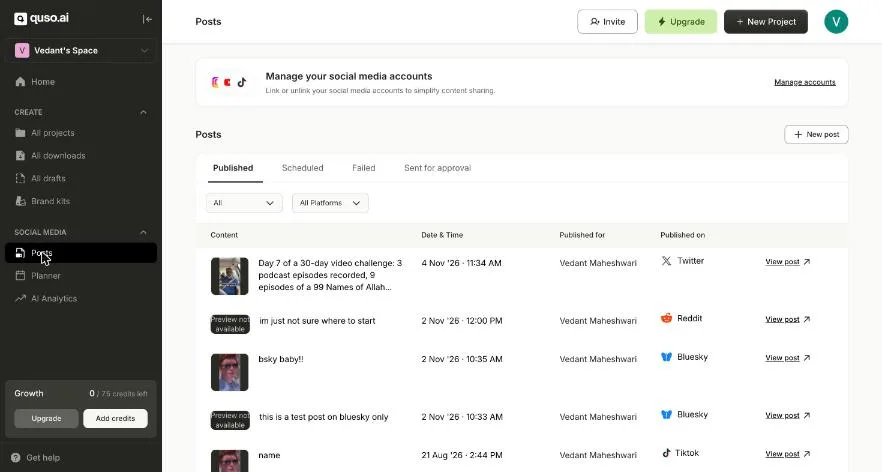
Posts: scheduled, published and failed posts across networks, each with a link to the live post.

Story rules in quso.ai
| Media | Exactly one photo or one video |
|---|---|
| Video length | Up to 60 seconds |
| Caption | Not shown on the Story; other networks in the same post still get it |
| How long it stays up | 24 hours, like any Story |
| Networks | Instagram and Facebook |
| Plans | Essential and Growth |
Not yet: editing a Story after it's scheduled, and Stories from the Content Planner's composer. Stickers, link stickers and polls can't be added from quso.ai; add those in the Instagram app.
Schedule a Facebook Story
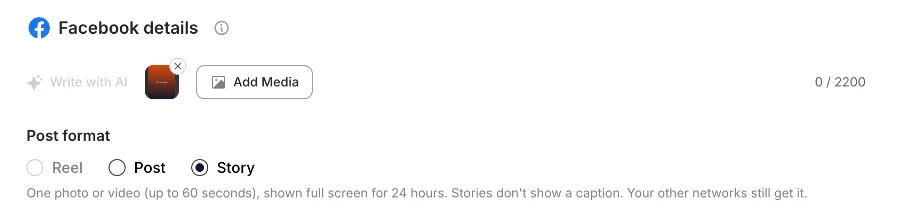
Facebook Stories use the same steps. On the Facebook tab, Post format has three choices: Reel, Post and Story. Pick Story, keep to one photo or one video of up to 60 seconds, and schedule. If you've attached more than one file, quso.ai tells you before you can publish.
One post can carry the same Story to Instagram and Facebook, and a regular version to your other networks.
Meta Business Suite vs quso.ai for Stories
Meta Business Suite is free and schedules Stories to Instagram and Facebook. If those are the only two places you post, start there.
quso.ai is worth it when Stories are one part of a wider plan: the same video goes out as a Story on Instagram, a Reel on Facebook, a TikTok and a YouTube Short, from one composer. It also makes the clips, cutting short vertical videos with captions from your long recordings. For feed posts and Reels, see the Instagram post scheduler.
What it costs
Free and Lite
Publish to TikTok only. No scheduling to other networks.
Essential, $39/month
Scheduling to every connected network, the Content Planner, and 300 credits a month for clipping.
Growth, $49/month
Everything in Essential, plus brand kits, social media analytics and 600 credits a month.
Monthly prices in USD. Prices can differ by country; the pricing page shows yours.
Questions people ask
- Can you schedule Instagram Stories?
- Yes, but not in the Instagram app, which schedules posts and Reels only. You can schedule Stories in Meta Business Suite, Meta's free app for Pages and connected Instagram accounts, or in a third-party scheduler such as quso.ai, which also schedules Facebook Stories and your other networks from the same post.
- How do I schedule an Instagram Story?
- In quso.ai, link Instagram under Posts, then Manage accounts. Create a post, add one photo or one video, select Instagram, open the Instagram tab and set Post format to Story. Click Schedule, pick the date and time, and confirm. Stories are on the Essential and Growth plans.
- Can I schedule several photos as one Story?
- No. A Story from quso.ai holds exactly one photo or one video, the same as a single Story frame on Instagram. Schedule each frame as its own post, a few minutes apart, to build a sequence.
- Does the caption show on a scheduled Story?
- No. Instagram and Facebook Stories don't show a caption. If the same post also goes to TikTok, LinkedIn or X, those networks still get the caption you wrote.
- How long can a scheduled Story video be?
- Up to 60 seconds. The Story option in quso.ai takes one photo or one video of up to 60 seconds, for both Instagram and Facebook.
- Can I schedule Facebook Stories too?
- Yes. On the Facebook tab, set Post format to Story. Like Instagram, a Facebook Story is one photo or one video, with videos up to 60 seconds. You can send the same Story to Instagram and Facebook from one post.
- Is there a free Instagram Story scheduler?
- Meta Business Suite is free and schedules Instagram and Facebook Stories. quso.ai's free plan publishes to TikTok only; scheduling Stories starts on Essential.
More ways to schedule
- Instagram post scheduler: schedule Instagram posts and Reels
- Facebook post scheduler: schedule Facebook posts and Reels
- How to make a slideshow on TikTok: photo posts in the app, or scheduled from your computer
- Social media scheduler: every network quso.ai publishes to, on one calendar