Social Media Planner Software: A Complete Guide for 2026
You're probably running social from five places right now.
Ideas sit in a spreadsheet. Draft captions live in Google Docs. Creative is split between Canva, a video editor, and a folder full of exports with names like final-v2-real-final. Scheduling happens in another app. Then performance data shows up later in a dashboard nobody checks until the end of the month.
That setup works for a while. Then content volume increases, more channels get added, someone asks for approvals, and the whole thing starts to drag. Posts go out late. Good ideas get lost. Old assets get recreated because nobody can find them. Teams spend more time moving content between tools than improving it.
That's why social media planner software matters now. Used well, it isn't just a scheduler. It becomes the operating layer that connects planning, creation, publishing, and measurement so your content strategy stops feeling like a pile of disconnected tasks.
Table of Contents
- Visual calendars and multi-platform scheduling
- Planning previewing and approvals
- AI creation and repurposing
- Analytics that close the loop
- Step 1 connect accounts and clean up the basics
- Step 2 define a repeatable content system
- Step 3 batch create and schedule from existing assets
- Step 4 review performance and refine weekly
Why Your Social Media Workflow Feels Chaotic
The usual breakdown happens slowly.
A coach starts with Instagram and LinkedIn. A podcast team adds YouTube Shorts, TikTok, and X. A small business hires a freelancer, then a designer, then someone to handle comments. Nobody plans a messy workflow. It just happens when each new problem gets solved with one more app.
The result is fragmented execution. One person writes captions. Another exports clips. Someone else schedules. Analytics live somewhere else. If a post underperforms, the team often can't trace whether the issue was the hook, the timing, the creative format, or the platform version. The workflow hides the answer.
Practical rule: If your team has to ask “Where does this live?” more than once a week, your social process is too fragmented.
I've seen the same pattern in service businesses outside marketing too. The common issue isn't effort. It's handoff friction. If you want a broader look at how teams solve that kind of operational sprawl, TimeTackle's roundup of top workflow automation platforms for service teams is useful because it shows the same principle in a wider context: centralize recurring work before you try to optimize it.
A lot of teams try to patch the problem with a better spreadsheet. That helps for a month. Then the calendar gets stale, assets drift out of sync, and nobody trusts the document anymore. If that sounds familiar, start with a cleaner planning foundation like this social media calendar template, then move the live workflow into software built for publishing operations.
The hidden cost of tool hopping
The biggest cost isn't usually software spend. It's attention loss.
- Context switching: Moving between docs, design tools, schedulers, and analytics breaks focus.
- Approval delays: Feedback gets buried in email threads, chat messages, or comments on the wrong file.
- Inconsistent publishing: Strong ideas miss their window because production and scheduling aren't connected.
- Weak learning loops: Teams publish content, but the performance signal doesn't make it back into planning.
Social media planner software fixes that when it acts as the central system, not just the final place where posts get queued.
What Is Social Media Planner Software
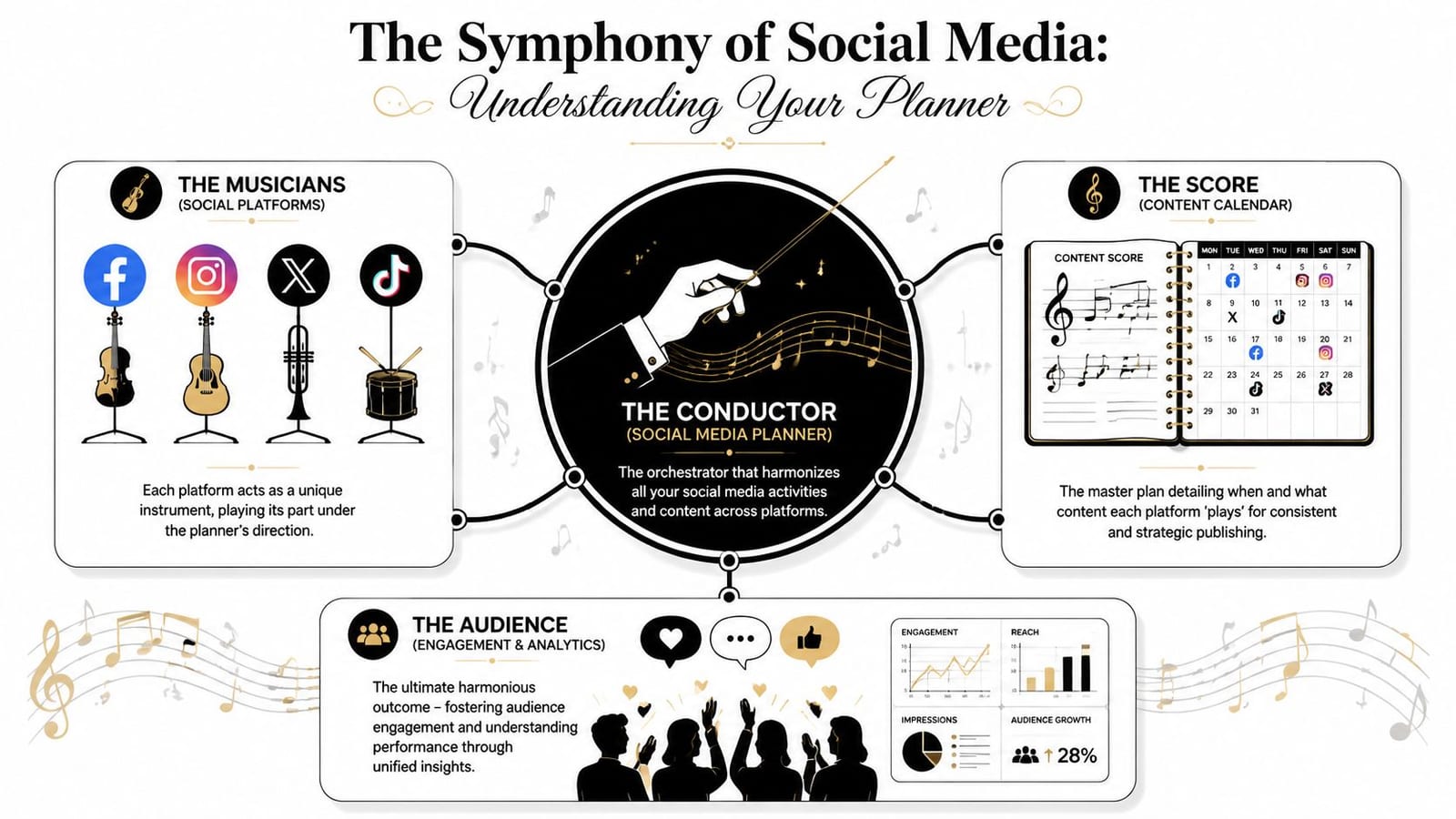
A modern social media planner is less like a timer and more like air traffic control for content.
It doesn't just send posts out at a chosen hour. It coordinates what gets published, where it goes, which version belongs on which network, who approves it, what it looks like in feed preview, and how the result feeds back into the next round of planning.
From post queue to control tower
Older scheduling tools were basically queues. You wrote a caption, attached media, picked a time, and moved on. Useful, but limited.
Current market guides show that the category has shifted into all-in-one publishing and planning systems with visual calendars, bulk scheduling, unified inboxes, and analytics dashboards. They also support publishing across major platforms including X, YouTube, LinkedIn, Pinterest, TikTok, Facebook, and Instagram, which reflects the move toward multi-channel orchestration rather than single-platform posting, as outlined in Sprout Social's review of social media scheduling tools.
That change matters because social strategy now starts before the post composer and continues after publishing. The planner has to support both sides.
What the planner actually controls
A good planner governs a few core layers at once:
- Content planning: Campaigns, content pillars, launch dates, and posting cadence.
- Asset coordination: Matching clips, graphics, captions, and variants to the right channel.
- Workflow management: Drafts, approvals, revisions, and status tracking.
- Publishing logistics: Scheduling, rescheduling, and platform-specific formatting.
- Feedback loop: Performance visibility that informs the next content cycle.
Some tools focus mainly on publishing. Others extend into ideation and creation. An option in that second category is quso.ai's AI content planner, which is built around planning and scheduling across multiple platforms while sitting closer to the content creation workflow than older scheduler-only tools.
The planner should answer three questions fast: what's going out, who owns it, and what happened after it published?
That's the definition. If your software can't answer those without extra docs, Slack messages, or a second dashboard, it's still acting like a scheduler, not a planner.
Core Features and Advanced Capabilities
Feature lists are where social software marketing usually gets noisy. Almost every tool says it has a calendar, automation, analytics, and AI. The core question is whether those pieces reduce work or just move it around.
Visual calendars and multi-platform scheduling
This is still the foundation.
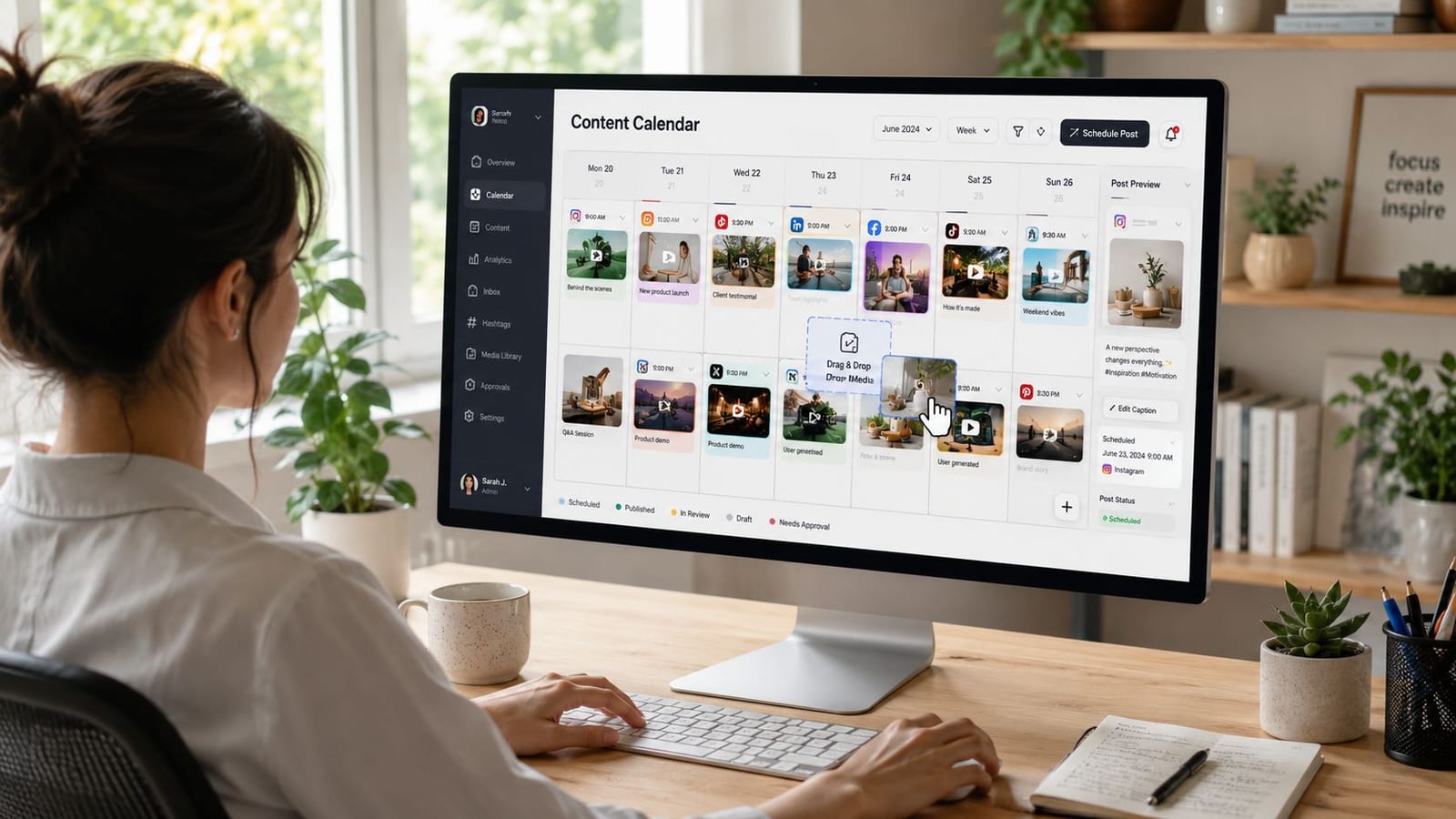
A visual calendar lets you see gaps, overlaps, campaign clusters, and dead weeks before they become a problem. That sounds basic, but it changes planning behavior. Teams stop thinking one post at a time and start managing publishing as a system.
What works:
- Drag-and-drop scheduling: Fast rescheduling matters when launches shift or trends interrupt the plan.
- Platform-specific versions: One idea rarely performs well as a copy-paste across every network.
- Bulk scheduling: Useful for evergreen content, event promos, and repurposed batches.
What doesn't:
- Rigid queues with weak previews: They save clicks but make quality control harder.
- Identical cross-posting by default: Efficient in theory, sloppy in practice.
Planning previewing and approvals
This is the feature set that separates decent tools from operationally useful ones.
Adobe Express describes its scheduler as a workflow where users can create, plan, preview and schedule across multiple platforms and devices, which captures what strong planner software now does in one interface and why it reduces context switching and approval friction in real production work, according to Adobe Express's Content Scheduler overview.
If you manage brand accounts, preview matters. If you work with clients or internal stakeholders, approvals matter even more. The best systems make feedback visible next to the post, not buried in chat.
AI creation and repurposing
Here, a lot of teams either save serious time or create a new mess.
AI inside planner software is useful when it helps with specific jobs:
- turning a long video into multiple post ideas
- drafting first-pass captions
- adapting copy for different platforms
- generating variations from one source asset
- surfacing reusable formats from past content
It's not useful when it floods the calendar with generic filler that nobody would publish without heavy editing.
For teams focused on personal brand or B2B distribution, a specialized tool can still make sense alongside a planner. If LinkedIn is a core growth channel, an AI-powered LinkedIn growth tool can complement your workflow by tightening content ideation and channel-specific execution.
AI should shorten the path from source material to publishable assets. It shouldn't create more drafts for your team to clean up.
The strongest setups use AI for transformation, not replacement. One webinar becomes clips, quotes, text posts, carousels, and follow-up assets. Then the planner organizes when and where each version runs.
Analytics that close the loop
Most analytics inside planner tools are good enough for editorial decisions and weak for deep attribution. That's fine. Not every dashboard needs to do everything.
What matters in a planner is whether the performance view helps answer practical questions:
- Which formats keep earning reposts or follow-up use?
- Which platform versions consistently need rewriting?
- Which campaigns were overproduced and underdistributed?
- Which content pillars deserve more calendar space?
The planner becomes valuable when analytics are close enough to planning that the team uses them. If your reporting lives in a separate tool nobody opens until the monthly recap, the feedback loop is broken.
Real Benefits for Creators and Marketing Teams
Most buyers don't need more features. They need fewer repeated tasks, cleaner execution, and a reliable publishing rhythm.
That's where the payoff shows up.
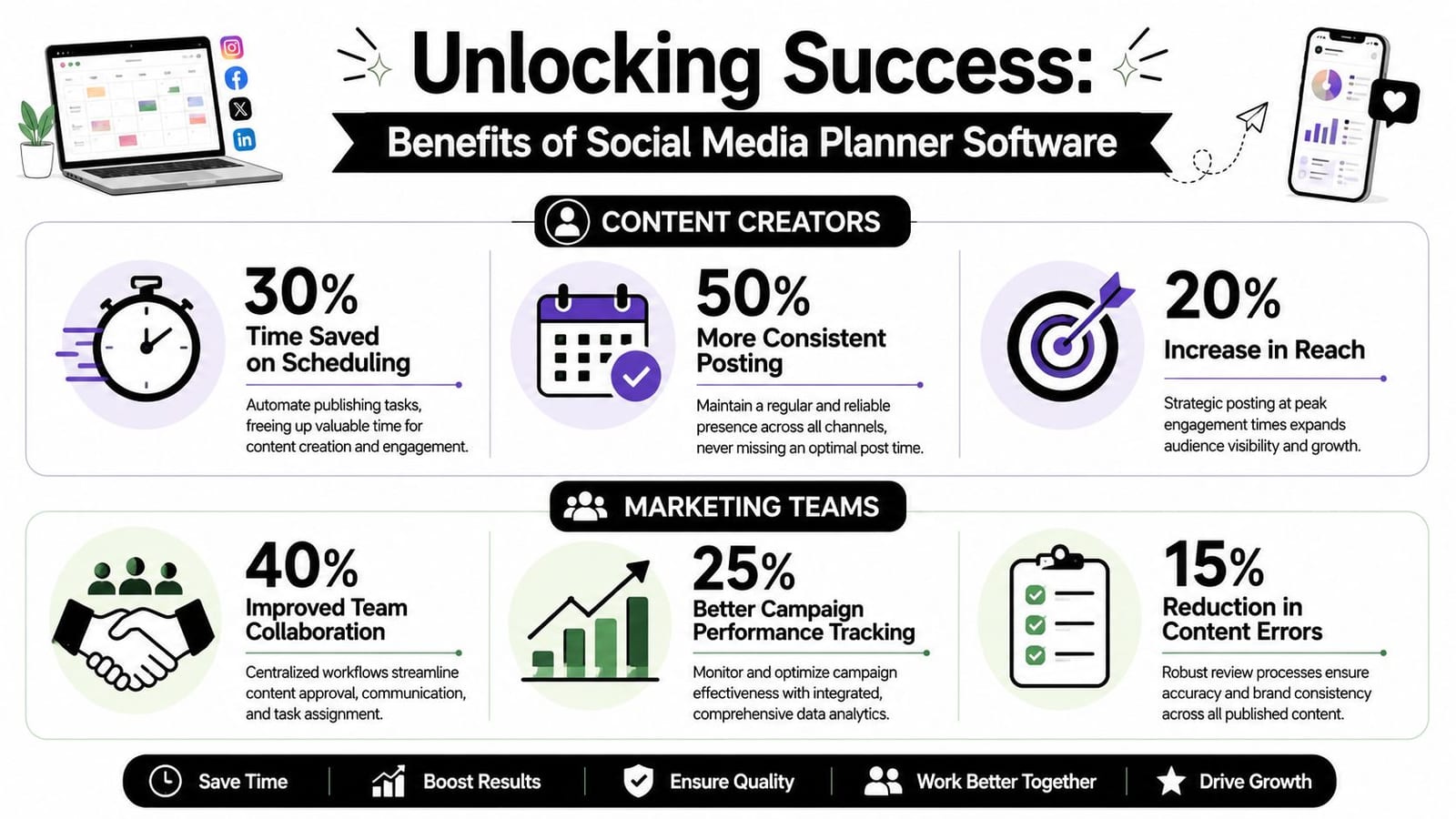
A 2026 benchmark found that 91% of marketers using scheduling tools said posting consistency improved, and 68% maintained a daily posting schedule compared with 29% of marketers not using scheduling tools. The same benchmark reported that managers using scheduling software saved an average of 6.3 hours per week, or about 328 hours per year, versus manual posting, according to Schedulewave's social media scheduling statistics.
For solo creators
The biggest gain for creators isn't “automation.” It's batchability.
A podcaster records once, then has to turn that episode into clips, audiograms, quote cards, captions, and a posting plan. Without a planner, that work gets spread across the week and steals energy from the next episode. With a planner, the creator can package that source material in one session and schedule distribution ahead.
Useful outcomes for solo operators:
- fewer panic posts
- a more stable content cadence
- less rework on captions and asset selection
- a clearer weekly production rhythm
The time recovery matters even more when you're the strategist, editor, publisher, and analyst all at once.
For in-house marketing teams
Teams benefit in a different way. Their bottleneck is rarely “what do we post today?” It's coordination.
A marketing manager usually isn't struggling to come up with ideas. They're chasing approvals, checking whether the designer used the latest graphic, making sure the product update post doesn't conflict with a webinar promo, and trying to maintain voice consistency across channels.
A planner gives the team one working environment for that process.
When the calendar, assets, approvals, and publishing status live together, team meetings get shorter because fewer decisions depend on hunting for information.
That kind of operational clarity is what keeps campaigns from slipping. It also reduces the quiet errors that hurt trust, like wrong links, outdated visuals, duplicated posts, or assets published before sign-off.
For agencies and client work
Agencies live and die by throughput and visibility.
Client work gets messy when each account has a separate approval chain, asset folder, and reporting rhythm. Planner software helps by making status visible. Drafted, pending review, approved, scheduled, published. Everyone sees the same pipeline.
A few practical wins matter most here:
- Client transparency: Shared calendars and previews cut back on “Can you send me the latest version?” messages.
- Faster iteration: When a client rejects a caption, the revision happens in context.
- Reusable systems: Agencies can build repeatable workflows for launches, promos, and monthly content packages.
The broad lesson is simple. The more recurring social work you manage, the more a planner behaves like infrastructure instead of software.
How to Choose the Right Planner Software
Don't choose based on the homepage. Choose based on the bottleneck you need to remove.
Some teams need better scheduling. Others need approvals. Others need repurposing from video, not another calendar. If you skip that distinction, you'll end up paying for a platform that demos well and fits badly.
The questions that matter
Start with these:
- Which platforms matter? If your strategy lives on LinkedIn, YouTube, and Instagram, broad platform support sounds nice but may not be decisive.
- Do you create from scratch or repurpose existing assets? Teams with webinars, podcasts, and long videos need stronger transformation workflows.
- How many people touch content before publishing? Solo users can live with simpler tools. Teams usually can't.
- Do you need lightweight analytics or editorial feedback loops? Most planners handle the second better than the first.
- Is inbox management part of the job? If customer response is central, unified engagement tools become more important.
Social Media Planner Buying Criteria
| Criterion | What to Look For | Best For |
|---|---|---|
| Platform coverage | Support for the channels you actively publish to, plus format support that matches your workflow | Multi-channel brands and agencies |
| Calendar usability | Clear weekly and monthly views, drag-and-drop edits, visible status stages | Teams managing campaigns |
| Content creation support | Caption drafting, asset organization, repurposing, creative workflow integration | Creators and lean teams |
| Approval workflow | Comments, permissions, review states, stakeholder visibility | In-house teams and client services |
| Preview quality | Feed previews and platform-specific formatting checks | Brand-sensitive accounts |
| Bulk scheduling | Easy import and batch posting without losing quality control | High-volume publishers |
| Analytics | Post-level performance views tied closely to calendar decisions | Managers optimizing cadence and format |
| Inbox and engagement | Unified response workflow if comments and messages are part of the role | Community-led brands |
| Ease of adoption | Fast onboarding, intuitive layout, low maintenance for day-to-day use | Small teams and solo operators |
Trade-offs that are easy to miss
The most common trade-off is depth versus simplicity.
A lightweight scheduler is easier to learn, but you may outgrow it once approvals and repurposing matter. A broad platform may cover everything, but feel heavy for a one-person operation. An all-in-one system can replace multiple tools, but only if the creation layer is good enough to justify consolidation.
There's also a category difference many buyers miss. Some planners are strongest at outbound publishing. Others are stronger at turning source material into ready-to-schedule content. If your content engine starts with long-form video, that second group is often a better fit than a scheduler-first product.
If you need a planner that sits close to AI-assisted creation, editing, repurposing, and scheduling in one workflow, that's where an integrated platform can make more sense than stitching together separate tools. The key is to buy for your real process, not the process the software demo assumes you have.
Implementing Your New Social Media Workflow
Teams often overcomplicate rollout. You don't need a perfect system on day one. You need a working loop you can trust.
Start with a simple process and force everything through it for a few weeks.
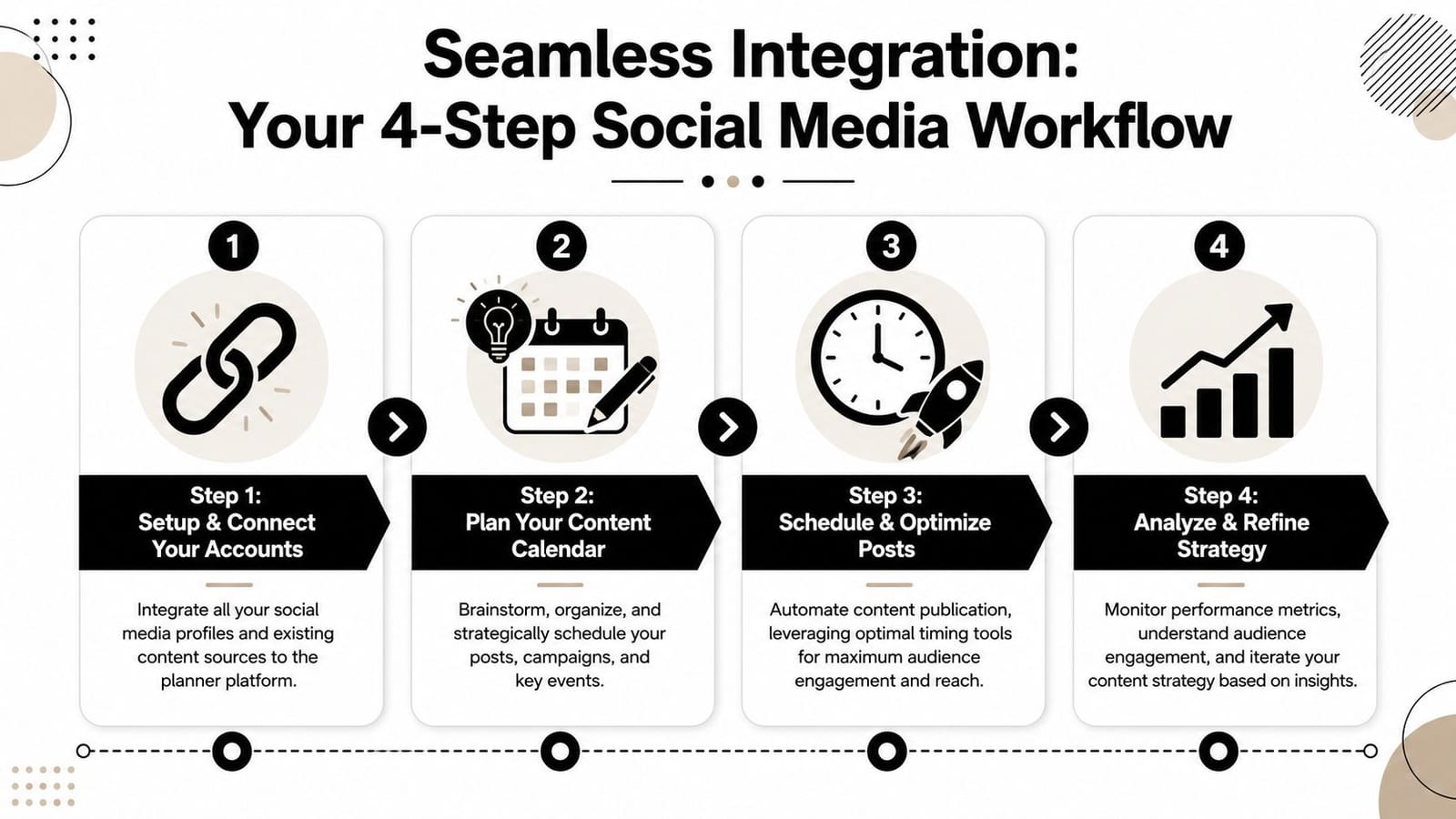
Step 1 connect accounts and clean up the basics
Connect only the channels you actively manage. Don't wire up every dormant profile just because the tool allows it.
Then clean your naming conventions. Campaign names, content pillars, asset folders, and approval labels should be readable by someone who didn't build the system.
Step 2 define a repeatable content system
Pick a small set of recurring content types. For example: educational posts, proof or case-based posts, personality or behind-the-scenes posts, and promotional posts.
That gives the calendar structure. It also makes delegation easier because contributors know what kind of asset they're producing.
Field note: Most social workflows fail because the publishing process is documented before the content model is clear.
Step 3 batch create and schedule from existing assets
Use what you already have first. Webinar recordings, podcast episodes, blog posts, client FAQs, sales call themes, newsletters. Existing material is the fastest path to a functioning content engine.
If your process is still rough, this practical guide on how to schedule social media posts helps map the basics cleanly.
This walkthrough is useful if your team wants to see a planner workflow in action:
Step 4 review performance and refine weekly
Don't wait for a big monthly report. Review weekly.
Look for pattern-level signals:
- which posts were easy to produce and worth repeating
- which formats created extra work without adding value
- which channels need native adaptation
- where approvals keep slowing the calendar
That's enough to improve the system quickly. The goal isn't a perfect dashboard. It's a tighter loop between planning and publishing.
The Future of Social Media Management Is Integrated
The old workflow was modular by accident. One tool for ideas, one for design, one for scheduling, one for reporting. That stack made sense when social teams posted less often and platforms were easier to manage separately.
That's no longer the case.
Modern social execution depends on integrated workflow. Planning has to connect to creation. Creation has to connect to scheduling. Scheduling has to connect to performance. When those pieces stay separate, teams lose speed and clarity at every handoff.
The same integration trend is happening in broader marketing measurement too. If your team is also trying to connect social performance with wider funnel analysis, it helps to understand how marketers track customer journey touchpoints across channels instead of treating each platform as an island.
Social media planner software is moving toward one role: the central operating system for content. Not just a queue. Not just a calendar. The place where strategy turns into execution and execution turns back into insight.
If you want to test that kind of unified workflow, quso.ai is built around planning, creating, repurposing, scheduling, and tracking content from one dashboard. It's a practical way to see whether an integrated social process fits your team better than juggling separate tools.