How to Make a Slideshow on TikTok (Photo Posts, Step by Step)
How to make a slideshow on TikTok: the short answer
In the TikTok app, tap the Add post (+) button, tap Photo, then Upload, and pick up to 35 photos. Tap Next, add a sound, text or filters, tap Next again to set the cover and description, then tap Post. TikTok calls this a photo post. Viewers swipe through the photos, which is why people also call it a TikTok slideshow or a TikTok carousel.
To make and schedule a photo post from a computer instead, a scheduler such as quso.ai can post your photos to TikTok as a photo post with a title, cover and recommended music, at the time you pick. That part is on quso.ai's paid plans.
Steps checked against TikTok's Help Center on November 6, 2026.
Slideshow, carousel or photo post: what's the difference?
They're the same thing. TikTok's own name is photo post: a set of photos that viewers swipe through, usually with a sound playing underneath. "TikTok slideshow" and "TikTok carousel" are what most people search for. If you've seen a creator post a numbered list, a before-and-after or a recipe one photo at a time, that was a photo post.
A photo post is different from a video made of photos. In a photo post, each image is its own slide that the viewer controls. If you'd rather the photos play by themselves with transitions, edit them into a video first and post it as a normal video.
How to make a slideshow on TikTok in the app
These are TikTok's own steps for posting photos from your phone.
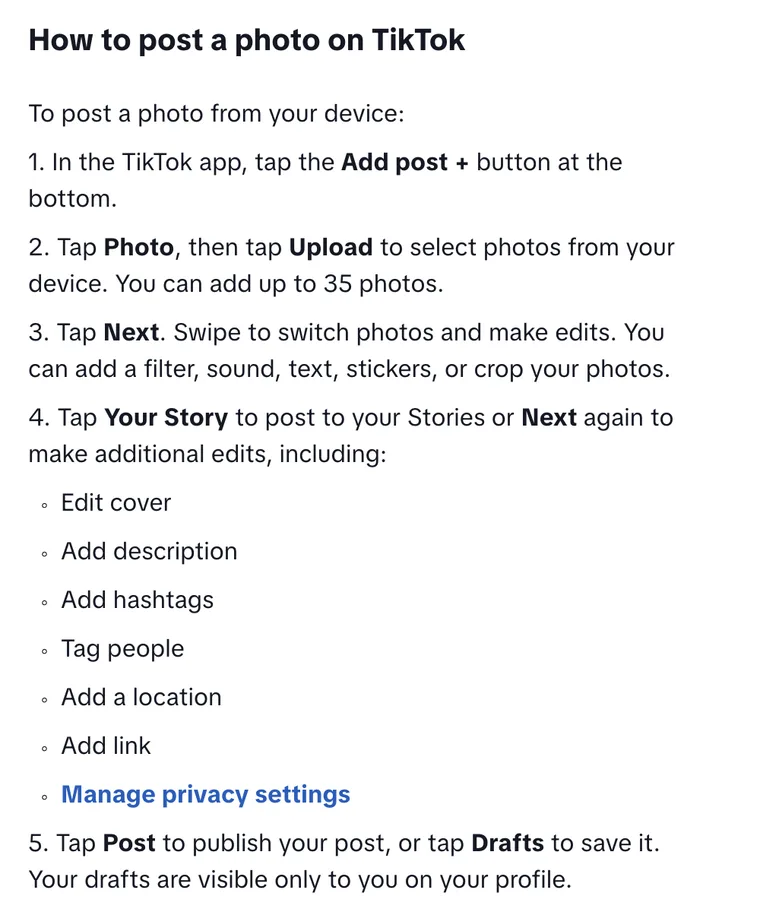
- In the TikTok app, tap the Add post (+) button at the bottom.
- Tap Photo, then tap Upload and select photos from your device. You can add up to 35 photos. Pick them in the order you want them to appear.
- Tap Next. Swipe to switch between photos and edit each one: add a filter, a sound, text or stickers, or crop it.
- Tap Next again to finish the post. Here you can edit the cover, add a description and hashtags, tag people, add a location or link, and choose who can view it. (Tap Your Story instead if you want the photos in your Story.)
- Tap Post to publish it, or Drafts to save it for later. Drafts are visible only to you.
How to add music to a TikTok slideshow
Add the sound in step 3, while you're editing the photos. Tap the sound option and pick a track or one of the suggestions. The sound plays under the whole post, not per photo, so pick one that fits the full set. Trending sounds come and go fast, so check what's popular in your niche the week you post.
How to choose the cover
The cover is the first thing people see on your profile grid. In step 4, edit the cover and choose the photo that reads best as a small thumbnail: a face, a big result or a short text overlay works better than a busy scene.
Can you post a TikTok slideshow from a computer?
TikTok's Help Center describes photo posts only in the app. Its web upload steps cover video: you click Upload and select a video file. If you work from a computer, the practical options are to send the photos to your phone, or to use a scheduler that publishes TikTok photo posts for you, like the one below.
Tips for a TikTok slideshow people swipe through
- Put the hook on photo one. It's the cover and the first slide in the feed. A short line of text on it ("5 mistakes I made…") tells people there's a reason to swipe.
- Keep one idea per photo. If a slide needs a paragraph to make sense, split it in two.
- Use the same size for every photo. Vertical 9:16 fills the screen. Mixing shapes leaves bars around some slides. See our TikTok dimensions guide for sizes.
- Don't max out at 35. The limit is 35, but most lists, tutorials and before-and-afters work at 5 to 10 photos.
- End with a reason to act. The last photo is the place to ask for a follow or point to the link in your bio.
How to make and schedule a TikTok photo post from your computer with quso.ai
quso.ai is a video clipping and social media scheduling app. Since November 2026 it can also post photos to TikTok as a photo post, so you can build the slideshow on your computer and have it go out at a set time. This is a paid-plan feature: TikTok photo posts and scheduling are on the Essential and Growth plans.
- Link TikTok. Open Posts, click Manage accounts, then Link on the TikTok card.
- Add your photos, no video. Create a post, select TikTok, and add your images. A post with photos and no video goes to TikTok as a photo post.
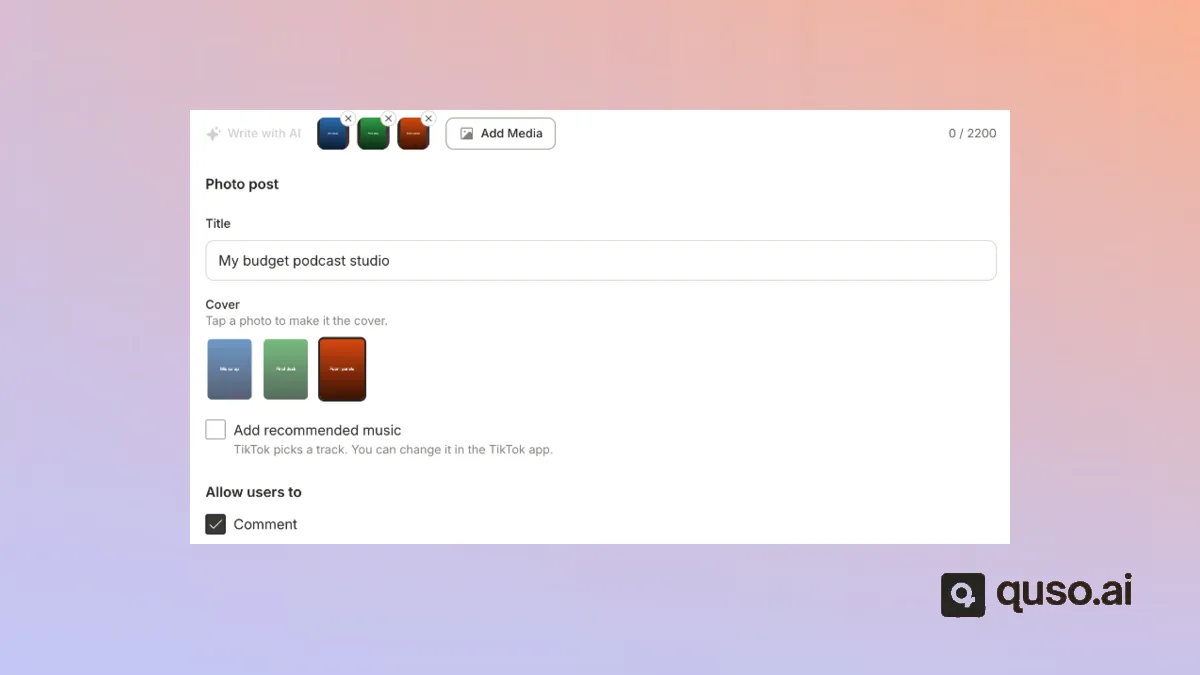
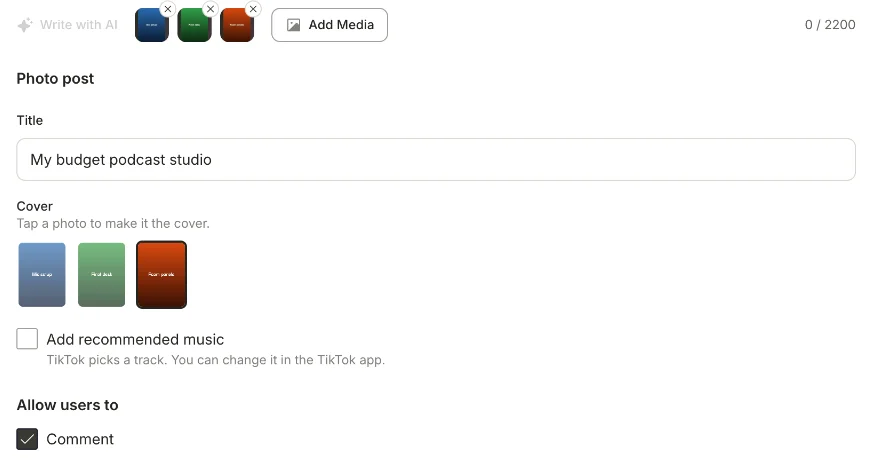
- Fill in the photo post settings. On the TikTok tab, add an optional title (up to 90 characters), tap a photo to make it the cover, and tick Add recommended music if you want TikTok to pick a track. You can change the track later in the TikTok app.
- Write the description in the caption box (up to 2,200 characters) and choose whether people can comment.
- Schedule it. Click Schedule, pick a date and time, and confirm. The same post can go to Instagram, Facebook or other networks you've linked.
Want to go further? quso.ai also schedules regular TikTok videos, and turns long videos into short clips with captions. See the TikTok scheduler and how to schedule TikTok posts. For Stories on Instagram and Facebook, there's an Instagram Story scheduler too.
TikTok slideshow FAQ
How many photos can you put in a TikTok slideshow?
Up to 35, according to TikTok's Help Center. You select them all at once when you tap Photo, then Upload.
How do I post a slideshow on TikTok?
Tap the Add post (+) button, tap Photo, then Upload, and choose your photos. Tap Next to edit them and add a sound, tap Next again to add a description and cover, then tap Post.
Is a TikTok carousel the same as a slideshow?
Yes. TikTok calls both a photo post: a set of photos viewers swipe through. "Carousel" is the word Instagram uses for the same idea.
Can I add music to a TikTok photo post?
Yes. Add a sound while you edit the photos, after the first Next. When you schedule a photo post with quso.ai, tick Add recommended music and TikTok picks a track, which you can change in the TikTok app.
Can I schedule a TikTok slideshow?
TikTok's Help Center doesn't describe scheduling photo posts. quso.ai schedules TikTok photo posts from a computer on its Essential and Growth plans: add the photos, set the title, cover and music, and pick a date and time.
Why can't I make a slideshow on TikTok?
Update the app first, since the Photo option is in the current version's Add post screen. If it still doesn't show, restart the app, switch between Wi-Fi and mobile data, and clear the app's cache, which are TikTok's own troubleshooting steps for posting problems.