Clips from any video
The best moments of a podcast or stream, vertical, with animated captions.
Skip this page next time?
Always open quso.ai/app → quso.ai for TikTok
Turn any long video into captioned TikToks and post them just by asking. Works on every quso.ai plan.
The best moments of a podcast or stream, vertical, with animated captions.
Comments, duets and stitches are on. Ask to turn any of them off.
Up to 2,200 characters (2,123 on Free, which adds 3 quso.ai lines).
Up to 10 images with a cover and a title. Uploads work from apps like Claude Code.
TikTok limits
| quso.ai plan | From your AI app |
|---|---|
| Free | Posts straight away, with the quso.ai watermark and 3 caption lines added |
| Lite, Plus | Posts straight away |
| Essential, Growth | Posts straight away or at a set time, plus the other 10 networks |
Ask in plain words. Add your link where it says [link].
Connect quso.ai first. In ChatGPT, start your message with @quso.
Found 13 clips in "How to Measure the Health of Your Business" · 29:51
Step 1
Add quso.ai to your AI app and link your TikTok account.
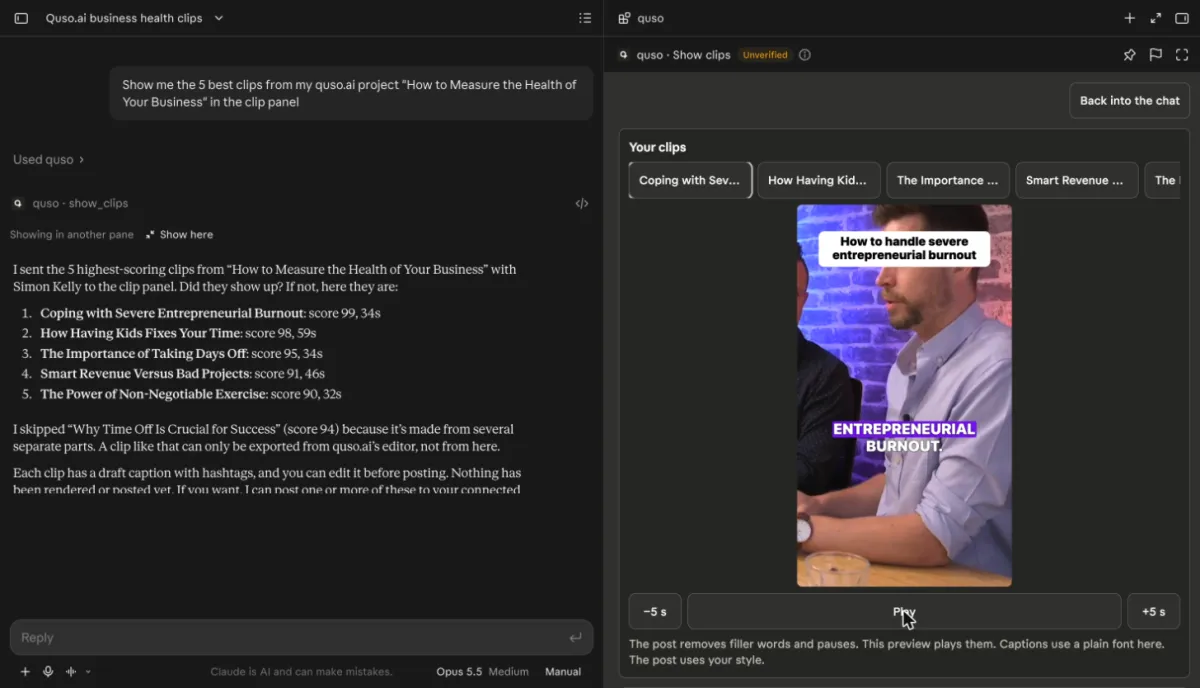 In Claude
Step 2
Your best clips open in a panel right in the chat.
This week
Already posted clips are skipped. Nothing posts twice.
Step 3
It posts to TikTok now, or at the time you pick.
Clip frames: Video: WP Elevation (CC BY).
The same request can post to several networks at once, each with its own caption.
| Network | Caption (characters) | Longest video | Images per post | Text-only posts |
|---|---|---|---|---|
| TikTokGuide | 2,200 | 10 min | 10 (photo post) | No |
 InstagramGuide | 2,200 | 15 min | 10 | No |
 YouTubeGuide | 5,000 + 100-character title | 2 hours | None | No |
 LinkedInGuide | 3,000 | 30 min | 9 | Yes |
 X | 280 (7,000 as a thread) | 10 min | 4 | Yes |
 Facebook | 2,200 | No set limit | 10 | Yes |
 Threads | 500 (12,500 as a thread) | 5 min | 10 | Yes |
 Bluesky | 300 | 10 min | 4 | Yes |
 Telegram | 1,024 | Files up to 20 MB | 1 | Yes |
 Reddit | 5,000 + 300-character title | No video | 1 | Yes |
 Snapchat | 500 | 5 to 60 sec | 1 | No |
TikTokGuideInstagramGuideYouTubeGuideLinkedInGuideXFacebookThreadsBlueskyTelegramRedditSnapchatLimits come from each network and can change. Pinterest isn't available from AI apps yet.
quso.ai gives Claude and ChatGPT a connector that posts videos to your TikTok account. It's made by quso.ai, not TikTok.
Yes. On quso.ai's Free plan, clips post to TikTok straight away, with the quso.ai watermark and 3 short lines added to the caption. Importing uses the Free plan's credits, 1 per minute of video.
Yes, on a quso.ai plan with social scheduling, such as Essential or Growth, at least 15 minutes and up to a year ahead. Lite, Plus and Free post straight away.
Yes. Ask, and quso.ai posts with duets, stitches or comments off. All three are on by default.
Up to 2,200 characters, or 2,123 on quso.ai's Free plan.
More questions? See everything quso.ai does in Claude and ChatGPT or the setup guide.