How to Hide Notes on Instagram From Someone (2026)
Part of the Instagram guide →
How to hide notes on Instagram: the short answer
To hide your note from someone, share it with Close Friends only and leave that person off the list. Instagram only offers two audiences for a note: followers you follow back, and Close Friends. So anyone you don't follow back never sees your notes. Removing a follower or blocking them also hides your notes from them. To hide other people's notes from your own inbox, tap and hold their note and tap Mute notes. Instagram doesn't notify anyone either way.
Steps checked against Instagram's Help Center on October 20, 2026.
Who can see your Instagram notes
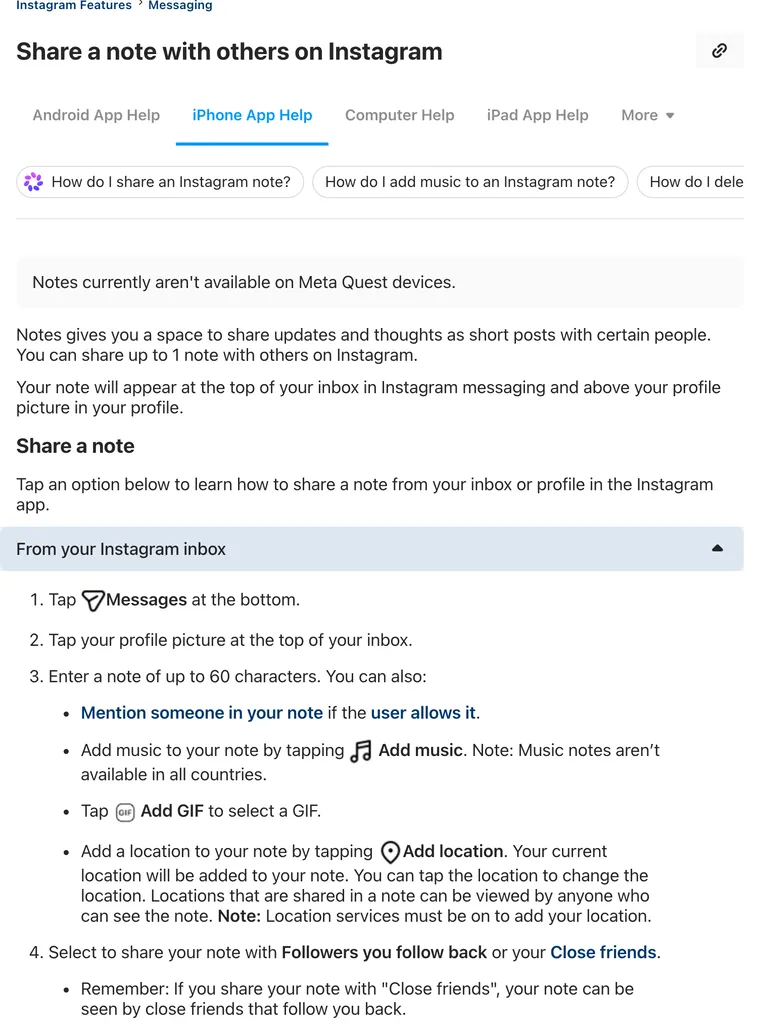
A note is a short post of up to 60 characters that sits above your profile picture in the inbox and on your profile for up to 24 hours. When you share one, Instagram makes you pick an audience: Followers you follow back or Close friends. With Close friends, only close friends who also follow you back can see it.
That one setting does most of the work. Everything below builds on it.
4 Ways to Hide Your Notes From Someone on Instagram
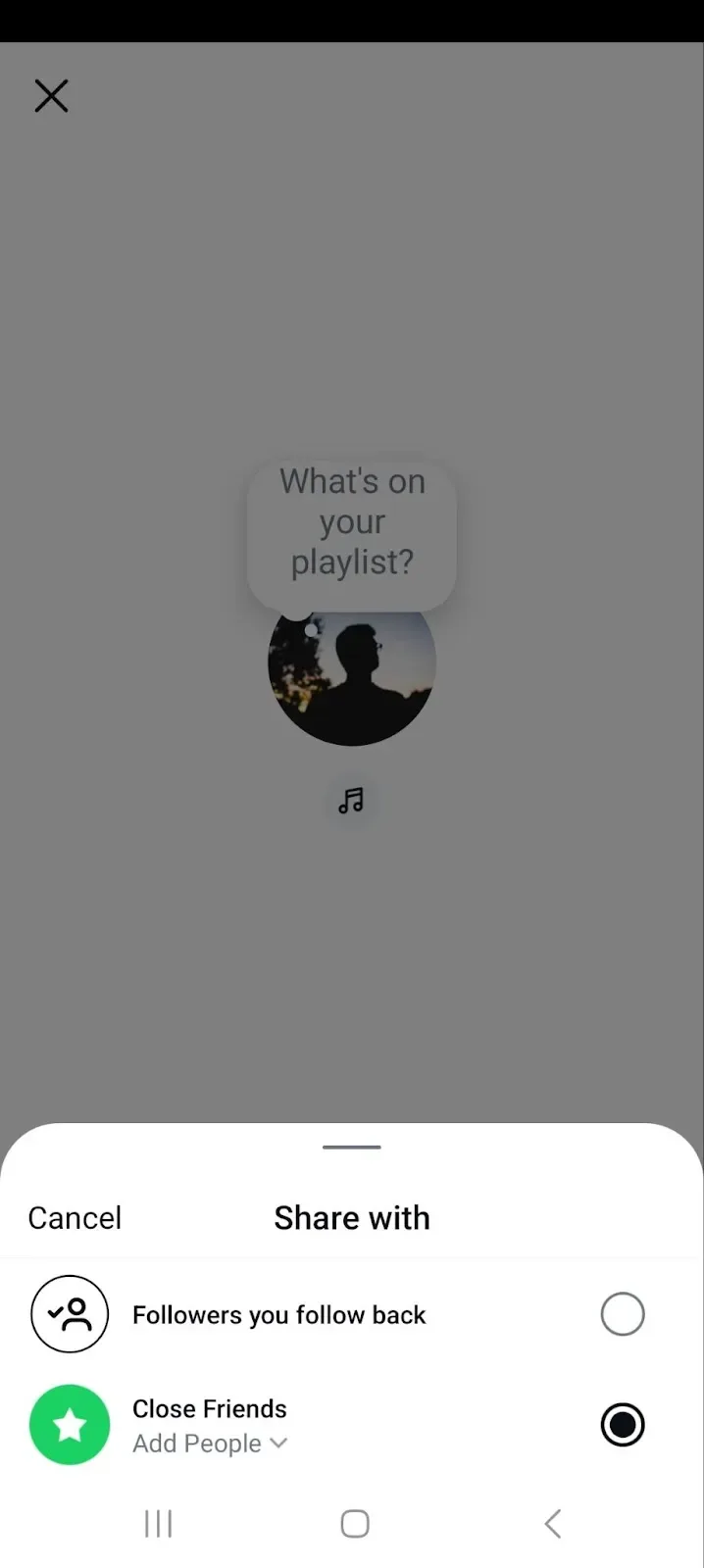
Method 1: Share your note with Close Friends only
It's the cleanest option. The other person isn't removed, blocked or told anything; they just never get the note.
- Tap Messages at the bottom, then tap your profile picture at the top of your inbox.
- Type your note.
- Choose Close friends as the audience. Tap it to add or remove people from the list.
- Tap Share.
Method 2: Stop following them back
The default audience is followers you follow back. Unfollow someone who follows you, and they drop out of it. They can still see your public posts.
Method 3: Remove them as a follower
Go to your profile, tap Followers, find them and tap Remove. Done. Once they're no longer a follower they can't be in either audience, and although Instagram doesn't send them a notification, they may notice the next time they look at your profile and see a Follow button where Following used to be.
Method 4: Block them
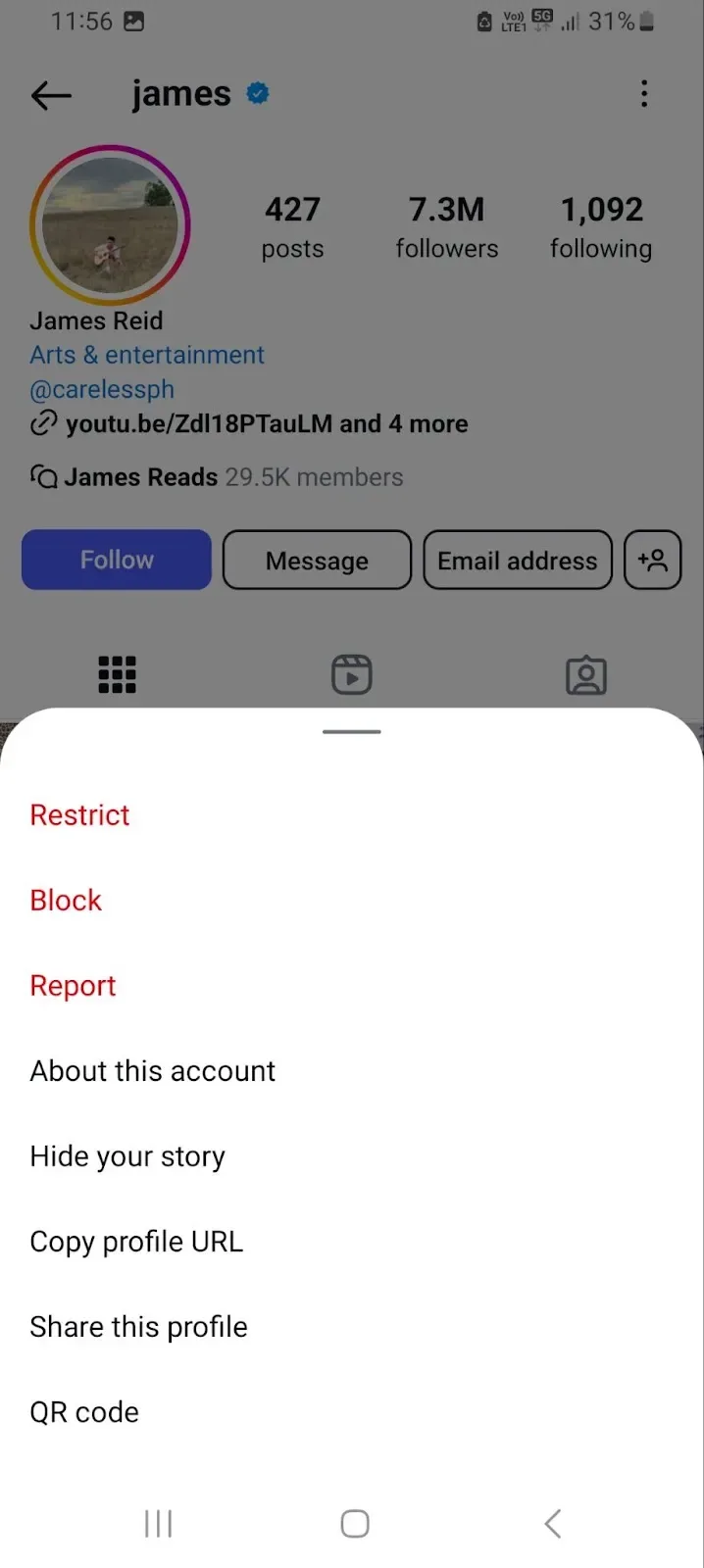
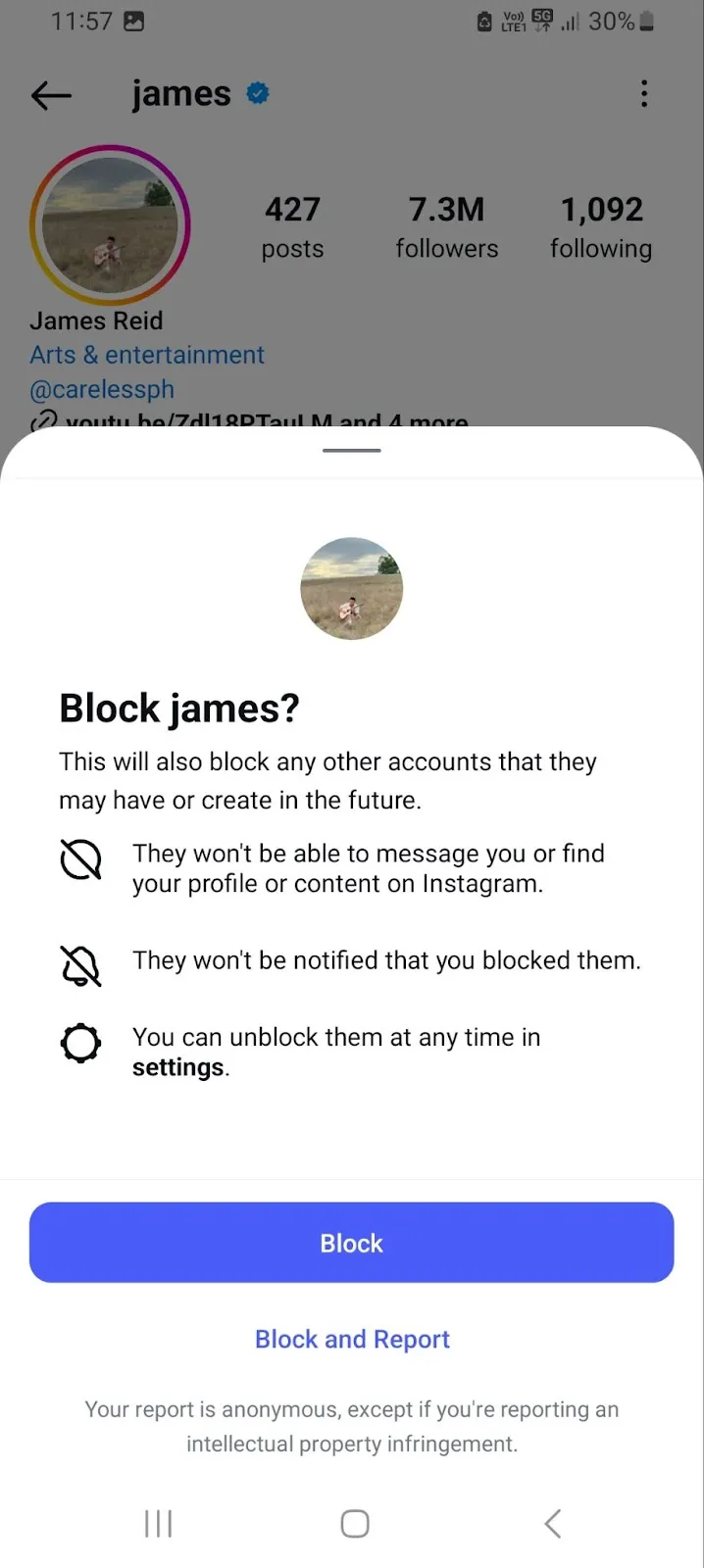
This is the heaviest option. A blocked person can't find your profile, follow you or message you, so they can't see your notes either.
- Go to their profile and tap the three dots in the top right.
- Tap Block, then confirm.
Does Restrict hide your notes?
Instagram doesn't say so. Its Restrict article lists what changes: they can't see when you're online or have read their messages, their new comments are hidden from others, and you stop getting notifications about them. Notes aren't on that list. If someone you restrict still follows you and you follow them back, assume they can still see notes you share with followers, and use Close Friends instead.
The Close Friends method in under two minutes, from tech tutorial creator Trevor Nace.
How to Hide Other People's Notes on Instagram
Seeing too many notes from one account? Mute them. They won't ever know.
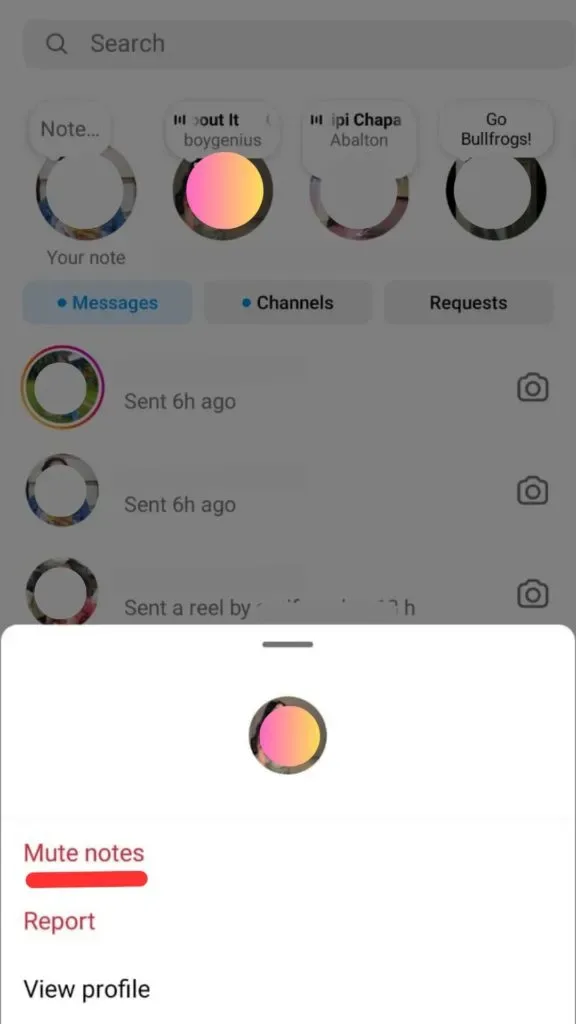
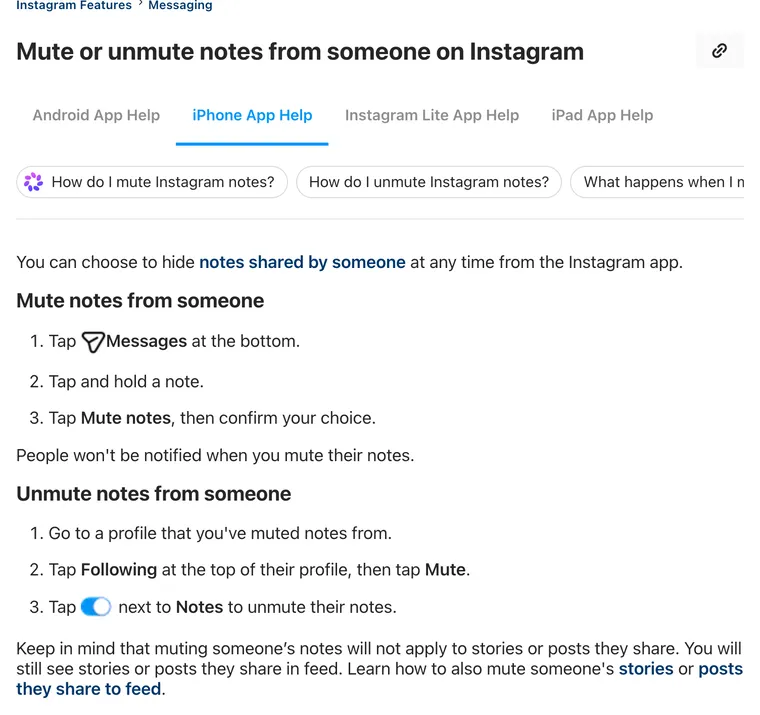
Mute someone's notes from your inbox
- Tap Messages at the bottom.
- Tap and hold their note.
- Tap Mute notes, then confirm.
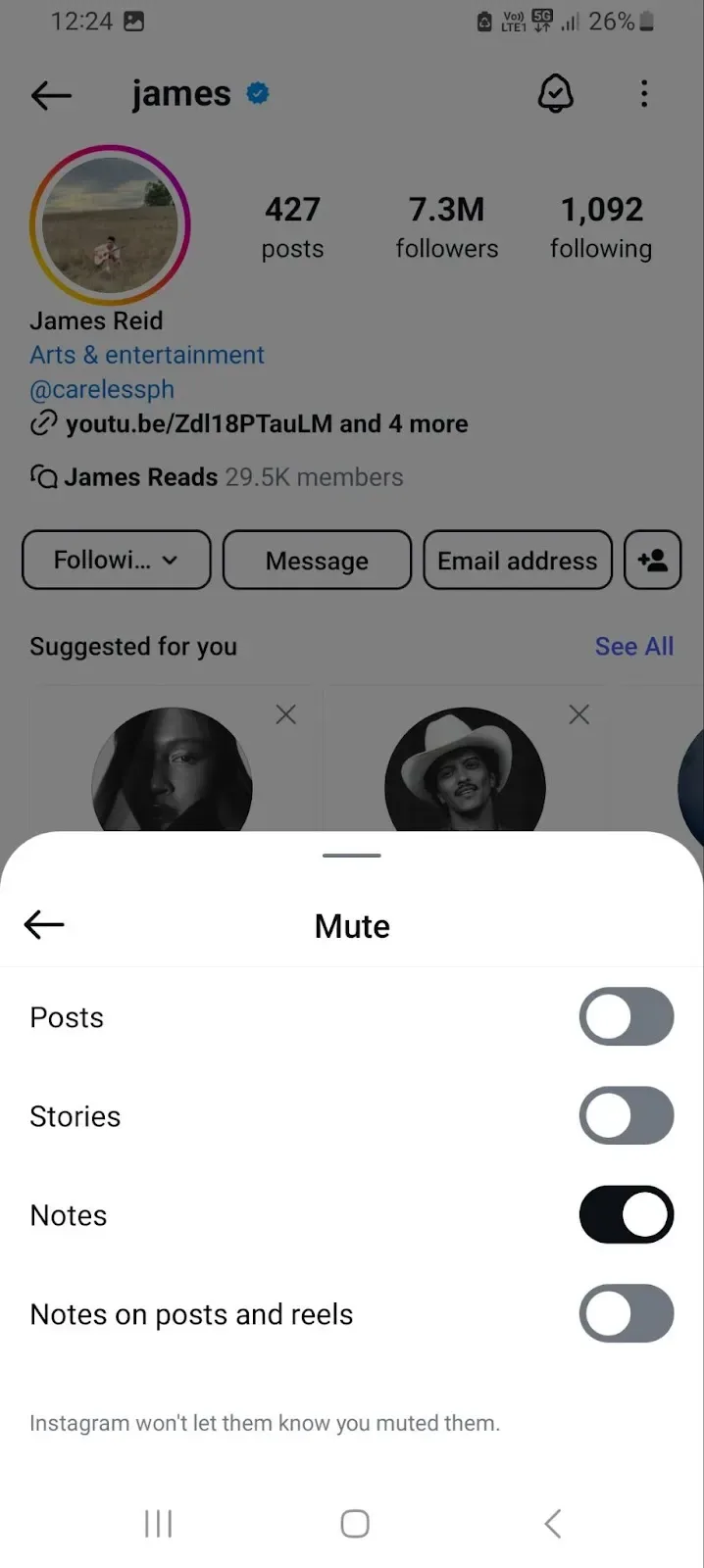
Mute or unmute notes from their profile
Go to their profile, tap Following, tap Mute, and switch the Notes toggle on (or off, to unmute). Posts and stories have their own toggles there. Muting notes leaves them alone.
How to delete or replace your note
Notes disappear after 24 hours on their own. To take one down sooner, tap it and choose Delete note. To swap it, tap it and choose Leave a new note, since you can only have one at a time.
5 Tips for Notes You Won't Want to Hide
1. Keep it short
Sixty characters is the cap. Three to six words read at a glance.
2. Use one emoji, not five
One emoji adds tone. A row of them makes the bubble hard to read in a crowded inbox, where your note is competing with every other bubble along the top of the screen for half a second of attention.
3. Sound like yourself
Notes are casual by design, so write the way you'd text a friend, typos and all, rather than the way you'd write a caption you've polished for twenty minutes before posting.
4. Ask something
A question gives people a reason to reply, and every reply lands in your DMs as a private chat. "Best show you watched this month?" gets answers; a quote rarely does.
5. Pick the audience every time
Instagram asks for the audience each time you leave a new note. Always check it first. If a note is only for a few people, Close Friends is two taps away, and it's far easier than deleting a note after the wrong person has already seen it.
Short on ideas? Our list of 400+ Instagram Notes ideas is sorted by mood.
Managing a brand account as well as a personal one? quso.ai's social media scheduler keeps the brand's Instagram and Facebook posts on one calendar, so your notes can stay personal.
Hide Instagram notes FAQ
How do you control who sees your notes on Instagram?
Every time you share a note, pick the audience: Followers you follow back, or Close friends. Close friends only see it if they also follow you back. To keep one person out, leave them off your Close Friends list, stop following them back, remove them as a follower or block them.
Can you hide your Instagram notes from someone without blocking them?
Yes. Share the note with Close Friends and leave them off the list. They aren't notified and nothing else about your account changes for them.
Can restricted accounts see your Instagram notes?
Instagram's Restrict article doesn't list notes among the things Restrict limits. If you restrict someone who follows you and you follow them back, assume they can still see notes shared with followers. Use Close Friends to keep a note from them.
How do I hide a note on Instagram?
Your own note: tap it and choose Delete note, or it disappears by itself after 24 hours. Someone else's note: tap and hold it in your inbox and tap Mute notes.
How do I hide from someone on Instagram?
Use Close Friends for notes and stories you don't want them to see, Restrict to quietly limit their comments and messages, or Block to stop them finding your profile at all.
Can you see who saw your note on Instagram?
Not a full viewer list. Instagram shows you who liked your note and who replied to it, and only you can see that. Replies arrive as private messages in your inbox.
Steps come from Instagram Help Center articles Share a note with others on Instagram, Mute or unmute notes from someone, Interact with notes you see and Restrict or unrestrict someone, checked October 20, 2026.