SRT File Generator
Turn the speech in a video into a timed .srt subtitle file you can upload to YouTube, an editor or a video player.
Creating an account is free. See pricing for your country.
The short answer
quso.ai makes an SRT file from the speech in your video. Upload it, choose the spoken language (99 are supported), fix any line in the editor, then download a .srt file from the Subtitles panel. SRT download is on every paid plan, from $29 a month. The free plan downloads the video with the captions burned in instead.
Checked against the quso.ai app and help center. Updated
How to generate an SRT file
- 1
Upload the video
Drop in an MP4, MOV, M4V or WebM file, or paste a YouTube link. Videos can run up to 5 hours.
- 2
Choose the spoken language
Pick the language the video is in. English comes as Global, US, UK or Australia.
- 3
Check the text and timing
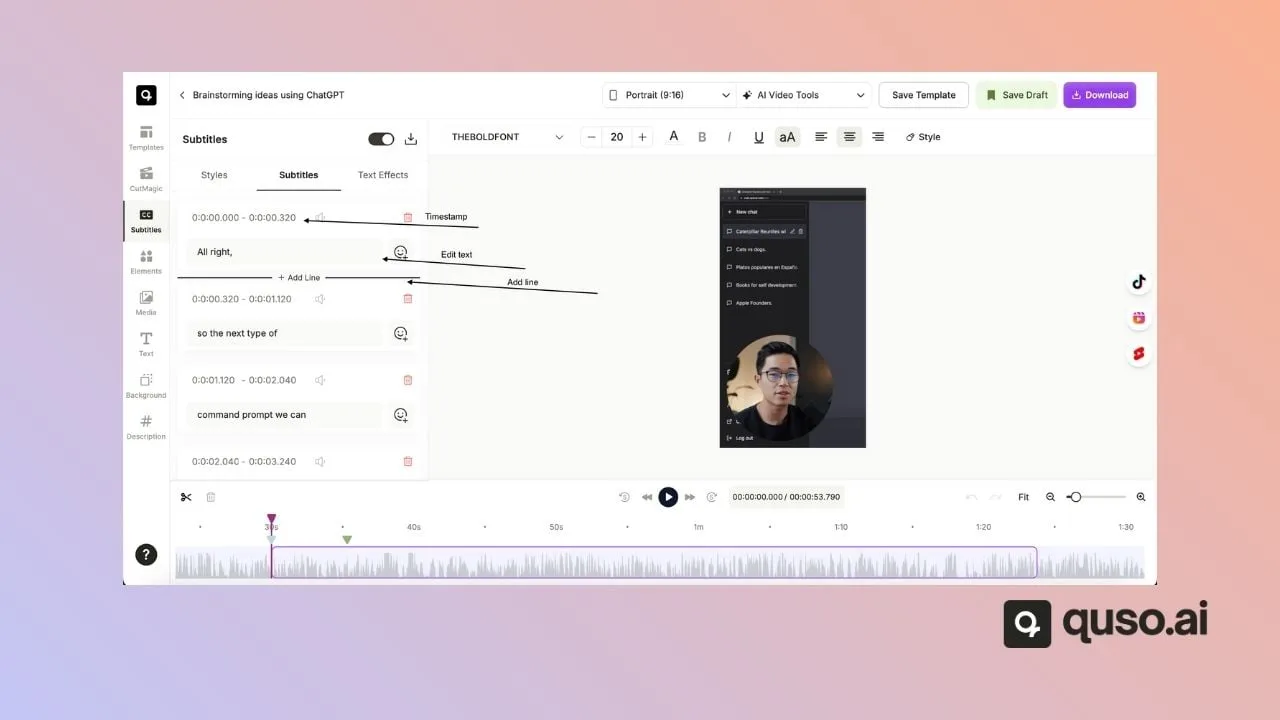
Every line in the Subtitles panel shows its start and end time. Edit a word, move a line or add a missing one. Fixes in the transcript sync to the subtitles.
- 4
Download the .srt
Click the download icon at the top of the Subtitles panel. That saves the file. On the free plan, the same button opens the upgrade screen instead of downloading anything.
What's inside an SRT file
An SRT (SubRip) file is plain text. Each subtitle is a block of three parts: a number, a start and end time written as hours:minutes:seconds,milliseconds, and the line of text. A blank line separates one block from the next. That's the whole format. Because it's nothing more than numbered blocks of text with timestamps, an SRT file is tiny, opens in any text editor, and is accepted by YouTube, most video editors and most web players, which is why it's what most people mean when they ask for a subtitle file.
1
00:00:00,000 --> 00:00:02,600
Captions help people follow along with the sound off.

2
00:00:02,600 --> 00:00:05,200
Upload a video and choose the language it's spoken in.

3
00:00:05,200 --> 00:00:07,800
quso.ai transcribes it and times every line.

4
00:00:07,800 --> 00:00:10,400
Fix any word, pick a style, and export.YouTube accepts SRT uploads in YouTube Studio under Subtitles, and recommends SRT or SBV if you're new to caption files (YouTube Help). Save the file as plain UTF-8 text with no styling, which is how quso.ai exports it.
What quso.ai's SRT export does and doesn't do
- 99 languages. The file is written in the language spoken in the video.
- SRT only. There's no VTT export; convert the SRT if a player asks for VTT.
- No translation. English in, English out.
- Paid plans. SRT download is on every paid plan, from $29 a month. Where quso.ai offers a free plan, it exports the video with captions burned in at 720p with a watermark. Pricing depends on your country.
- Burned-in too. The same project can also download the video with the captions drawn in, in one of 10 caption styles.
For the full picture of styles, languages and how quso.ai compares with other tools, see the AI subtitle generator. New to the format? Read what an SRT file is.
Frequently asked questions
How do I generate an SRT file from a video?+
Upload the video to an SRT generator such as quso.ai, choose the language that's spoken, correct the transcript, and download the .srt file. In quso.ai the download is in the editor's Subtitles panel, on any paid plan from $29 a month.
Is there a free SRT file generator?+
Not from quso.ai. Its SRT download needs a paid plan, and the free plan only exports the video with captions burned in. If your video is on YouTube, YouTube Studio writes automatic captions for free, and you can download a caption track from its Subtitles page and edit it.
Does quso.ai export VTT files?+
No, only SRT. The two formats are close: a VTT file starts with a WEBVTT line and writes milliseconds with a dot instead of a comma, so most converters and players switch between them easily.
Can quso.ai translate an SRT file?+
No. quso.ai writes subtitles in the language spoken in the video, so to get an SRT in another language you'd export the file and translate it with a separate tool, then check the timing still fits the speech.
What's the difference between an SRT file and burned-in captions?+
An SRT is a separate text file that players show as captions viewers can switch off. Burned-in captions are drawn into the video picture and always show. Use SRT for YouTube and course platforms, burned-in captions for TikTok, Reels and Shorts.