

🔊 How to Add Sound to Captions
Step 1: Open the Editor
- From your Quso.ai dashboard, open the project you want to edit.
- Click Edit to enter the video editor.

Step 2: Go to the Subtitles Tab
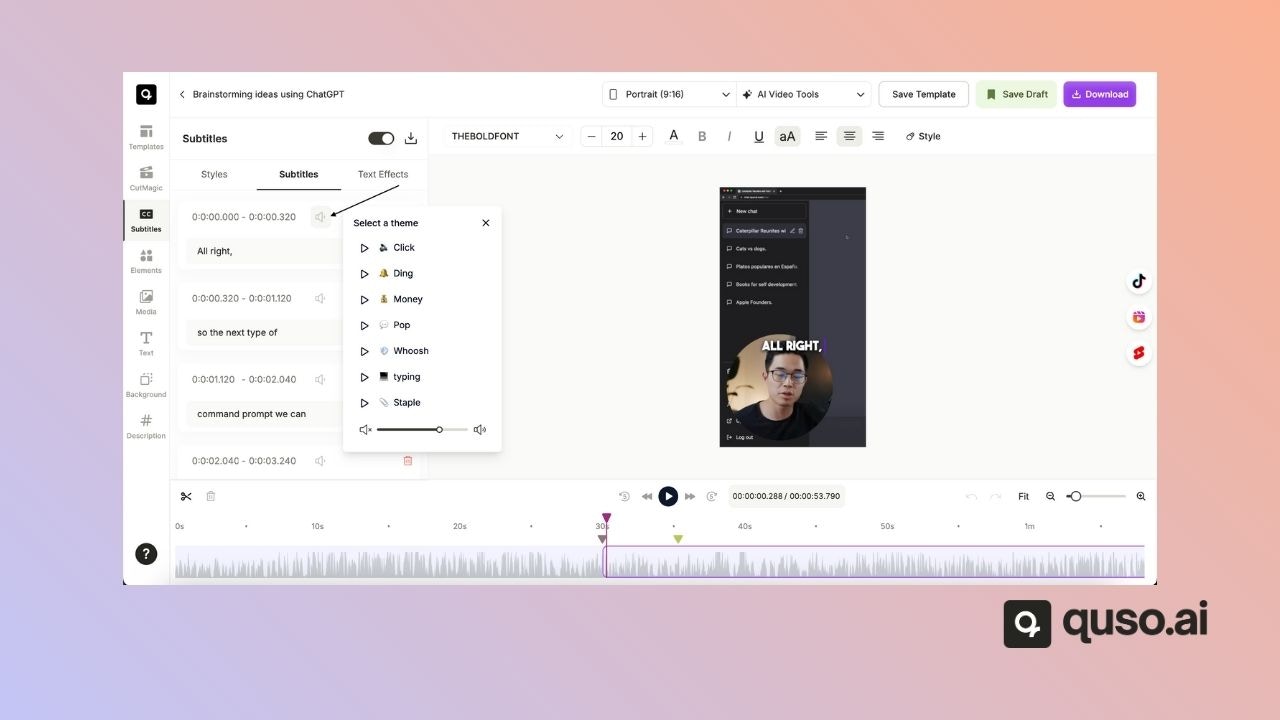
- On the left-hand panel, click on Subtitles to view your caption lines.

Step 3: Select a Caption and Add a Sound Effect
- Next to each subtitle, you’ll see a sound effects icon.
- Click it to open the sound effect library.
Step 4: Choose and Adjust
- Choose your desired sound effect from the list.
- Use the volume slider to adjust the intensity of the sound.
Step 5: Confirm and Repeat
- Confirm your selection to attach the sound to that caption.
- Repeat the process for any other subtitles where you’d like to add sound effects.